

When working with PowerShell, the first thing we encounter is commands (Cmdlets).
The command invocation looks like this:
Verb-Noun -Parameter1 ValueType1 -Parameter2 ValueType2[]
Help
To access help in PowerShell, use the Get-Help command. You can specify one of the parameters: example, detailed, full, online, showWindow.
Get-Help Get-Service -full will return a complete description of how the Get-Service command works.
Get-Help Get-S* will show all available commands and functions starting with Get-S*
There is also detailed documentation on the official Microsoft site.
Here is an example of help for the Get-EventLog command.
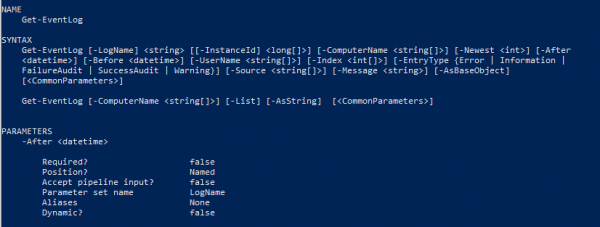
If parameters are enclosed in square brackets [], then they are optional.
So in this example, the log name is mandatory, while the parameter name is not. If the parameter type and its name are enclosed in brackets together, then this parameter is optional.
Looking at the EntryType parameter, we see values that are enclosed in curly braces. For this parameter, we can only use predefined values in curly braces.
Information on whether a parameter is mandatory can be found in the description below in the Required field. In the example above, the After attribute is optional, as false is indicated next to Required. Then we see the Position field, next to which it says Named. This indicates that the parameter can only be accessed by name, that is:
Get-EventLog -LogName Application -After 2020.04.26Since the LogName parameter was indicated with 0 instead of Named, this means we can access the parameter without a name, specifying it in the correct order:
Get-EventLog Application -After 2020.04.26Let's suppose this order:
Get-EventLog -Newest 5 ApplicationAlias
To use familiar commands from the console in PowerShell, there are aliases.
An example of an alias for the Set-Location command is cd.
So instead of invoking the command
Set-Location “D:”we can use
cd “D:”History
To see the history of command calls, you can use Get-History.
Run a command from the history Invoke-History 1; Invoke-History 2
Clear history Clear-History
Pipeline
The pipeline in PowerShell is when the result of the first function is passed to the second. Here is an example of using the pipeline:
Get-Verb | Measure-ObjectBut to better understand the pipeline, let's take a simpler example. There is a command
Get-Verb "get"If you call Get-Help Get-Verb -Full, you will see that the Verb parameter accepts pipeline input and it is noted in parentheses as ByValue.
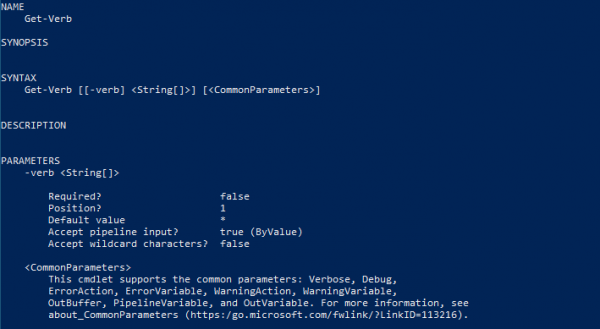
This means that we can rewrite Get-Verb "get" to "get" | Get-Verb.
Thus, the result of the first expression is a string that is passed to the Verb parameter of the Get-Verb command through pipeline input by value.
Additionally, pipeline input can be ByPropertyName. In this case, we will be passing an object that has a property with a similar name to Verb.
Variables
Variables are not strictly typed and are defined with a $ sign in front.
$example = 4The symbol > means to place data into
For example, $example > File.txt
This expression places the data from the $example variable into a file.
Similar to the command Set-Content -Value $example -Path File.txt
Arrays
Array initialization:
$ArrayExample = @(“First”, “Second”)Initializing an empty array:
$ArrayExample = @()Getting a value by index:
$ArrayExample[0]Get the entire array:
$ArrayExampleAdding an element:
$ArrayExample += “Third”$ArrayExample += @(“Fourth”, “Fifth”)Sorting:
$ArrayExample | Sort$ArrayExample | Sort -DescendingBut the array itself remains unchanged during this sorting. If we want the array to contain sorted data, we need to assign the sorted values:
$ArrayExample = $ArrayExample | SortIn fact, there is no concept of deleting an element from the array in PowerShell, but it can be done like this:
$ArrayExample = $ArrayExample | where { $_ -ne “First” }$ArrayExample = $ArrayExample | where { $_ -ne $ArrayExample[0] }
Deleting the array:
$ArrayExample = $nullLoops
Loop syntax:
for($i = 0; $i -lt 5; $i++){}
$i = 0
while($i -lt 5){}
$i = 0
do{} while($i -lt 5)
$i = 0
do{} until($i -lt 5)
ForEach($item in $items){}Exit from the loop break.
Skip an element continue.
Conditional Statements
if () {} elseif () {} elseswitch($someIntValue){
1 { “Option 1” }
2 { “Option 2” }
default { “Not set” }
}
Function
Function definition:
function Example () {
  echo &args
}
Calling the function:
Example “First argument” “Second argument”Defining arguments in the function:
function Example () {
  param($first, $second)
}
function Example ($first, $second) {}Calling the function:
Example -first “First argument” -second “Second argument”Exception
try{
} catch [System.Net.WebException],[System.IO.IOException]{
} catch {
} finally{
}
Source: habr.com
