

Are you planning to implement Atlassian software (Jira, Confluence)? Do you want to avoid making critical design mistakes that you'll have to address at the last minute?

Then you’re in the right place — we will discuss the implementation of Atlassian Jira + Confluence in corporations, considering various technical aspects.
Hello, I am a Product Owner at RSHB and responsible for the development of the Lifecycle Management System (LMS) built on Atlassian Jira and Confluence software products.
In this article, I will describe the technical aspects of building the LMS. This article will be useful for anyone planning to implement or develop Atlassian Jira and Confluence in a corporate environment. It does not require specialized knowledge and is aimed at those new to Atlassian products. The article will be helpful for administrators, product owners, project managers, architects, and anyone planning to implement systems based on Atlassian software.
Introduction
The article will cover the technical issues of implementing the Lifecycle Management System (LMS) in a corporate environment. Let's first define what this means.
What does a corporate solution mean?
It means a solution that is:
- Scalable. If the load increases, there is a technical ability to enhance the system's power. Scalability is divided into horizontal and vertical — in vertical scaling, the server power is increased, while in horizontal scaling the number of servers working for the system increases.
- Resilient. The system will remain accessible even if one component fails. Generally, corporate systems do not require resilience, but we will be considering such a solution. Our system is planned to support several hundred concurrent users, and downtime will be very critical.
- Supported. The solution must be under vendor support. Software without support should be replaced by in-house developments or other supported software.
- Installation Self-managed (On-premise). Self-managed means the ability to install software not in the cloud but on your own servers. To be precise, it includes all non-SaaS installation options. In this article, we will only consider Self-managed installation options.
- The ability to develop and test independently. To ensure predictable changes in the system, separate environments are required for development (changes in the system itself), a testing environment (Staging), and a production environment for user operations.
- Other. Supports various authentication scenarios, maintains audit logs, and has a customizable role model, etc.
These are the key elements of corporate solutions and, unfortunately, are often overlooked when designing the system.
What is a Lifecycle Management System (LMS)?
In short, in our case, it is Atlassian Jira and Atlassian Confluence — a system that provides tools for organizing collective work. The system does not 'impose' rules for organizing work; instead, it offers a variety of tools for work, including Scrum, Kanban boards, waterfall models, and scalable Scrum, etc.
The term LMS is not an industry term or a commonly used concept; it's merely the name of the system in our Bank. For us, LMS is not a bug-tracking system, nor is it an incident management system or a change management system.
What does implementation involve?
Implementing the solution consists of numerous technical and organizational questions:
- Allocating technical resources.
- Purchasing software.
- Creating an implementation team.
- Installing and configuring the solution.
- Developing the architecture of the solution. Role model.
- Creating operational documentation, including instructions, regulations, technical projects, specifications, etc.
- Changing the company's processes.
- Creating a support team. Developing an SLA.
- Training users.
- Other.
In this article, we will discuss the technical aspects of implementation without delving into organizational details.
Features of Atlassian
Atlassian is a leader in many segments:
(Leadership is driven by the successful acquisition of AgileCraft with its cloud solution)


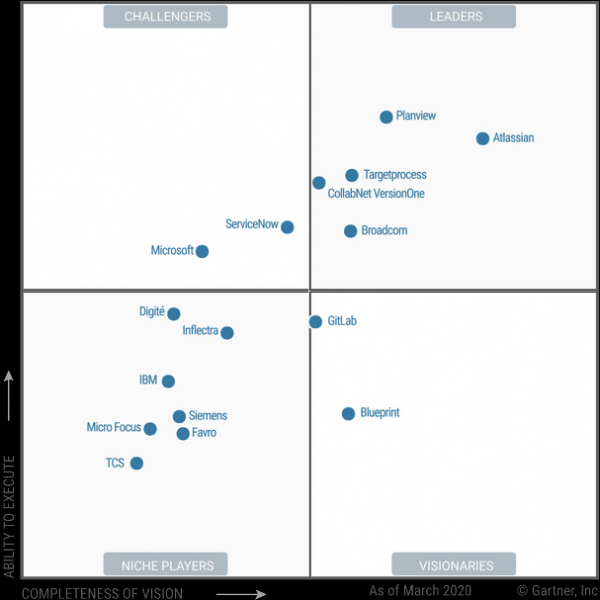
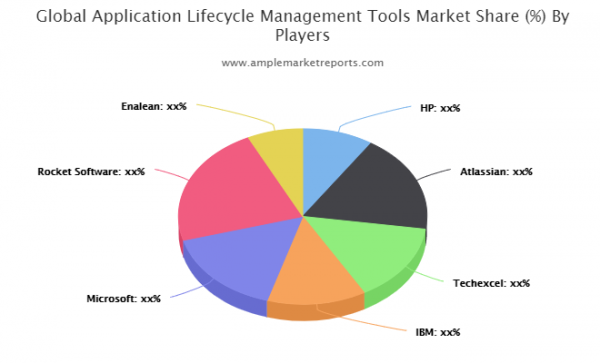
Atlassian's products have all the necessary corporate functionalities. I will highlight the following features:
- Atlassian solutions are based on the Java Tomcat web server. Apache Tomcat software is included with Atlassian software as part of the installation; it's not possible to change the version of Apache Tomcat installed with Atlassian software, even if the version is outdated and contains vulnerabilities. The only option is to wait for updates from Atlassian with a newer version of Apache Tomcat. Currently, for instance, the latest versions of Jira come with Apache Tomcat 8.5.42, while Confluence uses Apache Tomcat 9.0.33.
- User-friendly interface, implementing the best practices available in the market for this class of software.
- Fully customizable solution. With modifications, any change to the core functionality for the user can be implemented.
- Developed ecosystem. There are several hundred partners: , including 16 partners in Russia. Atlassian software, plugins, and training can be purchased through partners in Russia. Partners develop and support most plugins.
- App store (plugins): . Plugins significantly expand the functionality of Atlassian software. The basic functionality of Atlassian software is quite modest; for almost any task, there is a need to install additional plugins either for free or for an extra cost. Therefore, the costs for the software may turn out to be significantly higher than initially estimated.
Currently, there are several thousand plugins published in the store, almost a thousand of which have been tested and validated under the Data Center approved apps program. Such plugins can be considered stable and suitable for use in high-load systems.
I advise you to approach the issue of plugin planning carefully, as it greatly affects the cost of the solution; many plugins can lead to system instability, and the plugin developer may not provide support for solving the problem. - Training and certifications:
- SSO and SAML 2.0 mechanisms are supported.
- Support for scalability and fault tolerance is only available in the Data Center editions. This edition first appeared in 2014 (Jira 6.3). The functionality of Data Center editions is continually being expanded and refined (for example, the ability for single node installation was only introduced in 2020). The approach to plugins for Data Center editions changed significantly in 2018 with the introduction of Data Center approved apps.
- Support costs. The vendor's support cost is nearly equal to the full cost of software licenses. An example of license cost calculation is provided below.
- Lack of Long Term releases. There are so-called , but they, like all other versions, are supported for 2 years. The distinction is that for Enterprise versions, only fixes are released, without adding new features.
- Extended support options (for an additional fee).
- Several database management systems are supported. Atlassian software comes with a free H2 database, which is not recommended for production use. For production use, the following DBMS are supported: Amazon Aurora (Data Center only), PostgreSQL, Azure SQL, MySQL, Oracle DB, PostgreSQL, MS SQL Server. There are limitations on supported versions, and often only older versions are supported, but for each DBMS, there is a version with vendor support:
,
.
Technical architecture
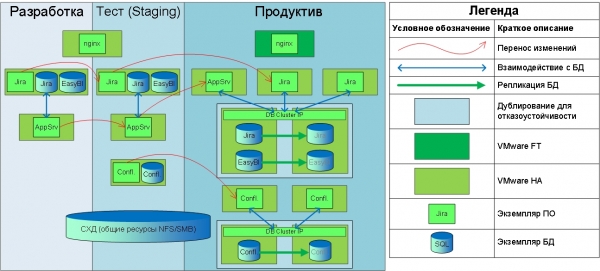
Explanations for the diagram:
- The diagram shows the implementation in our Bank; this configuration is provided as an example and is not recommended.
- nginx provides reverse proxy functionality for both Jira and Confluence.
- The fault tolerance of the DBMS is implemented using the DBMS capabilities.
- Changes between environments are transferred using the Configuration Manager for Jira plugin.
- AppSrv in the diagram is our own application server for reporting, not using Atlassian software.
- The EasyBI database is designed for building cubes and reports using the eazyBI Reports and Charts for Jira plugin.
- The Confluence Synchrony service (a component that allows simultaneous document editing) is not separated into a standalone installation and runs alongside Confluence on the same server.
Licensing
Atlassian licensing issues deserve a separate article; here, I will only mention the general principles.
The main issues we encountered were related to the licensing of Data Center editions. Licensing specifics for Server and Data Center editions:
- The license for the Server edition is perpetual, and the buyer can use the software even after the license expires. However, after the license expires, the buyer loses the right to receive product support and upgrade the software to current versions.
- Licensing is based on the number of users in the ‘JIRA Users’ global permission. It does not matter whether they use the system or not — even if users have never logged in, all users will be counted for the license. If the number of licensed users is exceeded, the decision will be to remove the ‘JIRA Users’ permission from some users.
- The Data Center license is essentially a subscription. Annual payment for the license is required. Upon expiration, access to the system will be blocked.
- The cost of licenses can change over time. As practice shows, it usually increases, possibly significantly. Therefore, if your licenses cost a certain amount this year, the cost may rise next year.
- Licensing is performed per user by tier (for example, the tier for 1001-2000 users). It is possible to upgrade to a higher tier for an additional fee.
- If the number of licensed users is exceeded, new users will be created without the right to log into the system (‘JIRA Users’ global permission).
- Plugins can only be licensed for the same number of users as the main software.
- Licensing is required only for production installations; for others, a Developer license can be obtained: .
- To purchase support, a renewal of Software maintenance is required — the cost is approximately 50% of the original software's cost. This option is not available for Data Center and does not apply to plugins — full annual payment will be required for their support.
Thus, annual software support costs more than 50% of the full software cost for the Server edition and 100% for the Data Center edition — significantly more than most other vendors. In my opinion, this is a significant downside of Atlassian’s business model.
Features of the transition from Server edition to Data Center:
- Transitioning from Server edition to Data Center is paid. The cost can be found here. .
- When transitioning from Server edition to Data Center, no payment is required for plugin edition change — plugins for the Server edition will function. However, renewing licenses for plugins will be mandatory for the Data Center edition.
- You can use plugins that do not have a version compatible with Data Center editions. However, such plugins may not work correctly, so it's best to plan alternatives in advance.
- To switch to the Data Center edition, a new license must be installed. The license for the Server edition remains available.
- There are no functional differences between the Data Center and Server editions for users; all differences are related to administration functions and technical installation capabilities.
- The cost of software and plugins differs for the Server and Data Center editions. The price difference is often less than 5% (not significant). An example of cost calculation is provided below.
Implementation scope
The basic delivery of Atlassian software includes a vast number of capabilities, but often the features provided by the system are severely lacking. Sometimes even the most basic functions are unavailable in the default package, so plugins are essential practically for any implementation. For the Jira system, we use the following plugins (the image is clickable):
For the Confluence system, we use the following plugins (the image is clickable):
Comments on tables with plugins:
- All prices are based on 2000 users;
- The prices are based on the prices specified , the actual cost (with discounts) is lower;
- As we can see, the total amount is almost the same for both the Data Center and Server editions;
- Only plugins that support the Data Center edition have been selected for use. Other plugins have been excluded from plans for system stability.
The functionality is briefly described in the Comments column. Additional plugins have expanded the system's functionality:
- Several visual tools have been added;
- Integration mechanisms have been improved;
- Tools for waterfall model projects have been added;
- Tools for scalable Scrum have been added to organize the work of large project teams;
- Functionality for time tracking has been added;
- Tools for automating operations and configuring solutions have been added;
- Functionality for simplifying and automating the solution's administration has been added.
Additionally, we use This application allows you to edit files in external applications (MS Office) and return them back to Confluence (check-in).
User workstation application (thick client) ALM Works Jira Client decided not to use due to poor vendor support and negative feedback.
For integration with MS Project we currently use a custom-built application that allows updating Issue statuses in MS Project from Jira and vice versa. In the future, for the same purposes, we plan to use a paid plugin. , which is installed as an add-in to MS Project.
Integration with external applications is implemented through Application Links. For Atlassian applications, the integrations are pre-configured and work immediately after setup; for example, information about Issues in Jira can be displayed on a page in Confluence.
REST API is used for accessing Jira and Confluence servers: .
SOAP and XML-RPC API are deprecated and not available for use in new versions.
Conclusion
Thus, we have reviewed the technical features of implementing a system based on Atlassian products. The proposed solution is one of the possible approaches and is well-suited for a corporate environment.
The proposed solution is scalable, fault-tolerant, contains three environments for development and testing, includes all necessary elements for collaboration in the system, and provides a wide range of tools for project management.
I am happy to answer questions in the comments.
Source: habr.com
