

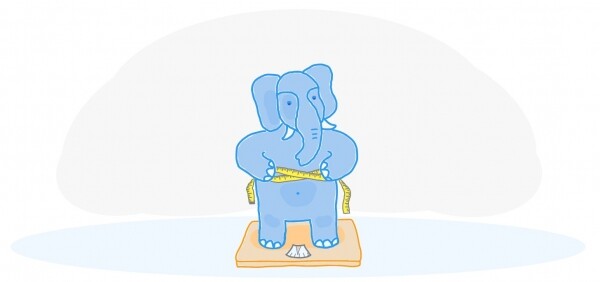
The effect of table and index bloat is well-known and exists not only in Postgres. There are built-in methods to combat it, such as VACUUM FULL or CLUSTER, but they block tables during operation and therefore cannot always be used.
This article will cover some theory on how bloat occurs, how it can be addressed, deferred constraints, and the issues they bring when using the pg_repack extension.
This article is based on at PgConf.Russia 2020.
Why bloat occurs
Postgres is based on a multi-version concurrency control model (). Its essence lies in the fact that each row in a table can have multiple versions, while transactions see only one of these versions, which does not necessarily have to be the same. This allows multiple transactions to work simultaneously with minimal interference with each other.
It is clear that all these versions need to be stored. Postgres operates with memory on a page-by-page basis, and a page is the minimum amount of data that can be read from or written to disk. Let’s consider a small example to understand how this happens.
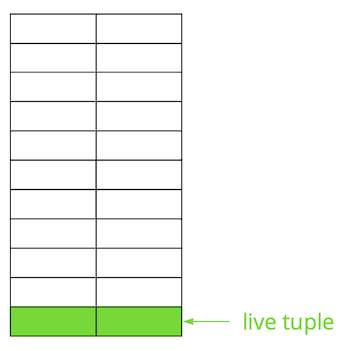
Suppose we have a table where we’ve added several records. New data appears on the first page of the file where the table is stored. These are live versions of the rows, which are accessible to other transactions after a commit (for simplicity, let’s assume a Read Committed isolation level).
Then, we updated one of the records, marking the old version as obsolete.
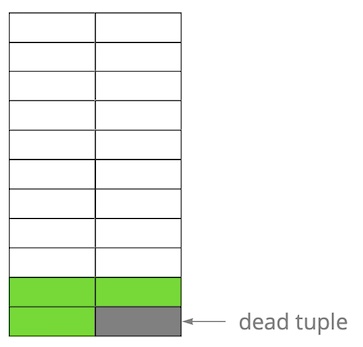
Step by step, as we update and delete row versions, we end up with a page where about half of the data is 'garbage.' This data is not visible to any transactions.
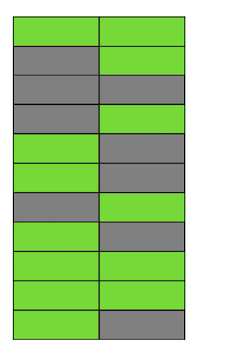
Postgres has a mechanism , which cleans up obsolete versions and frees up space for new data. However, if it isn't configured aggressively enough or is busy working on other tables, 'garbage data' remains, forcing us to use additional pages for new data.
Thus, in our example, at some point in time, the table will consist of four pages, but there will only be live data in half of it. As a result, when accessing the table, we will read significantly more data than necessary.
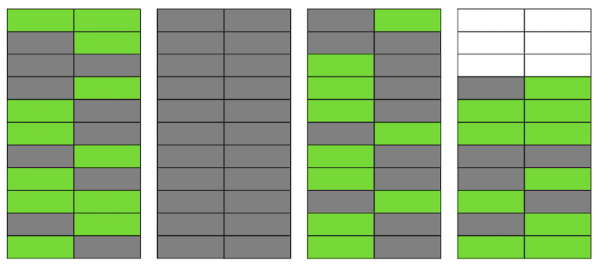
Even if VACUUM removes all outdated row versions now, the situation won't significantly improve. We will have free space on pages or even entire pages for new rows, but we will still be reading more data than necessary.
By the way, if a completely empty page (the second one in our example) were at the end of the file, VACUUM could trim it. However, since it's in the middle, there's nothing that can be done with it.
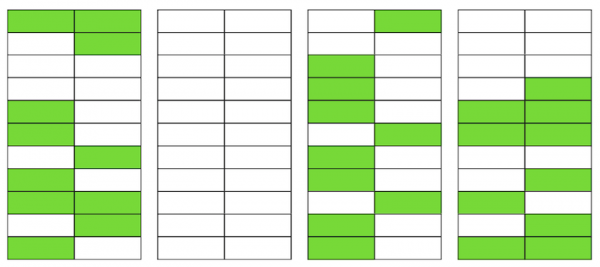
When the number of such empty or severely bloated pages becomes large, that's what we call bloat, it begins to affect performance.
The mechanics described above explain how bloat occurs in tables. In indexes, it happens pretty much the same way.
Do I have bloat?
There are several ways to determine if you have bloat. The idea of the first one is to use PostgreSQL's internal statistics, which contain approximate information about the number of rows in tables, the number of 'live' rows, etc. You can find many variations of ready-made scripts online. We based ours on from PostgreSQL Experts that can assess table bloat along with toast and bloat of btree indexes. In our experience, its accuracy is about 10-20%.
Another way is to use the extension , which allows you to look inside the pages and get both an estimated and an exact value of bloat. But in the latter case, you'll need to scan the entire table.
We consider a small bloat value, up to 20%, acceptable. It can be seen as an analogue of fillfactor for and . At 50% and above, performance issues may start to arise.
Ways to combat bloat
Postgres offers several built-in ways to combat bloat, but they may not always be suitable for everyone.
Configure AUTOVACUUM to prevent bloat from occurring.To be more precise, it needs to be maintained at a level that is acceptable for you. It may seem like a 'captain's' piece of advice, but in reality, this is not always easy to achieve. For instance, if you are actively developing with regular changes to the data schema or if some data migration is taking place, your workload profile can change frequently and, generally, vary across different tables. This means you need to consistently stay one step ahead and adjust AUTOVACUUM to the changing profile of each table. However, it is evident that doing this is not straightforward.
Another common reason why AUTOVACUUM struggles to process tables is the presence of long transactions, which prevent it from cleaning up data because that data is accessible to these transactions. The advice here is also quite clear – eliminate 'hanging' transactions and minimize the time of active transactions. However, if your application load is a hybrid of OLAP and OLTP, you may simultaneously have many frequent updates and short queries, as well as long operations – for example, generating a report. In such a situation, you may want to consider distributing the load across different databases, allowing for finer tuning of each one.
Another example – even if the profile is homogeneous, if the database is under very heavy load, then even the most aggressive AUTOVACUUM may struggle, and bloat will occur. Scaling (either vertical or horizontal) is the only solution.
What should you do in a situation where you have configured AUTOVACUUM, but bloat continues to increase?
The command VACUUM FULL rebuilds the contents of tables and indexes, leaving only the current data. It works perfectly to eliminate bloat, but during its execution, it takes an exclusive lock on the table (AccessExclusiveLock), meaning queries on this table cannot be executed, even selects. If you can afford to halt your service or part of it for some time (from several minutes to a few hours depending on the size of the database and your hardware), then this option is the best. Unfortunately, we do not manage to run VACUUM FULL within the scheduled maintenance time, so this method does not suit us.
The command CLUSTER it also reorganizes the contents of tables, like VACUUM FULL, while allowing the specification of an index according to which the data will be physically ordered on disk (though the order for new rows is not guaranteed in the future). In certain situations, this is a decent optimization for a number of queries involving reading multiple records by index. The drawback of this command is the same as VACUUM FULL—it locks the table during its operation.
The command REINDEX is similar to the two previous ones, but it reconstructs a specific index or all indices of a table. The locks are slightly weaker: ShareLock on the table (prevents modifications, but allows selects) and AccessExclusiveLock on the index being rebuilt (blocks queries using this index). However, in version 12 of Postgres, a parameter appeared , which allows the index to be rebuilt without blocking concurrent insertions, modifications, or deletions of records.
In earlier versions of Postgres, a similar result to REINDEX CONCURRENTLY can be achieved using . It allows an index to be created without strict locking (ShareUpdateExclusiveLock, which does not interfere with concurrent queries), then the old index is replaced with the new one, and the old index is deleted. This helps eliminate index bloat without interfering with your application's operation. It's important to note that rebuilding indexes will add extra load on the disk subsystem.
Thus, while there are ways to eliminate bloat for indexes 'hot', there are none for tables. Here, various external extensions come into play: (formerly pg_reorg), , and others. In this article, I will not compare them and will only discuss pg_repack, which we use after some modifications.
How pg_repack works
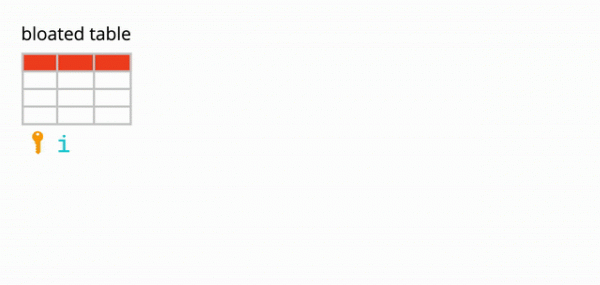
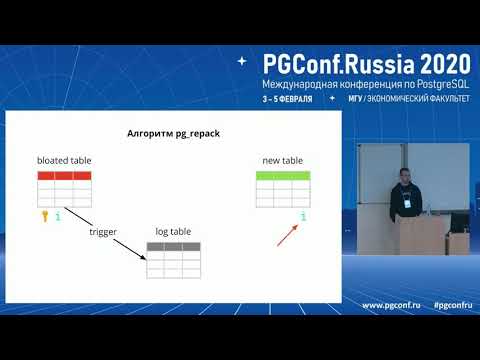
Suppose we have a fairly typical table—with indices, constraints, and, unfortunately, with bloat. The first step of pg_repack creates a log table to store data about all changes during its operation. A trigger will replicate these changes for each insert, update, and delete. Then a table is created, similar in structure to the original, but without indices and constraints, to avoid slowing down the data insertion process.
Next, pg_repack transfers data from the old table to a new one, automatically filtering out all irrelevant rows, and then creates indexes for the new table. During the execution of all these operations, changes accumulate in the log table.
The next step is to transfer the changes to the new table. The transfer is executed in several iterations, and when there are fewer than 20 records left in the log table, pg_repack acquires a strict lock, transfers the last data, and replaces the old table with the new one in the Postgres system tables. This is the only and very brief moment when you will not be able to work with the table. After that, the old table and the log table are deleted, freeing up space in the file system. The process is complete.
In theory, everything looks great, but what about in practice? We tested pg_repack without load and under load, checked its operation in the case of premature stop (in other words, by pressing Ctrl+C). All tests were positive.
We went to production — and that’s when everything went wrong.
The first attempt in production
On the very first cluster, we received an error about a unique constraint violation:
$ ./pg_repack -t tablename -o id
INFO: repacking table "tablename"
ERROR: query failed:
    ERROR: duplicate key value violates unique constraint "index_16508"
DETAIL:  Key (id, index)=(100500, 42) already exists.
This constraint had an auto-generated name index_16508 – it was created by pg_repack. By examining the attributes that make it up, we identified our constraint that corresponds to it. The problem turned out to be that this is not quite an ordinary constraint, but a deferred one (), i.e., its validation occurs later than the SQL command, which leads to unexpected consequences.
Deferred constraints: why they are needed and how they work
A bit of theory about deferred constraints.
Let’s consider a simple example: we have a reference table of cars with two attributes – the name and the order of the car in the reference.
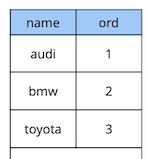
create table cars
(
  name text constraint pk_cars primary key,
  ord integer not null constraint uk_cars unique
);
Suppose we need to swap the first and second cars. The straightforward solution is to update the first value to the second, and the second to the first:
begin;
  update cars set ord = 2 where name = 'audi';
  update cars set ord = 1 where name = 'bmw';
commit;
However, when executing this code, we would expect to encounter a constraint violation because the order of values in the table is unique:
[23305] ERROR: duplicate key value violates unique constraint “uk_cars”
Detail: Key (ord)=(2) already exists.
How to do it differently? Option one: add an additional replacement for a value that definitely does not exist in the table, for example, “-1”. In programming, this is called “exchanging the values of two variables through a third one.” The only drawback of this method is the additional update.
Option two: redesign the table to use a floating-point data type for the order value instead of integers. Then, when updating a value from 1, for example, to 2.5, the first entry will automatically “slot in” between the second and third. This solution works, but there are two limitations. First, it will not suit you if the value is used somewhere in the interface. Second, depending on the precision of the data type, you will have a limited number of potential inserts before recalculating the values of all records.
Option three: make the constraint deferred so that it is checked only at the time of the commit:
create table cars
(
  name text constraint pk_cars primary key,
  ord integer not null constraint uk_cars unique deferrable initially deferred
);
Since the logic of our initial query guarantees that by the time of the commit all values are unique, it will execute successfully.
The example discussed above is certainly very synthetic, but it reveals the idea. In our application, we use deferred constraints to implement logic that addresses conflicts when multiple users interact with shared widget objects on the board. Using such constraints allows us to simplify the application code slightly.
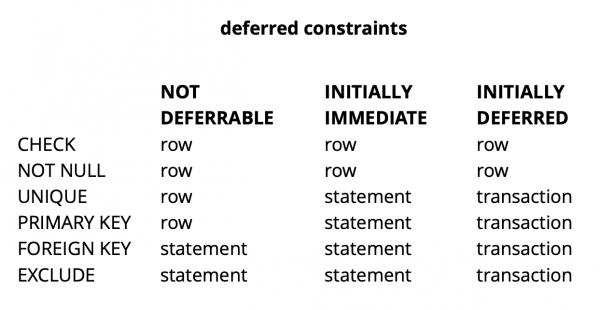
Overall, depending on the type of constraint in Postgres, there are three levels of granularity for their checking: row level, transaction level, and expression level.
Source:
CHECK and NOT NULL are always checked at the row level; for other constraints, as can be seen from the table, there are different options. More details can be read. .
In summary, deferred constraints provide more readable code and fewer commands in certain situations. However, this comes at the cost of complicating the debugging process, as the moment an error occurs and when you become aware of it are separated in time. Another potential issue is that the planner may not always be able to create an optimal plan when a deferred constraint is involved in the query.
Enhancement of pg_repack
We've clarified what deferred constraints are, but how are they related to our problem? Let's recall the error we encountered earlier:
$ ./pg_repack -t tablename -o id
INFO: repacking table "tablename"
ERROR: query failed:
    ERROR: duplicate key value violates unique constraint "index_16508"
DETAIL:  Key (id, index)=(100500, 42) already exists.
It occurs at the moment of copying data from the log table to the new table. This seems strange since the data in the log table gets committed along with the data from the original table. If they satisfy the constraints of the original table, how can they violate the same constraints in the new one?
As it turns out, the root of the problem lies in the previous step of pg_repack, where only indexes are created, but not constraints: there was a unique constraint in the old table, and instead, a unique index was created in the new one.
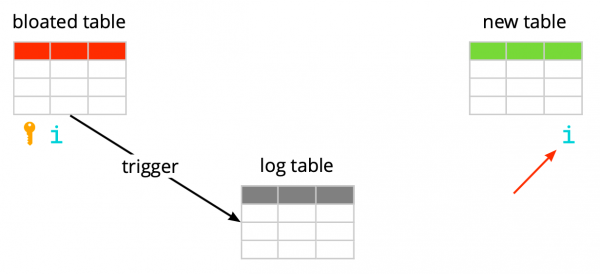
It's important to note that if the constraint is regular and not deferred, then the unique index created instead is equivalent to that constraint, as unique constraints in Postgres are implemented by creating a unique index. However, in the case of a deferred constraint, the behavior is not the same, because the index cannot be deferred and is always checked at the time of executing the SQL command.
Thus, the essence of the problem lies in the 'deferred' nature of the check: in the original table, it happens at the time of commit, whereas in the new table, it occurs at the moment of executing the SQL command. Therefore, we need to ensure that checks are performed consistently in both cases: either always deferred or always immediate.
So, what ideas do we have?
Create an index similar to deferred
The first idea is to perform both checks in immediate mode. This may result in several false positives related to the constraints, but if there are only a few, it shouldn't affect user operations, as these conflicts are a normal situation for them. They occur, for example, when two users start editing the same widget simultaneously, and the client of the second user does not receive information in time that the widget is already locked for editing by the first user. In this situation, the server responds with an error to the second user, and their client rolls back changes and locks the widget. A little later, when the first user completes editing, the second will receive information that the widget is no longer locked and can repeat their action.
To ensure checks are always in urgent mode, we created a new index similar to the original deferred constraint:
CREATE UNIQUE INDEX CONCURRENTLY uk_tablename__immediate ON tablename (id, index);
-- run pg_repack
DROP INDEX CONCURRENTLY uk_tablename__immediate;
In the test environment, we encountered only a few expected errors. Success! We ran pg_repack in production again and encountered 5 errors in the first cluster within an hour of operation. This is an acceptable result. However, in the second cluster, the number of errors increased significantly, and we had to stop pg_repack.
Why did this happen? The likelihood of an error depends on how many users are simultaneously working with the same widgets. Apparently, at that moment, the data stored in the first cluster had far fewer concurrent changes than in the others, meaning we simply got 'lucky.'
The idea did not work. At that moment, we saw two other options for solutions: to rewrite our application code to avoid deferred constraints or to 'teach' pg_repack to work with them. We chose the latter.
Replace the indexes in the new table with the deferred constraints from the source table.
The purpose of the enhancement was clear – if the source table has a deferred constraint, the new one should create such a constraint, not just an index.
To check our changes, we wrote a simple test:
- a table with a deferred constraint and one record;
- insert conflicting data in a loop that conflicts with the existing record;
- We are doing an update – the data no longer conflicts;
- We are committing changes.
create table test_table
(
  id serial,
  val int,
  constraint uk_test_table__val unique (val) deferrable initially deferred
);
INSERT INTO test_table (val) VALUES (0);
FOR i IN 1..10000 LOOP
  BEGIN
    INSERT INTO test_table VALUES (0) RETURNING id INTO v_id;
    UPDATE test_table set val = i where id = v_id;
    COMMIT;
  END;
END LOOP;
The original version of pg_repack always failed on the first insert, but the revised version worked without errors. Excellent.
We are going to production and are encountering an error again at the same stage of copying data from the log table to the new one:
$ ./pg_repack -t tablename -o id
INFO: repacking table "tablename"
ERROR: query failed:
    ERROR: duplicate key value violates unique constraint "index_16508"
DETAIL:  Key (id, index)=(100500, 42) already exists.
A classic situation: everything works in the test environments, but not in production?!
APPLY_COUNT and the junction of two batches
We started analyzing the code line by line and discovered an important detail: the data transfer from the log table to the new one occurs in batches; the constant APPLY_COUNT indicated the batch size:
for (;;)
{
num = apply_log(connection, table, APPLY_COUNT);

if (num > MIN_TUPLES_BEFORE_SWITCH)
     continue;  /* there might still be some tuples, repeat. */
...
}
The problem is that the data from the original transaction, in which several operations could potentially violate the constraint, may end up at the junction of two batches during transfer – half of the commands will be committed in the first batch, and the other half in the second. Here it’s a matter of chance: if the commands in the first batch don't violate anything, then everything is fine. If they do, an error occurs.
APPLY_COUNT is equal to 1000 records, which explains why our tests passed successfully – they did not cover the case of 'batch junctions'. We used two commands – insert and update, so exactly 500 transactions with two commands always fit into the batch, and we did not experience problems. After adding a second update, our fix stopped working:
FOR i IN 1..10000 LOOP
  BEGIN
    INSERT INTO test_table VALUES (1) RETURNING id INTO v_id;
    UPDATE test_table set val = i where id = v_id;
    UPDATE test_table set val = i where id = v_id; -- one more update
    COMMIT;
  END;
END LOOP;
So, the next task is to ensure that the data from the original table, which was changed in one transaction, also gets into the new table within the same transaction.
Abandoning batching
And once again, we had two options for a solution. The first: let’s completely abandon batch processing and transfer the data in a single transaction. The simplicity of this approach was its advantage – the required code changes were minimal (by the way, in older versions, pg_reorg worked precisely like this). However, there is a problem — we create a long transaction, which, as mentioned earlier, poses a risk of new bloat occurring.
The second solution is more complex, but perhaps more correct: to create a column in the log table with the identifier of the transaction that added the data to the table. Then, when copying data, we can group it by this attribute and ensure that related changes are transferred together. The batch will be formed from several transactions (or one large one), and its size will vary depending on how much data was altered in these transactions. It is important to note that since the data from different transactions enters the log table in a random order, it will no longer be possible to read it sequentially as before. A seqscan on each request filtered by tx_id is too costly; an index is needed, but it will also slow down the method due to the overhead of updating it. Overall, as always, something has to be sacrificed.
So, we decided to start with the first option, as it was simpler. Initially, we needed to determine whether the long transaction would be a real problem. Since the main data transfer from the old table to the new one also occurs within one long transaction, the question transformed into “how much are we increasing this transaction?” The duration of the first transaction mainly depends on the size of the table. The duration of the new one depends on how many changes accumulate in the table while the data is being transferred, i.e., the intensity of the load. The pg_repack run was done during minimal service load, and the volume of changes was incomparably small compared to the original table size. We decided that we could overlook the time of the new transaction (on average, it is about 1 hour and 2-3 minutes).
The experiments were positive. The launch in production was successful too. For clarity – here’s an image showing the size of one of the databases after the run:
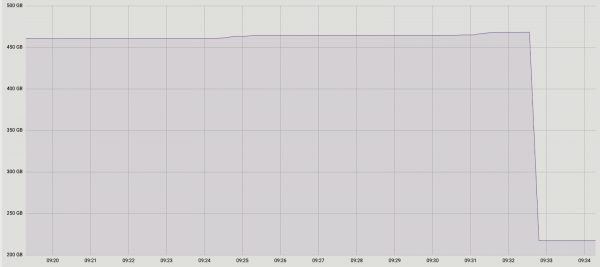
Since this solution fully satisfied us, we did not attempt to implement a second one, but we are considering discussing it with the extension developers. Unfortunately, our current enhancement is not yet ready for publication, as we have only addressed the issue with unique deferred constraints, and for a complete patch, support for other types is necessary. We hope to achieve this in the future.
You may wonder why we got involved in this pg_repack enhancement instead of using its alternatives. At one point, we thought about this as well, but the positive experience we had previously using it on tables without deferred constraints motivated us to delve into the problem and fix it. Moreover, using other solutions also requires time for testing, so we decided to first try to resolve the issue within it, and if we realize we cannot do this in a reasonable time, then we will begin to consider alternatives.
Conclusions
Based on our experience, here’s what we can recommend:
- Monitor your bloat. Based on monitoring data, you'll be able to understand how well autovacuum is configured.
- Configure AUTOVACUUM to keep bloat at an acceptable level.
- If bloat still increases and you cannot combat it with the out-of-the-box tools, do not hesitate to use external extensions. The key is to test everything thoroughly.
- Do not be afraid to enhance external solutions to meet your needs—sometimes this can be more effective and even simpler than changing your own code.
Source: habr.com
