

Today, I will tell you a story. A story about the evolution of computing and the emergence of remote workplaces from ancient times to the present day.
The Evolution of IT
The main takeaway from the history of IT is that...

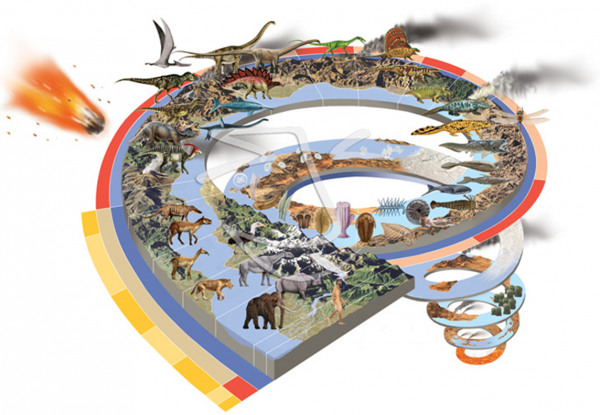
It is evident that IT develops in a spiral. The same solutions and concepts that were discarded decades ago gain new meaning and successfully begin to function under new conditions, with new tasks and new capabilities. In this regard, IT is no different from any other field of human knowledge and the history of the Earth as a whole.
Long ago, when computers were large
“I think there is a world market for maybe five computers,” said IBM's Thomas Watson in 1943.
Early computing technology was enormous. No, that’s not quite right; early technology was monstrous, cyclopean. A complete computing machine occupied an area comparable to a gymnasium and cost utterly unrealistic sums. For example, a ferrite core memory module from 1964.
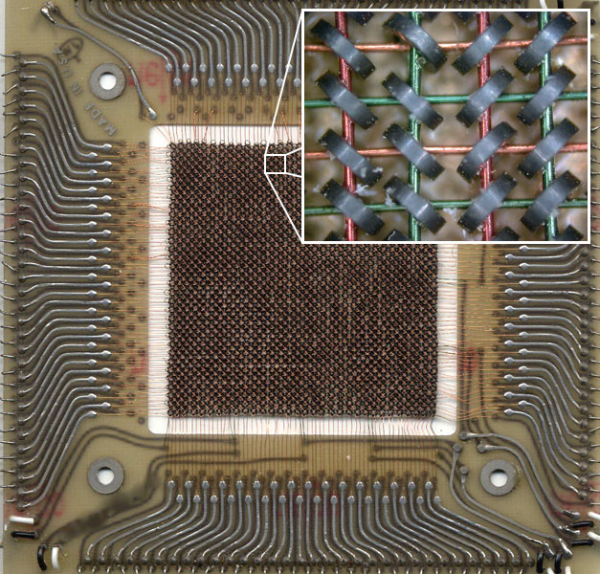
This module measures 11 cm x 11 cm and has a capacity of 512 bytes (4096 bits). A cabinet fully packed with these modules hardly had the capacity of an ancient 3.5” floppy disk (1.44 MB = 2950 modules), while consuming a significant amount of electricity and heating up like a steam locomotive.
It is precisely the enormous size that relates to the English term for debugging code — “debugging.” One of the first in the history of programming, Grace Hopper (yes, a woman), a naval officer, made a note in her action log in 1945 after investigating a program malfunction.
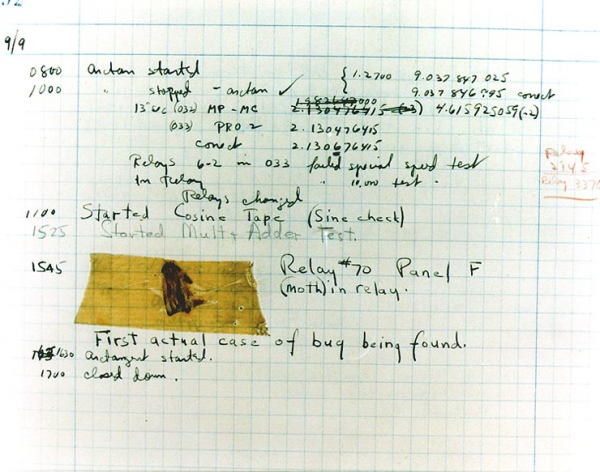
Since moth in general is a bug, all subsequent problems and actions to resolve them were reported to management as “debugging,” literally meaning to remove bugs. Thus, the term bug became permanently associated with program failures and coding errors, while debugging became debuggin.
As electronics, and especially semiconductor technology, progressed, the physical sizes of machines started to shrink, while computational power increased. However, even then, it was not possible for everyone to have a personal computer.
There are no reasons for anyone to want to keep a computer at home — Ken Olsen, founder of DEC, 1977.
The term 'minicomputer' emerged in the 1970s. I remember that when I first read this term many years ago, I envisioned something akin to a netbook, almost a handheld device. I couldn't have been further from the truth.
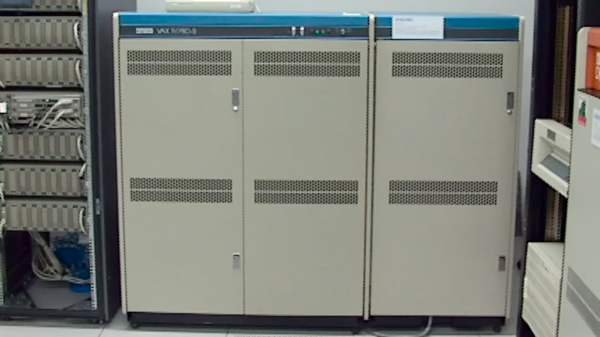
Minicomputers are only small in comparison to giant machine rooms, but they are still several cabinets worth hundreds of thousands or millions of dollars. However, the computing power had increased so much that it wasn't always utilized at 100%, and computers began to be accessible to students and university professors.
And then it arrived!

Few consider the Latin roots in the English language, but it is precisely this that brought us remote access as we know it today. Terminus (Latin) means end, boundary, or goal. The goal of the Terminator T800 was to end John Connor's life. Similarly, we know that transport stations where passengers are boarded and disembarked or cargo is loaded and unloaded are called terminals — the final destinations of routes.
Thus, the concept of terminal access emerged, and you can see the most famous terminal in the world, still living in our hearts.
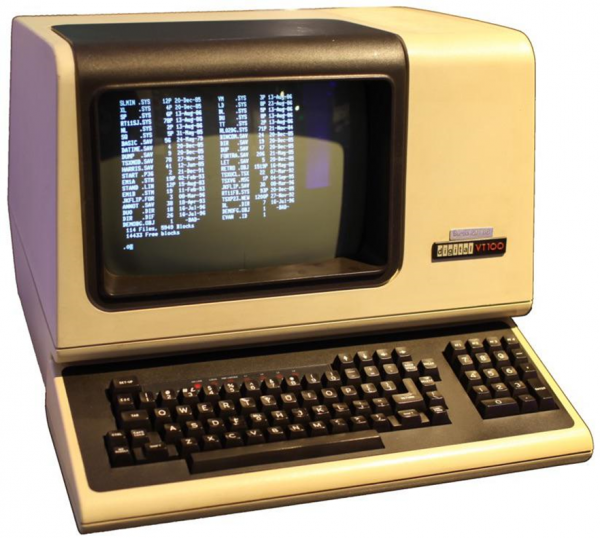
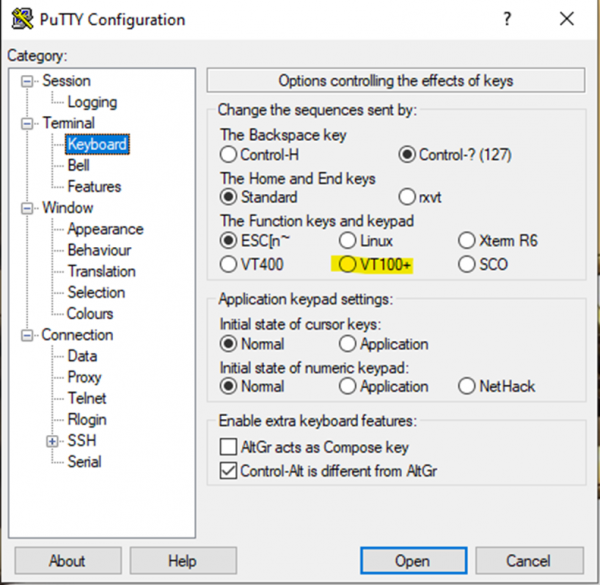
The DEC VT100 is called a terminal because it completes the information line. It essentially has zero computing power, and its only task is to display information received from a large machine and transmit keyboard input back to the machine. And although VT100s have physically died out long ago, we still fully utilize them.
Our days
I would start 'our days' from the early 80s, with the arrival of the first processors that were accessible to a wide audience and possessed some significant computing power. It is traditionally considered that the main processor of that era was the Intel 8088 (x86 family), the progenitor of the victorious architecture. What is the fundamental difference with the 70s concept?
For the first time, there is a trend to shift data processing from the center to the edge. Not all tasks require the insane power of a mainframe or even a mini-computer (compared to a weak x86). Intel does not stand still; in the 90s, it released the Pentium family, which became truly the first mass-market home computer in Russia. These processors are already capable of much — not just writing letters, but also multimedia tasks and working with small databases. In fact, for small businesses, the need for servers is completely eliminated — everything can be done on the edge, on client machines. Every year, processors get more powerful, and the difference between servers and personal computers becomes less significant in terms of computing power, often remaining only in power redundancy, hot-swappable support, and special enclosures for rack mounting.
Comparing modern client processors, which may seem 'funny' to administrators of heavy servers from the 90s at Intel, to the supercomputers of the past, can be slightly unsettling.
Let's take a look at an old-timer, nearly my age — the Cray X-MP/24 from 1984.
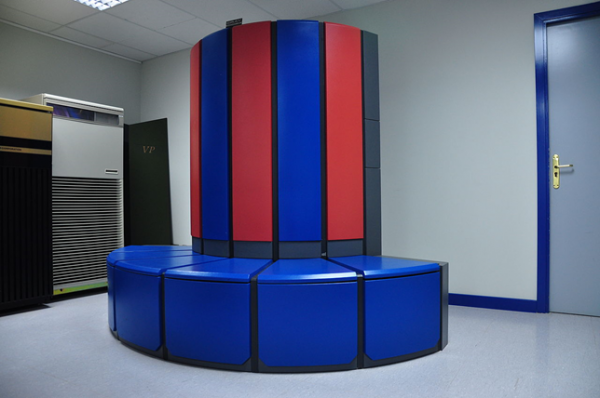
This machine was among the top supercomputers of 1984, featuring 2 processors at 105 MHz with a peak computing power of 400 MFlops (million floating point operations). Specifically, the machine depicted in the photo was located in the NSA's cryptography lab and was used for codebreaking. If we convert 15 million dollars from 1984 to 2020 dollars, the cost equates to 37.4 million, or $93,500 per MFlops.
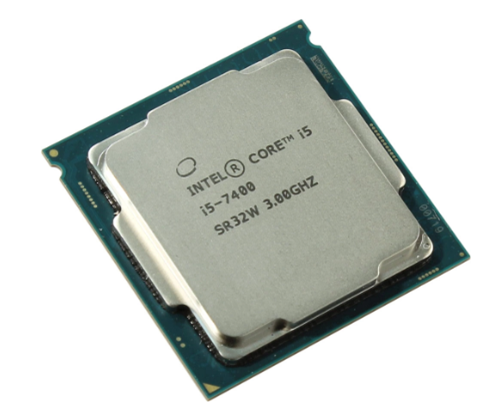
In the machine on which I am writing these lines, there is a Core i5-7400 processor from 2017, which isn't exactly new, and even at its launch, it was the youngest 4-core among all mid-range desktop processors. With 4 cores running at a base frequency of 3.0 GHz (3.5 GHz with Turbo Boost) and HyperThreading doubling the threads, it provides between 19 to 47 GFlops of power across various tests at a price of 16,000 rubles per processor. If you assemble the entire machine, its estimated cost would be $750 (according to prices and exchange rates on March 1, 2020).
Ultimately, we find that the superiority of a fairly average desktop processor today is 50-120 times that of a supercomputer from the top 10 of a not-so-distant past, while the drop in the specific cost of MFlops becomes an astonishing 93,500 / 25 = 3,700 times.
It's utterly unclear why we still need servers and centralized computing with such capabilities at the edge!
The reverse leap — the spiral has made a turn
Diskless workstations
The first signal that pushing computing to the edge won't be final was the emergence of diskless workstations. With a significant distribution of workstations across a company's territory, especially in polluted environments, the issue of managing and supporting these stations becomes quite serious.

The concept of 'corridor time' emerges — that percentage of time a support staff member is in the corridor, on their way to an employee with a problem. This time is paid, but completely unproductive. Hard disk failures played a significant role in this, especially in polluted areas. Let's remove the disk from the workstation, and handle everything else over the network, including booting. The network adapter receives not only the address from the DHCP server but also additional information — the TFTP server address (a simplified file service) and the boot image name, loads it into RAM, and starts the machine.
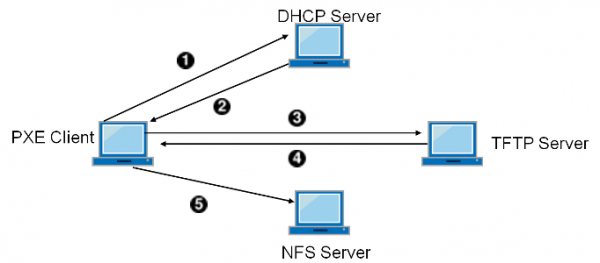
In addition to fewer breakdowns and reduced corridor time, the machine can now be replaced on-site with a new one, while the old one is taken for diagnostics at a designated workplace. But that’s not all!
A diskless workstation becomes significantly safer — if someone breaks into the room and takes all the computers, it's just a loss of hardware. No data is stored on diskless workstations.
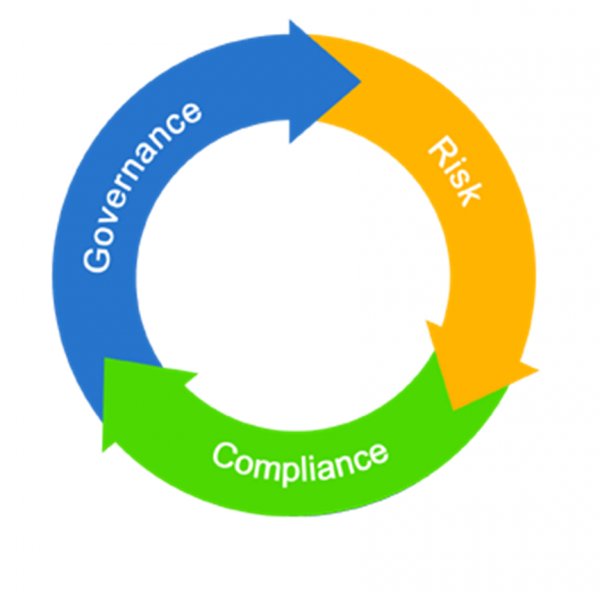
Let's remember this moment, as information security starts to play an increasingly important role after the 'carefree childhood' of information technologies. And IT is increasingly invaded by the daunting and important three letters — GRC (Governance, Risk, Compliance), or in Russian, 'Управляемость, Риск, Соответствие'.
Terminal servers
The widespread distribution of increasingly powerful personal computers on the periphery significantly outpaced the development of public networks. Classic client-server applications from the 90s to the early 00s did not perform well over thin channels, especially when data exchange was significant. This was particularly challenging for remote offices connected via modem and telephone lines, which could periodically freeze or drop connections. And…
The spiral made a turn and found itself back in terminal mode with the concept of terminal servers.
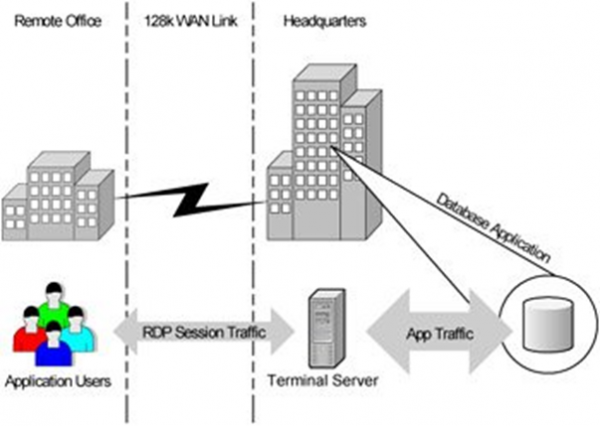
In fact, we have returned to the 70s with their zero clients and the centralization of computing power. It quickly became clear that, apart from the purely economic aspects of the channels, terminal access provided enormous opportunities for organizing secure remote access, including working from home for employees or extremely limited and controlled access for contractors from untrusted networks and uncontrolled devices.
However, terminal servers, despite all their advantages and progressiveness, also had a number of downsides — low flexibility, issues with noisy neighbors, strictly server-based Windows, etc.
The birth of proto VDI

However, in the early to mid-00s, industrial virtualization of x86 platforms was already making its way onto the scene. Someone simply voiced the idea that was floating in the air: why not give each user their own personal VM with client Windows and even administrative access instead of centralizing all clients on server terminal farms?
Abandoning thick clients
Parallel to the virtualization of sessions and operating systems, an approach was developing that aimed to lighten the client’s role at the application level.
The logic behind this was quite simple; personal laptops were still far from universal, not everyone had internet access, and many could only connect from internet cafes with very limited, to put it mildly, rights. In fact, all that could be run was a browser. The browser became an essential attribute of operating systems, and the internet was firmly taking root in our lives.
In other words, there was also a trend of shifting logic from the client to the center in the form of web applications, which required only the simplest client, internet access, and a browser.
And we found ourselves not just back where we started — with zero clients and central servers. We arrived there through several independent paths.
Virtual Desktop Infrastructure
Broker
In 2007, the market leader in industrial virtualization, VMware, released the first version of its VDM (Virtual Desktop Manager) product, which effectively became the first in the nascent virtual desktop market. Unsurprisingly, it didn't take long for the leader in terminal servers, Citrix, to respond, and in 2008, with the acquisition of XenSource, XenDesktop emerged. Of course, there were other vendors with their offerings, but let's not dig too deeply into history, veering off the concept.
And to this day, the concept remains. The key component of VDI is the connection broker.
This is the heart of the virtual desktop infrastructure.
The broker is responsible for the most critical processes of VDI:
- Defines the resources (machines/sessions) available to the connecting client;
- Balances clients across pools of machines/sessions when necessary;
- Connects the client to the selected resource.
Today, a client (terminal) for VDI can be practically anything with a screen — laptop, smartphone, tablet, kiosk, thin client, or zero client. And the responding part, the one that performs the productive load — is the terminal server session, a physical machine, or a virtual machine. Modern mature VDI products are closely integrated with virtual infrastructure and autonomously manage it in an automated mode, deploying or, conversely, removing unnecessary virtual machines.
Somewhat apart but extremely important for certain clients, the support for hardware acceleration of 3D graphics for designers or architects is a crucial VDI technology.
Protocol
Another extremely important part of a mature VDI solution is the protocol for accessing virtual resources. When it comes to working within a corporate local network with an excellent reliable 1 Gbps connection to the workplace and a latency of 1 ms, practically any protocol can be used without much thought.
Consideration is required when connections occur over uncontrolled networks, as the quality of such networks can vary greatly, with speeds as slow as several kilobits and unpredictable delays. This is critical for organizing proper remote work from dachas, homes, airports, and cafes.
Terminal Servers vs Client VMs
With the emergence of VDI, it seemed like it was time to say goodbye to terminal servers. Why do we need them if everyone has their own personal VM?
However, from a purely economic perspective, it turned out that for typical mass workstations, which are uniformly drab, there is still nothing more efficient than terminal servers in terms of cost per session. Despite their advantages, the approach of '1 user = 1 VM' consumes significantly more resources for virtual hardware and a full operating system, which worsens the economics for typical workplaces.
In the case of executive workplaces, non-standard and resource-intensive positions requiring high permissions (even to administrator level), a dedicated VM per user has the advantage. Within this VM, resources can be allocated individually, permissions of any level can be granted, and VMs can be balanced among virtualization hosts under high load.
VDI and Economics
For years, I have heard the same question—how is VDI cheaper than just giving everyone laptops? And for years, I have had to respond with the same answer: in the case of ordinary office workers, VDI is not cheaper when considering the pure costs of provisioning hardware. No matter how you look at it, laptops are becoming less expensive, while servers, storage systems, and system software come with considerable costs. If you are due to upgrade your hardware and think you can save through VDI—no, you won’t save.
I previously mentioned the dreaded three letters GRC—well, VDI is about GRC. It is about risk management, security, and the convenience of controlled data access. And all of this usually incurs quite significant costs for implementation across a variety of hardware. With VDI, control is simplified, security is enhanced, and your hair becomes soft and silky.
HPE Solutions for Remote Work
Remote and Cloud Management
iLO
HPE is far from a newcomer in remote server infrastructure management. It's been 18 years since the legendary iLO (Integrated Lights Out) was introduced back in March. Reflecting on my admin days in the 2000s, I couldn't have been more pleased. The initial setup in racks and cable connections were all that needed to be done in the noisy and cold data center. Everything else, including OS installation, could be managed from my workstation with dual monitors and a cup of hot coffee. And that was 13 years ago!
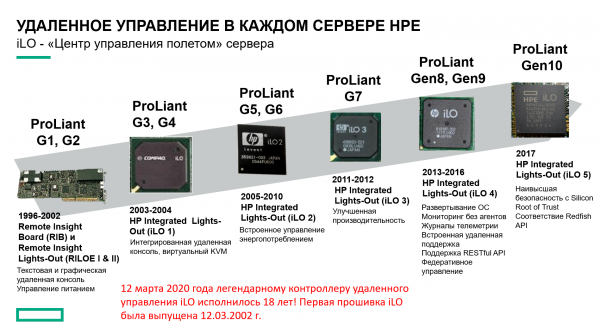
Today, HPE servers rightfully stand as an undisputed standard of quality for many years — and the gold standard of remote management systems, iLO, plays a significant role in this.
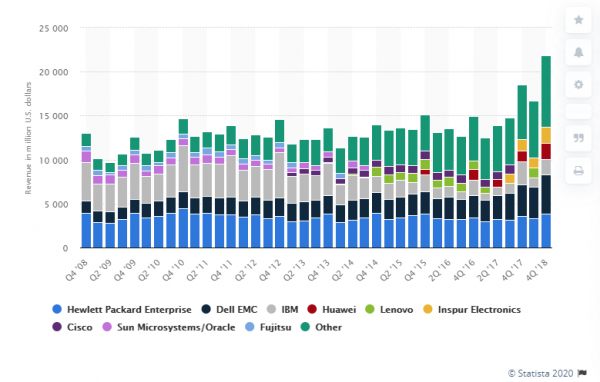
I would like to highlight HPE's efforts in keeping humanity in control of the coronavirus. , that until the end of 2020 (at least), the iLO Advanced license is available to everyone for free.
Infosight
If you have more than 10 servers in your infrastructure, and the administrator is not bored, then of course the cloud-based HPE Infosight AI monitoring system will be a great addition to standard monitoring tools. This system does not just monitor status and create graphs, but also autonomously recommends further actions based on the current situation and trends.
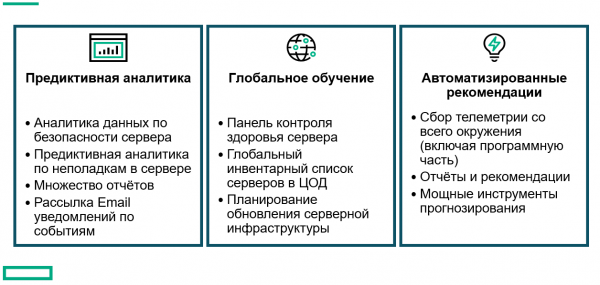
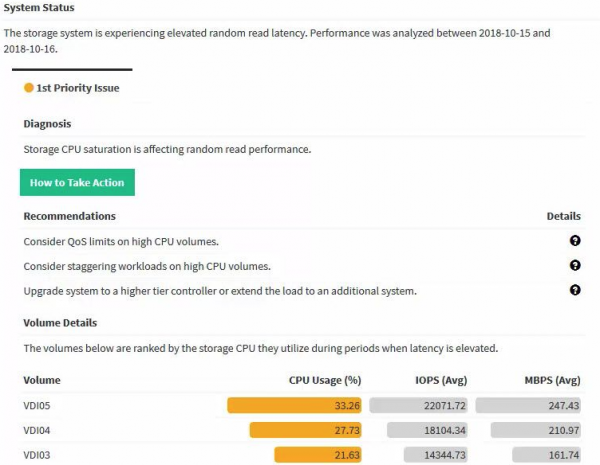
Be smart, , try Infosight!
OneView
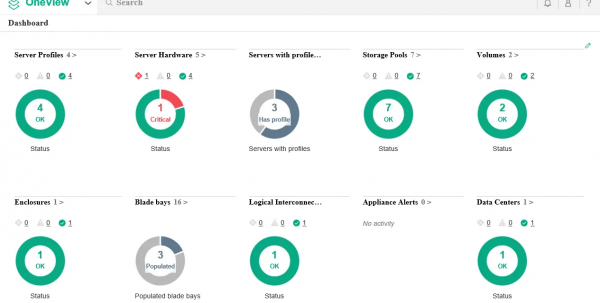
Last but not least, I want to highlight HPE OneView — a comprehensive product portfolio with vast capabilities for monitoring and managing the entire infrastructure. And all of this can be done without leaving your workstation, which, in your current situation, might even be at your summer house.
Storage systems are no slouches either!
Naturally, all storage systems are remotely managed and monitored — this has been the case for many years. Therefore, I want to talk today about something different: metro clusters.
Metro clusters are not a novelty in the market, but this very reason is why they are still not widely popular — it's due to inertia of thought and first impressions. Of course, they existed 10 years ago, but they were as expensive as a cast-iron bridge. The years since the first metro clusters have transformed the industry and made the technology more accessible to the public.
I remember projects where parts of the storage system were distributed separately for ultra-critical services in a metro cluster and separately for synchronous replication (which is significantly cheaper).
In fact, in 2020, a metro cluster costs you nothing if you can set up two sites and channels. And the channels for synchronous replication are exactly the same as those for metro clusters. Software licensing has long been available in packages — synchronous replication comes bundled with the metro cluster, and the only thing that still preserves the life of one-way replication is the need to organize an extended L2 network. Even then, L2 over L3 is already making strides across the country.
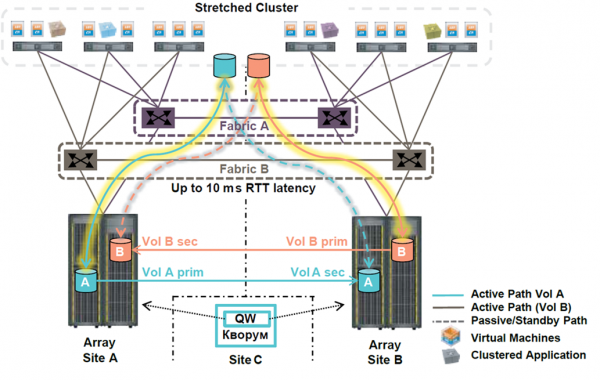
So what is the fundamental difference between synchronous replication and a metro cluster from the perspective of remote operation?
It's quite simple. A metro cluster operates on its own, automatically, always, and practically instantaneously.
What does the process of switching the load to synchronous replication look like on infrastructure with at least a few hundred VMs?
- A signal about the incident is received.
- The duty shift analyzes the situation — you can safely allocate from 10 to 30 minutes just to receive the signal and make a decision.
- If the duty engineers lack the authority to independently start the switch — another 30 minutes for communication with a person who has the authority and formal confirmation to begin the switch.
- Pressing the Big Red Button.
- 10-15 minutes for timeouts and remounting volumes, re-registering VMs.
- 30 minutes to change IP addressing — an optimistic estimate.
- And finally, starting VMs and launching production services.
In total, the RTO (time to restore business processes) can be reasonably estimated at 4 hours.
Let's compare this with the situation in the metro cluster.
- The storage system understands that the connection with the metro cluster is lost — 15-30 seconds.
- Virtualization hosts recognize that the first data center is lost — 15-30 seconds (simultaneously with item 1).
- Automatic restart of half to a third of VMs in the second data center — 10-15 minutes until services load.
- About this time, the duty shift understands what has happened.
In total: RTO = 0 for individual services, 10-15 minutes in general.
So why is the restart only for half to a third of the VMs? Here's the deal:
- You’re all doing it smartly by enabling automatic VM load balancing. As a result, on average, only half of the VMs are running in one of the data centers. The whole point of the metro cluster is to minimize downtime, so it's in your interest to minimize the number of VMs at risk.
- Some services can be clustered at the application level, distributed across different VMs. Thus, these paired VMs are either fastened with screws or tethered with ribbons to different data centers, ensuring that the service doesn’t have to wait for the VM to restart in case of a failure.
With a well-structured infrastructure featuring stretched metro clusters, business users can work with minimal latency from anywhere, even in the event of a data center failure. In the worst-case scenario, the delay will amount to the time of one cup of coffee.
And, of course, metro clusters work brilliantly with both the HPE 3Par going out of style and the brand-new Primera!
Remote Work Infrastructure
Terminal servers
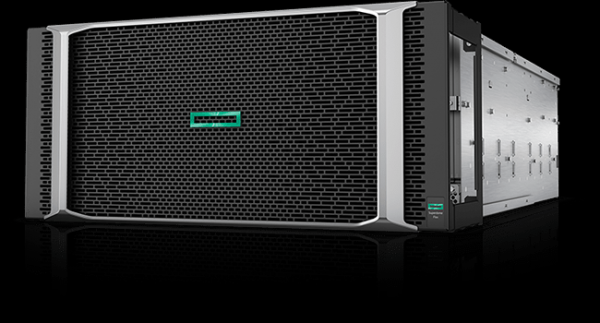
There’s no need to invent anything new for terminal servers; for many years HPE has been providing some of the best servers in the world for them. Timeless classics include the DL360 (1U) or DL380 (2U) or for AMD enthusiasts — the DL385. Of course, there are also blade servers, both the classic C7000 and the new composable platform Synergy.
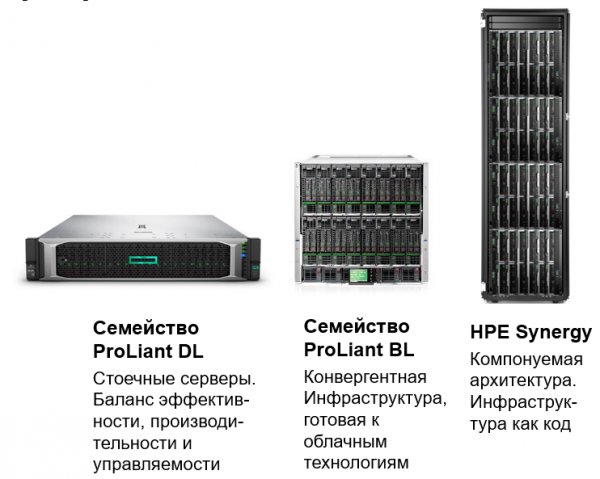
For every taste, for every need, maximum sessions per server!
Classic VDI + HPE Simplivity
In this case, when I say ‘classic VDI,’ I mean the concept of 1 user = 1 VM with client Windows. And of course, there’s nothing closer and more familiar to VDI loads for hyper-converged systems, especially with deduplication and compression.
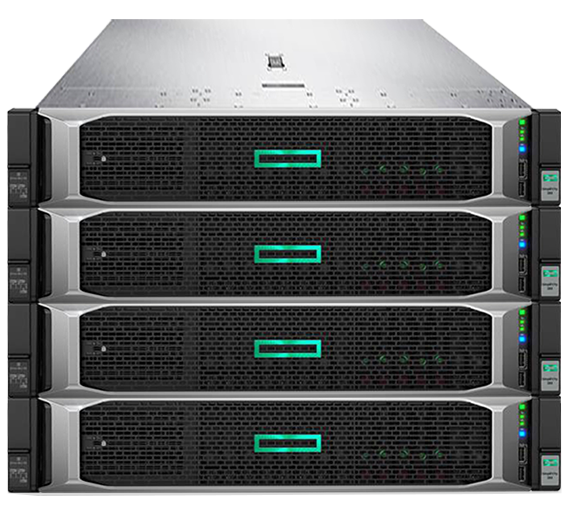
Here, HPE can offer both its own hyper-converged platform, Simplivity, and servers/certified nodes for partner solutions, such as VSAN Ready Nodes for building VDI on VMware VSAN infrastructure.
Let’s talk a bit more about the Simplivity solution. At its core, as the name gently suggests, is simplicity (the English word simple). Simplicity of deployment, simplicity of management, simplicity of scaling.
Hyperconverged systems are currently one of the hottest topics in IT, with around 40 vendors at different levels. According to Gartner's magic quadrant, HPE is in the top 5 globally and is positioned in the leaders' quadrant — understanding where the industry is heading and capable of implementing that understanding in hardware.
Architecturally, Simplivity is a classic hyperconverged system with controller virtual machines, meaning it can support various hypervisors, unlike systems integrated into the hypervisor. As of April 2020, it supports VMware vSphere and Microsoft Hyper-V, with plans announced for KVM support. A key feature of Simplivity since its market debut has been hardware-accelerated compression and deduplication using a special accelerator card.
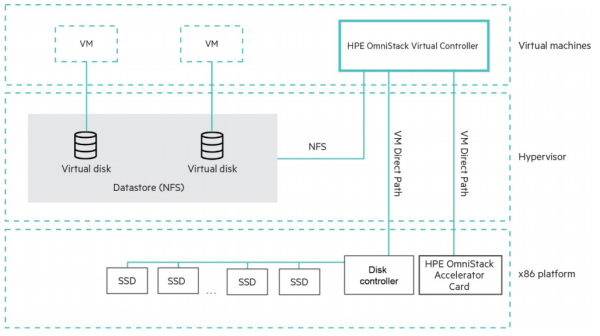
It is important to note that compression with deduplication is global and always enabled, making it not an optional feature, but rather an architectural aspect of the solution.
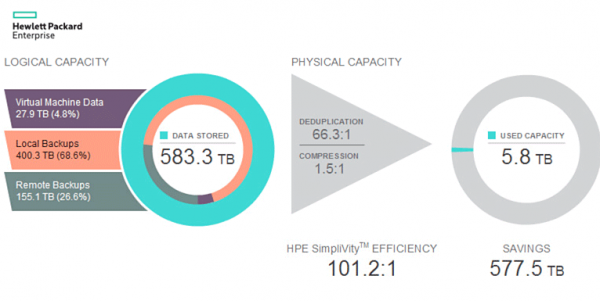
HPE is somewhat misleading when claiming a 100:1 efficiency, calculating it in a specific way, but space utilization efficiency is indeed very high. The number 100:1 is just too appealing. Let's delve into how Simplivity is technically implemented to achieve such figures.
Snapshot. Snapshots (instantaneous images) are 100% correctly implemented as RoW (Redirect-on-Write), meaning they occur instantly and do not penalize performance. This distinguishes them from some other systems. Why do we need local snapshots without penalties? It's quite simple: to reduce RPO from 24 hours (the average RPO for backups) down to single-digit minutes or even less.
Backup. A snapshot differs from a backup only in how it is perceived by the virtual machine management system. If deleting a machine also removes everything else, then it was a snapshot. If something remains, then it's a backup. Thus, any snapshot can be considered a full backup if marked accordingly in the system and not deleted.
Of course, many will argue—how can this be a backup if it is stored on the same system? The simple answer comes in the form of a counter question: do you have a formal threat model that establishes the backup storage rules? This is a legitimate backup against file deletion within the VM, and it’s a backup against the deletion of the VM itself. If a backup strictly on a standalone system is required, you can choose between replicating this snapshot to a second Simplivity cluster or to HPE StoreOnce.
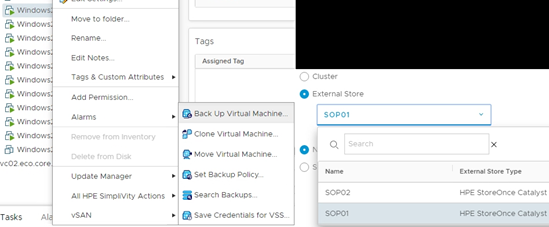
And this is precisely where it becomes clear that such architecture is ideally suited for any type of VDI. VDI consists of hundreds or even thousands of very similar machines running the same OS, with the same applications. Global deduplication will efficiently process and compress this, even better than a 100:1 ratio. Deploying 1000 VMs from a single template? No problem at all; these machines will take longer to register in vCenter than to clone.
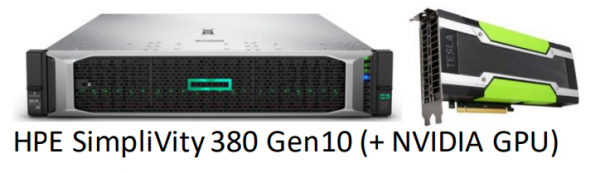
Specifically for users with special performance requirements, and for those who need 3D accelerators, a line of Simplivity G has been created.
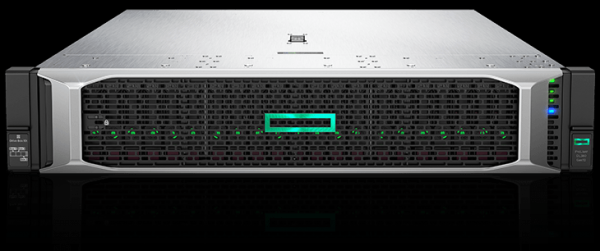
This series does not use a hardware deduplication accelerator, which reduces the number of disks per node to ensure the controller operates through software. This frees up PCIe slots for any additional accelerators. Additionally, the available memory per node has been doubled to 3TB for the most demanding workloads.
Simplivity is ideal for creating geographically distributed VDI infrastructures with data replication to a central data center.
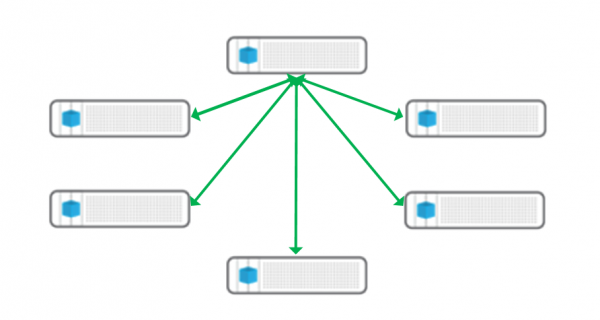
This type of VDI architecture (and not only VDI) is particularly interesting in the context of Russian realities—vast distances (and thus latencies) and far from ideal connectivity. Regional centers are created (or even just 1-2 Simplivity nodes in a very remote office), where local users connect via fast channels, maintaining full control and management from the center, while only a small amount of truly valuable data, not junk, is replicated to the center.
Naturally, Simplivity fully integrates with OneView and InfoSight.
Thin and zero clients.
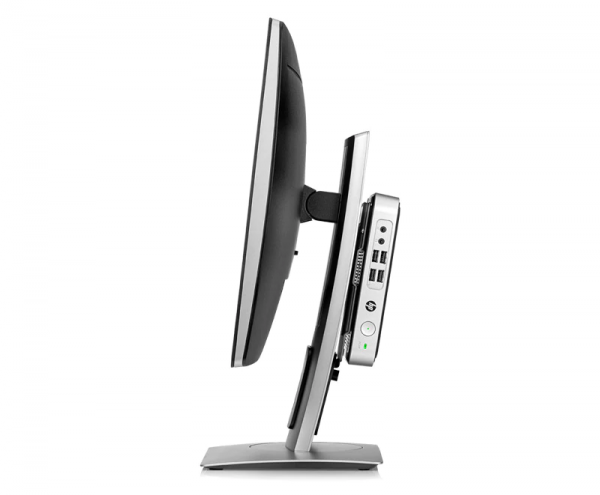
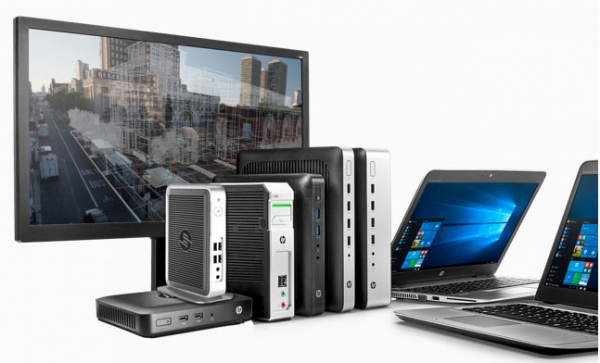
Thin clients are specialized solutions designed exclusively for use as terminals. Since there is virtually no load on the client besides maintaining the channel and decoding video, they almost always feature a passively cooled processor, a small boot disk only for starting a special embedded OS, and that's about it. There is practically nothing to break, and stealing data is pointless. The cost is low, and no data is stored on it.
There is a special category of thin clients known as zero clients. Their main distinction from thin clients is the absence of even an embedded general-purpose OS, functioning solely with a microchip with firmware. Often, they include special hardware accelerators for decoding video streams in terminal protocols such as PCoIP or HDX.
Despite the split of the large ‘Hewlett Packard’ into separate entities HPE and HP, it is worth mentioning the thin clients produced by HP.
The selection is vast, catering to every taste and need—even up to multi-monitor workplaces with hardware acceleration of video streams.
HPE Service for Your Remote Work
Lastly, but certainly not least, I want to mention the HPE service. It would take too long to list all levels of HPE service and its capabilities, but there is at least one extremely important offering in the context of remote work. Specifically, a service engineer from HPE/authorized service center. You continue to work remotely from your beloved vacation home, listening to the bees, while the HPE technician, upon arriving at the data center, replaces disks or a failed power supply in your servers.
HPE CallHome
In today’s circumstances, with movement restrictions, the CallHome function becomes more relevant than ever. Any HPE system equipped with this feature can autonomously report hardware or software failures to the HPE support center. It’s quite possible that a replacement part and/or service engineer will arrive long before you even notice issues or problems with your productive services.
I personally highly recommend enabling this function.
Source: habr.com
