

At 9:00 AM: You are holding a video conference in the office using your laptop. 9:00 PM: You are watching a live stream on your mobile phone at home. Wait a moment, have you ever wondered about the wireless devices operating in your seamless network? Of course, you've heard people around you mentioning routers from time to time. What about wireless access points? Is it the same as a router? Absolutely not! Below we will help you distinguish between these two different wireless network devices.
What is a Wireless Router?
A router is a networking device that can transmit data either wirelessly or via cables. As an intelligent device, a router can effectively direct incoming and outgoing traffic on the network. Traditionally, routers were connected to other local area network (LAN) devices via Ethernet cables for wired networking. Over time, wireless routers, which offer convenient installation without wiring, have gradually become favorites in many homes and small offices.
A wireless router refers to a networking device that performs routing functions via a wireless connection for devices supporting WiFi (such as laptops, smartphones, and tablets). For enterprise routers, they support IPTV/digital television services and can be used for Voice over IP (VoIP). Additionally, they also feature a firewall and password protection to guard against potential threats outside the local network.
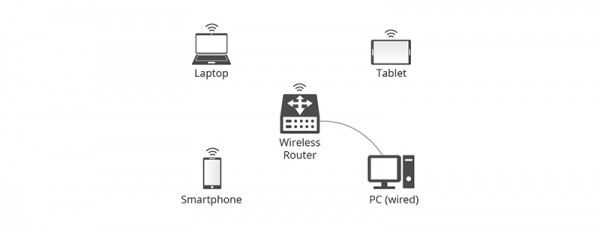
Figure 1: Wireless Router Connection Scenario
What is a Wireless Access Point?
A wireless access point (also known as a wireless AP or WAP) is a network hardware device that adds Wi-Fi capabilities to an existing wired network by connecting traffic from the wireless station to the wired local area network. A wireless access point can function as an independent device or as a component of a router.
In general, a wireless AP allows devices without built-in Wi-Fi connectivity to access a wireless network through an Ethernet cable. In other words, the signal from the router to the access point is converted from wired to wireless. Moreover, in case of increased access demands in the future, a WAP can also be used to extend the coverage area of existing networks.
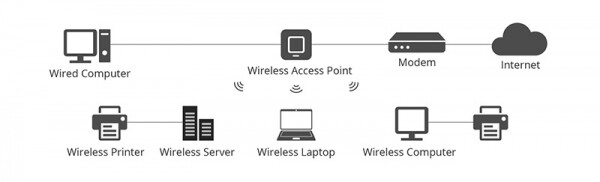
Figure 2: Wireless Access Point Connection Scenario
Wireless Access Point vs Router: What Are the Differences?
Both wireless access points and wireless routers support Wi-Fi network connections and play a similar role. So there has been some confusion. In reality, these two networking devices are more like cousins than twins. The differences between them will be explained below.
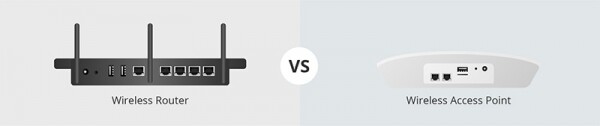
Figure 3: AP vs Router
Function
Typically, most wireless routers combine the functions of a wireless access point, Ethernet router, basic firewall, and a small Ethernet switch. Wireless access points
are usually built-in components of devices such as routers or Wi-Fi range extenders. In short, wireless routers can act as access points, but not all access points can function as routers.
There is no doubt that a wireless router, acting as an Ethernet hub, helps create a local area network by connecting and managing all devices attached to it. However, the access point is an auxiliary device in the local network and provides access only to the network established by the router. Therefore, if you are a network administrator, you can use a wireless router to change network settings, but a wireless access point does not have this capability.
Connection
Router mode vs AP mode, the connection method differs. A wireless access point cannot connect directly to a modem. Typically, a switch or router will be used as an intermediary. A wireless router has broadband switching capabilities and can be directly connected to a modem for Internet access.
Coverage
Wireless routers are the most common networking equipment today. However, if the router cannot cover the Wi-Fi signal, it will be weak or there may be no signal at all. Conversely, wireless access points can be added in areas with poor networking conditions, eliminating dead zones and extending the wireless network.
Application
Generally, wireless routers can serve residential spaces, SOHO working environments, and small offices or organizations, easily meeting fixed and moderate access needs. Clearly, such routers cannot be expanded to reflect the growing demand for predictable future networks. As for wireless access points, they are primarily used for large and medium enterprises and organizations, including multiple access points to support several users. Unlike the previous situation, network administrators can add more access points according to the growing demand to cover a wider physical area.
Based on experience, more powerful products can meet more needs. Simply put, the end effect must be considered. If you want to use a wireless network at home only to meet the needs of family members, then a wireless router is sufficient. However, if you want to build a more reliable wireless network that benefits a large number of users, a wireless access point is more appropriate.
Conclusion
Wireless routers and wireless access points depend on your needs. For future Wi-Fi architecture, some key factors need to be considered: the physical size of the location, network coverage, current number of Wi-Fi users, and even expected access requirements. As a first choice for many users, wireless routers are essential for almost any home and small business. With the emergence of wireless access points, modern large enterprises are eager to utilize them for covering larger areas or supporting more users in larger local networks.
Source: habr.com
