

It's no secret that last year was a year of significant changes for Apache Hadoop. Last year saw the merger of Cloudera and Hortonworks (essentially, the acquisition of the latter), while MapR, due to serious financial issues, was sold to Hewlett Packard. A few years ago, when it came to on-premises installations, the choice was often between Cloudera and Hortonworks, but today, unfortunately, that choice no longer exists. It was also surprising that Cloudera announced in February of this year that it would stop releasing binary builds of its distribution in the public repository, and now they are only available via paid subscription. Of course, the ability to download the latest versions of CDH and HDP released before the end of 2019 still exists, and support for them is expected for one to two years. But what should we do moving forward? For those who previously paid for a subscription, nothing has changed. And for those who do not want to switch to the paid version of the distribution but still want access to fresh versions of cluster components, patches, and other updates, we have prepared this article. Here, we will consider possible options for navigating this situation.
This article is more of an overview. It won’t compare distributions or delve deeply into them, nor will it provide installation and configuration recipes. So, what will it contain? We will briefly discuss the Arenadata Hadoop distribution, which rightfully deserves our attention due to its availability—something that is quite rare these days. We will then talk about Vanilla Hadoop, mainly focusing on how it can be 'prepared' using Apache Bigtop. Ready? Then welcome below the fold.
Arenadata Hadoop

This is a completely new and, so far, little-known distribution of domestic development. Unfortunately, at the moment, there is only limited information about it on Habr. .
More detailed information can be found on the official project. The latest versions of the distribution are based on Hadoop 3.1.2 for the 3rd version and 2.8.5 for the 2nd version.
Information about the roadmap can be found .
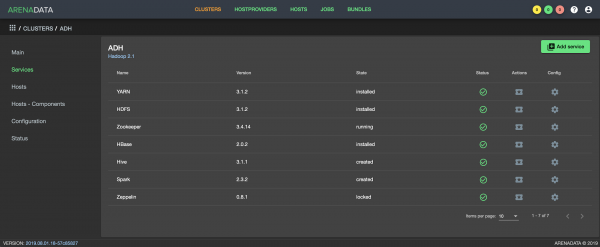
The Arenadata Cluster Manager interface
Arenadata's key product is , which is used for installing, configuring, and monitoring various software solutions of the company. ADCM is distributed for free, and its functionality is expanded through the addition of bundles, which consist of a set of ansible-playbooks. The bundles are divided into two types: enterprise and community. The latter are available for free download from the Arenadata website. There is also the possibility to develop your own bundle and connect it to ADCM.
For deploying and managing Hadoop 3, a community version of the bundle is offered in conjunction with ADCM, while for Hadoop 2, there is only as an alternative. As for the package repositories, they are open to public access, and can be downloaded and installed in the usual way for all cluster components. Overall, the distribution looks quite interesting. I am sure there will be those who are used to solutions like Cloudera Manager and Ambari, and who will appreciate ADCM itself. For some, it will also be a significant advantage that the distribution for import substitution.
Speaking of disadvantages, they will be the same as for all other Hadoop distributions. Specifically:
- The so-called 'vendor lock-in'. As we have seen with Cloudera and Hortonworks, there is always a risk of changes in the company's policy.
- A significant lag behind the upstream Apache.
Vanilla Hadoop

As you know, Hadoop is not a monolithic product, but essentially a whole array of services around its distributed file system HDFS. Few will find a single file cluster sufficient. Some need Hive, while others need Presto, and there are also HBase and Phoenix, and Spark is increasingly used. For orchestration and data loading, Oozie, Sqoop, and Flume are sometimes encountered. And when it comes to ensuring security, Kerberos in conjunction with Ranger immediately comes to mind.
Binary versions of Hadoop components are available on the websites of each project in the ecosystem as tarballs. You can download them and start installation, but with one condition: besides building packages from 'raw' binaries, which you will likely want to do, you won't have any certainty about the compatibility of the downloaded versions with each other. A more preferable option is to build using Apache Bigtop. Bigtop allows you to build from Apache's maven repositories, run tests, and package. But, importantly, Bigtop will build the versions of components that will be compatible with each other. We will discuss it in more detail below.
Apache Bigtop

Apache Bigtop is a tool for building, packaging, and testing a number of
open source projects, such as Hadoop and Greenplum. Bigtop has many
releases. At the time of writing, the latest stable release was version 1.4,
while the master contained 1.5. Different versions of releases use different versions
of components. For example, for 1.4, the core components of Hadoop have version 2.8.5, while in the master
it’s 2.10.0. The composition of supported components also changes. Obsolete and
unmaintained items are removed, while newer, more in-demand items come in, and
they are not necessarily from the Apache family.
In addition, Bigtop has many .
When we started getting acquainted with Bigtop, we were primarily surprised by its modest, compared to other Apache projects, popularity and recognition, as well as its quite small community. This means that there is minimal information about the product, and searching for solutions to encountered problems in forums and mailing lists might yield nothing at all. Initially, it was quite a challenge for us to perform a complete build of the distribution due to the peculiarities of the tool itself, but we will discuss this a little later.
As a teaser — those who were once fond of Linux universe projects like Gentoo and LFS might find it nostalgically pleasant to work with this tool and recall those 'epic' times when we would search for (or even write) build scripts and regularly rebuild Mozilla with new patches.
A major advantage of Bigtop is the openness and versatility of the tools it is based on. At its core are Gradle and Apache Maven. Gradle is well-known as the tool used by Google to compile Android. It is flexible and, as they say, "battle-tested." Maven is the standard tool for building projects in Apache itself, and since most of its products are released through Maven, it is indispensable here. It is worth paying attention to the POM (project object model) — a "fundamental" xml file that describes everything necessary for Maven to work with your project, around which all work revolves. In
the part of Maven, some obstacles arise that first-timers typically encounter when using Bigtop.
Practice
So, where should we start? Let's go to the download page and get the latest stable version as an archive. You can also find the binary artifacts compiled by Bigtop there. By the way, the common package managers YUM and APT are supported.
Alternatively, you can download the latest stable release directly from
github:
$ git clone --branch branch-1.4 https://github.com/apache/bigtop.gitCloning into 'bigtop'...
remote: Enumerating objects: 46, done.
remote: Counting objects: 100% (46/46), done.
remote: Compressing objects: 100% (41/41), done.
remote: Total 40217 (delta 14), reused 10 (delta 1), pack-reused 40171
Receiving objects: 100% (40217/40217), 43.54 MiB | 1.05 MiB/s, done.
Resolving deltas: 100% (20503/20503), done.
Updating files: 100% (1998/1998), done.
The resulting directory ./bigtop looks something like this:
./bigtop-bigpetstore — demonstration applications, synthetic examples
./bigtop-ci — CI tools, jenkins
./bigtop-data-generators — data generation, synthetic, for smoke tests, etc.
./bigtop-deploy — deployment tools
./bigtop-packages — configs, scripts, patches for building, the main part of the tool
./bigtop-test-framework — testing framework
./bigtop-tests — the tests themselves, load and smoke
./bigtop_toolchain — build environment, preparing the environment for tool operation
./build — working build directory
./dl — directory for downloaded sources
./docker — building in Docker images, testing
./gradle — gradle config
./output – directory where build artifacts go
./provisioner — provisioning
The most interesting part at this stage for us is the main config ./bigtop/bigtop.bom, where we can see all supported components with their versions. This is where we can specify a different product version (if we want to try building it) or a build version (for example, if we added a significant patch).
There is also great interest in the subdirectory .\/bigtop\/bigtop-packages, which is directly related to the process of building components and packaging them.
So, we downloaded the archive, unpacked it or cloned it from GitHub; can we start building?
No, first we need to prepare the environment.
Preparing the Environment
Here, a brief digression is necessary. To build almost any somewhat complex product, a specific environment is required — in our case, this includes JDK, shared libraries, header files, etc., as well as tools like ant, ivy2, and much more. One option to obtain the necessary Bigtop environment is to install the required components on the build host. I might be mistaken in the timeline, but it seems that starting from version 1.0, there is also an option to build using pre-configured and available Docker images, which can be seen here.
As for preparing the environment, there is an assistant for this — Puppet.
You can use the following commands, running them from the root directory
of the tool, .\/bigtop:
.\/gradlew toolchain\n.\/gradlew toolchain-devtools\n.\/gradlew toolchain-puppetmodules
Or directly through Puppet:
puppet apply --modulepath= -e "include bigtop_toolchain::installer"\npuppet apply --modulepath= -e "include bigtop_toolchain::deployment-tools"\npuppet apply --modulepath= -e "include bigtop_toolchain::development-tools"Unfortunately, difficulties may arise at this stage. The general advice here is to use a supported distribution that is up to date on the build host or try the Docker route.
Building
What can we try to build? The output of the command will answer this question.
.\/gradlew tasks In the Package tasks section, there are several products that are final artifacts of Bigtop.
They can be identified by the suffix -rpm or -pkg-ind (in the case of building
in Docker). The most interesting in our case is Hadoop.
Let's try to perform the build in the environment of our build server:
.\/gradlew hadoop-rpmBigtop will automatically download the necessary source files required for a specific component and start the build. Thus, the tool's functionality relies on Maven repositories and other sources, meaning it needs internet access.
During the operation, standard output is generated. Sometimes, this output and error messages can help understand what went wrong. At other times, additional information may be required. In such cases, it's worth adding the arguments --info or --debug, and it may also be useful to include –stacktrace. There is a convenient way to create a data set for subsequent queries in mailing lists, the key --scan.
With it, Bigtop will gather all information and present it in Gradle, after which it will provide a link,
where a competent person can understand why the build failed.
It is important to note that this option may expose sensitive information to the public, such as usernames, nodes, environment variables, etc., so proceed with caution.
Errors are often the result of being unable to obtain some necessary components for the build. Generally, the issue can be resolved by creating a patch to fix something in the source files, for example, the address in pom.xml in the root directory of the sources. This is done by creating and placing it in the corresponding directory ./bigtop/bigtop-packages/src/common/oozie/ the patch, for example, in the form of patch2-fix.diff.
--- a/pom.xml
+++ b/pom.xml
@@ -136,7 +136,7 @@


central
- http://repo1.maven.org/maven2
+ https://repo1.maven.org/maven2

false
Most likely, by the time you read this article, the aforementioned fix will not need to be done by yourself.
When implementing any patches and corrections in the build mechanism, you may need to 'reset' the build via the clean command:
./gradlew hadoop-clean
> Task :hadoop_vardefines
> Task :hadoop-clean
BUILD SUCCESSFUL in 5s
2 actionable tasks: 2 executed
This operation will revert all changes made to the build of this component, after which the build will be performed again. This time we will try to build the project in a Docker image:
./gradlew -POS=centos-7 -Pprefix=1.2.1 hadoop-pkg-ind
> Task :hadoop-pkg-ind
Building 1.2.1 hadoop-pkg on centos-7 in Docker...
+++ dirname ./bigtop-ci/build.sh
++ cd ./bigtop-ci/..
++ pwd
+ BIGTOP_HOME=/tmp/bigtop
+ '[' 6 -eq 0 ']'
+ [[ 6 -gt 0 ]]
+ key=--prefix
+ case $key in
+ PREFIX=1.2.1
+ shift
+ shift
+ [[ 4 -gt 0 ]]
+ key=--os
+ case $key in
+ OS=centos-7
+ shift
+ shift
+ [[ 2 -gt 0 ]]
+ key=--target
+ case $key in
+ TARGET=hadoop-pkg
+ shift
+ shift
+ [[ 0 -gt 0 ]]
+ '[' -z x ']'
+ '[' -z x ']'
+ '[' '' == true ']'
+ IMAGE_NAME=bigtop/slaves:1.2.1-centos-7
++ uname -m
+ ARCH=x86_64
+ '[' x86_64 '!=' x86_64 ']'
++ docker run -d bigtop/slaves:1.2.1-centos-7 /sbin/init
+
CONTAINER_ID=0ce5ac5ca955b822a3e6c5eb3f477f0a152cd27d5487680f77e33fbe66b5bed8
+ trap 'docker rm -f
0ce5ac5ca955b822a3e6c5eb3f477f0a152cd27d5487680f77e33fbe66b5bed8' EXIT
....
many outputs
....
Wrote: /bigtop/build/hadoop/rpm/RPMs/x86_64/hadoop-2.8.5-1.el7.x86_64.rpm
Wrote: /bigtop/build/hadoop/rpm/RPMs/x86_64/hadoop-hdfs-2.8.5-1.el7.x86_64.rpm
Wrote: /bigtop/build/hadoop/rpm/RPMs/x86_64/hadoop-yarn-2.8.5-1.el7.x86_64.rpm
Wrote: /bigtop/build/hadoop/rpm/RPMs/x86_64/hadoop-mapreduce-2.8.5-1.el7.x86_64.rpm
Wrote: /bigtop/build/hadoop/rpm/RPMs/x86_64/hadoop-hdfs-namenode-2.8.5-1.el7.x86_64.rpm
Wrote: /bigtop/build/hadoop/rpm/RPMs/x86_64/hadoop-hdfs-secondarynamenode-2.8.5-1.el7.x86_64.rpm
Wrote: /bigtop/build/hadoop/rpm/RPMs/x86_64/hadoop-hdfs-zkfc-2.8.5-1.el7.x86_64.rpm
Wrote: /bigtop/build/hadoop/rpm/RPMs/x86_64/hadoop-hdfs-journalnode-2.8.5-1.el7.x86_64.rpm
Wrote: /bigtop/build/hadoop/rpm/RPMs/x86_64/hadoop-hdfs-datanode-2.8.5-1.el7.x86_64.rpm
Wrote: /bigtop/build/hadoop/rpm/RPMs/x86_64/hadoop-httpfs-2.8.5-1.el7.x86_64.rpm
Wrote: /bigtop/build/hadoop/rpm/RPMs/x86_64/hadoop-yarn-resourcemanager-2.8.5-1.el7.x86_64.rpm
Wrote: /bigtop/build/hadoop/rpm/RPMs/x86_64/hadoop-yarn-nodemanager-2.8.5-1.el7.x86_64.rpm
Wrote: /bigtop/build/hadoop/rpm/RPMs/x86_64/hadoop-yarn-proxyserver-2.8.5-1.el7.x86_64.rpm
Wrote: /bigtop/build/hadoop/rpm/RPMs/x86_64/hadoop-yarn-timelineserver-2.8.5-1.el7.x86_64.rpm
Wrote: /bigtop/build/hadoop/rpm/RPMs/x86_64/hadoop-mapreduce-historyserver-2.8.5-1.el7.x86_64.rpm
Wrote: /bigtop/build/hadoop/rpm/RPMs/x86_64/hadoop-client-2.8.5-1.el7.x86_64.rpm
Wrote: /bigtop/build/hadoop/rpm/RPMs/x86_64/hadoop-conf-pseudo-2.8.5-1.el7.x86_64.rpm
Wrote: /bigtop/build/hadoop/rpm/RPMs/x86_64/hadoop-doc-2.8.5-1.el7.x86_64.rpm
Wrote: /bigtop/build/hadoop/rpm/RPMs/x86_64/hadoop-libhdfs-2.8.5-1.el7.x86_64.rpm
Wrote: /bigtop/build/hadoop/rpm/RPMs/x86_64/hadoop-libhdfs-devel-2.8.5-1.el7.x86_64.rpm
Wrote: /bigtop/build/hadoop/rpm/RPMs/x86_64/hadoop-hdfs-fuse-2.8.5-1.el7.x86_64.rpm
Wrote: /bigtop/build/hadoop/rpm/RPMs/x86_64/hadoop-debuginfo-2.8.5-1.el7.x86_64.rpm
+ umask 022
+ cd /bigtop/build/hadoop/rpm//BUILD
+ cd hadoop-2.8.5-src
+ /usr/bin/rm -rf /bigtop/build/hadoop/rpm/BUILDROOT/hadoop-2.8.5-1.el7.x86_64
Executing(%clean): /bin/sh -e /var/tmp/rpm-tmp.uQ2FCn
+ exit 0
+ umask 022
Executing(--clean): /bin/sh -e /var/tmp/rpm-tmp.CwDb22
+ cd /bigtop/build/hadoop/rpm//BUILD
+ rm -rf hadoop-2.8.5-src
+ exit 0
[ant:touch] Creating /bigtop/build/hadoop/.rpm
:hadoop-rpm (Thread[Task worker for ':',5,main]) completed. Took 38 mins 1.151 secs.
:hadoop-pkg (Thread[Task worker for ':',5,main]) started.
> Task :hadoop-pkg
Task ':hadoop-pkg' is not up-to-date because:
Task has not declared any outputs despite executing actions.
:hadoop-pkg (Thread[Task worker for ':',5,main]) completed. Took 0.0 secs.
BUILD SUCCESSFUL in 40m 37s
6 actionable tasks: 6 executed
+ RESULT=0
+ mkdir -p output
+ docker cp
ac46014fd9501bdc86b6c67d08789fbdc6ee46a2645550ff6b6712f7d02ffebb:/bigtop/build .
+ docker cp
ac46014fd9501bdc86b6c67d08789fbdc6ee46a2645550ff6b6712f7d02ffebb:/bigtop/output .
+ docker rm -f ac46014fd9501bdc86b6c67d08789fbdc6ee46a2645550ff6b6712f7d02ffebb
ac46014fd9501bdc86b6c67d08789fbdc6ee46a2645550ff6b6712f7d02ffebb
+ '[' 0 -ne 0 ']'
+ docker rm -f ac46014fd9501bdc86b6c67d08789fbdc6ee46a2645550ff6b6712f7d02ffebb
Error: No such container:
ac46014fd9501bdc86b6c67d08789fbdc6ee46a2645550ff6b6712f7d02ffebb
BUILD SUCCESSFUL in 41m 24s
1 actionable task: 1 executed
The build has been carried out under CentOS, but it can also be done under Ubuntu:
.\/gradlew -POS=ubuntu-16.04 -Pprefix=1.2.1 hadoop-pkg-indIn addition to building packages for various Linux distributions, the tool can create a repository with the built packages, for example:
.\/gradlew yumWe can also recall smoke tests and deployment in Docker.
Create a cluster of three nodes:
.\/gradlew -Pnum_instances=3 docker-provisionerRun smoke tests in a cluster of three nodes:
.\/gradlew -Pnum_instances=3 -Prun_smoke_tests docker-provisionerDelete the cluster:
.\/gradlew docker-provisioner-destroyGet commands for connecting inside Docker containers:
.\/gradlew docker-provisioner-sshShow status:
.\/gradlew docker-provisioner-statusMore details about Deployment tasks can be found in the documentation.
Regarding tests, there is quite a large quantity, primarily smoke and integration tests. Their analysis is beyond the scope of this article. I will just say that building the distribution is not as complex a task as it may seem at first glance. All components that we use in production have been built and passed tests, and we did not encounter issues with their deployment and execution of basic operations in the test environment.
In addition to the existing components in Bigtop, it is possible to add something else, even your own custom software. All this is well automated and fits into the CI/CD concept.
Conclusion
It is evident that a distribution built in this way should not immediately be sent to production. It is important to understand that if there is a real need to build and maintain your distribution, then it requires financial and time investment.
Nevertheless, with the right approach and a professional team, it is quite possible to manage without commercial solutions.
It is important to note that the Bigtop project itself needs development, and it appears that there is no active development taking place today. The prospects for the arrival of Hadoop 3 in it are also unclear. By the way, if you have a real need for building Hadoop 3, you can take a look at from Arenadata, which, in addition to the standard
components, also includes a whole range of additional ones (Ranger, Knox, NiFi).
As for Rostelecom, for us, Bigtop is one of the options being considered today. Whether we will choose it or not will be shown in time.
Appendix
To include a new component in the build, you need to add its description to bigtop.bom and ./bigtop-packages. You can try doing this by analogy with existing components. Give it a go. It's not as difficult as it seems at first glance.
What do you think? We would love to see your thoughts in the comments, and thank you for your attention!
This article was prepared by the data management team at Rostelecom.
Source: habr.com
