

Note: translation.: This material is from an educational project — the answer to a common question when designing infrastructure based on Kubernetes. We hope that sufficiently detailed descriptions of the pros and cons of each option will help you make an optimal choice for your project.

TL;DR: the same set of workloads can be run on several large clusters (each cluster will handle a large number of workloads) or on many small ones (with a small number of workloads in each cluster).
Below is a table assessing the pros and cons of each approach:
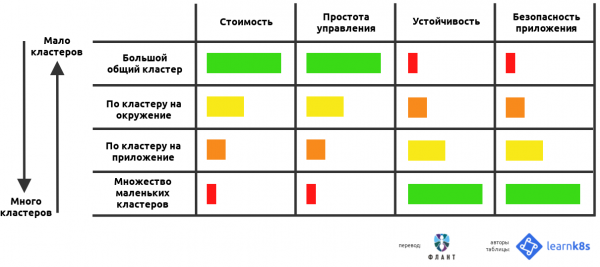
When using Kubernetes as a platform for application deployment, several fundamental questions often arise about the intricacies of cluster configuration:
- How many clusters should be employed?
- How large should they be?
- What should each cluster include?
In this article, I will attempt to answer all these questions by analyzing the pros and cons of each approach.
Framing the Question
As a software creator, you are likely developing and deploying multiple applications in parallel.
Moreover, many instances of these applications are probably running in various environments — for instance, these could be dev, test and prod.
As a result, you end up with a whole matrix of applications and environments:
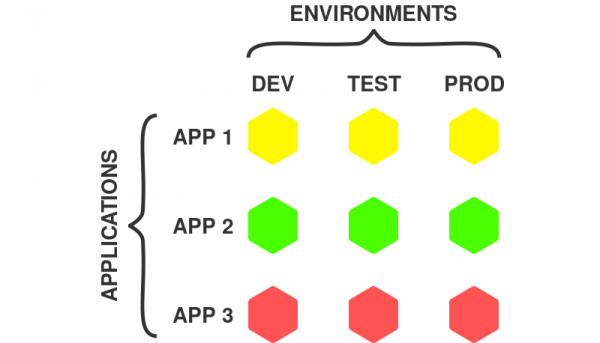
Applications and Environments
In the example above, there are 3 applications and 3 environments, resulting in 9 possible combinations.
Each application instance represents a self-sufficient deployment unit that can be worked with independently of others.
Note that application instance may consist of multiple components, such as frontend, backend, database, etc. In the case of a microservices application, the instance will include all microservices.
As a result, Kubernetes users have several questions:
- Should all instances of an application be placed in one cluster?
- Should a separate cluster be created for each application instance?
- Or, perhaps, should a combination of the above approaches be used?
All these options are quite viable since Kubernetes is a flexible system that doesn't limit the user's choices.
Here are some possible paths:
- one large shared cluster;
- multiple small specialized clusters;
- one cluster for each application;
- one cluster for each environment.
As shown below, the first two approaches are at opposite ends of the spectrum:
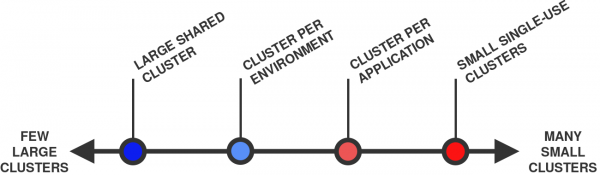
From a few large clusters (on the left) to many small ones (on the right)
In general, one cluster is considered 'larger' than another if it has more nodes and pods in total. For example, a cluster with 10 nodes and 100 pods is larger than a cluster with 1 node and 10 pods.
Well, let's get started!
1. One large shared cluster
The first option is to deploy all workloads in a single cluster:
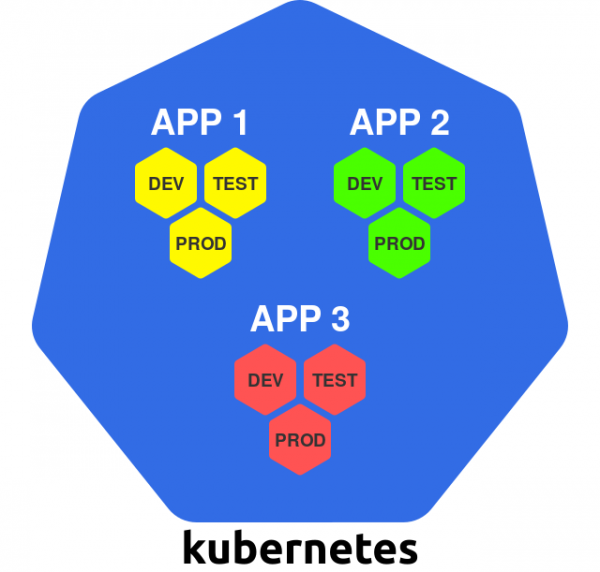
One large cluster
Within this approach, the cluster serves as a universal infrastructure platform — everything you need can simply be deployed in the existing Kubernetes cluster.
Kubernetes allows for logical separation of parts of the cluster, so each instance of an application can use its own namespace.
Let's look at the pros and cons of this approach.
+ Efficient resource utilization
In the case of a single cluster, only one copy of all resources necessary to start and manage the Kubernetes cluster is required.
For example, this is true for master nodes. Typically, each Kubernetes cluster has about 3 master nodes, so for a single cluster, this number will remain the same (in comparison, 10 clusters will require 30 master nodes).
This nuance also applies to other services operating at the cluster-wide level, such as load balancers, Ingress controllers, authentication, logging, and monitoring systems.
In a single cluster, all these services can be utilized at once for all workloads (there is no need to create copies as in the case of multiple clusters).
+ Cost-effectiveness
As a result of the above, fewer clusters typically cost less because there are no redundant resource expenses.
This is especially true for master nodes, which can be quite costly regardless of the hosting method (on-premises or in the cloud).
Some managed Kubernetes services, such as or , providing a management layer for free. In this case, the issue of costs is less pressing.
There are also managed services that charge a fixed fee for the operation of each Kubernetes cluster (for example, ).
+ Efficient administration
Managing one cluster is easier than managing several.
Administration can include the following tasks:
- upgrading the version of Kubernetes;
- configuring the CI/CD pipeline;
- installing the CNI plugin;
- setting up user authentication systems;
- installing an admission controller;
and many others…
In the case of a single cluster, you'll only have to do all of this once.
For multiple clusters, you'll need to repeat these operations multiple times, which will likely require some automation tools to ensure consistency and uniformity in the process.
Now, a few words about the downsides.
− Single point of failure
In the event of a failure of the single cluster, all all workloads will stop working!
There are many scenarios where something can go wrong:
- upgrading Kubernetes leads to unexpected side effects;
- a cluster-wide component (for example, the CNI plugin) starts malfunctioning;
- one of the cluster components is misconfigured;
- failure in the underlying infrastructure.
One such incident can cause significant damage to all workloads hosted in the shared cluster.
− Lack of strict isolation
Working in a shared cluster means that applications share hardware, network capabilities, and the operating system on the cluster nodes.
In a sense, two containers with two different applications running on the same node are like two processes running on the same machine under the same OS kernel.
Linux containers provide some form of isolation, but it is nowhere near as strong as that provided by, say, virtual machines. Essentially, a process in a container is the same as a process running in the host operating system.
This can become a security concern: such an arrangement theoretically allows unrelated applications to interact with each other (intentionally or accidentally).
Moreover, all workloads in the Kubernetes cluster share some common cluster services, such as — this allows applications to find the services of other applications within the cluster.
All the above points can have different implications depending on the security requirements of the applications.
Kubernetes provides various tools to prevent issues in security, such as and . However, proper configuration requires specific experience, and they cannot completely close all security gaps.
It is essential to always remember that Kubernetes was originally designed for collaboration, not for isolation and security.
− No strict multi-tenancy
Given the abundance of shared resources in the Kubernetes cluster, there are numerous ways in which different applications can "step on each other's toes."
For instance, one application can monopolize a shared resource (like CPU or memory) and deprive other applications running on the same node of access to it.
Kubernetes provides various mechanisms to control such behavior, such as (see also the article "” — ed. note), and . However, as with security, their configuration is quite non-trivial, and they cannot prevent all unforeseen side effects.
− A large number of users
In the case of a single cluster, access must be granted to many people. The larger the number of users, the higher the risk that someone might "break" something.
Within the cluster, you can control who can do what with the help of (see the article "” — ed. note). However, it will not prevent users from "breaking" something within their area of responsibility.
− Clusters cannot grow indefinitely
A cluster that is used for all workloads will likely be quite large (in terms of nodes and pods).
But here arises another problem: clusters in Kubernetes cannot grow indefinitely.
There is a theoretical limit on the size of a cluster. In Kubernetes, it is about .
However, in real life, problems can arise much sooner—in fact, at just .
The issue is that large clusters put a high load on the Kubernetes control plane. In other words, maintaining the cluster operational and effectively utilizing resources requires careful configuration.
This issue is explored in the corresponding article on the original blog titled "».
But let's consider the opposite approach: many small clusters.
2. Many small, specialized clusters
With this approach, you use a separate cluster for each deployed component:
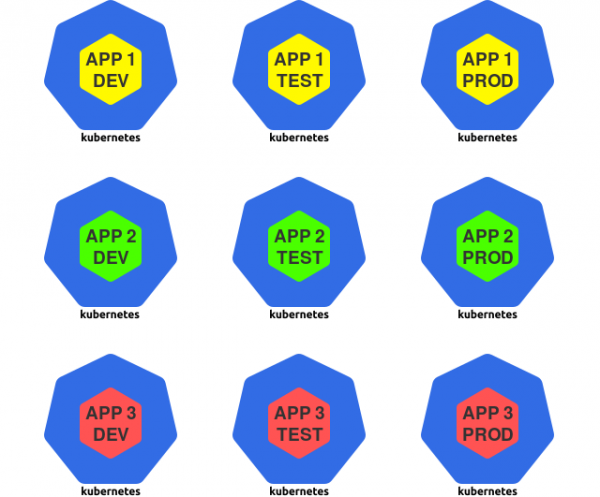
Many small clusters
For the purposes of this article, a deployed component is understood to be an instance of an application—for example, a dev version of a specific application.
In this strategy, Kubernetes is used as a specialized runtime for individual application instances.
Let's look at the pros and cons of this approach.
+ Limited "blast radius"
When a cluster "fails," the negative consequences are limited to just those workloads that were deployed in that cluster. All other workloads remain untouched.
+ Isolation
Workloads hosted in individual clusters do not share resources like CPU, memory, operating system, network, or other services.
As a result, we achieve strict isolation between unrelated applications, which can positively impact their security.
+ Few users
Considering that each cluster contains only a limited set of workloads, the number of users with access to it is reduced.
The fewer people who have access to the cluster, the lower the risk of something "breaking."
Let's look at the downsides.
− Inefficient resource utilization
As mentioned earlier, each Kubernetes cluster requires a certain set of control resources: master nodes, control plane components, monitoring and logging solutions.
In the case of a large number of small clusters, more resources must be allocated for management.
− Costliness
Inefficient resource utilization inherently leads to high expenses.
For example, having 30 master nodes instead of three with the same computing power will inevitably affect costs.
− Administration complexities
Managing multiple Kubernetes clusters is much more difficult than working with a single one.
For instance, you will need to configure authentication and authorization for each cluster. Updating the Kubernetes version will also need to be done several times.
You will likely need to apply automation to improve the efficiency of all these tasks.
Now let's consider less extreme scenarios.
3. One cluster for each application
In this approach, you create a separate cluster for all instances of a specific application:
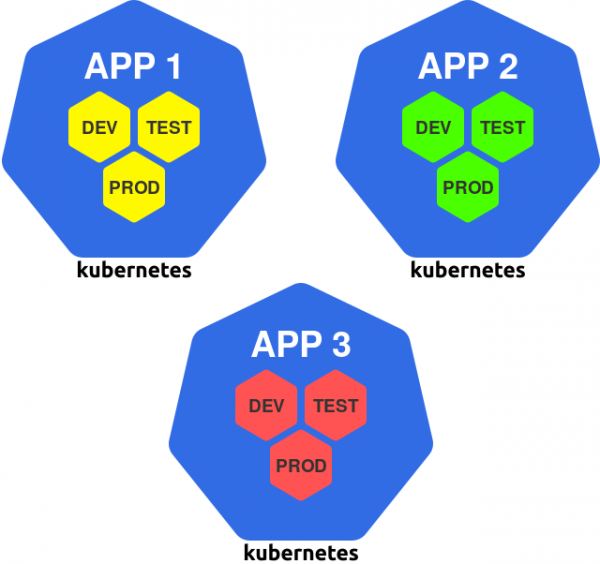
Cluster per application
This method can be seen as a generalization of the principle of 'one cluster per team,' since a team of engineers typically works on one or more applications.
Let's look at the pros and cons of this approach.
+ The cluster can be tailored for the application
If the application has specific requirements, they can be implemented in the cluster without affecting other clusters.
Such needs may include workers with GPUs, specific CNI plugins, service mesh, or some other service.
Each cluster can be configured to suit the application it runs, containing only what is necessary.
− Different environments in one cluster
The downside of this approach is that instances of applications from different environments coexist in the same cluster.
For example, the production version of the application runs in the same cluster as the development version. This also means that developers operate in the same cluster where the production version of the application is being deployed.
If a failure occurs in the cluster due to the actions of developers or bugs in the development version, the production version may also suffer — a significant drawback of this approach.
And finally, the last scenario on our list.
4. One cluster for each environment
This scenario involves dedicating a separate cluster for each environment:
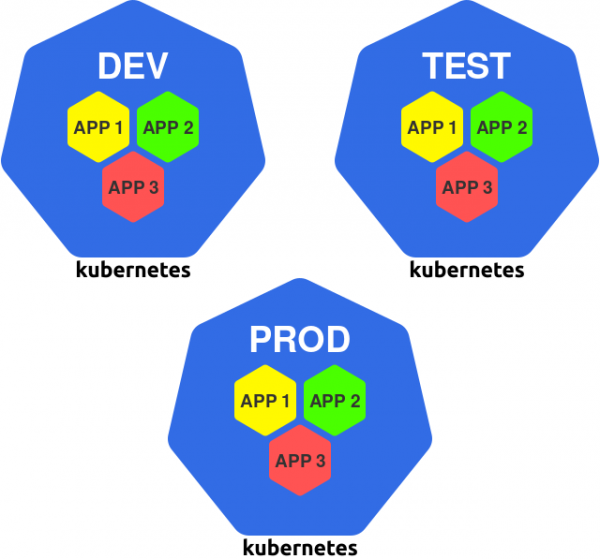
One cluster per environment
For instance, you may have clusters dev, test and prod, in which you will run all instances of the application intended for a specific environment.
Here are the pros and cons of this approach.
+ Isolation of the production environment
Under this approach, all environments are isolated from each other. However, in practice, this is especially important for the production environment.
Production versions of the application are now independent of what is happening in other clusters and environments.
Thus, if a problem suddenly arises in the dev cluster, the production versions of the applications will continue to work as if nothing happened.
+ The cluster can be tailored to the environment
Each cluster can be adjusted to its environment. For example, you can:
- install development and debugging tools in the dev cluster;
- install testing frameworks and tools in the cluster; test;
- use more powerful hardware and network channels in the cluster; prod.
This allows for increased efficiency in both the development and operation of applications.
+ Restricting access to the production cluster
The need to work directly with the prod cluster arises infrequently, so the circle of people with access can be significantly limited.
One can go even further and completely deny people access to this cluster, and perform all deployments using an automated CI/CD tool. This approach will minimize the risk of human errors precisely where it is most critical.
Now, a few words about the downsides.
− Lack of isolation between applications
The main drawback of the approach is the absence of hardware and resource isolation between applications.
Unrelated applications share the cluster’s resources: the system kernel, CPU, memory, and some other services.
As mentioned earlier, this can be potentially dangerous.
− Inability to localize application dependencies
If an application has special requirements, they must be met in all clusters.
For example, if an application requires a GPU, then each cluster must contain at least one worker with a GPU (even if it is only used by that application).
As a result, we risk incurring higher costs and inefficient use of resources.
Conclusion
With a certain set of applications, they can be placed in several large clusters or many small ones.
The article discusses the pros and cons of various approaches, from a single global cluster to several small and specialized ones.
- one large shared cluster;
- multiple small specialized clusters;
- one cluster for each application;
- one cluster for each environment.
So, which approach should be chosen?
As usual, the answer depends on the use case: you need to weigh the pros and cons of different approaches and choose the most optimal option.
However, the choice is not limited to the examples above — you can use any combination of them!
For example, you can set up a couple of clusters for each team: a cluster for development (where the environments dev and test) and a cluster for production (where the production environment will be).
Based on the information in this article, you will be able to appropriately optimize the pros and cons for the specific scenario. Good luck!
P.S.
Also read in our blog:
- «»;
- «»;
- «»;
- «».
Source: habr.com
