

Mozilla today has released a stable version of the Firefox 76 browser for desktop operating systems Windows, macOS, and Linux. This new release comes with bug fixes, security patches, and new features, the most interesting of which involve the improved Firefox Lockwise password manager.
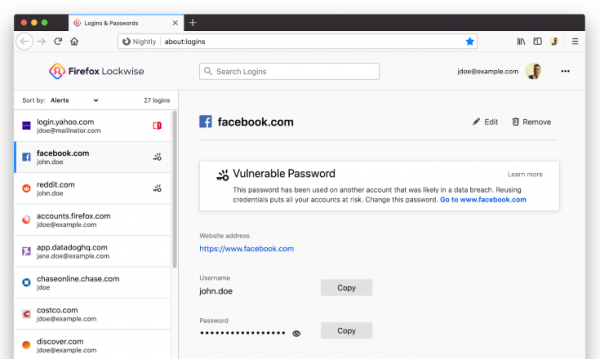
A highlight of Firefox 76 is the innovations added to the built-in Firefox Lockwise password manager (available at about:logins). First, Lockwise will now prompt users for their account credentials on their installed Windows or macOS (if a master password is not set) before showing any passwords in plain text. Mozilla stated that this feature was added at the request of the Firefox community. Previously, users complained that an attacker could wait until the PC owner stepped away from their workspace and then quickly access the built-in Firefox password manager to find and copy passwords onto a regular piece of paper.
Secondly, the built-in Firefox password manager now scans all saved user passwords for leaks. The developer company reports that if any of the user’s passwords match a password that was previously compromised online, the browser will display a corresponding warning recommending that the password be changed. This is because that password is now likely part of the password dictionaries that hackers use for brute force attacks.
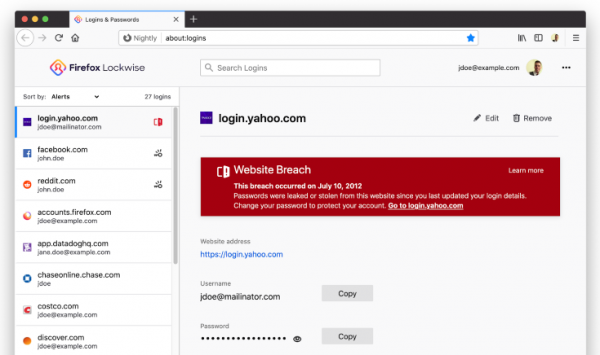
Thirdly, Lockwise received another security upgrade in the form of integration with Firefox Monitor. This platform allows users to check whether their credentials have appeared online. Starting with Firefox 76, Lockwise will also show warnings for sites that have recently experienced security breaches (for example, passwords that have ended up in hacker databases), urging users to change their credentials.
Mozilla assures users that there is no need to panic about the new security innovations, as the Firefox web browser operates not on the actual passwords but on encrypted versions of the credentials to maintain user privacy.
You can upgrade to Firefox 76 using the built-in browser update tool available in the 'Help' -> 'About Firefox' section. Alternatively, you can download the latest version of the browser from .
Source: 3dnews.ru
