

The release of the web browser has taken place , as well as Firefox 68.8 for the Android platform. Additionally, an update has been released. with long-term support . Soon moving to the stage of The Firefox 77 branch will transition, with the release scheduled for June 2.
:
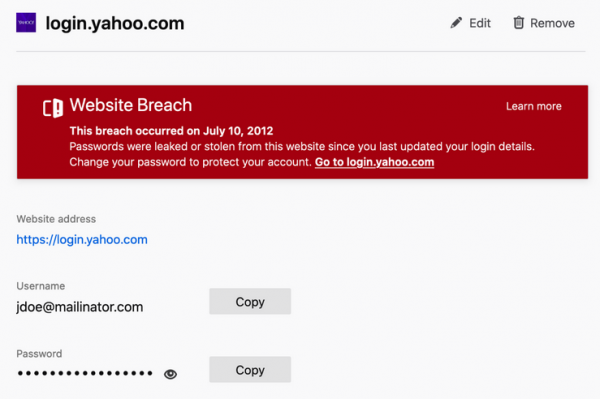
- features the built-in Lockwise add-on, which offers the 'about:logins' interface to manage saved passwords. It provides a warning for saved accounts associated with sites that have previously experienced data breaches. The warning is displayed if a password record in Firefox has not been updated since the site's compromise.

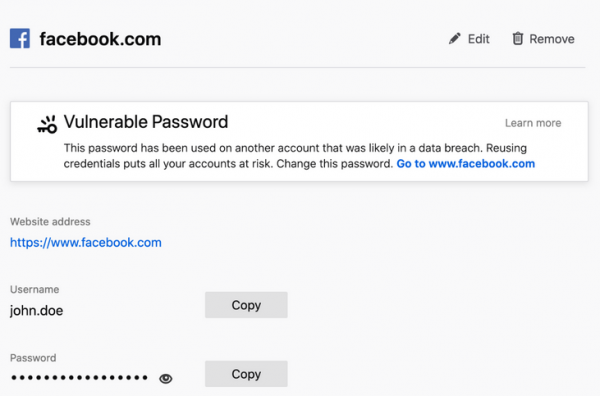
A warning has also been added for compromised passwords used across multiple sites. If one of the saved accounts is involved in a data breach and the user reuses the same password on other sites, they will be advised to change their password. The check is performed through integration with a database that contains information on 9.5 billion accounts stolen from 443 sites due to hacks. The method is anonymous and based on transmitting a SHA-1 hash prefix from the email (the first few characters), to which the server responds with the corresponding hash tails from its database, while the browser on its side checks them against the existing full hash and issues a warning if there is a match (the full hash is not transmitted).

The number of sites for which the feature applies has been expanded when filling out registration forms. Previously, the prompt to suggest a strong password was only displayed when there were fields with the 'autocomplete=new-password' attribute. Regardless of the site used, a password can now be generated through the context menu.
In Windows and macOS, if a master password is not set in Firefox, support for the operating system's authentication dialog and input of system credentials before viewing saved passwords has been added. After entering the system password, access to the saved passwords is granted for 5 minutes, after which the password must be entered again. This measure will help protect credentials from prying eyes if the computer is left unattended, provided that a master password is not set in the browser.
- operation '«, which is disabled by default. When the mode is activated using the parameter «dom.security.https_only_mode» in about:config, all unencrypted requests will automatically be redirected to their secure page versions («https://” with «https://»). This replacement occurs both at the level of resources loaded on the pages and when entering into the address bar. If an attempt to access via https to the address entered in the address bar times out, the user will see an error page with a button to make the request via http://. In the case of failures when loading «https://» subresources during page processing, such failures will be ignored, but warnings will be output to the web console, which can be viewed through web developer tools.
- A quick switching feature has been added for viewing videos in «» (Picture-in-Picture) and fullscreen mode. The user can minimize the video into a small window and continue working on other tasks, including in other applications and on virtual desktops. To shift focus back to the video, a double mouse click is sufficient to switch to fullscreen viewing. A second double click will return the viewing to the «picture-in-picture» mode.
- Work has been done to improve the visibility and usability of the address bar. When opening a new tab, the shadow around the address bar field has been reduced. The bookmarks bar has been slightly widened to increase the touch area for touchscreen screens.
- In Wayland-based environments, through
, hardware acceleration for decoding VP9 and other video formats supported in Firefox has been enabled. The acceleration is provided via VA-API (Video Acceleration API) and FFmpegDataDecoder (previously, only H.264 support was implemented). To manage the activation of acceleration in about:config, the parameters «widget.wayland-dmabuf-webgl.enabled» and «widget.wayland-dmabuf-vaapi.enabled» should be set. - In Windows, for laptop users with Intel GPU and screen resolution no more than 1920×1200, the compositing system , written in Rust and offloading the rendering operations of the page content to the GPU, is enabled by default.
- Support for the object has been added , which
allows the use of interfaces and , working outside the main execution thread in Firefox. The new API allows real-time audio processing, programmatically controlling sound parameters without introducing additional delays and not affecting sound output stability. The emergence of AudioWorklet has enabled connection to calls in Zoom in Firefox without the need for separate extensions, as well as implementing complex audio processing scenarios in the browser, such as spatial sound for virtual reality systems or games. - In CSS , defining system color values (CSS Color Module Level 4).
- In Intl.NumberFormat, Intl.DateTimeFormat, and Intl.RelativeTimeFormat constructors, support for the 'numberingSystem' and 'calendar' options is enabled by default. For example: 'Intl.NumberFormat('en-US', { numberingSystem: 'latn' })' or 'Intl.DateTimeFormat('th', { calendar: 'gregory' })'.
- Blocking of unknown protocols has been enabled in methods like 'location.href' or .
- When testing website views on mobile devices using the Responsive Design Mode in developer tools, simulation of mobile device behavior when handling double-tap scaling has been provided. Correct rendering of meta-viewport tags has been implemented, allowing websites to be optimized for Firefox for Android without a mobile device.
- In the network request inspection interface, double-clicking the column divider in the header now automatically adjusts the column width to fit the displayed data.
- A new Control filter has been added to the WebSocket inspection interface to show control frames. The ability to preview messages in the format , has been added to the list of automatically formatted protocols similar to socket.io, SignalR, and WAMP.
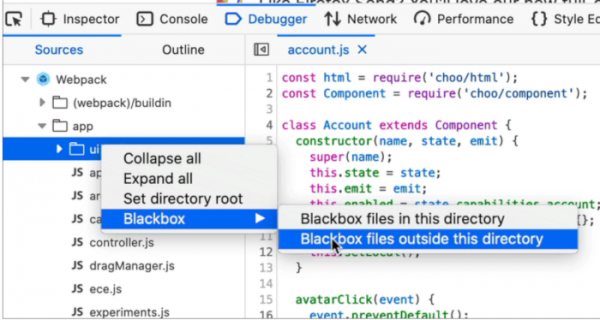
- In the JavaScript debugger, the possibility of ignoring files not used during debugging has been added. Through the 'blackbox' context menu, options for hiding the content placed in the selected directory or outside of it in the sidebar have been provided. When copying stack traces, the full path is now placed in the clipboard instead of just the file name.

- The web console now supports hiding code fragments that exceed five lines in multiline mode (to reveal, click anywhere in the area displaying the code).
In addition to new features and bug fixes, Firefox 76 addresses , of which 10 (CVE-2020-12387, CVE-2020-12388, and 8 under CVE-2020-12395) are marked as critical and potentially capable of allowing an attacker to execute code by opening specially crafted pages. The CVE-2020-12388 vulnerability allows escaping the sandbox isolation in Windows through manipulation of access tokens. The CVE-2020-12387 vulnerability is related to accessing a freed memory block (Use-after-free) during the termination of a Web Worker. CVE-2020-12395 encompasses memory issues such as buffer overflows.
Source: opennet.ru
