

Nota: this is a translation of a public postmortem from the engineering blog of the company . It describes a problem with conntrack in the Kubernetes cluster that led to partial downtime of some production services.
This article may be useful for those who want to learn a little more about postmortems or prevent some potential DNS issues in the future.

This is not DNS
Cannot be that this is DNS
This was DNS
A little about postmortems and processes at Preply
A postmortem describes a failure or any event in production. A postmortem includes a timeline of events, a description of the impact on users, root cause, actions taken, and lessons learned.
At weekly pizza meetings with the tech team, we share various information. One of the most important parts of these meetings is the postmortems, which are often accompanied by a presentation with slides and a deeper analysis of the incident that occurred. Although we do not "applaud" after postmortems, we strive to cultivate a culture of "no blame" (). We believe that writing and presenting postmortems can help us (and not just us) in preventing similar incidents in the future, which is why we share them.
Those involved in the incident should feel that they can talk about it in detail without fear of punishment or retaliation. No blame! Writing a postmortem is not a punishment but a learning opportunity for the whole company.
DNS Issues in Kubernetes. Postmortem
Date: 28.02.2020
Authors: Amet U., Andrey S., Igor K., Alexey P.
Status: Completed
In short: Partial DNS unavailability (26 min) for some services in the Kubernetes cluster
Impact: 15000 events lost for services A, B, and C
Root cause: Kube-proxy failed to correctly remove the old entry from the conntrack table, causing some services to still try to connect to non-existent pods.
E0228 20:13:53.795782 1 proxier.go:610] Failed to delete kube-system/kube-dns:dns endpoint connections, error: error deleting conntrack entries for UDP peer {100.64.0.10, 100.110.33.231}, error: conntrack command returned: ...Trigger: Due to low load within the Kubernetes cluster, CoreDNS-autoscaler reduced the number of pods in the deployment from three to two.
Solution: Another application deployment initiated the creation of new nodes, CoreDNS-autoscaler added more pods to serve the cluster, which prompted a rewrite of the conntrack table.
Detection: Prometheus monitoring detected a large number of 5xx errors for services A, B, and C, and initiated a call to on-duty engineers.

5xx errors in Kibana
Actions
Action
Type
Responsible
Task
Disable autoscaler for CoreDNS
prevent.
Amet U.
DEVOPS-695
Set up a caching DNS server
reduce.
Max V.
DEVOPS-665
Configure conntrack monitoring
prevent.
Amet U.
DEVOPS-674
Lessons Learned
What went well:
- Monitoring worked smoothly. The reaction was quick and organized.
- We didn't hit any limits on the nodes.
What went wrong:
- The real root cause is still unknown, appears to be in conntrack.
- All actions only address the consequences, not the root cause (the bug).
- We knew that sooner or later we might face DNS issues, but we didn't prioritize the tasks.
Where we got lucky:
- Another deployment triggered CoreDNS-autoscaler, which rewrote the conntrack table.
- This bug affected only a portion of services.
Timeline (EET)
Time
Action
22:13
CoreDNS-autoscaler reduced the number of pods from three to two.
22:18
On-duty engineers began receiving calls from the monitoring system.
22:21
On-duty engineers started investigating the cause of the errors.
22:39
On-duty engineers began rolling back one of the last services to the previous version.
22:40
5xx errors ceased to appear, the situation stabilized.
- Time to detection: 4 min
- Time to take action: 21 min
- Time to fix: 1 min
Additional information
- CoreDNS Logs:
I0228 20:13:53.507780 1 event.go:221] Event(v1.ObjectReference{Kind:"Deployment", Namespace:"kube-system", Name:"coredns", UID:"2493eb55-3dc0-11ea-b3a2-02bb48f8c230", APIVersion:"apps/v1", ResourceVersion:"132690686", FieldPath:""}): type: 'Normal' reason: 'ScalingReplicaSet' Scaled down replica set coredns-6cbb6646c9 to 2 - Links to Kibana (cut out), Grafana (cut out)
To minimize CPU usage, the Linux kernel uses something called conntrack. In short, it is a utility that maintains a list of NAT entries stored in a special table. When the next packet comes from the same pod to the same pod as before, the final IP address will not be recalculated but will be taken from the conntrack table.
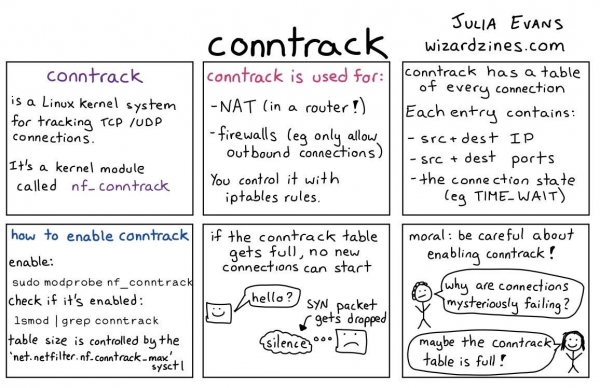
How conntrack works
Summary
This was an example of one of our postmortems with some useful links. Specifically, in this article, we share information that might be beneficial to other companies. This is why we are not afraid to make mistakes and why we have made one of our postmortems public. Here are a few more interesting public postmortems:
- GitLab:
- Dropbox:
- Spotify:
- Many others from and repository
- Also public postmortem from the SRE Book
Source: habr.com
