

Description
Sentry — a tool for monitoring exceptions and errors in your applications.
Main Features:
- easily integrates into the project,
- captures errors both in the user's browser and on your server.
- Free,
- The error list is updated in real time,
- If an error has been marked as resolved and appears again, it is recreated and counted in a separate thread,
- Errors are grouped and displayed in order of frequency of occurrence,
- Errors can be filtered by status, logging source, logging level, server name, etc.
Comparison with ELK logs: the main difference is that in ELK each new identical log is a separate entry, while in Sentry each new identical exception is just +1 to the count of its entry.
Sentry supports most programming languages. More details .
Running Sentry using Docker and Docker Compose
You can run Sentry using Docker and Docker Compose as described here: . However, the script runs additional services on the same server in single mode (non-redundant) (For Sentry version 10.0.0):
- data
- postgres
- redis
- zookeeper
- kafka
- clickhouse
- symbolicator
If you need redundancy, you will have to either use a cloud product or install Sentry without this script.
This post describes the process of building Sentry and its dependencies into RPM. If you need to install Sentry where there is no internet, you can create a yum repository from the produced RPM.
Important clarification on building and installing packages
Some packages depend on each other. Therefore, the build and installation process is divided into several stages.
TODO:
This post discusses the build and installation of Sentry version 9.1.2. Once the developers release a couple of minor versions, you can build Sentry version 10.X.Y. Many of the latest commits to master are fixes.
Server requirements for building RPM
The more CPU you have, the faster the semaphore and symbolic package builds will occur.
Disable Selinux
The community would appreciate it if someone writes SELinux policies for Sentry.
sudo sed -i s/SELINUX=.*$/SELINUX=disabled/ /etc/selinux/config
sudo reboot
Enable the epel-release repository
sudo yum install -y epel-release gitWe compile pip dependencies into RPM and install them. File 1general_dependencies.sh
echo "Install dependencies"
sudo yum install -y cargo gcc gcc-c++ libffi-devel libjpeg-devel libxml2-devel
libxslt libxslt-devel make mc openssl-devel python-devel memcached
python-lxml python-nose python2-pip python34 rpm-build rpmdevtools
ruby-devel rubygems zlib-devel redis xmlsec1-openssl xmlsec1
libtool-ltdl-devel xmlsec1-devel xmlsec1-openssl-devel openldap-devel

echo "Build common pip dependencies to rpm by fpm"
gem install --no-document fpm
echo "For chardet==3.0.2 need setuptools>=12"
echo "For cryptography==2.8 need setuptools>=18.5"
fpm -s python -t rpm setuptools==18.5
sudo yum install -y python-setuptools-18.5-1.noarch.rpm
fpm -s python -t rpm --name python2-pip pip==20.0.2
sudo yum install -y python2-pip-20.0.2-1.noarch.rpm
Installing and starting PostgreSQL 9.6 for building python-psycopg2-binary. File 2psycopg2-binary.sh
You can change the PostgreSQL version in the script.
sudo yum install -y postgresql-devel
fpm -s python -t rpm psycopg2-binary==2.7.7
sudo yum install -y python-psycopg2-binary-2.7.7-1.x86_64.rpm
sudo yum remove -y postgresql-devel postgresql postgresql-libs
Building and installing python-dateutil rpm. File 3dateutil.sh
#!/bin/bash

echo "Build and install python-dateutil rpm"
mkdir -p ~/rpmbuild/{BUILD,RPMS,SOURCES,SRPMS,SPECS}
spectool -g -R spec/python-dateutil.spec
wget https://raw.githubusercontent.com/patsevanton/sentry-rpm/master/spec/python-dateutil-system-zoneinfo.patch -P ~/rpmbuild/SOURCES
wget https://raw.githubusercontent.com/patsevanton/sentry-rpm/master/spec/python-dateutil-timelex-string.patch -P ~/rpmbuild/SOURCES
rpmbuild --bb spec/python-dateutil.spec
sudo yum install -y ~/rpmbuild/RPMS/noarch/python-dateutil-2.4.2-1.el7.noarch.rpm
Building and installing python-urllib3 rpm. File 4urllib3.sh
Spoiler Title
echo "Build pip dependencies to rpm by fpm for urllib3"
fpm -s python -t rpm pycparser==2.19
sudo yum install -y python-pycparser-2.19-1.noarch.rpm
fpm -s python -t rpm cffi==1.14.0
sudo yum install -y python-cffi-1.14.0-1.x86_64.rpm
fpm -s python -t rpm cryptography==2.8
sudo yum install -y python-cryptography-2.8-1.x86_64.rpm
fpm -s python -t rpm idna==2.7
sudo yum install -y python-idna-2.7-1.noarch.rpm
sudo chmod +r /usr/lib/python2.7/site-packages/idna-2.7-py2.7.egg-info/PKG-INFO
fpm -s python -t rpm pyOpenSSL==19.1.0
sudo yum install -y python-pyopenssl-19.1.0-1.noarch.rpm
fpm -s python -t rpm pbr==5.4.4
sudo yum install -y python-pbr-5.4.4-1.noarch.rpm
fpm -s python -t rpm mock==2.0.0
sudo yum install -y python-mock-2.0.0-1.noarch.rpm
fpm -s python -t rpm py==1.8.1
sudo yum install -y python-py-1.8.1-1.noarch.rpm
fpm -s python -t rpm six==1.10.0
sudo yum install -y python-six-1.10.0-1.noarch.rpm
fpm -s python -t rpm pluggy==0.6.0
sudo yum install -y python-pluggy-0.6.0-1.noarch.rpm
fpm -s python -t rpm attrs==19.3.0
sudo yum install -y python-attrs-19.3.0-1.noarch.rpm
fpm -s python -t rpm more-itertools==5.0.0
sudo yum install -y python-more-itertools-5.0.0-1.noarch.rpm
fpm -s python -t rpm pytest==3.5.1
sudo yum install -y python-pytest-3.5.1-1.noarch.rpm

echo "Build urllib rpm"
spectool -g -R spec/urllib3-1.24.2.spec
sudo yum-builddep -y spec/urllib3-1.24.2.spec
rpmbuild --bb spec/urllib3-1.24.2.spec
sudo yum install -y ~/rpmbuild/RPMS/noarch/python-urllib3-1.24.2-1.el7.noarch.rpm
Building other pip dependencies into rpm and installing them. File 5other_dependencies.sh
Spoiler Title
echo "Build rpm by fpm"
fpm -s python -t rpm jmespath==0.9.5
sudo yum install -y python-jmespath-0.9.5-1.noarch.rpm
fpm -s python -t rpm amqp==1.4.9
sudo yum install -y python-amqp-1.4.9-1.noarch.rpm
fpm -s python -t rpm anyjson==0.3.3
sudo yum install -y python-anyjson-0.3.3-1.noarch.rpm
fpm -s python -t rpm billiard==3.3.0.23
sudo yum install -y python-billiard-3.3.0.23-1.x86_64.rpm
fpm -s python -t rpm docutils==0.16
sudo yum install -y python-docutils-0.16-1.noarch.rpm
fpm -s python -t rpm Pillow==4.2.1
sudo yum install -y python-pillow-4.2.1-1.x86_64.rpm
fpm -s python -t rpm botocore==1.5.70
sudo yum install -y python-botocore-1.5.70-1.noarch.rpm
fpm -s python -t rpm boto3==1.4.5
sudo yum install -y python-boto3-1.4.5-1.noarch.rpm
fpm -s python -t rpm chardet==3.0.2
sudo yum install -y python-chardet-3.0.2-1.noarch.rpm
fpm -s python -t rpm croniter==0.3.31
sudo yum install -y python-croniter-0.3.31-1.noarch.rpm
fpm -s python -t rpm cssselect==1.1.0
sudo yum install -y python-cssselect-1.1.0-1.noarch.rpm
fpm -s python -t rpm cssutils==0.9.10
sudo yum install -y python-cssutils-0.9.10-1.noarch.rpm
fpm -s python -t rpm django-crispy-forms==1.4.0
sudo yum install -y python-django-crispy-forms-1.4.0-1.noarch.rpm
fpm -s python -t rpm django-jsonfield==0.9.13
sudo yum install -y python-django-jsonfield-0.9.13-1.noarch.rpm
fpm -s python -t rpm django-picklefield==0.3.2
sudo yum install -y python-django-picklefield-0.3.2-1.noarch.rpm
fpm -s python -t rpm django-sudo==2.1.0
sudo yum install -y python-django-sudo-2.1.0-1.noarch.rpm
fpm -s python -t rpm django-templatetag-sugar==1.0
sudo yum install -y python-django-templatetag-sugar-1.0-1.noarch.rpm
fpm -s python -t rpm djangorestframework==2.4.8
sudo yum install -y python-djangorestframework-2.4.8-1.noarch.rpm
fpm -s python -t rpm email-reply-parser==0.2.0
sudo yum install -y python-email_reply_parser-0.2.0-1.noarch.rpm
fpm -s python -t rpm enum34==1.1.9
sudo yum install -y python-enum34-1.1.9-1.noarch.rpm
fpm -s python -t rpm functools32==3.2.3.post2
sudo yum install -y python-functools32-3.2.3_2-1.noarch.rpm
fpm -s python -t rpm futures==3.3.0
sudo yum install -y python-futures-3.3.0-1.noarch.rpm
fpm -s python -t rpm hiredis==0.1.6
sudo yum install -y python-hiredis-0.1.6-1.x86_64.rpm
fpm -s python -t rpm honcho==1.0.1
sudo yum install -y python-honcho-1.0.1-1.noarch.rpm
fpm -s python -t rpm httplib2==0.17.0
sudo yum install -y python-httplib2-0.17.0-1.noarch.rpm
fpm -s python -t rpm jsonschema==2.6.0
sudo yum install -y python-jsonschema-2.6.0-1.noarch.rpm
fpm -s python -t rpm kombu==3.0.35
sudo yum install -y python-kombu-3.0.35-1.noarch.rpm
fpm -s python -t rpm celery==3.1.18
sudo yum install -y python-celery-3.1.18-1.noarch.rpm
fpm -s python -t rpm loremipsum==1.0.5
sudo yum install -y python-loremipsum-1.0.5-1.noarch.rpm
fpm -s python -t rpm lxml==4.5.0
sudo yum install -y python-lxml-4.5.0-1.x86_64.rpm
fpm -s python -t rpm milksnake==0.1.5
sudo yum install -y python-milksnake-0.1.5-1.noarch.rpm
fpm -s python -t rpm mistune==0.8.4
sudo yum install -y python-mistune-0.8.4-1.noarch.rpm
fpm -s python -t rpm mmh3==2.3.1
sudo yum install -y python-mmh3-2.3.1-1.x86_64.rpm
fpm -s python -t rpm exam==0.10.6
sudo yum install -y python-exam-0.10.6-1.noarch.rpm
fpm -s python -t rpm msgpack==0.6.2
sudo yum install -y python-msgpack-0.6.2-1.x86_64.rpm
fpm -s python -t rpm oauth2==1.9.0.post1
sudo yum install -y python-oauth2-1.9.0.post1-1.noarch.rpm
fpm -s python -t rpm oauthlib==3.1.0
sudo yum install -y python-oauthlib-3.1.0-1.noarch.rpm
fpm -s python -t rpm parsimonious==0.8.0
sudo yum install -y python-parsimonious-0.8.0-1.noarch.rpm
fpm -s python -t rpm requests==2.20.1
sudo yum install -y python-requests-2.20.1-1.noarch.rpm
fpm -s python -t rpm petname==2.0
sudo yum install -y python-petname-2.0-1.noarch.rpm
fpm -s python -t rpm python-utils==2.3.0
sudo yum install -y python-utils-2.3.0-1.noarch.rpm
fpm -s python -t rpm progressbar2==3.10.1
sudo yum install -y python-progressbar2-3.10.1-1.noarch.rpm
fpm -s python -t rpm pytest-django==2.9.1
sudo yum install -y python-pytest-django-2.9.1-1.noarch.rpm
fpm -s python -t rpm pytest-html==1.9.0
sudo yum install -y python-pytest-html-1.9.0-1.noarch.rpm
fpm -s python -t rpm python-memcached==1.59
sudo yum install -y python-memcached-1.59-1.noarch.rpm
fpm -s python -t rpm python-openid==2.2.5
sudo yum install -y python-openid-2.2.5-1.noarch.rpm
fpm -s python -t rpm python-u2flib-server==4.0.1
sudo yum install -y python-u2flib-server-4.0.1-1.noarch.rpm
fpm -s python -t rpm qrcode==5.3
sudo yum install -y python-qrcode-5.3-1.noarch.rpm
fpm -s python -t rpm querystring-parser==1.2.4
sudo yum install -y python-querystring_parser-1.2.4-1.noarch.rpm
fpm -s python -t rpm redis==2.10.5
sudo yum install -y python-redis-2.10.5-1.noarch.rpm
fpm -s python -t rpm rb==1.7
sudo yum install -y python-rb-1.7-1.noarch.rpm
fpm -s python -t rpm redis-py-cluster==1.3.4
sudo yum install -y python-redis-py-cluster-1.3.4-1.noarch.rpm
fpm -s python -t rpm requests-oauthlib==0.3.3
sudo yum install -y python-requests-oauthlib-0.3.3-1.noarch.rpm
fpm -s python -t rpm percy==2.0.2
sudo yum install -y python-percy-2.0.2-1.noarch.rpm
fpm -s python -t rpm selenium==3.141.0
sudo yum install -y python-selenium-3.141.0-1.noarch.rpm
fpm -s python -t rpm semaphore==0.4.65
sudo yum install -y python-semaphore-0.4.65-1.x86_64.rpm
fpm -s python -t rpm sentry-sdk==0.14.1
sudo yum install -y python-sentry-sdk-0.14.1-1.noarch.rpm
fpm -s python -t rpm setproctitle==1.1.10
sudo yum install -y python-setproctitle-1.1.10-1.x86_64.rpm
fpm -s python -t rpm simplejson==3.8.2
sudo yum install -y python-simplejson-3.8.2-1.x86_64.rpm
fpm -s python -t rpm sqlparse==0.1.19
sudo yum install -y python-sqlparse-0.1.19-1.noarch.rpm
fpm -s python -t rpm statsd==3.1
sudo yum install -y python-statsd-3.1-1.noarch.rpm
fpm -s python -t rpm strict-rfc3339==0.7
sudo yum install -y python-strict-rfc3339-0.7-1.noarch.rpm
fpm -s python -t rpm structlog==16.1.0
sudo yum install -y python-structlog-16.1.0-1.noarch.rpm
fpm -s python -t rpm symbolic==6.1.4
sudo yum install -y python-symbolic-6.1.4-1.x86_64.rpm
fpm -s python -t rpm toronado==0.0.11
sudo yum install -y python-toronado-0.0.11-1.noarch.rpm
fpm -s python -t rpm ua-parser==0.7.3
sudo yum install -y python-ua-parser-0.7.3-1.noarch.rpm
fpm -s python -t rpm uwsgi==2.0.18
sudo yum install -y python-uwsgi-2.0.18-1.noarch.rpm
fpm -s python -t rpm -n PyYAML pyyaml==3.11
sudo yum install -y PyYAML-3.11-1.x86_64.rpm
fpm -s python -t rpm django-auth-ldap==1.2.17
sudo yum install -y python-django-auth-ldap-1.2.17-1.noarch.rpm
We are collecting the rpm sentry and installing it. File 6sentry.sh
echo "Install nodejs and yarn"
curl -sL https://rpm.nodesource.com/setup_10.x | sudo bash -
sudo yum install -y nodejs
sudo sed -e '/nodesource-source/,+6d' -i /etc/yum.repos.d/nodesource-el7.repo
curl -sL https://dl.yarnpkg.com/rpm/yarn.repo | sudo tee /etc/yum.repos.d/yarn.repo
sudo yum install -y yarn

cp spec/config.yml spec/sentry.conf.py ~/rpmbuild/SOURCES
cp spec/sentry-cron.service spec/sentry-web.service spec/sentry-worker.service ~/rpmbuild/SOURCES
spectool -g spec/sentry-9.1.2.spec
sudo yum-builddep -y spec/sentry-9.1.2.spec
rpmbuild -bb spec/sentry-9.1.2.spec
sudo yum install -y ~/rpmbuild/RPMS/noarch/python-sentry-9.1.2-1.el7.noarch.rpm
Installing sentry rpm with dependencies on another server
Disable Selinux
sudo sed -i s/^SELINUX=.*$/SELINUX=disabled/ /etc/selinux/config
#### sudo reboot
Enable the epel-release repository
sudo yum install -y epel-release git libjpeg-turbo redis
sudo systemctl start redis
Installing and starting PostgreSQL 9.6. File 7postgresql.sh
sudo yum install -y https://download.postgresql.org/pub/repos/yum/reporpms/EL-7-x86_64/pgdg-redhat-repo-latest.noarch.rpm
sudo yum install -y postgresql96 postgresql96-server postgresql96-contrib
sudo /usr/pgsql-9.6/bin/postgresql96-setup initdb
sudo systemctl start postgresql-9.6
sudo -i -u postgres psql -c "create user sentry with password 'password';"
sudo -i -u postgres psql -c "create database sentry with owner sentry;"
sudo -i -u postgres psql -c "alter role sentry superuser;"

# TODO: Check without superuser rights for the sentry role
#sudo -i -u postgres psql -c "alter role sentry nosuperuser;"
#sudo -i -u postgres psql -c "CREATE SCHEMA main AUTHORIZATION sentry;"
Running migration (creating the DB schema) and starting services. File 8start_sentry.sh
sudo systemctl start redis
sudo -i -u sentry /usr/bin/sentry --config /etc/sentry/ upgrade
sudo systemctl start sentry-worker
sudo systemctl start sentry-cron
sudo systemctl start sentry-web
Creating an internal administrator for Sentry
sudo -i -u sentry /usr/bin/sentry --config /etc/sentry/ createuser Building sentry in rpm, installation, configuration for the lazy
Disable Selinux
sudo sed -i s/SELINUX=.*$/SELINUX=disabled/ /etc/selinux/config
sudo reboot
Running scripts to build and install sentry
sudo yum install -y epel-release git
git clone https://github.com/patsevanton/sentry-rpm.git
cd sentry-rpm
./1general_dependencies.sh
./2psycopg2-binary.sh
./3dateutil.sh
./4urllib3.sh
./5other_dependencies.sh
./6sentry.sh
Copying rpm from rpmbuild/RPMS and the root of sentry-rpm to the target server. Creating a yum repo. Installing all compiled rpm packages.
./7postgresql.sh
./8start_sentry.sh
Creating an internal administrator for Sentry
sudo -i -u sentry /usr/bin/sentry --config /etc/sentry/ createuser Testing exception submission
We will test it on a Java project. Downloading java and maven.
sudo yum install -y java-1.8.0-openjdk-devel git
sudo wget http://repos.fedorapeople.org/repos/dchen/apache-maven/epel-apache-maven.repo -O /etc/yum.repos.d/epel-apache-maven.repo
sudo yum -y install apache-maven
git clone https://github.com/getsentry/examples.git
cd examples/java/basic
mvn compile exec:java
Now we need to run java passing it SENTRY_DSN
SENTRY_DSN=https://public:private@host:port/1 mvn exec:javaNow we need to find the generated default SENTRY_DSN.
Accessing Sentry. Going to the default project internal.
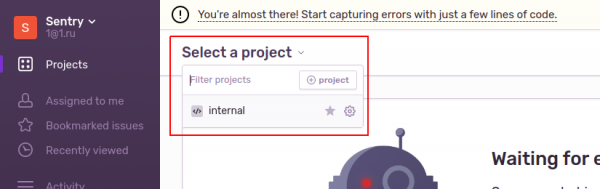
or
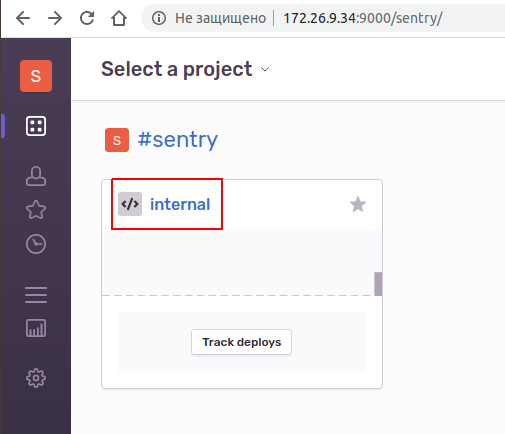
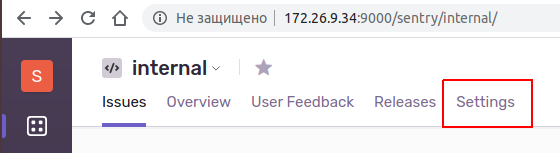
Navigating to project settings.
Navigating to Client Keys (DSN).
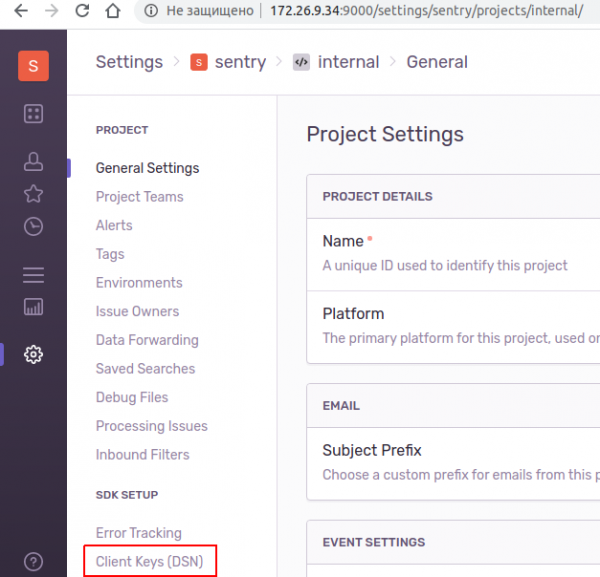
Copy the DSN. This is the SENTRY_DSN.
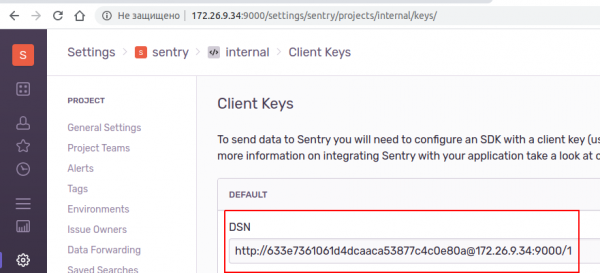
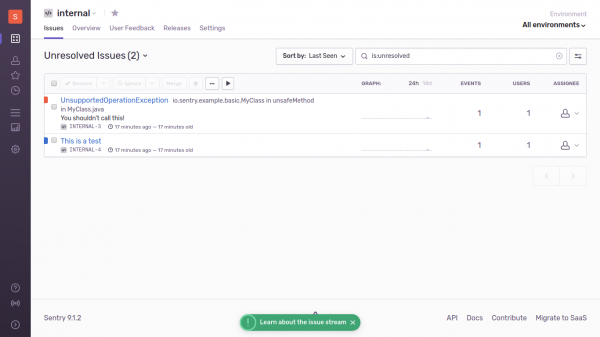
Running java with this parameter.
SENTRY_DSN=http://633e7361061d4dcaaca53877c4c0e80a@172.26.9.34:9000/1 mvn exec:javaWe see such a picture.
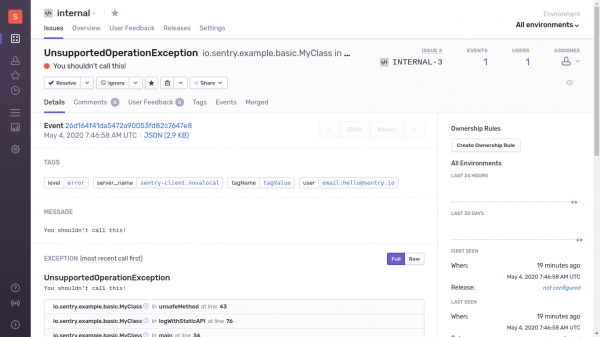
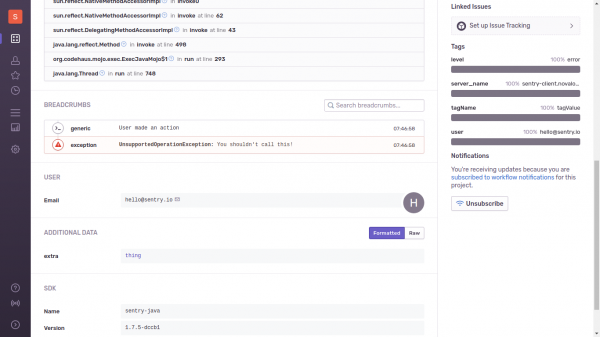
If we go to UnsupportedOperationException, we will see additional information.
I created a Telegram chat for Sentry.
In the next episodes:
- Test LDAP. I have already prepared the script.
9sentry-ldap-auth.sh - Test Sentry version 10.0.X after a couple of minor releases are rolled out.
Repository with scripts:
Source: habr.com
