

Hello, my name is Dmitry Krasnov. For over five years, I have been engaged in managing Kubernetes clusters and building complex microservice architectures. At the beginning of this year, we launched a Kubernetes cluster management service based on Containerum. Taking this opportunity, I’ll explain what Kubernetes is and how integration with a vendor differs from open source.
To start, what is ? It is a system for managing containers across many hosts. Interestingly, it translates from Greek as "pilot" or "helmsman." Initially developed by Google, it was later donated to the Cloud Native Computing Foundation, an international non-profit organization uniting leading developers, end users, and suppliers of container technologies.
Managing a large number of containers
Now let’s clarify what containers are. A container is an application along with its environment — primarily the libraries that the program depends on. All of this is packaged in archives and presented as an image that can be run independently of the operating system, tested, and more. However, there is a problem — managing containers across many hosts is very complicated. Hence, Kubernetes was created.
The container image consists of the application plus its dependencies. The application, its dependencies, and the operating system's file system image reside in different parts of the image, known as layers. Layers can be reused for different containers. For instance, the base layer of Ubuntu can be used for all applications within a company. When launching containers, there is no need to store multiple copies of the same base layer on the host. This helps optimize storage and delivery of images.
When we want to launch an application from a container, the necessary layers stack on top of each other to form an overlay file system. A writable layer is added on top, which is removed when the container stops. This ensures that every time the container runs, the application has a consistent environment that cannot be changed. It guarantees the reproducibility of the environment across different host operating systems. Whether it's Ubuntu or CentOS, the environment remains consistent. Moreover, the container is isolated from the host using built-in mechanisms in the Linux kernel. Applications within the container do not see files, processes, or other containers on the host. This isolation of applications from the host OS provides an additional layer of security.
There are many tools for managing containers on the host. The most popular among them is Docker. It provides a complete lifecycle for container operations. However, it works only on a single host. When there's a need to manage containers across multiple hosts, Docker can turn the engineers' lives into a nightmare. That's why Kubernetes was created.
The demand for Kubernetes is precisely due to its ability to manage groups of containers across multiple hosts as unified entities. Its popularity is driven by the capability to build DevOps or Development Operations, where Kubernetes is utilized to run processes of that same DevOps.
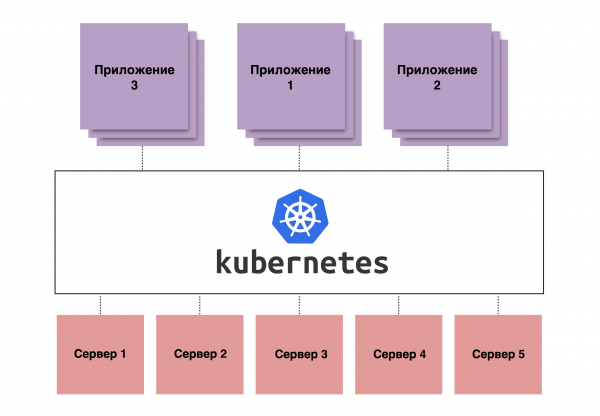
Figure 1. A schematic representation of how Kubernetes works
Full automation
DevOps, in essence, represents the automation of the development process. Simply put, developers write code that is pushed to a repository. This code can then be automatically assembled into a container with all dependencies, tested, and deployed to the next stage – Staging, and then immediately to Production.
Together with Kubernetes, DevOps allows automating this process to be carried out virtually without the involvement of the developers themselves. This significantly speeds up the build process, as the developer does not have to manage this on their own computer — they simply write a piece of code, push it to the repository, and then a pipeline is triggered, which may include building, testing, and deploying. This happens with every commit, so testing is continuous.
Using a container ensures that the entire environment of the program will be released in production exactly as it was tested. This means that problems such as 'different versions in testing and production, and it all crashed upon deployment' will not arise. Since today we have a trend towards microservices architecture, where instead of one large application there are hundreds of small ones, manually managing them would require an enormous staff. Therefore, we use Kubernetes.
Pros, pros, pros
When talking about the advantages of Kubernetes as a platform, it provides significant benefits in terms of managing microservices architecture.
- Management of multiple replicas. The most important aspect is container management across multiple hosts. More importantly, it involves managing multiple replicas of applications in containers as a single entity. This allows engineers not to worry about each individual container. If one of the containers fails, Kubernetes will detect it and restart it.
- Cluster network. Kubernetes also has what is known as a cluster network with its own address space. This ensures that each pod has its own address. A pod is understood as the smallest structural unit of a cluster, where containers are directly run. Moreover, Kubernetes features a functionality that combines a load balancer and Service Discovery. This eliminates the need for manual IP address management and allows this task to be handled by Kubernetes. Automatic health checks will also help detect issues and redirect traffic to operational pods.
- Configuration management. When managing a large number of applications, it becomes challenging to handle application configurations. Kubernetes provides special resources called ConfigMaps for this purpose. They allow for centralized storage of configurations and injection into pods when starting applications. This mechanism ensures configuration consistency whether there are ten or a hundred replicas of applications.
- Persistent Volumes. Containers are inherently immutable, and when a container stops, all data written to the file system will be lost. However, some applications store data directly on disk. To address this issue, Kubernetes has a feature for managing disk storage — Persistent Volumes. This mechanism uses external storage for data and can inject persistent storage, either block or file-based, into containers. This solution allows data to be stored separately from the workers, protecting it in case those workers fail.
- Load Balancer. Even though in Kubernetes we manage abstract entities such as Deployments, StatefulSets, etc., ultimately, containers run on regular virtual machines or physical servers. They are not perfect and can fail at any moment. Kubernetes will detect this and redirect internal traffic to other replicas. But what about the traffic coming from outside? If we simply direct traffic to one of the workers, if it fails, the service will become unavailable. To solve this problem, Kubernetes has services like Load Balancers. They are designed to automatically configure an external cloud load balancer for all workers in the cluster. This external load balancer directs external traffic to workers and monitors their status. If one or more workers become unavailable, traffic is rerouted to others. This enables the creation of highly available services with Kubernetes.
Kubernetes excels particularly in running microservices architectures. Implementing it into a traditional architecture is possible but pointless. If an application cannot run in multiple replicas, what difference does it make — whether in Kubernetes or not?
Open source Kubernetes
Open source Kubernetes is a great thing: you set it up and it works. It can be deployed on your own servers and infrastructure, with a master and workers that run all applications. Most importantly, it’s all free. However, there are nuances.
- The first is the requirement for knowledge and experience from the administrators and engineers who will deploy and maintain it all. Since the client has full freedom of action within the cluster, they bear responsibility for its operability. And it’s very easy to break everything here.
- The second is the lack of integrations. If you launch Kubernetes without having a popular virtualization platform, you will not gain all the benefits of the program, such as the use of Persistent Volumes and Load Balancer services.
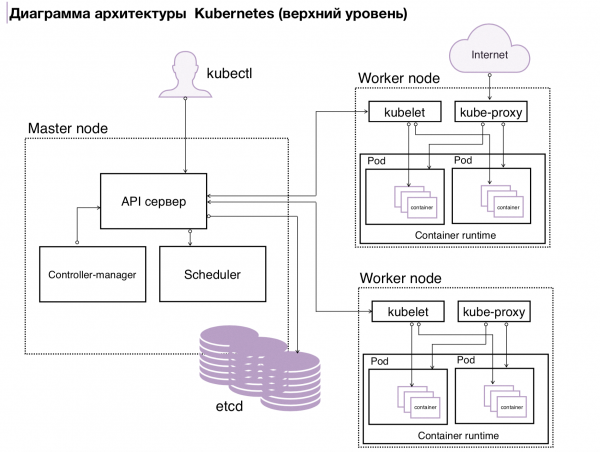
Figure 2. k8s Architecture
Kubernetes from the vendor
Integration with a cloud provider offers two opportunities:
- Firstly, a person can simply click the ‘create cluster’ button and receive a pre-configured and ready-to-use cluster.
- Secondly, the vendor sets up the cluster and configures the integration with the cloud.
Here’s how it works for us. The engineer who launches the cluster specifies how many workers are needed and their parameters (for example, 5 workers, each with 10 CPUs, 16 GB of RAM, and, say, 100 GB of disk space). After that, they gain access to the already formed cluster. The workers, where the load runs, are completely handed over to the client, but the entire management plane remains under the vendor’s responsibility (in case the service is provided as a managed service).
However, this scheme has its drawbacks. Because the management plane remains with the vendor, they do not provide full access to the client, which reduces flexibility in working with Kubernetes. Sometimes a client wants to attach some specific functionality to Kubernetes, for example, LDAP authentication, but the management plane configuration does not allow for that.
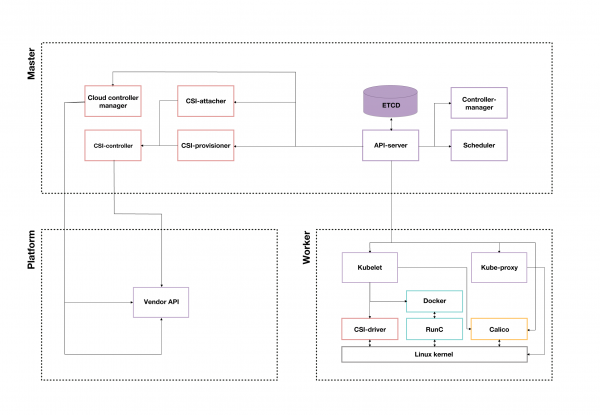
Figure 3. Example of a Kubernetes Cluster from a Cloud Provider
What to choose: open source or vendor-based
So, open source Kubernetes or vendor-based? If you choose open source Kubernetes, the user can do whatever they want with it. But there's a significant risk of self-sabotage. With vendor-based solutions, it's more complex since everything is thought out and configured by the company. The biggest drawback of open source Kubernetes is the demand for specialists. With vendor-based solutions, a company is free from this headache, but it will have to decide whether to pay its specialists or the vendor.
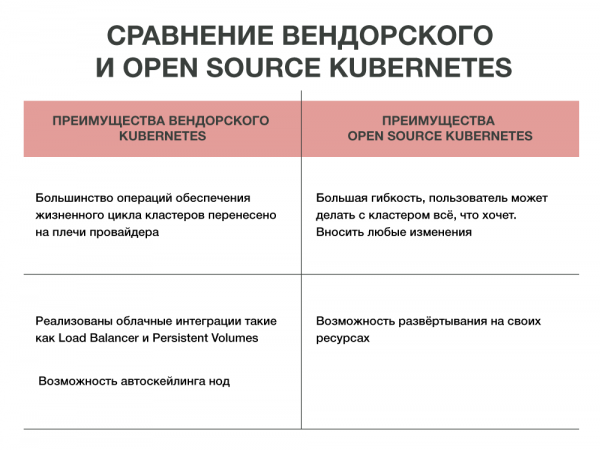
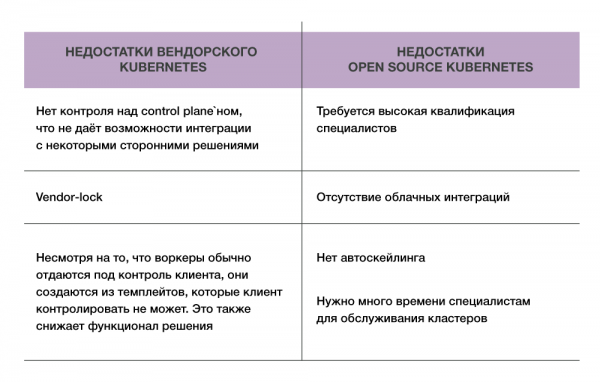
Well, the advantages are obvious, and the downsides are also known. One thing remains unchanged: Kubernetes solves a lot of problems by automating the management of multiple containers. Which one to choose, open source or vendor-based, is a decision each person must make for themselves.
The article was prepared by Dmitry Krasnov, the lead architect of the Containerum service at #CloudMTS provider.
Source: habr.com
