


Not long ago, I encountered a rather unconventional task of configuring routing for MetalLB. Normally, MetalLB doesn’t require any additional steps, but in our case, we have a fairly large cluster with a rather simple network configuration.
In this article, I will explain how to configure source-based and policy-based routing for the external network of your cluster.
I won’t go into detail about installing and setting up MetalLB, as I assume you already have some experience. Let’s get straight to the point: the routing configuration. So, we have four scenarios:
Scenario 1: No configuration is required
Let’s analyze a simple case.
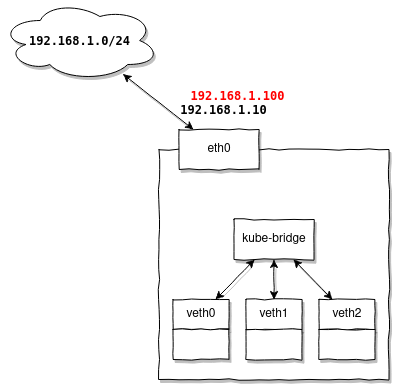
Additional routing configuration is not required when the IP addresses provided by MetalLB are in the same subnet as your nodes' addresses.
For example, you have a subnet 192.168.1.0/24, there is a router 192.168.1.1, and your nodes receive addresses: 192.168.1.10-30, then for MetalLB, you can configure a range 192.168.1.100-120 and be sure that they will work without any additional settings.
Why is that? Because your nodes already have routes configured:
# ip route
default via 192.168.1.1 dev eth0 onlink
192.168.1.0/24 dev eth0 proto kernel scope link src 192.168.1.10
And addresses from the same range will reuse them without any additional effort.
Scenario 2: Additional configuration is required
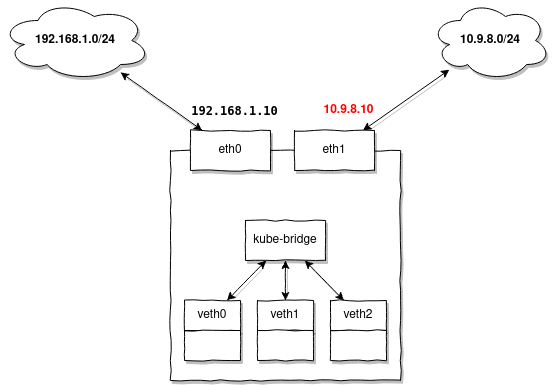
You should configure additional routes whenever your nodes do not have a configured an IP address or a route to the subnet for which MetalLB is issuing addresses.
Let me explain in more detail. Whenever MetalLB assigns an address, it can be compared to a simple command like:
ip addr add 10.9.8.7/32 dev loNote that:
- a) The address is assigned with a prefix
/32meaning that a route to the subnet will not be automatically added (it’s just an address) - b) The address is assigned to any node interface (for example, loopback). It’s worth mentioning the peculiarity of the Linux networking stack. It doesn’t matter on which interface you add the address; the kernel will always process ARP requests and send ARP replies on any of them. This behavior is considered correct and is widely used in a dynamic environment like Kubernetes.
This behavior can be configured, for example, by enabling strict ARP:
echo 1 > /proc/sys/net/ipv4/conf/all/arp_ignore
echo 2 > /proc/sys/net/ipv4/conf/all/arp_announce
In this case, ARP responses will be sent only if the interface explicitly contains a specific IP address. This setting is mandatory if you plan to use MetalLB and your kube-proxy operates in IPVS mode.
However, MetalLB does not use the kernel to process ARP requests; it does this itself in user space, so this option will not affect MetalLB's operation.
Let's return to our task. If there is no route for the issued addresses on your nodes, add it in advance to all nodes:
ip route add 10.9.8.0/24 dev eth1Case 3: When source-based routing is needed
You will need to configure source-based routing when you receive packets through a separate gateway, not the one set up as default. Consequently, response packets must also go through this same gateway.
For example, you have the same subnet 192.168.1.0/24 allocated for your nodes, but you want to issue external addresses using MetalLB. Let's assume you have several addresses from the subnet 1.2.3.0/24 located in VLAN 100, and you want to use them to access Kubernetes services from the outside.
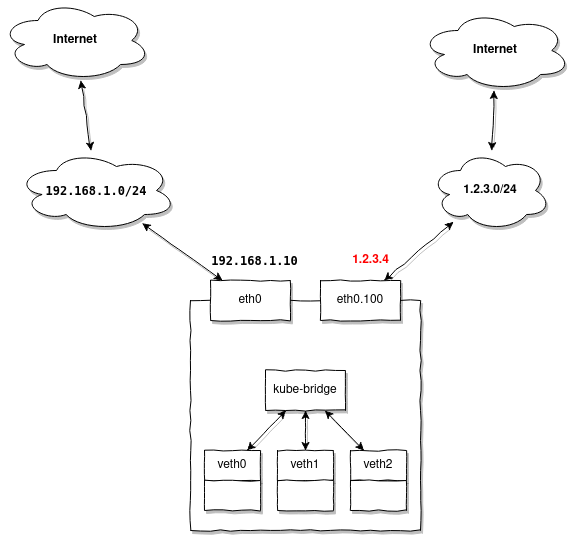
When accessing 1.2.3.4 you will be making requests from a different subnet than 1.2.3.0/24 and expecting a response. The node that is currently the master for the issued MetalLB address 1.2.3.4will receive a packet from the router 1.2.3.1, but the response must definitely go back the same way, through 1.2.3.1.
Since our node already has a configured default gateway 192.168.1.1, by default, the response will go to it instead of 1.2.3.1, through which we received the packet.
How can we handle this situation?
In this case, you need to prepare all your nodes so that they are ready to service external addresses without additional configuration. That is, for the above example, you need to create a VLAN interface on the node in advance:
ip link add link eth0 name eth0.100 type vlan id 100
ip link set eth0.100 up
And then add the routes:
ip route add 1.2.3.0/24 dev eth0.100 table 100
ip route add default via 1.2.3.1 table 100
Note that we are adding routes to a separate routing table 100 it will contain only two routes necessary for sending the response packet through the gateway 1.2.3.1, which is behind the interface eth0.100.
Now we need to add a simple rule:
ip rule add from 1.2.3.0/24 lookup 100which explicitly states: if the source address of the packet is in 1.2.3.0/24, then the routing table should be used. 100It describes a route that will send it through 1.2.3.1
Case 4: When policy-based routing is needed
The network topology is the same as in the previous example, but let's say you also want the ability to access external addresses from the pool 1.2.3.0/24 of your pods:
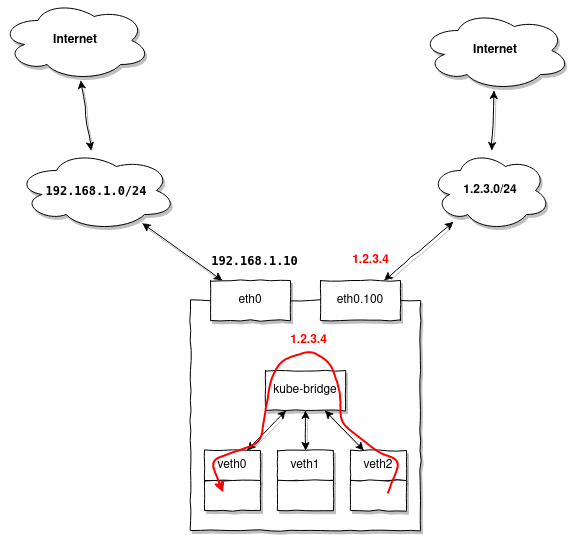
The peculiarity is that when accessing any address in 1.2.3.0/24, the response packet arriving at the node, with the source address in the range 1.2.3.0/24 , will obediently be sent to eth0.100, but we want Kubernetes to redirect it to our first pod that generated the initial request.
Solving this problem turned out to be difficult, but it became possible thanks to policy-based routing:
To better understand the process, here’s a netfilter block diagram:
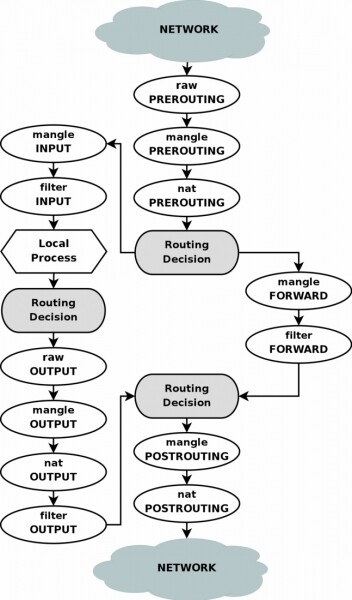
First, as in the previous example, we will create an additional routing table:
ip route add 1.2.3.0/24 dev eth0.100 table 100
ip route add default via 1.2.3.1 table 100
Now let's add several rules in iptables:
iptables -t mangle -A PREROUTING -i eth0.100 -j CONNMARK --set-mark 0x100
iptables -t mangle -A PREROUTING  -j CONNMARK --restore-mark
iptables -t mangle -A PREROUTING -m mark ! --mark 0 -j RETURN
iptables -t mangle -A POSTROUTING -j CONNMARK --save-mark
These rules will mark incoming connections on the interface eth0.100, tagging all packets with the tag 0x100, this same tag will be assigned to the responses within the same connection.
Now we can add a routing rule:
ip rule add from 1.2.3.0/24 fwmark 0x100 lookup 100That is, all packets with the source address 1.2.3.0/24 and the tag 0x100 should be routed using the table 100.
Thus, other packets received on a different interface will not fall under this rule, allowing them to be routed by standard Kubernetes methods.
There’s another issue, in Linux there is a so-called reverse path filter, which creates problems as it performs a simple check: for all incoming packets, it changes the source address of the packet to that of the sender and checks if the packet can leave through the same interface it was received on; if not, it filters it out.
The problem is that in our case it will not operate correctly, but we can disable it:
echo 0 > /proc/sys/net/ipv4/conf/all/rp_filter
echo 0 > /proc/sys/net/ipv4/conf/eth0.100/rp_filter
Note that the first command controls the global behavior of rp_filter; if it is not disabled, the second command will have no effect. However, other interfaces will remain with rp_filter enabled.
To avoid completely restricting the filter's functionality, we can use the rp_filter implementation for netfilter. By using rpfilter as an iptables module, it's possible to set up quite flexible rules, for example:
iptables -t raw -A PREROUTING -i eth0.100 -d 1.2.3.0/24 -j RETURN
iptables -t raw -A PREROUTING -i eth0.100 -m rpfilter --invert -j DROP
enable rp_filter on the interface eth0.100 for all addresses except 1.2.3.0/24.
Source: habr.com
