


Continuing the discussion about nuances and recommended best practices. Is a backup channel necessary, and what should it be like?
Introduction
Before you start working remotely seriously and for an extended period, you don't think about many things. For example, how to ensure quick system recovery. Where to get a computer to replace the one that broke if you need to connect to work not in a day, but right now. And finally, what to do if the connection is lost?
Before switching to remote work, these issues were handled by a system administrator, technical support engineer, network engineer, and so on. Now, it's all on you, relying on your own experience...
But why is there such urgency?
First of all, to avoid losing your job due to periodic connectivity issues. The infamous 'Murphy's laws' still apply, and a single disconnection at the worst moment can cost you your job, or at least your career.
Secondly, Internet disruptions can impact income, especially if your work is based on commissions.
There are other reasons as well. For instance, updating antivirus software and other security tools. The need for urgent payments, such as an electricity bill, loan repayments, and so on.
If the Internet is down for a long time, and the support hotline plays an endless message: 'We apologize, all operators are currently busy...', it’s the perfect time to use a backup channel.
Is it necessary to purchase a separate device for this?
It all depends on the specific situation. Each person has to decide for themselves.
First, consider your income level and how much you want to keep your job.
Second, how quickly will help arrive? For example, if the only modem, router, or media converter fails — how quickly will the provider offer a replacement? Or do you have to repair, purchase a new one, and set it up yourself — all while lacking proper Internet access?
What should a remote worker do if Internet access is lost?
The safest option is not to wait for an issue to happen, but to immediately set up a line with a second provider at an acceptable price. Even better — take advantage of some kind of "connection promotion," while keeping the old line as backup.
However, this service is not always available. You might have to wait anywhere from a couple of days... to indefinitely. To illustrate, let’s look at a couple of examples.
Example one — "an old house with an old provider"
Background: The old house was officially recognized as a historic building. Before this "historic recognition," the house had one provider that "came in" a long time ago. Consequently, the equipment was installed back then, and thereafter it was all based on the principle: "if it works, don’t touch it." Over time, the load on the channel increased, and the quality of the connection declined.
When it comes to historic buildings, providers must coordinate installation work for the wired network with city authorities. And the city authorities are reluctant to grant permission on the principle: "There is internet access, and that’s enough."
Thus, the only provider became a natural monopoly, with no plans to address the problem of poor connection quality.
Note. Don’t think that such problems only occur among wealthy citizens living in the center of Moscow or St. Petersburg. There can be various reasons why a second cable cannot be run to a building. Having wireless internet access still creates competition and pushes providers back to the civilized realm of market economics.
Example two — "there's no money, but keep it up!"
Background: The only "wired" provider in a suburban development of low-rise cottages.
After a while, several cottages completely lost the signal from the incoming cable. Constant calls to technical support yielded no results. Ultimately, driven to "white heat" by repeated complaints, the provider's system administrator delivered this tirade: "The switch that your connection went through has burned out, management won’t provide funds for a new one because of the coronavirus, global crisis, and so on. Connect to something yourself and leave me alone."
Note. In addition to these two examples, it's worth mentioning that cables and networking equipment are sometimes damaged during hallway repairs, there can be simple thefts of networking equipment, and many other issues that affect both providers and residents.
Therefore, having a backup wireless channel is highly advisable to avoid depending on such "situations."
How can you prepare in advance for troubles?
Earlier in the article we already discussed that using a mobile phone comes with not only "benefits" but also significant "drawbacks."
Simply put, using a personal smartphone to maintain a working online connection is not particularly advantageous. Of course, it all depends on local specifics and the particular offer, but if you haven't earned any special "bonuses" from your mobile operator and don't have an excellent corporate rate in terms of price and data volume, it's better to look for alternative options.
One of the few advantages of using a personal smartphone as a common modem is that, supposedly, "you don't need to buy anything." However, in this case, the personal device becomes a family "shared use" item, which may not please the owner. Ultimately, one ends up needing to purchase a new smartphone or simply a basic phone just for calling.
Sharing internet from a smartphone for personal use might be justifiable, but this solution is hardly suitable for a whole family or a small office.
It's also worth mentioning various external antennas that boost the signal, which are not always compatible with a regular "iPhone."
And a regular smartphone definitely won't last long if it's hung on a balcony or on some "white birch outside my window" to catch a more stable signal.
Ready to buy a wireless device. What to choose?
If we need to establish a connection indoors, it makes sense to purchase a reliable LTE router with powerful antennas, which will ensure a good stable Wi-Fi signal inside the building across both frequencies: 5GHz and 2.4GHz. This way, we accommodate both modern devices that support the 5GHz band and older network clients that only support the 2.4GHz band. Additionally, there may be situations where devices are located in areas where only the 2.4GHz signal can reach.
If we are talking about a country house, an outdoor LTE router with a powerful built-in antenna may be required.
Using an LTE router as the primary device for Internet access
For the above scenarios with a poor provider, it is recommended to connect via a wireless LTE channel as the main option, while utilizing a weak local wired provider line (if available) as a backup.
For example, outside the city, where wired connections are poor — we catch a signal using LTE. If a good wired access becomes available (for instance, if we return to the city after "self-isolation"), the mobile network can be used as a backup channel or to relieve the wired channel during peak load times.
Among such "universal soldiers," an LTE router Cat. 6 for indoor use is recommended —
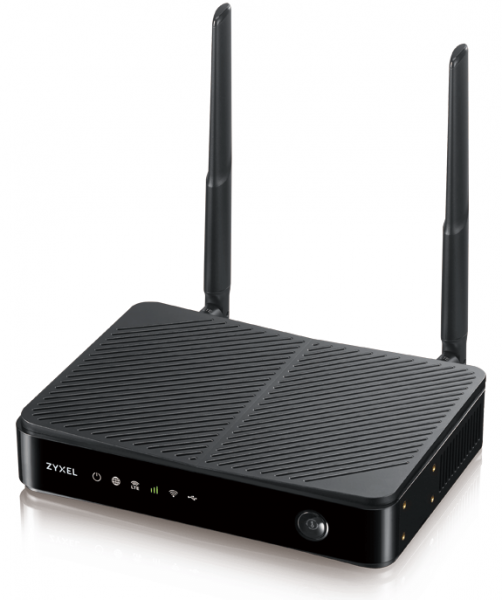
Figure 1. LTE router for indoor use LTE3301-PLUS.
The good news is that for the LTE3301-PLUS and other models with removable antennas, outdoor antennas from any vendor will work.
Using an additional LTE router for outdoor placement
A common scenario is that the cellular signal is poorly received indoors. In this case, it is reasonable to use an outdoor LTE router powered by PoE. This can be especially critical for single-story country buildings, where the signal does not reach effectively. For such cases, an outdoor gigabit LTE Cat.6 router with a LAN port would be suitable.
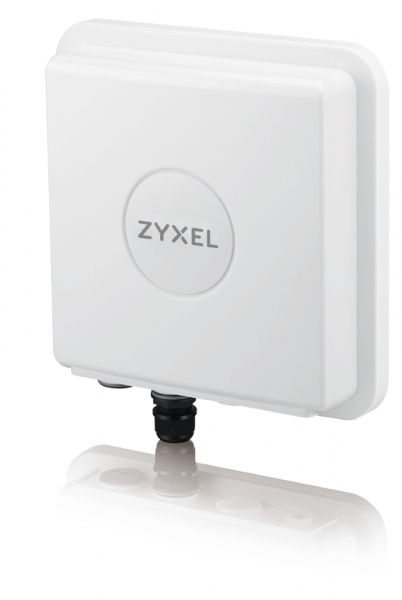
Figure 2. Outdoor gigabit LTE Cat.6 router LTE7460-M608.
We are currently discussing suburban real estate, but working in an office also requires reliable connectivity. For small firms, using a backup channel based on LTE is a reasonable solution, especially if the landlord does not allow additional drilling and inviting another provider.
Note. In the absence of a PoE network source: switch, router, you can use an injector for PoE power; the injector for the LTE7460-M608 model is already included in the package.
At the end of May 2020, a new model will be available. (outdoor LTE Cat.12 router Zyxel LTE7480-M804 (SIM card inserted), with , and support for LTE/3G/2G, LTE bands 1/3/7/8/20/38/40, LTE antennas with a gain of 8 dBi. The router has 1 LAN GE port with PoE power. Of course, a PoE injector is also included.
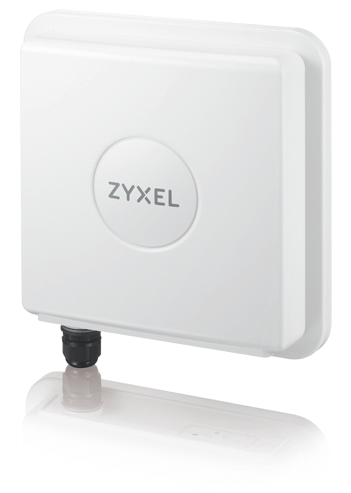
Figure 3. The new outdoor LTE Cat.12 router Zyxel LTE7480-M804.
Using the router for outdoor placement indoors is possible, but the reverse is not. Therefore, such devices can also serve simply as a replacement for an LTE modem, but with an Ethernet output that can be extended up to 100m.
A configuration can be implemented with an LTE router and an additional router from a 'wired' provider. This setup has certain advantages — complete redundancy and no single point of failure. It is also advisable to consider the mutual influence of the two Wi-Fi networks on each other, which we discussed in detail in the series of articles:
When having to move
A common remote work scheme is when an employee spends the majority of their time outside the city and comes to the city briefly for business. To avoid paying for Internet access in two locations, one can purchase a portable LTE router that acts as a backup Internet access point at their usual location and serves as the primary one during trips to the city.
Earlier, we discussed a cute model , but now a more modern counterpart has been released, which supports 5GHz and 2.4GHz and is generally an improved version.
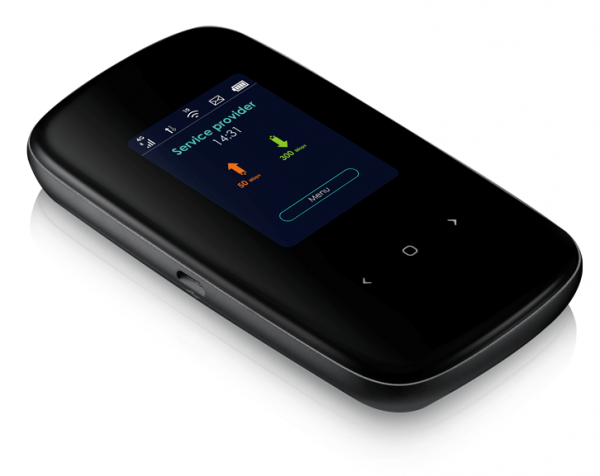
Figure 4. The portable router LTE2566-M634.
When everything is gathered.
Let's consider another option for organizing work, which is also quite mobile, although it is harder to call this an individual personal device.
This is about a desktop gigabit LTE Cat.6 router AC1200 with a LAN port and Wi-Fi—
This model is designed and manufactured specifically for situations where access needs to be organized for multiple people (family, small office), and there is a need to move from place to place from time to time.
Note. The Zyxel LTE4506(-M606) LTE-A HomeSpot provides mobile broadband connectivity using Carrier Aggregation technology, and since this technology is compatible with LTE, DC-HSPA+/HSPA/UMTS, and EDGE/GPRS/GSM, it can operate in cellular networks across different countries. The LTE4506 can simultaneously transmit two streams of wireless traffic AC1200 (2.4 GHz and 5 GHz), allowing up to 32 devices to be connected via Wi-Fi at the same time.
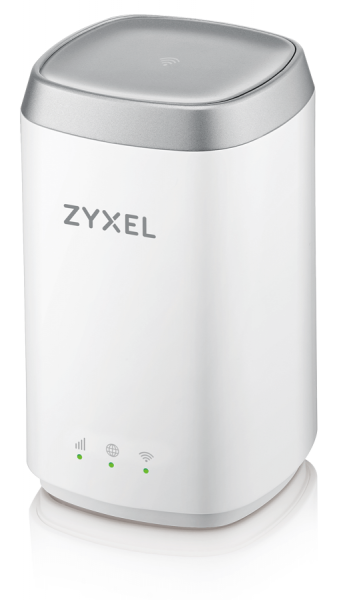
Figure 5. Portable router Zyxel LTE4506-M606
Such a model can be placed, for example, on a desk, in a meeting room, in the kitchen, in a hotel room, or anywhere else where you find it convenient to work at the moment.
Its interesting design, convenient controls, and compact size allow it to be positioned closer to the immediate participants in the network exchange instead of hiding it on a shelf.
Another plus is that this device, due to its small size and lack of placement requirements, can easily move from place to place while maintaining a stable cellular signal reception and providing reliable Wi-Fi and wired connections.
For example, it can be placed in a car if work involves travel. The larger size (compared to the LTE2566-M634) allowed for not compromising on the dimensions of the internal antenna and other components, which improves connection quality compared to an individual pocket router.
Instead of a conclusion
"Is it worth making such efforts?" asks the skeptical reader — "after all, this 'self-isolation' will eventually end..."
The thing is, the very idea of remote work is gradually finding its place in our lives. Indeed, gathering together to 'feel the elbow of a comrade,' while daily losing over an hour of life commuting to the office and the same returning home, causing traffic jams and crowds in the subway — what’s the point of all this?
Sooner or later, businesses will fully 'appreciate' remote work (especially saving on rent and maintaining unnecessary office space), just as they have appreciated the matrix management model. They will increasingly adopt this new work mode.
Accordingly, employees, having tasted the freedom of working from home, will strive for this mode of organization.
We'll live and see!
Useful links
Source: habr.com
