

Minio is a simple, fast, and AWS S3-compatible object storage. Minio is designed for hosting unstructured data such as photographs, videos, log files, and backups. Minio also supports a distributed mode that allows connecting multiple disks to a single object storage server, even if they are on different machines.
The goal of this post is to configure Minio so that each user can only work with their own bucket.
Overall, Minio is suitable for the following cases:
- storage without replication over a reliable file system with S3 access (small and medium-sized storage hosted on NAS and SAN);
- storage without replication over an unreliable file system with S3 access (for development and testing);
- storage with replication across a small group of servers in a single rack with S3 protocol access (fault-tolerant storage with a failure domain equal to the rack).
On RedHat systems, we connect an unofficial Minio repository.
yum -y install yum-plugin-copr
yum copr enable -y lkiesow/minio
yum install -y minio minio-mc
Generate and add to MINIO_ACCESS_KEY and MINIO_SECRET_KEY in /etc/minio/minio.conf.
# Custom username or access key of minimum 3 characters in length.
MINIO_ACCESS_KEY=

# Custom password or secret key of minimum 8 characters in length.
MINIO_SECRET_KEY=
If you are not using nginx in front of Minio, you need to change.
--address 127.0.0.1:9000to
--address 0.0.0.0:9000Start Minio.
systemctl start minioCreate a connection to Minio named myminio.
minio-mc config host add myminio http://localhost:9000 MINIO_ACCESS_KEY
MINIO_SECRET_KEY
Create the bucket user1bucket.
minio-mc mb myminio/user1bucketCreate the bucket user2bucket.
minio-mc mb myminio/user2bucketCreate the policy file user1-policy.json.
{
  "Version": "2012-10-17",
  "Statement": [
    {
      "Action": [
        "s3:PutBucketPolicy",
        "s3:GetBucketPolicy",
        "s3:DeleteBucketPolicy",
        "s3:ListAllMyBuckets",
        "s3:ListBucket"
      ],
      "Effect": "Allow",
      "Resource": [
        "arn:aws:s3:::user1bucket"
      ],
      "Sid": ""
    },
    {
      "Action": [
        "s3:AbortMultipartUpload",
        "s3:DeleteObject",
        "s3:GetObject",
        "s3:ListMultipartUploadParts",
        "s3:PutObject"
      ],
      "Effect": "Allow",
      "Resource": [
        "arn:aws:s3:::user1bucket/*"
      ],
      "Sid": ""
    }
  ]
}
Create the policy file user2-policy.json.
{
  "Version": "2012-10-17",
  "Statement": [
    {
      "Action": [
        "s3:PutBucketPolicy",
        "s3:GetBucketPolicy",
        "s3:DeleteBucketPolicy",
        "s3:ListAllMyBuckets",
        "s3:ListBucket"
      ],
      "Effect": "Allow",
      "Resource": [
        "arn:aws:s3:::user2bucket"
      ],
      "Sid": ""
    },
    {
      "Action": [
        "s3:AbortMultipartUpload",
        "s3:DeleteObject",
        "s3:GetObject",
        "s3:ListMultipartUploadParts",
        "s3:PutObject"
      ],
      "Effect": "Allow",
      "Resource": [
        "arn:aws:s3:::user2bucket/*"
      ],
      "Sid": ""
    }
  ]
}
Create a user user1 with the password test12345.
minio-mc admin user add myminio user1 test12345Creating user user2 with password test54321.
minio-mc admin user add myminio user2 test54321Creating a policy in Minio named user1-policy from the file user1-policy.json.
minio-mc admin policy add myminio user1-policy user1-policy.jsonCreating a policy in Minio named user2-policy from the file user2-policy.json.
minio-mc admin policy add myminio user2-policy user2-policy.jsonApplying policy user1-policy to user user1.
minio-mc admin policy set myminio user1-policy user=user1Applying policy user2-policy to user user2.
minio-mc admin policy set myminio user2-policy user=user2Checking the connection of policies to users
minio-mc admin user list myminioThe check of policy connections to users will look something like this
enabled    user1                 user1-policy
enabled    user2                 user2-policy
For clarity, access via the browser at the address
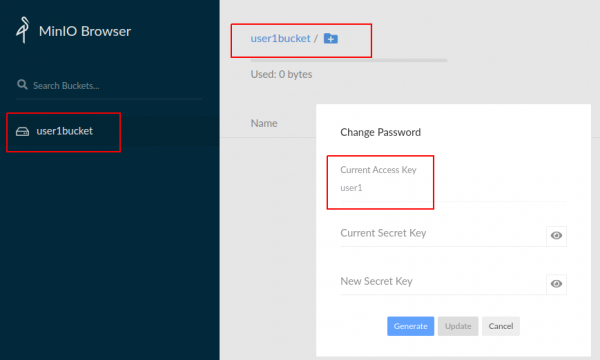
We see that we have connected to Minio as MINIO_ACCESS_KEY=user1. The bucket user1bucket is accessible to us.
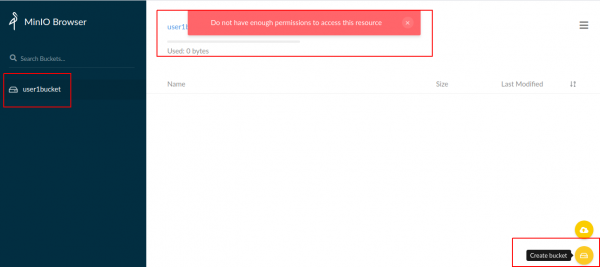
Creating a bucket will not be possible, as there is no corresponding Action in the policy.
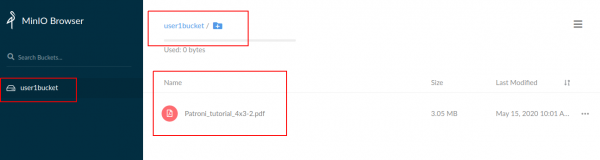
Let's create a file in the bucket user1bucket.
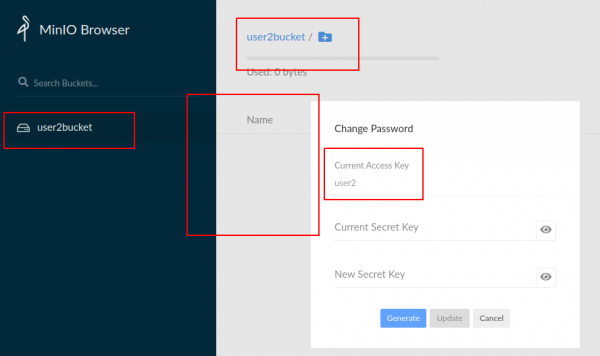
Connecting to Minio as MINIO_ACCESS_KEY=user2. The bucket user2bucket is accessible to us.
And we do not see either user1bucket or files from user1bucket.
Created a Telegram chat about Minio
Source: habr.com
