

Introduction
Open source project — a free enterprise-level virtualization platform. Browsing through Habr, I found that it is not as widely covered here as it deserves.
oVirt is essentially the upstream for the commercial Red Hat Virtualization (RHV, formerly RHEV) system, growing under the umbrella of Red Hat. To avoid confusion, this do not is similar to CentOS vs RHEL, the model is closer to Fedora vs RHEL.
Under the hood — , it utilizes a web interface for management. It is based on RHEL/CentOS 7.
oVirt can be used for both “traditional” server and desktop virtualization (VDI), unlike VMware solutions where both systems can coexist in a single setup.
The project is well , has long reached maturity for productive use, and is ready for high loads.
This article is the first in a series on how to build a working fault-tolerant cluster. By following them, we will have a fully functional system in a short time (about 2 hours), although some issues cannot be covered, I will try to highlight them in the following articles.
We have been using it for several years, starting with version 4.1. Our production system currently runs on HPE Synergy 480 and ProLiant BL460c 10th generation machines with Xeon Gold CPU.
At the time of writing, the current version is 4.3.
Articles
- Introduction (We are here)
Functional features
In oVirt, there are 2 main entities: ovirt-engine and ovirt-host(s). For those familiar with VMware products, oVirt as a platform is similar to vSphere, the ovirt-engine management layer performs the same functions as vCenter, and the ovirt-host is the hypervisor, like ESX(i). Since vSphere is a very popular solution, I will occasionally draw comparisons to it.
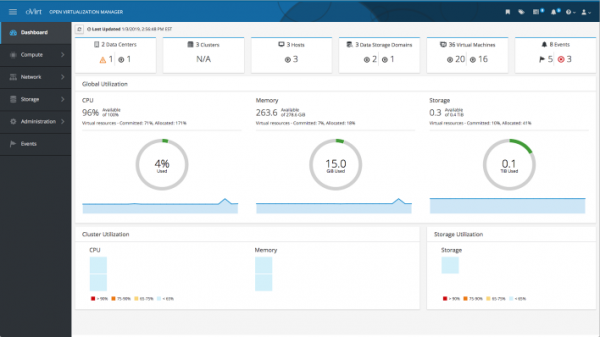
Fig. 1 — oVirt control panel.
Most Linux distributions and versions of Windows are supported as guest machines. There are agents for guest machines along with optimized virtual devices and virtio drivers, primarily for disk controllers and network interfaces.
To implement a fault-tolerant solution and all the interesting features, shared storage is required. Both block FC, FCoE, iSCSI, as well as file-based NFS storage and more are supported. For a fault-tolerant solution, the storage system must also be fault-tolerant (at least 2 controllers, multipathing).
Using local storage is possible, but by default, only shared storages are suitable for the current cluster. Local storages make the system a disparate set of hypervisors, and even with a shared storage, it will not be possible to assemble a cluster. The most correct approach is diskless machines with boot from SAN, or minimal size disks. Possibly, through vdsm hook, there is a way to assemble from local disks using Software Defined Storage (e.g., Ceph) and present it to VMs, but I haven't seriously considered it.
Architecture
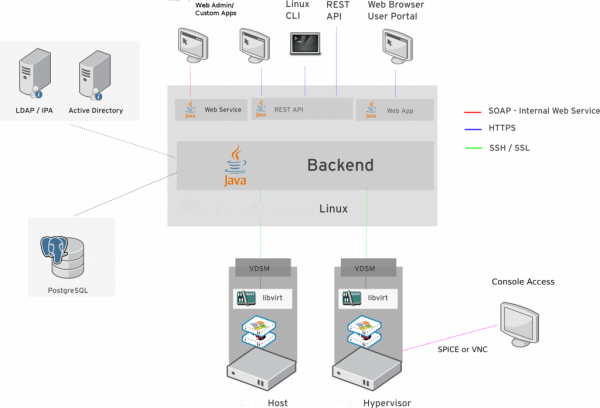
Fig. 2 — oVirt architecture.
More details on the architecture can be found in the developer.
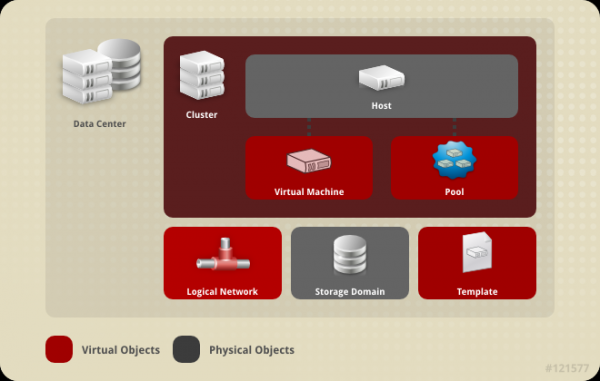
Fig. 3 — oVirt objects.
The top element in the hierarchy is Data Center. It defines whether shared or local storages are used, as well as the set of features utilized (compatibility, from 4.1 to 4.3). There can be one or more. For many cases, it is suitable to use the default Data Center — Default.
The Data Center consists of one or more Clusters. A cluster defines the type of processor, migration policies, etc. For small installations, you can also get by with the Default cluster.
A cluster, in turn, consists of Hosthosts that perform the main work — they carry virtual machines, and storages are connected to them. A cluster is expected to have 2 or more hosts. Although it is technically possible to make a cluster with one host, it has no practical benefits.
oVirt supports many features, including live migration of virtual machines between hypervisors (live migration) and storages (storage migration), virtual desktop infrastructure with VM pools, stateful and stateless VMs, support for NVIDIA Grid vGPU, import from vSphere, KVM, and has powerful and much more. All these features are available without licensing fees, and if support is needed, it can be purchased from Red Hat through regional partners.
On the prices for RHV
The cost is low compared to VMware; only support is purchased — without the need to buy the license itself. Support is purchased only for hypervisors and ovirt-engine, unlike vCenter Server, which incurs costs.
Example calculation for the 1st year of ownership
Let's consider a cluster of 4 two-socket machines and retail prices (without project discounts).
Standard RHV subscription per socket/year (premium 365/24/7 — $1499), total 4*2*$999=$7992.
:
- VMware vCenter Server Standard $10,837.13 per instance, plus Basic subscription $2,625.41 (Production — $3,125.39);
- VMware vSphere Standard $1,164.15 + Basic Subscription $552.61 (Production $653.82);
- VMware vSphere Enterprise Plus $6,309.23 + Basic Subscription $1,261.09 (Production $1,499.94).
Total: 10,837.13 + 2,625.41 + 4 * 2 * (1,164.15 + 552.61) = $27 196,62 for the lowest option. The difference is about 3.5 times!
In oVirt, all features are available without restrictions.
Brief specifications and maximums
System requirements
The hypervisor requires a CPU with hardware virtualization enabled, a minimum of 2 GB of RAM to start — 55 GB recommended storage for the OS (mostly for logs, etc., the OS takes up little space).
Read more — .
For minimum requirements 2 cores/4 GB RAM/25 GB storage. Recommended — from 4 cores/16 GB RAM/50 GB storage.
As in any system, there are limits on capacities and quantities, most of which exceed the capabilities of available commercial servers. For example, a pair of can address 2 TiB of RAM and provides 40 cores (80 threads), which is even less than the limits of a single VM.
Virtual Machine Maximums:
- Maximum concurrently running virtual machines: Unlimited;
- Maximum virtual CPUs per virtual machine: 384;
- Maximum memory per virtual machine: 4 TiB;
- Maximum single disk size per virtual machine: 8 TiB.
Host Maximums:
- Logical CPU cores or threads: 768;
- RAM: 12 TiB;
- Number of hosted virtual machines: 250;
- Simultaneous live migrations: 2 incoming, 2 outgoing;
- Live migration bandwidth: Default to 52 MiB (~436 Mb) per migration when using the legacy migration policy. Other policies use adaptive throughput values based on the speed of the physical device. QoS policies can limit migration bandwidth.
Manager Logical Entity Maximums:
In 4.3 there are .
- Data center
- Maximum data center count: 400;
- Maximum host count: 400 supported, 500 tested;
- Maximum VM count: 4000 supported, 5000 tested;
- Cluster
- Maximum cluster count: 400;
- Maximum host count: 400 supported, 500 tested;
- Maximum VM count: 4000 supported, 5000 tested;
- Network
- Logical networks/cluster: 300;
- SDN/external networks: 2600 tested, no enforced limit;
- Storage
- Maximum domains: 50 supported, 70 tested;
- Hosts per domain: No limit;
- Logical volumes per block domain (more): 1500;
- Maximum number of LUNs (more): 300;
- Maximum disk size: 500 TiB (limited to 8 TiB by default).
Deployment options
As mentioned before, oVirt is built from 2 basic elements — ovirt-engine (management) and ovirt-host (hypervisor).
The Engine can be hosted either outside the platform itself (standalone Manager — this can be a VM running on another platform or a separate hypervisor and even a physical machine), or on the platform itself (self-hosted engine, similar to the VCSA approach from VMware).
The hypervisor can be installed on (EL Host), as well as on (oVirt-Node, based on el7).
Hardware requirements for all options are approximately the same.
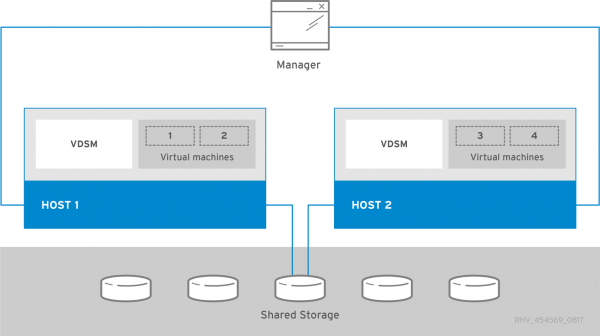
Fig. 4 — standard architecture.
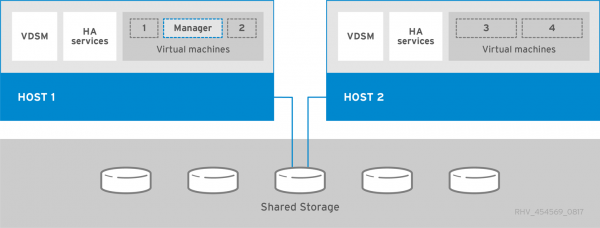
Fig. 5 — Self-hosted Engine architecture.
I chose the standalone Manager and EL Hosts option for myself:
- The standalone Manager is slightly simpler when there are startup issues, eliminating the chicken-and-egg dilemma (just like with VCSA — you can’t start until at least one host is fully up), but there is a dependency on another system*;
- EL Host provides all the power of the OS, which is useful for external monitoring, debugging, troubleshooting, etc.
* However, during the entire time of operation, this was not needed, even after a serious power failure.
But let's get to the point!
For the experiment, there's a chance to free up a couple of ProLiant BL460c G7 blades with Xeon® CPU. We will use them to reproduce the installation process.
We will name the nodes ovirt.lab.example.com, kvm01.lab.example.com, and kvm02.lab.example.com.
Now we move directly to .
Source: habr.com
