

A couple of weeks ago, I published Since the Raspberry Pi 4 is also based on ARM, some of the optimizations mentioned in the previous article are quite suitable for it. I would like to share these tips and find out if you experience similar performance improvements.
After setting up the Raspberry Pi in my , I noticed that during moments of memory shortage it became very unresponsive and even froze. To address this problem, I added ZRAM and made several adjustments to the kernel parameters.
Activating ZRAM on Raspberry Pi
creates a block storage in RAM named /dev/zram0 (or 1, 2, 3, etc.). Pages written to it are compressed and stored in memory. This allows for very fast I/O operations and also frees up memory through compression.
The Raspberry Pi 4 comes with 1, 2, 4, or 8 GB of RAM. I will be using the 1 GB model, so adjust the instructions according to your model. With 1 GB, the default swap file (slow!) will be used less frequently. I used the following script for installation and automatic configuration.
Instructions are provided in the repository linked above. To install:
git clone https://github.com/foundObjects/zram-swap.git
cd zram-swap && sudo ./install.sh
If you want to edit the config:
vi /etc/default/zram-swap In addition, ZRAM can be activated by installing zram-tools. If you are using this method, be sure to edit the config in the file /etc/default/zramswap, and set about 1 GB of ZRAM:
sudo apt install zram-toolsAfter installation, you can check the ZRAM storage statistics with the following command:
sudo cat /proc/swaps
Filename				Type		Size	Used	Priority
/var/swap                               file		102396	0	-2
/dev/zram0                              partition	1185368	265472	5
pi@raspberrypi:~ $
Adding kernel parameters for better ZRAM utilization
Now let's fix the system behavior when the Raspberry Pi resorts to swapping at the last moment, which often leads to freezes. We will add a few lines to the file /etc/sysctl.conf and reboot.
These lines will 1) delay the inevitable memory exhaustion, increasing pressure on the kernel cache, and 2) start preparing for memory exhaustion earlier, initiating swapping in advance. But this will be a much more efficient swap with compressed memory via ZRAM!
Here are the lines to add to the end of the file /etc/sysctl.conf:
vm.vfs_cache_pressure=500
vm.swappiness=100
vm.dirty_background_ratio=1
vm.dirty_ratio=50
Then restart the system or activate the changes with the following command:
sudo sysctl --systemvm.vfs_cache_pressure=500 increases pressure on the cache, which makes the kernel more inclined to reclaim memory used for caching directory objects and indexes. You will use less memory over a longer period. Sudden drops in performance are mitigated by earlier swapping.
vm.swappiness=100 increases the parameter that determines how aggressively the kernel will swap memory pages, as we are first using ZRAM.
vm.dirty_background_ratio=1 & vm.dirty_ratio=50 — background processes will start writing immediately upon reaching the 1% limit, but the system will not forcibly perform synchronous I/O until it reaches the dirty_ratio of 50%.
These four lines (when used with ZRAM) will help improve performance in case you inevitably run out of RAM and start swapping, as I have. Knowing this fact, and considering that memory compression in ZRAM is three times better, it's better to start this swapping earlier.
Cache pressure helps because we are effectively telling the kernel: 'Hey, listen, I don't have extra memory to use for cache, so please clear it out as soon as possible and keep only the most frequently used/important data.'
Even with reduced caching, if over time most of the installed memory is occupied, the kernel will start opportunistic swapping much earlier, so that the CPU (compression) and I/O for swapping will not drag on until the last moment and utilize all resources at once when it's already too late. ZRAM uses a bit of CPU for compression, but in most low-memory systems, this impacts performance much less than swapping without ZRAM.
In conclusion
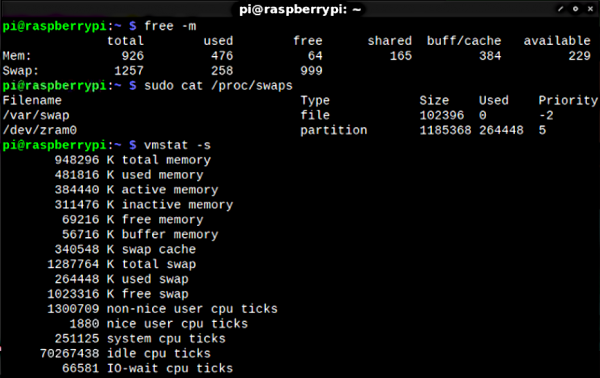
Let's take a look at the result again:
pi@raspberrypi:~ $ free -h
total used free shared buff/cache available
Mem: 926Mi 471Mi 68Mi 168Mi 385Mi 232Mi
Swap: 1.2Gi 258Mi 999Mi

pi@raspberrypi:~ $ sudo cat /proc/swaps
Filename Type Size Used Priority
/var/swap file 102396 0 -2
/dev/zram0 partition 1185368 264448 5
264448 in ZRAM is nearly one gigabyte of uncompressed data. Everything went into ZRAM, and nothing ended up in the much slower swap file. Try these settings for yourself; they work on all Raspberry Pi models. My unusable, hanging system has turned into a functional and stable one.
In the near future, I hope to continue and update this article with some results from testing the system before and after installing ZRAM. Right now, I just don’t have the time for it. Meanwhile, feel free to perform your own tests and let me know in the comments. The Raspberry Pi 4 is simply a beast with these settings. Enjoy!
On the topic:
- (2017)
- (2020)
Source: habr.com
