

SQL, what could be simpler? Each of us can write a simple query — just type select, list the required columns, then from, the table name, add a few conditions in where and that's it — we have useful data at our fingertips, (almost) regardless of which DBMS is running behind the scenes (or maybe it's not even a DBMS at all And we’ll start right with
ORM pre-Petrov Russia .
ORM proponents traditionally value the speed and simplicity of development, independence from the DBMS, and code cleanliness. For many of us, the code for working with the database (and often the database itself)
usually looks something like this…
@Entity @Table(name = "stock", catalog = "maindb", uniqueConstraints = { @UniqueConstraint(columnNames = "STOCK_NAME"), @UniqueConstraint(columnNames = "STOCK_CODE") }) public class Stock implements java.io.Serializable {@Id @GeneratedValue(strategy = IDENTITY) @Column(name = "STOCK_ID", unique = true, nullable = false) public Integer getStockId() { return this.stockId; } ...
The model is adorned with smart annotations, and somewhere behind the scenes, the valiant ORM is generating and executing tons of some SQL code. By the way, developers are striving to shield themselves from their database with layers of abstractions, indicating a certain"SQL hatred" .
But what if we take the best of both worlds? As is done in the wonderful tool with the optimistic name
Yesql I will provide a couple of lines from the general concept in my free translation, and you can get to know it in more detail. .
Clojure is a cool language for creating DSLs, but SQL itself is already a cool DSL, and we don’t need another one. S-expressions are beautiful, but they add nothing new here. In the end, we’re just getting parentheses for the sake of parentheses. Don’t agree? Then wait for the moment when the abstraction over the database starts leaking, and you’ll begin the struggle with the function. (raw-sql)
What to do? Let’s keep SQL as plain SQL — one file for one query:
-- name: users-by-country
select *
  from users
 where country_code = :country_code
… and then read this file, turning it into a regular Clojure function:
(defqueries "some/where/users_by_country.sql"
   {:connection db-spec})

;;; A function with the name `users-by-country` has been created.
;;; Let's use it:
(users-by-country {:country_code "GB"})
;=> ({:name "Kris" :country_code "GB" ...} ...)
By adhering to the principle of "SQL separately, Clojure separately," you get:
- No syntactic surprises. Your database (like any other) does not conform to the SQL standard 100% — but that doesn't matter for Yesql. You'll never waste time hunting for functions with SQL-equivalent syntax. You’ll never have to return to the function (raw-sql "some (‘funky’ :: SYNTAX)").
- Better editor support. Your editor already has excellent support for SQL. By keeping SQL as SQL, you can simply use it.
- Team compatibility. Your DBAs can read and write SQL that you use in your Clojure project.
- Easier performance tuning. Need to build a plan for a problematic query? It’s not an issue when your query is plain SQL.
- Reuse of queries. Drag those same SQL files into other projects, because it's just good old SQL — simply share it.
In my opinion, the idea is very cool and at the same time very simple, which has allowed the project to gain a lot of traction in a variety of languages. And we will try to apply a similar philosophy of separating SQL code from everything else far beyond ORM.
IDE & DB managers
Let's start with a simple everyday task. We often need to search for objects in a database, for example, to find a table in a schema and examine its structure (which columns, keys, indexes, constraints, etc. are used). From any graphical IDE or basic DB manager, we expect these capabilities first and foremost. The process should be quick without waiting half an hour for a window with the necessary information to appear (especially when connected to a remote database), and the information provided should be fresh and up-to-date, not stale cached data. Moreover, the larger and more complex the database and the more of them there are, the harder this becomes.
But usually, I toss the mouse aside and just write the code. Suppose we need to find out which tables (and with what properties) are present in the "HR" schema. In most DBMS, the desired result can be achieved with a straightforward query from information_schema:
select table_name
     , ...
  from information_schema.tables
 where schema = 'HR'
The contents of such reference tables vary from database to database, depending on the capabilities of each DBMS. For example, for MySQL, we can get specific parameters for that DBMS from the same reference:
select table_name
     , storage_engine -- Used engine ("MyISAM", "InnoDB" etc)
     , row_format     -- Row format ("Fixed", "Dynamic" etc)
     , ...
  from information_schema.tables
 where schema = 'HR'
Oracle does not support information_schema, but it has , and it does not cause major issues:
select table_name
     , pct_free       -- Minimum free space in the data block (%)
     , pct_used       -- Minimum used space in the data block (%)
     , last_analyzed  -- Date of last statistics collection
     , ...
  from all_tables
 where owner = 'HR'
ClickHouse is no exception:
select name
     , engine -- Used engine ("MergeTree", "Dictionary" etc)
     , ...
  from system.tables
 where database = 'HR'
Something similar can be done in Cassandra (where there are column families instead of tables and keyspaces instead of schemas):
select columnfamily_name
     , compaction_strategy_class  -- Garbage collection strategy
     , gc_grace_seconds           -- Garbage lifetime
     , ...
  from system.schema_columnfamilies
 where keyspace_name = 'HR'
For most other databases, similar queries can also be conceived (even in Mongo, there is a , which contains information about all collections in the system).
Of course, this method can provide information not only about tables but about any object at all. Occasionally, kind people share such code for different databases, such as in the series of articles on Habr titled "Functions for Documenting PostgreSQL Databases" (, , ). Naturally, keeping all these queries in mind and constantly typing them out is not exactly a pleasure, so in my favorite IDE/editor, I have a pre-prepared set of snippets for frequently used queries, and I just need to enter the names of the objects into the template.
As a result, this method of navigating and searching for objects is much more flexible, saves a lot of time, and allows obtaining exactly the information needed in the format currently required (as described in the post ).
Operations with Objects
After we find and study the necessary objects, it's time to do something useful with them. Naturally, without taking our fingers off the keyboard.
It's no secret that simply deleting a table will look almost the same across all databases:
drop table hr.personsHowever, creating a table is more interesting. Practically any DBMS (including many NoSQL databases) can do "create table" in one form or another, and its main part will hardly differ much (name, list of columns, data types), but the other details can vary significantly and depend on the internal structure and capabilities of a particular DBMS. My favorite example is that in Oracle's documentation, the bare BNF for the syntax of "create table" . Other DBMS have more modest capabilities, but each also possesses many interesting and unique features for creating tables (, , , ). Rarely will any graphical "wizard" from another IDE (especially a universal one) be able to fully cover all these capabilities, and if it can, it won't be a sight for the fainthearted. At the same time, a correctly and timely written operator create table will allow you to easily take advantage of all of them, making storage and access to your data reliable, optimal, and as comfortable as possible.
Many databases also have their own specific types of objects that are absent in other databases. Moreover, we can perform operations not only on database objects but also on the database itself, for example, "kill" a process, free some memory space, enable tracing, switch to "read only" mode, and much more.
And now let's do some drawing
One of the most common tasks is to build a diagram with database objects, to visualize the objects and their relationships in a nice picture. This capability is available in almost any graphical IDE, as well as in separate command line utilities, specialized graphical tools, and modeling software. They can generate a drawing "as they can", and you can only influence this process a bit through several parameters in the configuration file or checkboxes in the interface.
But this problem can be solved much more simply, flexibly, and elegantly, of course, with the help of code. For constructing diagrams of any complexity, we have several specialized markup languages (DOT, GraphML, etc.), and a plethora of applications (GraphViz, PlantUML, Mermaid) that can read such instructions and visualize them in various formats. Well, we already know how to obtain information about objects and their relationships.
Let's give a small example of what this could look like, using PlantUML and (on the left, an SQL query that generates the necessary instruction for PlantUML, and on the right, the result):
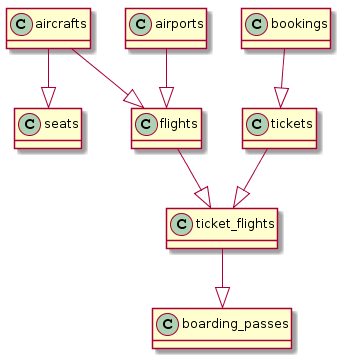
select '@startuml'||chr(10)||'hide methods'||chr(10)||'hide stereotypes' union all
select distinct ccu.table_name || ' --|> ' ||
       tc.table_name as val
  from table_constraints as tc
  join key_column_usage as kcu
    on tc.constraint_name = kcu.constraint_name
  join constraint_column_usage as ccu
    on ccu.constraint_name = tc.constraint_name
 where tc.constraint_type = 'FOREIGN KEY'
   and tc.table_name ~ '.*' union all
select '@enduml'
If you try a bit harder, you can get something that looks very much like a real ER diagram based on :
The SQL query is just a little more complex
-- Header
select '@startuml
!define Table(name,desc) class name as "desc" << (T,#FFAAAA) >>
!define primary_key(x) <b>x</b>
!define unique(x) <color:green>x</color>
!define not_null(x) <u>x</u>
hide methods
hide stereotypes'
union all
-- Tables
select format('Table(%s, "%s n information about %s") {'||chr(10), table_name, table_name, table_name) ||
(select string_agg(column_name || ' ' || upper(udt_name), chr(10))
from information_schema.columns
where table_schema = 'public'
and table_name = t.table_name) || chr(10) || '}'
from information_schema.tables t
where table_schema = 'public'
union all
-- Relationships between tables
select distinct ccu.table_name || ' "1" --> "0..N" ' || tc.table_name || format(' : "A %s may have many %s"', ccu.table_name, tc.table_name)
from information_schema.table_constraints as tc
join information_schema.key_column_usage as kcu on tc.constraint_name = kcu.constraint_name
join information_schema.constraint_column_usage as ccu on ccu.constraint_name = tc.constraint_name
where tc.constraint_type = 'FOREIGN KEY'
and ccu.constraint_schema = 'public'
and tc.table_name ~ '.*'
union all
-- Footer
select '@enduml' 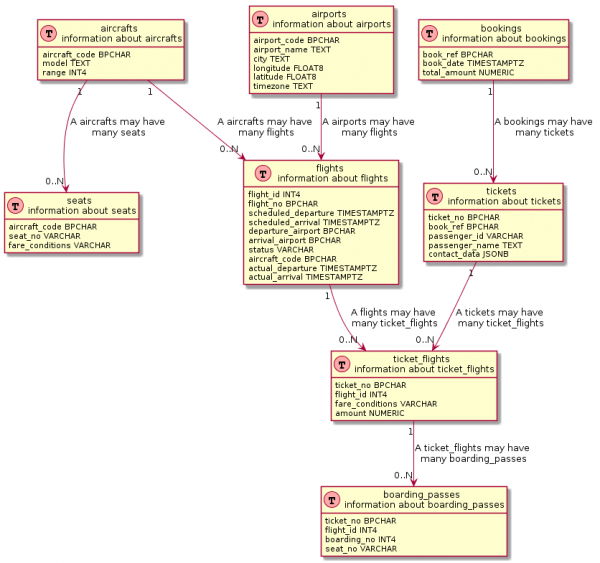
If you look closely, many visualization tools under the hood also use similar queries. However, these queries are usually deeply , not to mention any modifications.
Metrics and monitoring
Let's move on to the traditionally challenging topic of database performance monitoring. I'll recall a small true story shared with me by 'one of my friends.' In a recent project, there lived a powerful DBA, and few developers knew him personally or had actually seen him (despite rumors that he worked somewhere in the neighboring building). At the 'X' hour, when the production system of a large retailer began to feel 'unwell' once again, he would quietly send screenshots from the Oracle Enterprise Manager, highlighting critical areas in red for 'clarity' (which, to put it mildly, was of little help). And it was on this 'snapshot' that the healing process had to take place. Meanwhile, no one had access to the precious (in both senses of the word) Enterprise Manager, as the system was complex and expensive, and the fear was that 'developers might accidentally break something.' Therefore, developers would empirically find the location and cause of the slowdowns and release a patch. If a grim letter from the DBA didn’t arrive again soon, everyone would breathe a sigh of relief and return to their current tasks (until the next Letter).
But the monitoring process can look more cheerful and friendly, and most importantly — accessible and transparent for everyone. At least the basic part of it, as an addition to the main monitoring systems (which are undoubtedly useful and, in many cases, indispensable). Any DBMS is freely and completely ready to share information about its current state and performance. In the same 'bloody' Oracle DB, almost any performance information can be obtained from system views, starting from processes and sessions to the state of the buffer cache (for instance, , section 'Monitoring'). In Postgresql, there is also a whole array of system views for , including those indispensable for every DBA’s everyday life, such as , , performance metrics. performance_schema. profiler .
Thus, armed with any metrics collector (Telegraf, Metricbeat, Collectd) that can execute custom SQL queries, a repository for these metrics (InfluxDB, Elasticsearch, Timescaledb), and a visualizer (Grafana, Kibana), you can create a sufficiently lightweight and flexible monitoring system that will be closely integrated with other system-wide metrics (obtained, for example, from the application server, from the OS, etc.). This is similar to how it is done in pgwatch2, which uses the combination of InfluxDB + Grafana along with a set of queries to system views, to which you can also .
Total
And this is just a rough outline of what can be done with our database using standard SQL code. I'm sure there are many more applications; feel free to share in the comments. Next time, we will discuss how (and, most importantly, why) to automate all of this and integrate it into your CI/CD pipeline.
Source: habr.com
