

The Capacity Tier (or as we call it internally within Veeam - captier) emerged back in the days of Veeam Backup and Replication 9.5 Update 4 under the name Archive Tier. The idea behind it is to enable moving backups that fall outside the so-called operational restore window to object storage. This helped to free up disk space for users who had little of it. This option was called Move Mode.
To perform this seemingly simple action, two conditions needed to be met: all points from the backup being moved had to be outside the aforementioned operational restore window, which is clearly defined in the UI. And secondly, the chain had to be in what is called a 'sealed state' (sealed backup chain or Inactive Backup Chain). This means that over time, there are no changes in this chain.
But in VBR v10, the concept was enhanced with new features — Copy Mode, Sealed Mode, and a feature with a complicated name, Immutability.
Today, we will discuss these fascinating topics. First, we'll look at how it worked in VBR9.5u4, and then cover the changes in the tenth version.

And may the advocates of pure language forgive me, but there are too many terms that cannot be translated.
So, there will be plenty of Anglicisms here.
And a lot of GIFs.
And images.
- Without the slightest regret. The author of the article.
How it was
Let’s start with an analysis of the operational restore window and sealed backup (or as they are called in the documentation, Inactive Backup Chain). Without understanding these, further explanation will not be possible.
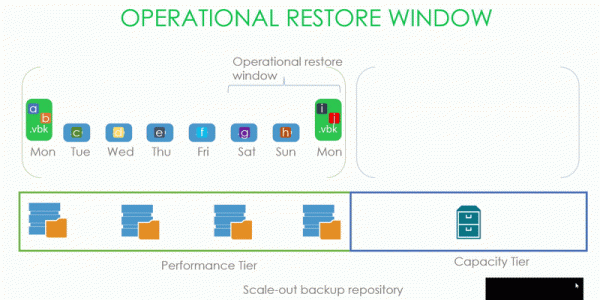
As we can see in the picture, we have a backup chain with data blocks located on the Performance tier of the SOBR repository, to which the Capacity Tier is connected. Our operational backup window is three days.
Accordingly, a .vbk created on Monday seals the previous chain, which has a window set for three days. Thus, it is possible to start moving to the capacity tier everything older than these three days.
But what exactly was meant by a sealed chain and what could be sent to the capacity tier in update 4?
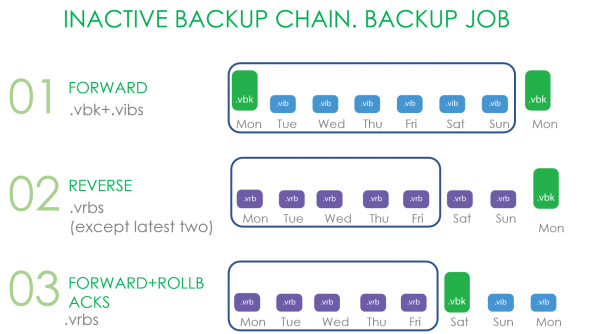
For Forward Incremental, the sign of sealing a chain is the creation of a new full backup. It doesn't matter how this full backup is obtained: synthetic full and active full backups are counted.
In the case of Reverse, it is all files that are not included in the operational window.
In the case of Forward increment with rollbacks, these are all rollbacks and .vbk, if there is another .vbk on the performance extent.
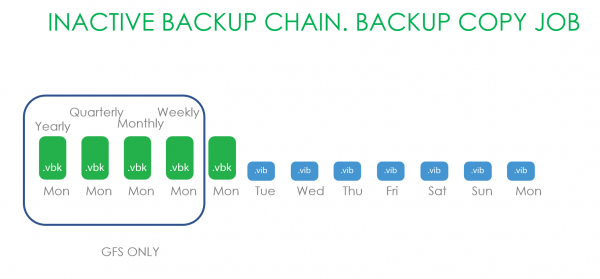
Now let's consider the option of working with Backup Copy chains. Here, only what falls under GFS retention was transported. Because everything stored in newer backup copy chains may have been altered in one way or another.
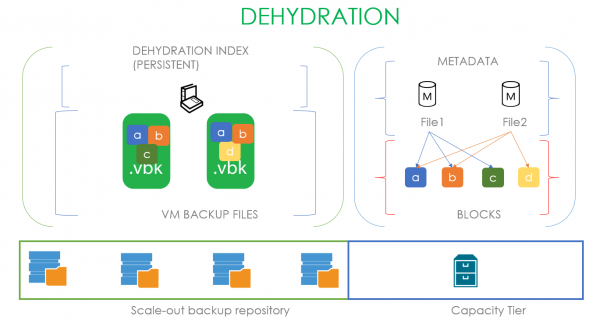
Now let's look under the hood. There, a process called dehydration occurs — leaving empty backup file placeholders on the extent and moving blocks from these files to the capacity tier. To optimize this process, a so-called dehydration index is used, which allows blocks that have already been copied to the capacity tier not to be copied again.
Let's illustrate this with an example: suppose we have a .vbk that has exited the operational window and belongs to a sealed chain. This means we have the full right to move it to the capacity tier. At the moment of moving, a metadata file is created in the capacity tier and blocks of the transferable file. The metadata file at the reference level describes which blocks make up our file. In the case shown, our first file consists of blocks a, b, c, and links to these blocks are placed in the metadata. When we have a second .vbk file ready to move and consisting of blocks a, b, and d, by analyzing the dehydration index, we understand that we only need to transfer block d. Its metadata file will contain links to the two previous blocks and one new block.
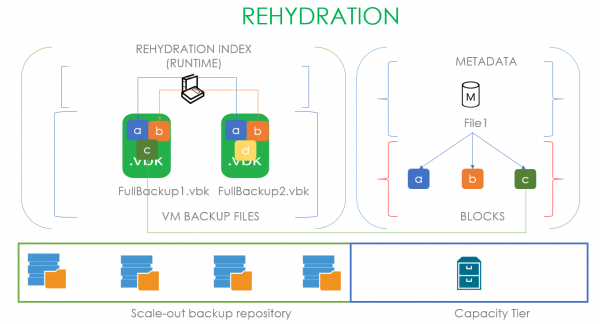
Accordingly, the process of refilling these placeholders with data is called rehydration. Here, a rehydration index is used, based on the oldest .vbk file on the local performance extent. That is, if a user wants to retrieve a file from the capacity tier, we first create an index of blocks from the oldest full backup and transfer only the missing blocks from the capacity tier. In the scenario depicted, to rehydrate FullBackup1.vbk according to the rehydration index, we only need block C, which we take from the capacity tier. If the capacity tier is cloud object storage, it allows for substantial cost savings.
It may seem that this technology is identical to that used in WAN Accelerators, but that is merely an illusion. In accelerators, deduplication is global; here, local deduplication is used within each file based on a specific offset. This occurs due to the different tasks being addressed: we need to copy large full backup files, and our research shows that even if there is a significant time gap between them, this deduplication algorithm yields better results.
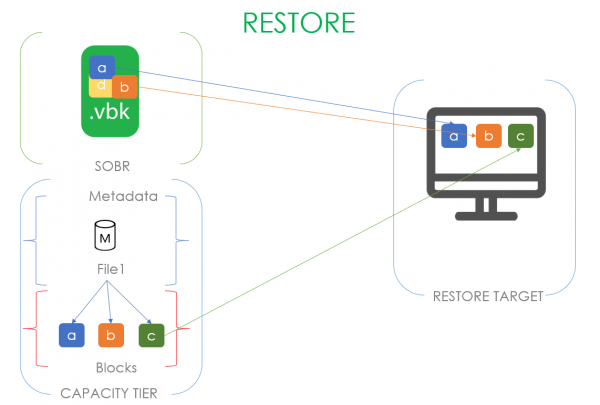
But too many indexes make the god of indexes! There’s also an index for data recovery! When we initiate the recovery of a machine located in the capacity tier, we will only read the unique data blocks that are not present in the performance tier.
As it became
That's all for the introductory part. It's quite detailed, but as mentioned earlier, these details are necessary to explain how the new features work. So, without further preamble, let's move on to the first.
Copy mode
Is largely based on existing technologies, but it carries an entirely different logic of use.
The goal of this mode is to ensure that all data located on the local extent has a copy in the capacity tier.
If we compare Move and Copy modes directly, it turns out that:
- You can only move a sealed chain. In the case of the copy mode, everything is taken, regardless of what happens in the backup job.
- Moving is triggered when files go beyond the operational backup window, while copying is triggered as soon as the backup file appears.
- Tracking new data for copying occurs continuously, while moving was triggered every 4 hours.
In examining the new mode, I propose starting from simple examples to complex ones.
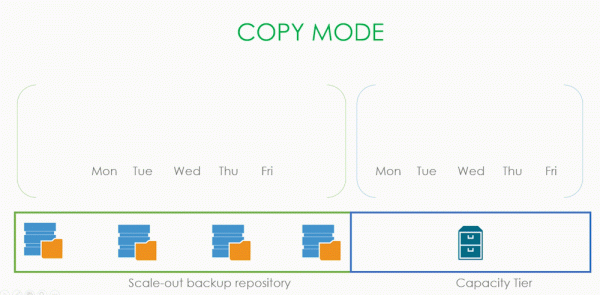
In the most basic case, we simply have new files with increments, and we just copy them to the capacity tier. Regardless of what mode is used in the backup job, whether it belongs to the sealed part of the chain or not, regardless of whether our operational window has expired. We just took and copied.
The process behind this is still dehydration as described above. In copy mode, it also ensures that we do not copy blocks that are already present in our storage. The only difference is that in move mode we replaced actual files with dummy files, whereas here we do not touch them and leave everything as it is. Otherwise, this is exactly the same dehydration index that carefully tries to save you time and money.
The question arises — if we look at the UI, there is an option to select both options simultaneously. How will this combined mode work?
Let's break it down.
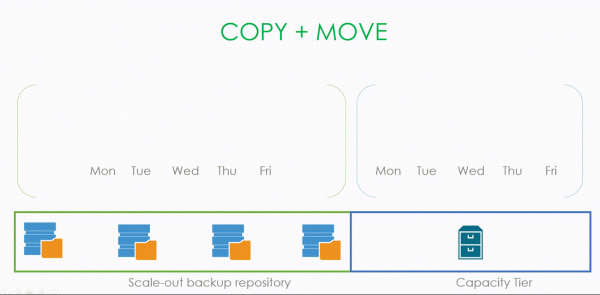
It starts out standard: a backup file is created and immediately copied. An increment is also created for it and copied as well. This continues until we realize that the files have gone beyond our operational window and a sealed chain has appeared. At this point, we perform the dehydration operation and replace these files with dummy files. Naturally, we do not copy anything back to the capacity tier.
The entire fascinating logic is controlled by just one checkbox in the interface: Copy backups to object storage as soon as they are created.
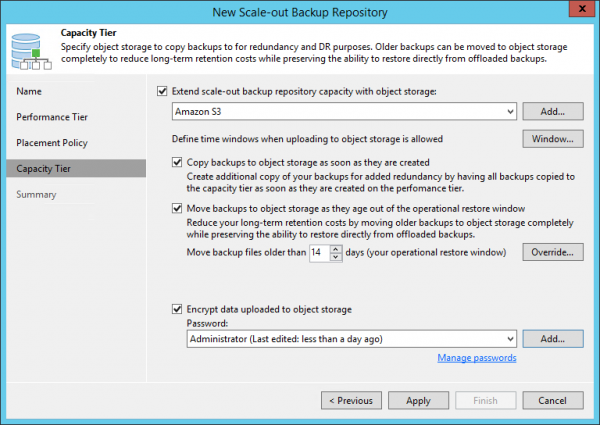
But why do we need this Copy mode?
It might be better to rephrase the question — what risks are we protecting ourselves from with it? What problem does it help us solve?
The answer is obvious: of course, it is data recovery. If we have a complete copy of local data in object storage, it doesn’t matter what happens to our production environment; we can always recover data from files located in a hypothetical Amazon.
So let’s go through the possible scenarios, from the simplest to the more complex.
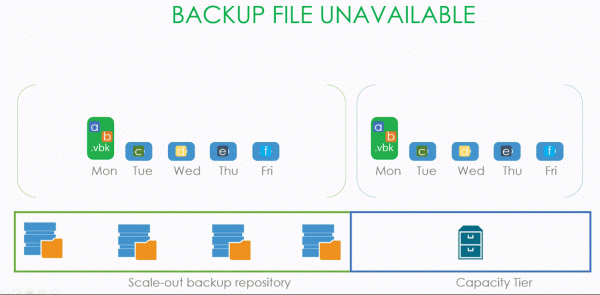
The simplest disaster that can hit us is the unavailability of one of the files in the backup chain.
A more serious issue is when one of the extents of our SOBR repository fails.
It gets even worse when the entire SOBR repository becomes unavailable but the capacity tier is operational.
And everything is really bad when the backup server dies and your first instinct is to try to run to the Canadian border in ten minutes.
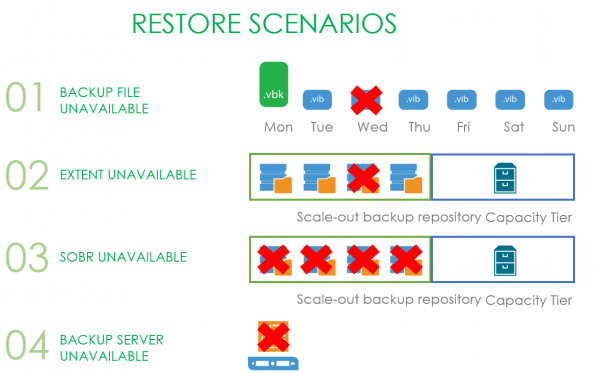
Now let’s examine each situation separately.
When we lose one (or even several) backup files, we only need to run the rescan process of the repository, and the lost file will be replaced with a placeholder file. Additionally, through the rehydration process (which was mentioned at the beginning of the article), the user can download data from the capacity tier to local storage.
Now the situation is more complicated. Suppose our SOBR consists of two extents operating in Performance mode, meaning our .vbk and .vib files are distributed unevenly across them. At some point, one of the extents becomes unavailable, and the user urgently needs to restore a machine whose data resides on that specific extent.
The user launches the recovery wizard, selects a point to which they want to restore, and during the process, the wizard realizes that not all necessary data for recovery is locally available, and therefore it needs to be downloaded from the capacity tier. Meanwhile, the blocks remaining in local storage will not be downloaded from the cloud. Praise be to the restore index (yes, it was also discussed at the beginning of the article).
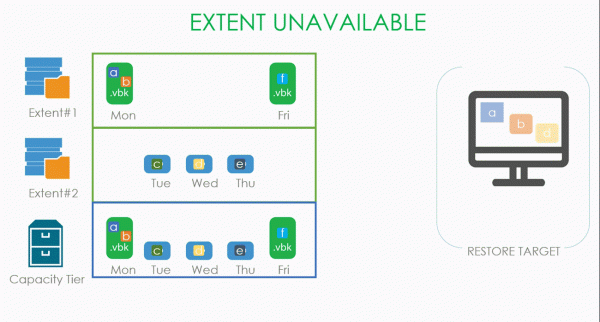
A variant of this situation is when the entire SOBR repository becomes unavailable. In this case, there is nothing to copy from local storages, and all blocks are downloaded from the cloud.
The most interesting scenario is when the backup server dies. There are two options: the admin is proactive and made configuration backups, or the admin is a self-sabotaging person and did not make a configuration backup.
In the first case, it will be enough to deploy a clean installation of VBR somewhere and restore its database from the backup using standard tools. At the end of this process, everything will return to normal. Alternatively, it may be restored according to one of the scenarios mentioned above.
But if the admin is his own enemy or the backup configuration suffers from some legendary failure, we won't leave him to his fate. For this scenario, we've introduced a new procedure called Import Object Storage. This allows us to skip the manual recreation process of the SOBR repository and the attachment of the capacity tier, followed by a rescan, and simply add object storage in the Veeam interface and start the Import Storage Repository procedure. The only thing that might stand in your way between you and your backups is a request to enter a password if your backups were encrypted.
That's all about Copy Mode, and now we move on to
Sealed Mode
The main idea is that no new backups can appear on the selected extent of the SOBR repository. Up until v10, we only had Maintenance Mode, which completely prohibited any operations with the repository. It was a hardcore mode for taking the storage out of service, where only the Evacuate button was available, which once moved the backups to another extent.
Sealed Mode is a sort of 'soft' variant: we prohibit the creation of new backups and gradually delete old ones according to the chosen retention policy, but we do not lose the ability to restore from the stored points during this process. This is very useful when we either approach the end of the hardware's lifespan and need to replace it, or we simply need to free it up for something more important, and it’s not possible to just move everything at once. Or it cannot be deleted.
Accordingly, the principle of operation is quite simple: we need to prohibit all write operations (the creation of new data), leaving read (restores) and delete (retention) operations allowed.
Both modes can be used simultaneously, but it should be noted that Maintenance has a higher priority.
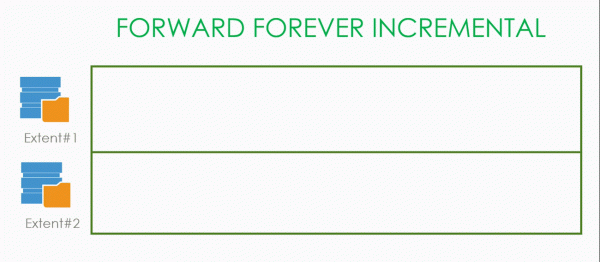
As an example, let's consider a SOBR consisting of two extents. Suppose that backups were created in Forward Forever Incremental mode for the first four days, and then we seal the extent. This leads to the initiation of the creation of a new active full on the second available extent. If our retention is four, then when the entire chain located on the sealed extent goes beyond its limits, it is removed with a clear conscience.
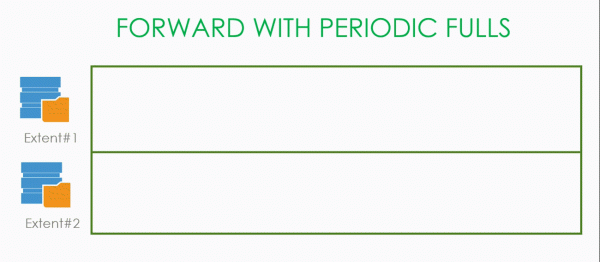
There are situations where deletion occurs earlier. For example, this is the Forward incremental with periodic full backups. If we created full backups for the first two days, and on Thursday we decide to seal the repository, then on Friday, when a new full backup is created, the file from Monday will be deleted since there are no dependencies at that point. And that point is not dependent on anything. After that, we wait until four points are created on the available extent and delete the remaining three that cannot be deleted independently of each other.
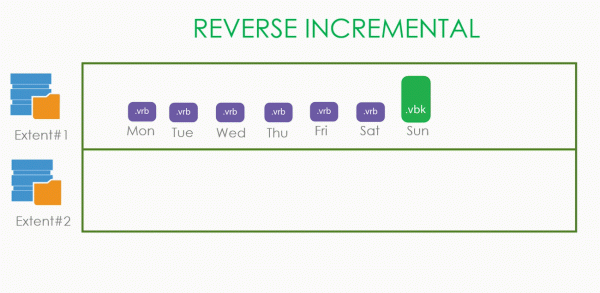
Things are simpler with Reverse Incremental. In it, the oldest points are not dependent on anything and can be safely deleted. Therefore, as soon as a new .vbk is created on a new extent, the old .vrb files will be deleted one by one.
By the way, the reason we create a new .vbk each time is that if we don't create it and continue the old chain of increments, the old .vbk would hang for an indefinitely long time in any mode, hindering its deletion. Therefore, it was decided that as soon as the extent is sealed, we create a full backup on a free extent.
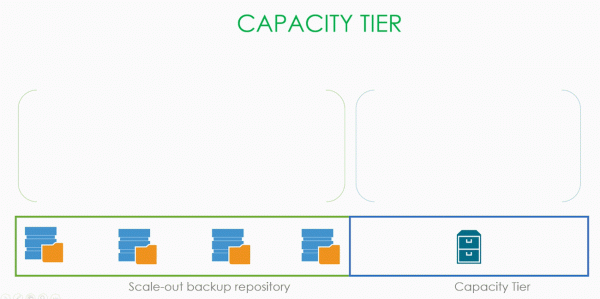
Things are more complicated with the capacity tier.
First, let's consider copy mode. Suppose that backups were actively created for four days, and then the capacity tier was sealed. We do not delete anything; we patiently wait for the retention period, after which we delete the data from the capacity tier.
The same thing happens in move mode — we wait for the retention period, delete the old data in local storage, and remove the data stored in object storage.
An interesting example with Forever forward incremental. We set the retention to three points and start making backups on Monday, which are faithfully copied to the cloud. After sealing the storage, backups continue to be created, maintaining three points, but the data stored in the capacity tier remains dependent and cannot be deleted. Therefore, we wait until Thursday when our .vbk exceeds the retention limit, and only then do we calmly delete the entire saved chain.
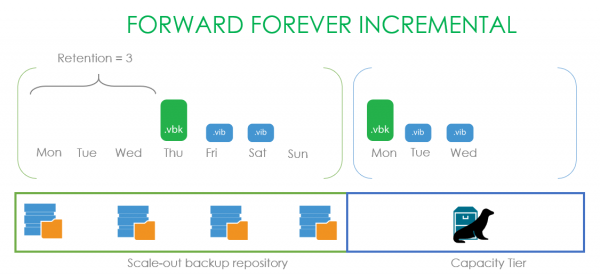
And a small note: all examples here are shown with one machine. If you have several machines in the backup, the retention will vary depending on whether an Active Full backup was made or not.
That's basically it. So let's move on to the most hardcore feature —
Immutability
As with the previous points, let's first discuss the problem that this feature addresses. As soon as we export our backups to storage, there is a strong desire to ensure their preservation, that is, to physically prohibit their deletion and any modifications during the specified retention period. This includes administrators and their root accounts as well. This allows us to protect them from accidental or intentional damage. Those who work with AWS may have encountered a similar function called Object Lock.
Now let's discuss the mode in general terms and then delve into the details. In our example, Immutability will be enabled for our capacity tier with a retention of four days. Additionally, the backup will include Copy mode.
Immutability does not interact with the overall retention policy in any way. For instance, it does not add additional points or anything like that. Simply put, during the four days, a person cannot delete backup files. If a backup is made on Monday, the file can only be deleted on Friday.
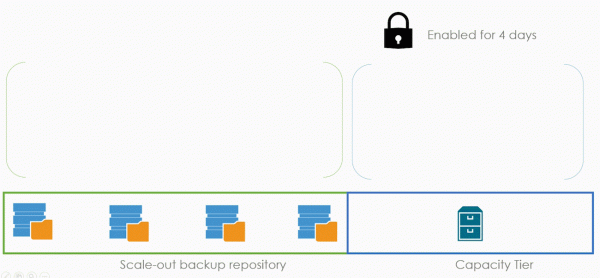
All previously explained concepts of dehydration, indexes, and metadata continue to function exactly the same. However, with one condition — the lock is applied not only to the data but also to the metadata. This is to prevent a malicious attacker from erasing our metadata base and to ensure that the data blocks do not turn into useless binary mush.
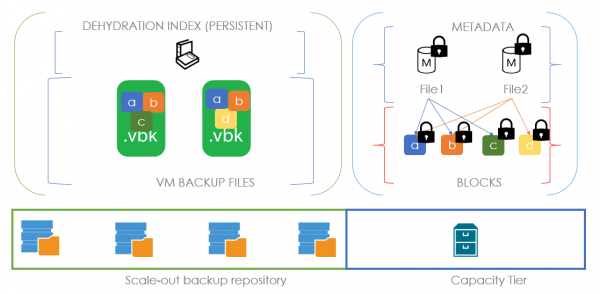
And now is a great time to explain our block generation technology. To do this, let's consider the situation that led to its emergence.
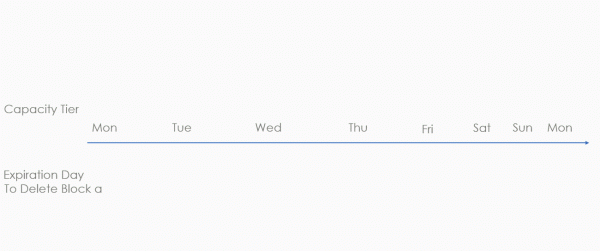
Let's take a six-day timeline and mark the anticipated expiration of immutability from the bottom. On the first day, we create a file consisting of data block a, along with its metadata. If immutability is set for three days, it is reasonable to assume that on the fourth day, the data will be unlocked and deleted. On the second day, we will add a new file2, consisting of block b with the same settings. Block a should still be deleted on the fourth day. However, on the third day, something terrible happens — a file called File3 is created, containing a new block d and a reference to the old block a. This means that for block a, its immutability flag must be reset to a new term, which shifts to the sixth day. And here lies the problem — in real backups, there are a huge number of such blocks. To extend their immutability period, an enormous number of requests need to be made each time. Effectively, this will be an nearly infinite daily process, as there is a high probability that we will find large bundles of deduplicated blocks with each copy. And what does a large number of requests mean for object storage providers? Exactly! A huge bill at the end of the month.
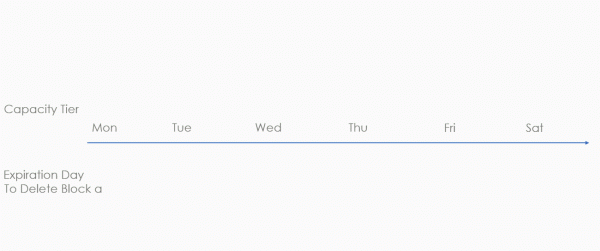
And to avoid charging our beloved clients significant amounts for no reason, a block generation mechanism was devised. This is an additional period that we add to the designated immutability period. In the example below, this additional period is two days. But this is only for illustration. In reality, a specific formula is used that provides approximately ten additional days for a monthly lock.
Let's continue to examine the same situation, but now with block generation. On the first day, we create file1 from block a and metadata. We consider the generation period and immutability — which means the option to delete the file will be on the sixth day. If on the second day we create File2, consisting of block b and a reference to block a, the expected deletion date remains unchanged. It remains set for the sixth day. This way, we are trying to save money on the number of requests. The only scenario in which the deadline can shift is if the generation period has expired. That is, if on the third day the new File3 contains a reference to block a, generation 2 will be added because Gen1 has already expired. The expected deletion date for block a will then shift to the eighth day. This dramatically reduces the number of requests to extend the lifespan of deduplicated blocks, saving clients a substantial amount of money.
The technology itself is available to S3 users and S3-compatible hardware, the manufacturers of which guarantee that their implementation is no different from Amazon's. Hence the legitimate question of why Azure is not supported — they have a similar feature, but it works at the container level, not at the object level. By the way, in Amazon, object lock is available in two modes: compliance and governance. In the second case, there remains the possibility for the greatest admin over admins and root over roots, despite the object lock, to still delete data. In the compliance case, everything is nailed down tightly, and backups cannot be deleted by anyone, not even Amazon admins (according to their official statements). We support this very mode.
And, traditionally, a few useful links:
- About in all details.
- All information about in its best form
- O in detail
Source: habr.com
