

In this article, I want to show how easy and free it is to create a failover scheme for a website (or any other online service) using a combination of monitoring and a dynamic DNS service. This means that in the event of any issues with the main site (from a PHP Error on the page to running out of space or simply having an alarmingly low number of orders in the case of an online store), new visitors will be directed to a secondary (or tertiary, and so on) known working server, or to a 'Sorry' page, where they are politely informed that 'there is a problem, we are already aware and fixing it, we will resolve it soon' (and you in this case will actually be aware and able to fix things).
To live with failover or without?
Until something goes wrong, there is not much difference. But when it does happen, without failover, you often encounter the following: you try to quickly figure out what the problem is, and it doesn’t work (backups don't restore, the software for some reason doesn't work as stated in the documentation, etc.), and there’s no time, the servers/sites are down, clients are calling, everyone’s on edge, you try to fix it clumsily and messily 'with duct tape,' then somehow it seems to start with crutches and keeps running. You think that in your spare time you need to analyze things in detail and redo everything nicely, but nothing is as permanent as a temporary solution.
Now, here's how it happens in a polished version with failover:
- An error occurs
- The error is automatically detected
- A notification is sent out
- Failover is triggered to switch to one of the backup servers
- The issue is calmly and without panic resolved, fixed, and the server is brought back online.
This scheme may indeed have its own quirks, but it's linear; each stage is simple and can be debugged individually, which significantly reduces the chance of failure. All actions can be automated and executed quickly (unlike the task of finding and fixing some unknown epic issue). Your plane has landed in a distant country, you turn on your phone and see a notification in Telegram that the server has crashed, but all is well—the backup server has activated, and you can continue your trip without needing to fly back or fix it via SSH from the nearest café with WiFi. You can sort it out when it’s more convenient.
The future is already here!
Previously, the main problem that made failover often an unacceptable solution was the cost involved. You either had to buy expensive hardware (and hire even more expensive specialists) or cobble something complicated together following guides (I even came across a case where two servers were connected with a null-modem cable and were sending heartbeats through it, so the backup server would know to take over when needed). Now there are simpler and free methods available. If you have a website with cats—there's no excuse for not having implemented failover yet!
Moreover, a failover scheme requires at least one server (and possibly more), which used to be a significant cost, but nowadays you can get a VDS for pennies.
The most reliable cat website
For a practical illustration of the solution with okerr + dynamic DNS, we launched our cat website . We dislike cats, so there won’t be many there. There are three websites in total, each looks roughly the same (all on the same template), but with different kittens to make them easy to distinguish, and each provides technical information to show how failover works. The page updates itself every minute, but you can always hit reload in your browser.
In the technical information, there’s a line that says “status=OK”. Sometimes servers simulate problems and write status=ERR. The main server “crashes” at 20 minutes past each hour (0:20, 1:20, 2:20, ...). The backup server does so at 40 minutes past. The last server (the “sorry” server) is always operational. At the top of every hour, the main and backup servers “recover”.
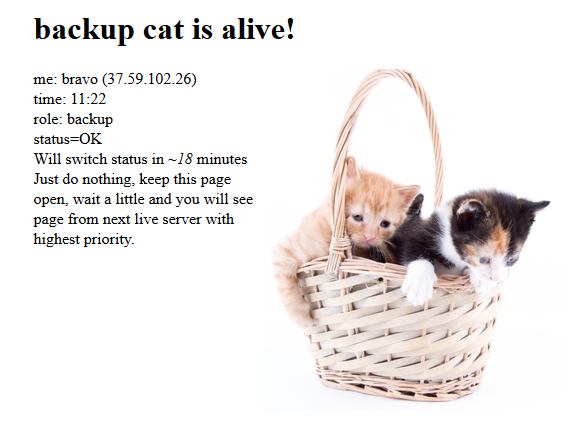
If you open the website and keep it in a tab, you will see that it never goes down (although each individual server simulates a problem periodically), and in the case of a server issue, it simply 'runs' between live servers. The image, name, and address of the server and its role will change. Sometimes you can catch a moment when status=ERR (a problem already exists, but the failover scheme has not yet kicked in), but the next update will show you a page from a live site.
Failover on okerr + dynamic DNS
Let's take a look at how it works under the hood. The task of the file manager is to ensure that the address cat.okerr.com always points to the IP address of the working server.
Behind each of the servers that host our cat website on okerr, there is an indicator that checks its status every minute.
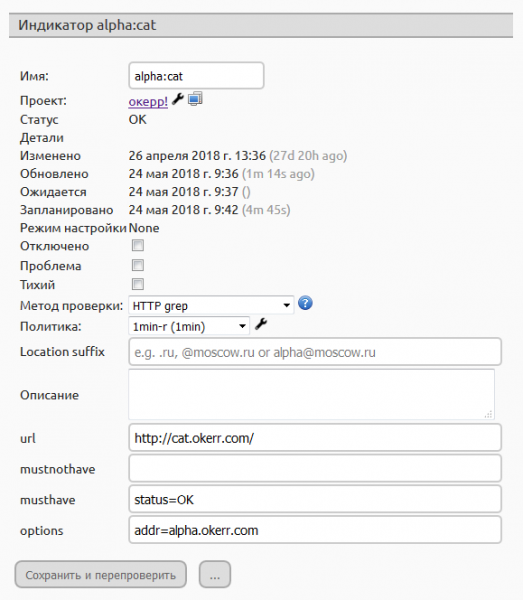
In this screenshot, we see how the site cat.okerr.com is checked from the server alpha.okerr.com. The page should contain status=OK, and as we see at the top, the status of our indicator is currently OK. When the server 'breaks', it will show ERR. (This is just one example of an indicator; okerr is a monitoring service, so you can attach any type of indicator, for example, checking free disk space, the number of new orders in the database, and even logical indicators. For example, at night there will be one set of error criteria, and during the day another).
In the project settings, we created a failover scheme with these indicators:
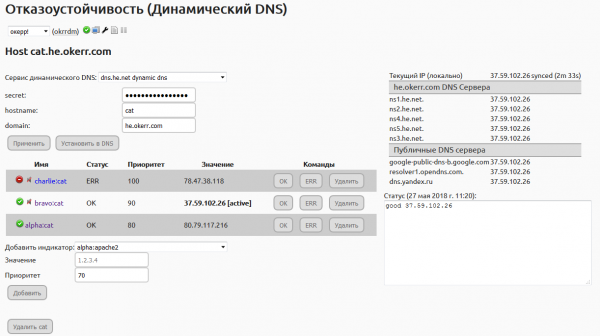
The scheme has three indicators (three servers), differing in priority. The main server for the site is charlie; if it is not working (if 'status=OK' is not displayed or it is simply unavailable), then bravo, and in the last case, alpha. The right side of the page displays the status of the DNS records on different servers.
For those who noticed that the name cat.he.okerr.com is used: We are using a slightly more complex scheme. Instead of simply changing the DNS record cat.okerr.com, we change cat.he.okerr.com (on a Dynamic DNS provider ), and cat.okerr.com is a CNAME (alias) that does not change, always pointing to cat.he.okerr.com. We simply prefer Hurricane as a dynamic DNS provider, and it has keys for managing a specific record (not the entire zone), which we find safer. You can also opt not to provide passwords or keys for managing the entire domain in okerr, but only for a subdomain or record.
From failure to recovery
Step by step, how this scheme works:
- A problem occurs (simulated) on the server
- The okerr sensor checks the status of each server once a minute and reports back to the main project server at okerr.
- The indicator for the corresponding server changes its status from OK to ERR.
- When the indicator's status changes, failover is recalculated to determine which address needs to be set (if necessary. For example, if the primary server is operational while the backup has failed, there will be no changes).
- This address is communicated to the dynamic DNS service. Upon completion of this step, you will see the status 'synced' on the right.
- Very soon (within seconds), the record will reach the DNS servers of your domain (which for your site are ns1-ns5.he.net).
- From this moment on, some users will already be directed to the new live server. However, not all DNS servers around the world have updated the records yet, and some may still have the old record cached. You may see the data on public DNS servers 'dancing', showing both new and old values. If you refresh the failover settings page, okerr will request new data from the DNS servers.
- Once the data has stabilized, and the old cached record has expired everywhere — all 100% of requests will go to the new server.
To speed up step 7 (often the longest), the TTL of the dynamic DNS record should be set as low as possible. Most services allow intervals of 90-120 seconds. This is a reasonable compromise.
Additional
All of this can be set up in an evening (if you already have a redundant server). Both okerr and dynamic DNS services are free. To get more checks and shorter check intervals in okerr, you need to complete training (from the profile page). Upon completion, your level is immediately raised (20 indicators per hour + 1 quick, 10-minute one). If this is still not enough — write to support@okerr.com, and it is likely that an upgrade will be possible (there has always been a possibility; I have never been refused, and in fact, I have suggested it myself). I just don’t want to promise everyone everything from the start, as I am not sure there will be enough resources to hold to my word. But since there are currently few users, there are no issues with increasing limits.
What okerr can do in general — check it out on the website . In general, this is monitoring (Zabbix from the cloud), and the failover is a nice additional feature. You can also access a demo on the site without registration.
When the indicator state changes, a notification is sent via email or Telegram. (We looked into what's happening and realized that, apparently, Telegram is the most reliable messenger. Thank you, RKN, for the stress test!) With the correct okerr setup, any notification is either a signal to 'drop everything, it needs fixing!' or 'all clear!'. There shouldn’t be unnecessary alerts from okerr (if there are, adjustments need to be made). For example, our cat website's server alpha is last and never simulates an error. If it goes down, we need to know. Meanwhile, the other servers constantly simulate errors, so to avoid receiving alerts multiple times an hour, those indicators are set to 'quiet'.
It also makes sense to set up a sorry server (on the cheapest hosting) that either has your apology page (in case all primary and backup servers are down) or redirects to the status page on okerr (for example, ours ) or statuspage.io.
Source: habr.com
