

OpenShift virtualization (the upstream project – Kubernetes: KubeVirt, see. and ), formerly known as Container-native Virtualization, was introduced as a feature of the OpenShift platform designed for deploying and managing virtual machines (VMs) as fundamental entities of Kubernetes. This task is technically complex due to the fundamental differences in technologies. To achieve the set goal, familiar technologies based on Red Hat Enterprise Linux and KVM, which have been with us for years and proven their effectiveness, were used.

In this article, we will explore the technical aspects of OpenShift virtualization that make the coexistence of VMs and containers possible within a single platform that manages them as a whole.
Computational tasks
Containers utilize mechanisms of the Linux kernel, such as namespaces and cgroups, for process isolation and resource management. Typically, processes refer to applications like Python, Java, or executable files, but they can actually be any processes, like bash, Emacs, or vim.
So, what is a virtual machine? From the perspective of the hypervisor, it is also a process. However, it is not an application process, but rather a KVM process responsible for executing a specific VM.
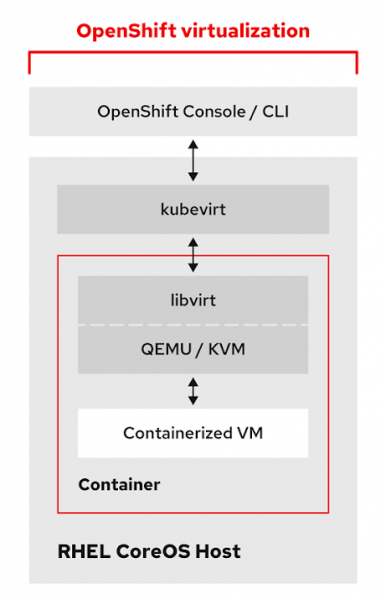
A container image contains all the tools, libraries, and files needed for a KVM virtual machine. If we inspect the pod of a running VM, we will see helpers and qemu-kvm processes. Additionally, we have access to KVM tools for managing virtual machines, such as qemu-img, qemu-nbd, and virsh.

Since a virtual machine is a pod, it automatically inherits all the functionality of a pod in Kubernetes. VM pods have the same scheduling schemas and criteria applied to them as regular pods, such as taints, tolerations, affinity, and anti-affinity. You also benefit from high availability, etc. However, there is one important difference: regular pods do not migrate from host to host in the usual sense. If a node goes down, the pod on it is terminated and rescheduled on another node in the cluster. In the case of a virtual machine, we expect to see live migration.
To address this gap, a custom resource definition (CDR) was created that describes the live migration mechanism responsible for initializing, monitoring, and managing live migrations of VMs between worker nodes.
apiVersion: kubevirt.io/v1alpha3
kind: VirtualMachineInstanceMigration
metadata:
  name: migration-job
spec:
  vmiName: fedora
When deactivating a node, tasks for migrating virtual machines that have Live Migration set as their eviction strategy are automatically created. This allows you to control the behavior of virtual machines when moving between nodes in the cluster. You can configure Live Migration and manage the VMs just like any other pods.
Network
Any Kubernetes system provides communication between nodes and pods through software-defined networks (SDN). OpenShift is no exception and, starting from version 3, it uses OpenShiftSDN by default. Additionally, OpenShift 4 introduced a new feature called Multus, which allows multiple networks to be made available and connected to pods simultaneously.
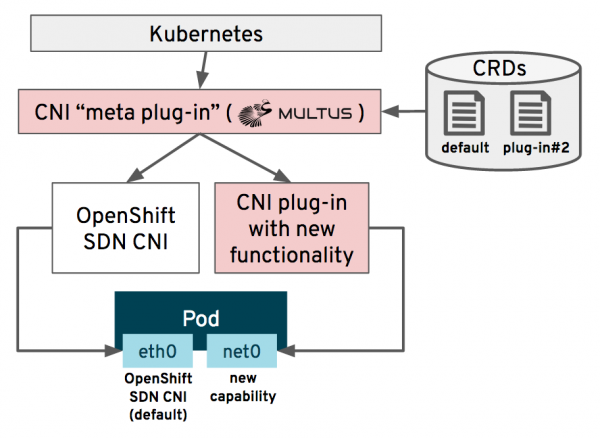
With Multus, the administrator can specify additional CNI networks that will then be deployed and configured in the cluster by a special operator called Cluster Network Operator. After this, pods can connect to one or more of these networks, usually to the standard OpenShiftSDN and an additional interface. SR-IOV devices, standard Linux Bridge devices, MACVLAN, and IPVLAN devices can also be used if required by your VM. The illustration below shows how to set Multus CNI for a bridge network on the eth1 interface:
apiVersion: operator.openshift.io/v1
kind: Network
metadata:
  name: cluster
spec:
  additionalNetworks:
  - name: multus1
rawCNIConfig: '{ "cniVersion": "0.3.1", "type": "bridge", "master": "eth1", "ipam":
   { "type": "static", "addresses": [ { "address": "191.168.1.1/24" } ] } }'
   type: Raw
In the context of OpenShift virtualization, this means that VMs can connect directly to an external network, bypassing the SDN. This is critical for virtual machines moved to OpenShift from Red Hat Virtualization or VMware vSphere, as there will be no change in network settings with Layer 2 OSI access. It also means that VMs can have a network address that bypasses the SDN. Thus, we can effectively utilize specialized network adapters or connect directly to the storage area network...
To learn more about how to create and connect OpenShift virtualization virtual machines to the network, you can . In addition, , deployed as part of OpenShift virtualization, offers another familiar method for creating and managing network configurations on physical nodes used under hypervisors.
Storage
Connecting and managing virtual machine disks within OpenShift virtualization is accomplished using Kubernetes concepts such as StorageClasses, PersistentVolumeClaims (PVC), and PersistentVolumes (PV), as well as storage protocols standard to the Kubernetes environment. This allows Kubernetes administrators and application teams to have a single, familiar management mechanism for both containers and virtual machines. For many virtualization administrators, this concept may seem familiar, as it employs the same principle of separating VM configuration files and disks, which is used in OpenStack and many other cloud platforms.
However, it is not feasible to create a new disk for each VM every time, as we need to preserve data during migration from the hypervisor to OpenShift. Even when deploying a new VM, it is always faster to do it from a template than to create it from scratch. Therefore, we need the functionality to import existing disks.
To simplify this task, OpenShift virtualization deploys the Containerized Data Importer (CDI) project, which streamlines the import of disk images from various sources to create an entry in the PVC.
apiVersion: v1
kind: PersistentVolumeClaim
metadata:
  name: "fedora-disk0"
  labels:
    app: containerized-data-importer
  annotations:
    cdi.kubevirt.io/storage.import.endpoint: "http://10.0.0.1/images/Fedora-Cloud-Base-31-1.9.x86_64.qcow2"
spec:
  storageClassName: ocs-gold
  accessModes:
  - ReadWriteOnce
  resources:
    requests:
      storage: 20Gi
This entry activates the CDI, triggering the sequence of actions shown in the figure below:
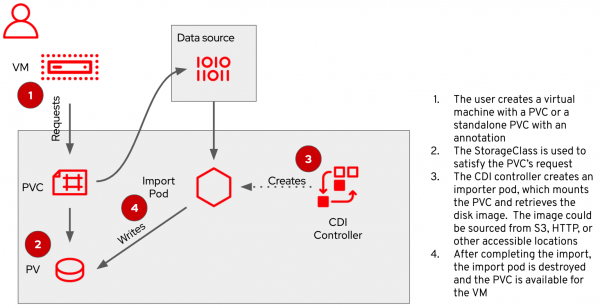
Once CDI completes its process, the PVC will contain a virtual machine disk ready for use and formatted to the OpenShift standard...
When working with OpenShift virtualization, OpenShift Container Storage (OCS) will also come in handy. This Red Hat solution, based on the Ceph file system, implements persistent storage functionality for containers. In addition to the standard PVC access methods – RWO (block) and RWX (file) – OCS provides RWX for raw block devices, which is very useful for organizing shared block access for high-performance applications. Moreover, OCS supports the new Object Bucket Claim group request standard, allowing applications to directly utilize object data storage.
Virtual machines in containers
If you're curious to see how it works, know that OpenShift virtualization is already available in Tech Preview as part of OpenShift 3.11 and above. Owners of an active OpenShift subscription can use OpenShift virtualization completely free of charge and without any additional steps. As of this post, the latest versions are OpenShift 4.4 and OpenShift virtualization 2.3. If you're using earlier versions, it's worth upgrading to get the latest features. The fully supported version of OpenShift virtualization is expected to be released in the second half of 2020.
For more information, please refer to for installation instructions, including , which provides details on configuring external networks.
Source: habr.com
