

KDPV - Reuters
If you rent a server, you do not have full control over it. This means that at any moment, specially trained personnel may come to the host and ask for any of your data. And the host will provide it if the request is documented legally.
You definitely don't want the logs of your web server or user data to fall into someone else's hands. It's impossible to build perfect protection. Defending against a host that owns the hypervisor and provides you with a virtual machine is nearly impossible. However, it might be possible to slightly reduce the risks. Encrypting rented machines is not as useless as it seems at first glance. At the same time, let's look at the threats of data extraction from physical servers.
Threat Model
As a rule, the host will try to protect the client's interests as much as possible within the bounds of the law. If an official request asks only for access logs, the host will not hand over dumps of all your virtual machines with databases. At least they shouldn't. If they ask for all data, the host will copy the virtual disks with all the files, and you won't know about it.
Regardless of how events unfold, your main task is to make the attack too complicated and expensive. Usually, there are three main options for threats.
Official
Most often, a paper letter is sent to the host's office requesting the needed data in accordance with the relevant decree. If everything is correctly formatted, the host provides the necessary access logs and other data to the authorities. Usually, they just ask for the required data.
Occasionally, if absolutely necessary, law enforcement representatives personally come to the data center. For example, when you have your dedicated server, and the data can only be retrieved physically.
In all countries, access to private property, conducting searches, and other activities require evidence that the data may contain important information for a criminal investigation. Additionally, a properly executed search warrant is necessary. There may be nuances related to the specifics of local legislation. The main point to understand is that, if following the correct official procedures, data center representatives will not let anyone beyond the checkpoint.
Moreover, in most countries, it is not simply permissible to take working equipment. For example, in Russia, until the end of 2018, according to Article 183 of the Criminal Procedure Code of the Russian Federation, part 3.1, it was guaranteed that, when conducting a seizure, the removal of electronic information carriers would be carried out with the participation of a specialist. At the request of the legal owner of the seized electronic information carriers or the holder of the information contained on them, the specialist involved in the seizure, in the presence of witnesses, would copy the information from the seized electronic information carriers onto other electronic information carriers.
Unfortunately, this clause was later removed from the article.
Secret and unofficial
This falls within the realm of specially trained personnel from the NSA, FBI, MI5, and other three-letter agencies. Often, the legislation of countries provides extremely broad powers to such structures. Moreover, there is almost always a legislative prohibition on any direct or indirect disclosure of the fact of collaboration with such law enforcement agencies. Similar legal norms exist in Russia. .
In the event of such a threat to your data, it will almost certainly be extracted. In addition to simple seizure, the entire unofficial arsenal of backdoors, zero-day vulnerabilities, data extraction from the RAM of your virtual machine, and other delights may be employed. The host provider will be obliged to assist law enforcement specialists as much as possible.
Dishonest employee
Not all people are equally good. Some data center admins might decide to earn a little extra by selling your data. What happens next depends on their permissions and access. The worst part is that an administrator with access to the virtualization console has complete control over your machines. They can always take a snapshot along with all the contents of the RAM and study it leisurely afterwards.
VDS
So, you have a virtual machine provided by the host. How can you arrange encryption to safeguard yourself? In reality, there is very little you can do. Moreover, even someone else's dedicated server might ultimately turn out to be a virtual machine with the necessary devices mapped.
If the goal of the remote system is not just to store data but to perform some computations, then the only option for working with an untrusted machine will be the implementation of . In this case, the system will perform calculations without being able to understand what it is doing. Unfortunately, the overhead costs for implementing such encryption are so high that practical application is currently limited to very narrow tasks.
Additionally, when the virtual machine is running and performing some actions, all encrypted volumes remain accessible; otherwise, the OS would simply not be able to work with them. This means that having access to the virtualization console, you can always take a snapshot of the running machine and extract all keys from the RAM.
Many vendors have attempted to organize hardware encryption of RAM so that even the host does not have access to this data. For example, Intel Software Guard Extensions technology creates areas in the virtual address space that are protected from reading and writing by other processes, including the operating system kernel. Unfortunately, you cannot fully trust these technologies, as you will be limited to your virtual machine. Moreover, there are already ready-made examples of against this technology. Still, encrypting virtual machines is not as pointless as it may seem.
Encrypting data on VDS
I should clarify right away that everything we do below does not constitute complete protection. The hypervisor will allow you to make the necessary copies without stopping the service and unnoticed by you.
- If the host provides a 'cold' image of your virtual machine upon request, you are relatively safe. This is the most common scenario.
- If the host delivers a complete snapshot of the running machine, then things are quite bad. All data will be mounted in the system openly. Additionally, there will be an opportunity to rummage through the RAM in search of private keys and similar information.
By default, if you deploy an OS from a vanilla image, the host does not have root access. You can always mount a media with a rescue image and change the root password by chrooting into the virtual machine's environment. But this will require a reboot, which will be noticed. Plus, all mounted encrypted partitions will be locked.
However, if the virtual machine deployment is not from a vanilla image but from a pre-prepared one, the host often can add a privileged account to assist in emergency situations for the client. For example, to reset a forgotten root password.
Even in the case of a complete snapshot, not everything is so grim. An attacker will not receive encrypted files if you have mounted them from a remote filesystem of another machine. Yes, theoretically, one could sift through the memory dump and extract the encryption keys from there. But in practice, this is very non-trivial, and it is highly unlikely that the process would go beyond a simple file transfer.
Order a machine
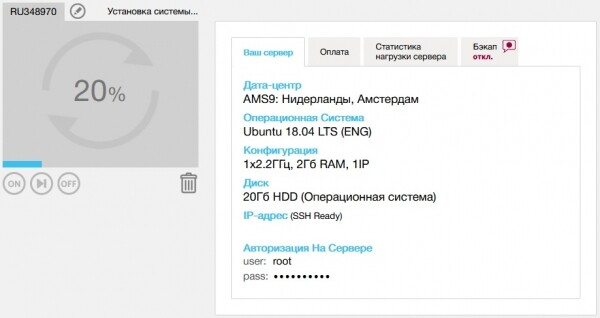
For our testing purposes, we'll take a simple machine in . We don’t need many resources, so let’s opt for a pay-as-you-go model for the actual megahertz and traffic used. Just enough to play around.
The classic dm-crypt for the entire partition did not fly. By default, the disk is handed over in one piece, with root for the entire partition. Reducing the partition from ext4 on a mounted root is practically a guaranteed brick instead of a filesystem. I tried) The drum didn’t help.
Create a cryptographic container
Therefore, we will not encrypt the entire section but will use file crypto-containers, specifically the audited and reliable VeraCrypt. This is sufficient for our purposes. First, let's download and install the CLI version from the official website. You can also check the signature.
wget https://launchpad.net/veracrypt/trunk/1.24-update4/+download/veracrypt-console-1.24-Update4-Ubuntu-18.04-amd64.deb
dpkg -i veracrypt-console-1.24-Update4-Ubuntu-18.04-amd64.deb
Now, we will create the container somewhere in our home directory to mount it manually upon reboot. In the interactive version, specify the container size, password, and encryption algorithms. You can choose the patriotic cipher Grasshopper and the hash function StriBOG.
veracrypt -t -c ~/my_super_secretNow let's install nginx, mount the container, and upload the secret information into it.
mkdir /var/www/html/images
veracrypt ~/my_super_secret /var/www/html/images/
wget https://upload.wikimedia.org/wikipedia/ru/2/24/Lenna.png
Let's slightly modify /var/www/html/index.nginx-debian.html to get the desired page, and we can test it.
Connect and check
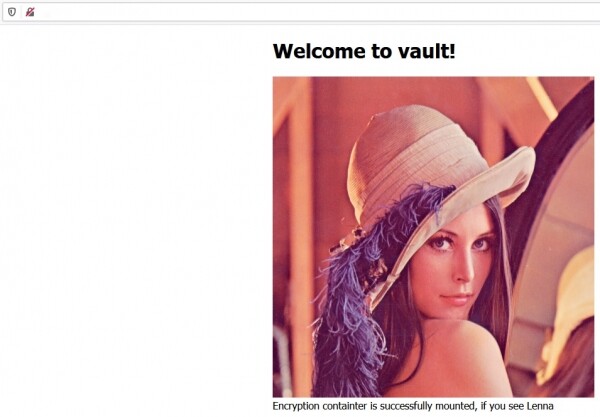
The container is mounted, the data is accessible and served.

Here's the machine after reboot. The data is safely stored in ~/my_super_secret.
If you really want a hardcore approach, you can encrypt the entire OS, so that upon reboot it requires SSH connection and password entry. This will also be sufficient in scenarios of simple retrieval of 'cold data'. Here is and remote disk encryption. Although in the case of VDS, it's complicated and excessive.
Bare metal
It's not easy to set up your own server in a data center. Someone else's dedicated server may turn out to be a virtual machine with all devices mapped through it. However, interesting protection options begin to emerge when you have the opportunity to place your trusted physical server in the data center. Here you can fully utilize traditional dm-crypt, VeraCrypt, or any other encryption of your choice.
It is important to understand that with total encryption implemented, the server will not be able to boot on its own after a reboot. You will need to establish a connection to the local interface, such as IP-KVM, IPMI, or another similar alternative. After that, we manually enter the master key. The scheme does not look great in terms of continuity and fault tolerance, but there are no significant alternatives if the data is that valuable.
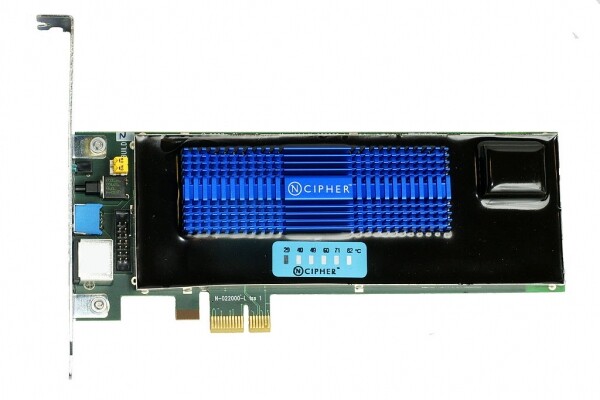
NCipher nShield F3 Hardware Security Module
A softer option assumes that the data is encrypted and the key is located directly in the server within a specialized HSM (Hardware Security Module). These are typically very functional devices that not only provide hardware cryptography but also have mechanisms to detect attempts at physical breaches. If someone starts tampering with your server using an angle grinder, the HSM with an independent power source will erase the keys it holds in its memory. The attacker will end up with an encrypted mess. Additionally, a reset can occur automatically.
Deleting keys is a much quicker and more humane option than activating a thermite device or electromagnetic pulse. Your neighbors in the data center would take a long time to retaliate for such devices. Moreover, in the case of using encryption on the storage devices themselves, you typically experience minimal overhead. All this happens transparently to the operating system. However, you have to trust a conditional Samsung and hope that they have a fair AES256, not just a simple XOR.
At the same time, it should not be forgotten that all unnecessary ports must be physically disabled or simply filled with compound. Otherwise, you give attackers the opportunity to conduct . If you have an exposed PCI Express or Thunderbolt port, including USB with support for it — you are vulnerable. An attacker could exploit these ports to carry out an attack and gain direct access to the memory holding the keys.
In a particularly sophisticated scenario, an attacker could execute a cold boot attack. In this case, they simply pour a good amount of liquid nitrogen onto your server, crudely extract the frozen memory modules, and take a dump from them with all the keys. Often for such an attack, a regular cooling spray and temperatures around -50 degrees are sufficient. There is also a more careful option. If you haven’t disabled booting from external devices, the attacker’s algorithm becomes even easier:
- Freeze the memory modules without opening the case
- Plug in their bootable USB stick
- Using special utilities to extract data from the RAM that survived the reboot due to freezing.
Divide and conquer
Okay, we only have virtual machines, but we still want to somehow reduce the risks of data leakage.
You might consider rethinking the architecture and separating data storage and processing across different jurisdictions. For example, having the frontend with encryption keys hosted in the Czech Republic, while the backend with encrypted data resides somewhere in Russia. In the event of a standard confiscation attempt, it is highly unlikely that enforcement agencies could execute this simultaneously across various jurisdictions. Additionally, this partially insulates us from the scenario of snapshot retrieval.
Alternatively, a completely clean option could be End-to-End encryption. Of course, this goes beyond the scope of the technical specifications and does not imply performing computations on a remote machine. Nevertheless, it is quite a viable option when it comes to data storage and synchronization. For instance, this is very well implemented in Nextcloud. Meanwhile, synchronization, versioning, and other server-side benefits won't disappear.
Total
There are no perfectly secure systems. The goal is simply to make an attack more costly than the potential benefit.
Some risk reduction for data access on a virtual server can be achieved by combining encryption and separate storage with different hosts.
A more or less reliable option is to use your own physical server.
However, you'll still have to trust the host in one way or another. This underpins the entire industry.
Source: habr.com
