

Hello everyone, my name is Sergey Emelyanchik. I am the head of the company Audit-Telecom, the lead developer, and the author of the Veliam system. I decided to write an article about how my friend and I created an outsourcing company, developed software for ourselves, and later started distributing it to anyone interested as a SaaS solution. I will also discuss how I was initially skeptical about whether this was possible. The article will include not only the story but also technical details about how the Veliam product was created, including snippets of the source code. I will share the mistakes we made and how we corrected them. I had doubts about whether to publish such an article, but I thought it was better to do it, receive feedback, and improve than to refrain from publishing and wonder what could have been...
Background
I worked in a company as an IT employee. The company was quite large with an extensive network structure. I won’t dwell on my job responsibilities, just note that none of them involved development.
We had monitoring in place, but out of sheer academic interest, I wanted to try writing my own simple version. The idea was to create a web-based solution so that anyone could easily access it without installing any clients to see what was happening on the network from any device, including mobile devices via Wi-Fi. I also wanted to quickly identify the location of any equipment that might be malfunctioning, as we had very strict response time requirements for such issues. In the end, I devised a plan to create a simple web page featuring a JPEG background of the network diagram, cut out the devices with their IP addresses on this picture, and overlay dynamic content in the form of green or flashing red IP addresses at the appropriate coordinates. The task was laid out, so we began.
Previously, I was involved in programming with Delphi, PHP, JS, and had a very basic understanding of C++. I have a fairly good knowledge of network operations, including VLANs, Routing (OSPF, EIGRP, BGP), and NAT. That was enough for me to write a prototype of a primitive monitoring system on my own.
I wrote what I had planned in PHP. The Apache server and PHP were on Windows because Linux was something incomprehensible and very complicated for me at that time. As it turned out later, I was very mistaken and in many ways Linux is much simpler than Windows, but that's a separate topic and we all know how many debates there are about it. The Windows Task Scheduler triggered a PHP script at a small interval (I don't remember exactly, but something like once every three seconds) that pinged all objects and saved their status to a file.
system("ping -n 3 -w 100 {$ip_address}");
Yes, yes, working with the database at that time was also uncharted territory for me. I didn't know that processes could be run in parallel, which made the traversal of all network nodes take a long time since it was done in a single thread. Problems arose especially when several nodes were unreachable as each of them delayed the script by 300 ms. On the client side, there was a simple looping function that downloaded updated information from the server via Ajax request at intervals of a few seconds and refreshed the interface. And after three unsuccessful pings in a row, if a web page with monitoring was open on the computer, a cheerful tune would play.
When everything came together, I was very inspired by the result and thought that I could add more (given my knowledge and capabilities). However, I have always disliked systems with a million graphs, which I believed, and still believe to this day, are unnecessary in most cases. I wanted to implement only what would genuinely help me in my work. This principle remains fundamental in the development of Veliam. Moreover, I realized it would be great if I didn't have to keep monitoring open to be aware of issues, and that I could check the page only when a problem occurred to see where that problematic network node was located and what to do about it. Back then, I didn't read my email much; I simply didn't use it. I stumbled upon SMS gateways online, where I could send a GET or POST request, and they would send an SMS with the text I wrote to my mobile phone. I immediately knew I wanted that. So, I started studying the documentation. After some time, I succeeded, and now I received SMS notifications about network problems on my mobile with the name of the 'failed object'. Even though the system was primitive, it was created by me, and what motivated me most to develop it was that it was an applied program that genuinely helped me in my work.
And then the day came when one of the internet channels at work went down, and my monitoring did not indicate this at all. The Google DNS was still pinging excellently. It was time to think about how to monitor whether the communication channel was active. There were various ideas on how to do this. I did not have access to all the equipment. I had to come up with ways to understand which of the channels was active without being able to check it on the network equipment itself. Then a colleague suggested that perhaps the traceroute to public servers could differ depending on which communication channel the internet was currently using. I checked, and it turned out to be true. The traceroute showed different paths.
system("tracert -d -w 500 8.8.8.8");
This is how another script was created, or rather, the tracing was inexplicably added at the end of the same script that pinged all devices in the network. After all, this was yet another lengthy process that ran in the same thread and slowed down the entire script's operation. Back then, it wasn't so obvious. Regardless, it did its job; the code strictly defined what the tracing for each of the channels should be. Thus, the system began to operate, which was already monitoring (in a loose sense, as there was no collection of metrics, just pinging) network devices (routers, switches, Wi-Fi, etc.) and communication channels with the outside world. SMS messages were reliably received, and the diagram always clearly indicated where the problem was.
Next, in my daily work, I had to deal with cross-linking. Every time I needed to log into Cisco switches to check which interface to use, it became tiresome. It would have been great to click on an item in the monitoring and see a list of its interfaces with descriptions. This would save me time. Moreover, in this scheme, I wouldn't have to launch Putty or SecureCRT, enter credentials, and commands. I could just click in the monitoring, see what was needed, and get back to my work. I started looking for ways to interact with the switches. At a glance, I immediately came across two options: SNMP or logging into the switch via SSH, entering the necessary commands, and parsing the results. I dismissed SNMP due to the complexity of implementation; I was eager to get results. Working with SNMP would require delving deep into MIB to form data about the interfaces based on this information. There's a wonderful command in CISCO:
show interface statusIt shows exactly what I need for cross-checks. Why struggle with SNMP when I just want to see the output of this command, I thought. After some time, I realized this possibility. I clicked on the object on the web page. An event was triggered, causing the AJAX client to contact the server, which in turn connected via SSH to the switch I needed (the credentials were hardcoded in the code; I had no desire to refine it or create separate menus where I could change the credentials from the interface; I needed results quickly). It entered the aforementioned command and returned the output to the browser. That way, I could see interface information with a single mouse click. It was extremely convenient, especially when I had to look at this information on different switches at the same time.
Channel monitoring based on tracing turned out not to be the best idea, as sometimes there were works on the network, causing the trace to change and the monitoring to start screaming about problems with the channel. But after spending a lot of time analyzing, I realized that all the channels were working, while my monitoring was misleading me. Eventually, I asked colleagues who managed the channel-forming switches to simply send me syslog messages whenever the visibility status of neighbors changed. Accordingly, this was much simpler, faster, and more truthful than tracing. If an event like neighbor lost came through, I immediately sent out an alert about the channel failure.
Next, I added more commands for clicking on the object and incorporated SNMP for gathering some metrics, and that was pretty much it. The system didn’t evolve further. It did everything I needed; it was a good tool. Many readers might tell me that there’s already a ton of software on the internet for these tasks. However, back then, I couldn’t find any free products, and I really wanted to develop my programming skills. What better motivation can there be than a real practical task? Thus, the first version of the monitoring was completed and was not modified further.
Creation of the company Audit-Telecom
As time went on, I started to take on side jobs with other companies, thanks to my work schedule allowing me to do so. Working in different companies quickly enhances your skills in various areas and broadens your horizons. There are companies where, as the saying goes, you are a jack of all trades. On one hand, this is challenging; on the other hand, if you don’t get lazy, you become a versatile specialist, which allows you to solve tasks more quickly and effectively because you understand how related fields operate.
My friend Pavel (also an IT specialist) constantly tried to motivate me to start my own business. There were countless ideas with various options for ventures. This was discussed for many years. In the end, it seemed like nothing would come of it, as I am a skeptic and Pavel is a dreamer. Each time he proposed an idea, I never believed in it and declined to participate. Yet, we really wanted to start our own business.
Finally, we managed to find an option that suited both of us and to engage in what we are good at. In 2016, we decided to create an IT company that would help businesses solve their IT tasks. This includes deploying IT systems (1C, terminal servers, mail servers, etc.), providing support, classic HelpDesk for users, and network administration.
To be honest, at the moment the company was created, I didn't believe in it about 99.9%. But somehow Pavel managed to make me give it a try, and looking back, he was right. Pavel and I each invested 300,000 rubles, registered a new LLC 'Audit-Telecom', rented a tiny office, made cool business cards, just like most inexperienced, budding entrepreneurs do, and began searching for clients. The client search is a whole separate story. Perhaps we'll write a separate article for the corporate blog if anyone is interested. Cold calls, flyers, and the like. It yielded no results. As I read many business stories now, a lot depends on luck, one way or another. We got lucky. Just a couple of weeks after the firm was established, my brother Vladimir reached out to us, who brought us our first client. I won’t bore you with the details of working with clients; this article isn’t about that. I’ll just mention that we went for an audit, identified critical issues, and these issues broke while a decision was being made about whether to collaborate with us on a permanent basis as outsourcers. After that, a positive decision was made immediately.
Subsequently, primarily through word of mouth via acquaintances, other companies began to engage our services. The helpdesk was in one system, connections to network equipment and servers were in another, depending on the setup. Some saved shortcuts, while others used RDP address books. Monitoring was yet another separate system. Working for the team across disparate systems is very inconvenient. Important information gets lost. For example, if a client’s terminal server becomes unavailable, immediate requests come in from the users of that client. The support specialist creates a ticket (it came in over the phone). If incidents and tickets were registered in one system, the support specialist would immediately see what the user's problem was and inform them while simultaneously connecting to the necessary object to address the situation. Everyone is aware of the tactical situation and works cohesively. We couldn't find such a system where everything is integrated. It became clear that it was time to create our own product.
Continuing work on our monitoring system
It became clear that the system developed earlier was completely unsuitable for current tasks, both in terms of functionality and quality. Therefore, it was decided to build the system from scratch. Graphically, it needed to look entirely different. It should have been a hierarchical system, allowing quick and convenient access to the required object for the relevant client. The structure from the first version was absolutely unjustified in this case since clients varied, and the specific location of the equipment didn't matter at all. This responsibility had already been transferred to the documentation.
So, the tasks are:
- Hierarchical structure;
- A server component that can be installed at the client as a virtual machine to collect the necessary metrics and send them to a central server, which will aggregate and display this information for us;
- Alerts. Such that cannot be overlooked since, at that time, there was no one available to just sit and watch the monitor;
- A ticketing system. Clients started appearing with us, for whom we serviced not only server and network equipment but also workstations;
- The ability to quickly connect to servers and equipment from the system;
The tasks were set, and we began writing. Meanwhile, we were processing requests from clients. At that time, there were already four of us. We started developing both parts simultaneously: the central server and the server for installation at clients. By this time, Linux was no longer unfamiliar to us, and it was decided that the virtual machines at client sites would run on Debian. There would be no installers; we would simply create a server-side project on one specific virtual machine and then clone it for the respective client. This was another mistake. Later, it became clear that there was no well-thought-out update mechanism in such a scheme. We added a new feature, but then there was a significant problem in distributing it to all client servers, but we'll return to this later, step by step.
We created the first prototype. It was able to ping the necessary network devices and servers of our clients and send this data to our central server. In turn, the central server updated this data in the overall database. Here, I will not only narrate the story of what was accomplished, but also highlight the amateur mistakes that were made and how we had to pay for them with time. So, all the object tree was stored in a single file as a serialized object. As long as we connected a few clients to the system, everything was more or less fine, although there were some artifacts that were completely unclear at times. But when we connected a dozen servers to the system, wonders started to happen. Occasionally, for reasons unknown, all the objects in the system simply vanished. It's important to note that the servers belonging to clients were sending data to the central server every few seconds via a POST request. A careful reader and an experienced programmer has already guessed that a problem arose with multiple access to the very file where the serialized object was stored from different threads at the same time. And it was precisely when this occurred that the wonders of object disappearance manifested. The file simply became empty. However, this was not discovered immediately, but only during operation with several servers. During this time, functionality was added for port scanning (the servers sent not only information about the availability of devices to the central server but also about the open ports on them). This was done by calling the command:
$connection = @fsockopen($ip, $port, $errno, $errstr, 0.5);
the results were often incorrect and scanning took a very long time. I almost forgot about pinging, which was done using fping:
system("fping -r 3 -t 100 {$this->ip}");
This process was also not parallelized, which made it very lengthy. Later, fping was modified to accept an entire list of IP addresses to check at once, and in return, we received a ready list of those who responded. Unlike us, fping was capable of parallelizing processes.
Another common routine task was setting up various services through the web. For instance, the ECP from MS Exchange. Essentially, it's just a link. We decided to enable the addition of such links directly into the system to eliminate the need to search in documentation or bookmarks for how to access a specific client's ECP. This is how the concept of resource links for the system emerged, and their functionality is still available today and has not undergone changes, well, almost.
Functionality of Resource Links in Veliam
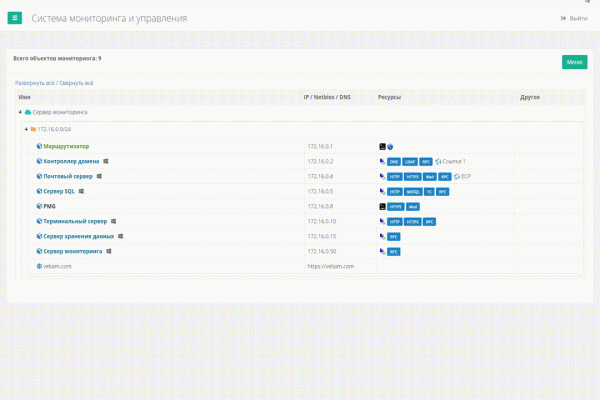
Remote Connections
Here's how it looks in action in the current version of Veliam
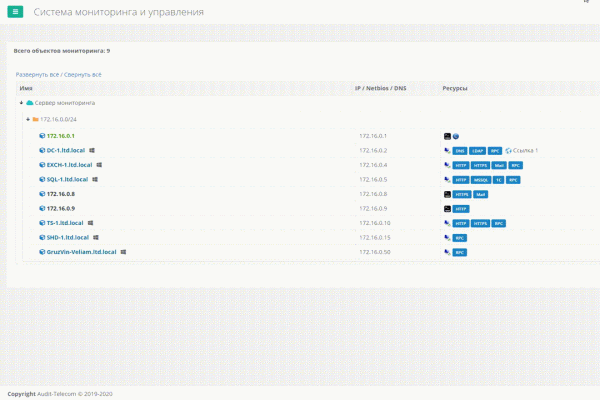
One of the tasks was to provide quick and convenient connections to servers, which have now grown to over a hundred, and sifting through millions of pre-saved RDP shortcuts was extremely inconvenient. A tool was needed. There are software solutions online that act like an address book for such RDP connections, but they are not integrated with the monitoring system, and accounts cannot be saved. Having to enter credentials for different clients each time is a real headache, especially when connecting multiple times a day to various servers. SSH connections are slightly better; there are many good software options that allow you to organize those connections into folders and remember the credentials for them. However, there are two issues. First, we didn’t find a single program for RDP and SSH connections. Second, if I'm not at my computer and need to connect quickly, or if I've just reinstalled the system, I will have to dig into the documentation to find the client’s credentials. This is inconvenient and a waste of time.
The hierarchical structure for our clients' servers already existed in our internal product. We just needed to figure out how to integrate quick connections to the necessary equipment, at least within our network.
Given that the client in our system was a browser that does not have access to local computer resources, we needed a way to invoke the required application through a command. Thus, the concept of a 'Windows custom URL scheme' was devised. This led to the creation of a certain 'plugin' for our system, which simply included Putty and Remote Desktop Plus, and upon installation, registered the URI scheme in Windows. Now, when we wanted to connect to a target using RDP or SSH, we would click this action in our system, triggering the Custom URI functionality. The standard mstsc.exe integrated into Windows or putty, which was included with the 'plugin', would launch. I use the term plugin in quotes because it is not a browser plugin in the traditional sense.
This was already something. A convenient address book. In the case of Putty, everything worked really well; you could input both the connection IP and the login and password as parameters. That is, we were able to connect to Linux servers in our network with just one click without entering passwords. However, RDP was not so straightforward. The standard mstsc does not accept credentials as parameters. Remote Desktop Plus came to the rescue. It allowed for this functionality. Now we manage without it, but for a long time it was a faithful assistant in our system. With HTTP(S) websites, it was simple; such resources could simply be opened in the browser. Convenient and practical. But this was only a blessing within the internal network.
Since we solved the overwhelming majority of problems remotely from the office, the simplest solution was to establish VPNs to clients. This allowed us to connect to them from our system. Nevertheless, it was still somewhat inconvenient. Each client required us to maintain a bunch of saved connections on each computer. VPN We had to enable the corresponding VPN before connecting to any of them. We used this solution for quite a considerable period. However, as the number of clients increased, so did the number of VPNs, and it all started to become burdensome, necessitating a change. Especially tears came to my eyes after reinstalling the system, when I had to input dozens of VPN connections again in the new Windows profile. I said enough is enough, and began to ponder what could be done about it.
It has become customary for all clients to use routers from the well-known company Mikrotik. They are quite functional and convenient for performing almost any task. However, one drawback is that they are often 'hijacked'. We addressed this issue by simply closing all external access. However, we needed a way to access them without having to visit the client, as that takes time. We simply created tunnels to each Mikrotik and allocated them to a separate pool, without any routing, to prevent the merging of our network with the clients' networks and their networks with each other.
The idea arose to make it so that when I clicked on the desired object in the system, the central monitoring server, knowing the SSH credentials for all client Mikrotiks, would connect to the necessary one and create a port forwarding rule to the desired host with the needed port. There are several points to consider here. The solution is not universal—it will only work for Mikrotik, as the command syntax is unique to each router. Additionally, these forwards would then need to be removed somehow, and the server part of our system essentially couldn't track in any way whether I had finished my RDP session. Also, such forwarding poses a security risk for the client. However, we weren't chasing universality, as the product was only used within our company and we had no thoughts of making it public.
Each of the problems was resolved in its own way. When a rule was created, this forwarding was only accessible for one specific external IP address (from which the connection was initiated). This way, security holes were avoided. However, with every such connection, a rule was added to the Mikrotik's NAT page and not removed. And it is well known that the more rules there are, the heavier the load on the router's processor becomes. Overall, I couldn't accept the situation where I would log into some Mikrotik only to find hundreds of dead, unnecessary rules.
Since our server cannot track the connection status, let MikroTik track them itself. I wrote a script that constantly monitored all forwarding rules with a specific description and checked if there was a TCP connection matching the rule. If there wasn’t one for a while, then the connection was likely done and the forward could be removed. It all worked out; the script functioned well.
By the way, here it is:
global atmonrulecounter {"dontDelete"="dontDelete"}
:foreach i in=[/ip firewall nat find comment~"atmon_script_main"] do={
	local dstport [/ip firewall nat get value-name="dst-port" $i]
	local dstaddress [/ip firewall nat get value-name="dst-address" $i]
	local dstaddrport "$dstaddress:$dstport"
	#log warning message=$dstaddrport
	local thereIsCon [/ip firewall connection find dst-address~"$dstaddrport"]
	if ($thereIsCon = "") do={
		set ($atmonrulecounter->/$dstport) ($atmonrulecounter->/$dstport + 1)
		#:log warning message=($atmonrulecounter->/$dstport)
		if (($atmonrulecounter->/$dstport) > 5) do={
			#log warning message="Removing nat rules added automatically by atmon_script"
			/ip firewall nat remove [/ip firewall nat find comment~"atmon_script_main_$dstport"]
			/ip firewall nat remove [/ip firewall nat find comment~"atmon_script_sub_$dstport"]
			set ($atmonrulecounter->/$dstport) 0
		}
	} else {
		set ($atmonrulecounter->/$dstport) 0
	}
}
It could have been made prettier, faster, etc., but it worked, didn’t overload the MikroTiks, and performed excellently. We could finally connect to the clients' servers and network equipment with just one click. No need to raise a VPN or enter passwords. The system became really convenient to work with. Maintenance time was reduced, and we spent our time working instead of connecting to the necessary objects.
Mikrotik Backup
We had set up backups for all the MikroTiks on FTP. Overall, it was fine. But when we needed to retrieve a backup, we had to open that FTP and search for it there. We have a system where all routers are recorded, and we know how to communicate with devices via SSH. Why not make it so that the system automatically retrieves backups from all MikroTiks daily, I thought. And I started to implement it. We connected, made a backup, and stored it.
PHP script code for taking a backup from MikroTik:
<?php

	$IP = '0.0.0.0';
	$LOGIN = 'admin';
	$PASSWORD = '';
	$BACKUP_NAME = 'test';

    $connection = ssh2_connect($IP, 22);

    if (!ssh2_auth_password($connection, $LOGIN, $PASSWORD)) exit;

    ssh2_exec($connection, 'system backup save name="atmon" password="atmon"');
    stream_get_contents($connection);
    ssh2_exec($connection, 'export file="atmon.rsc"');
    stream_get_contents($connection);
    sleep(40); // Waiting for backup to complete

    $sftp = ssh2_sftp($connection);

    // Download backup file
    $size = filesize("ssh2.sftp://$sftp/atmon.backup");
    $stream = fopen("ssh2.sftp://$sftp/atmon.backup", 'r');
    $contents = '';
    $read = 0;
    $len = $size;
    while ($read < $len && ($buf = fread($stream, $len - $read))) {
        $read += strlen($buf);
        $contents .= $buf;
    }
    file_put_contents($BACKUP_NAME . '.backup', $contents);
    @fclose($stream);

    sleep(3);
    // Download RSC file
    $size = filesize("ssh2.sftp://$sftp/atmon.rsc");
    $stream = fopen("ssh2.sftp://$sftp/atmon.rsc", 'r');
    $contents = '';
    $read = 0;
    $len = $size;
    while ($read
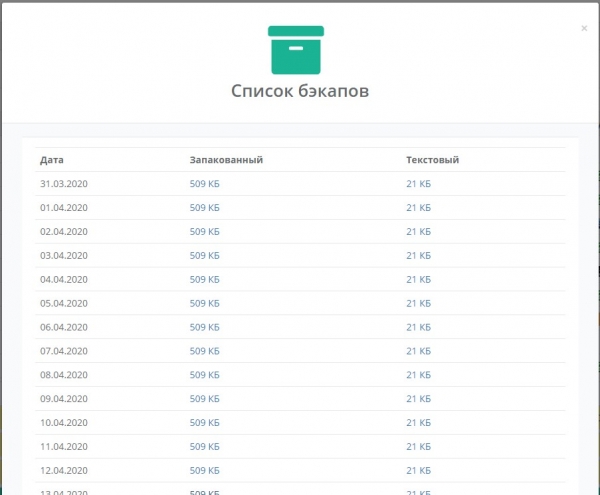
Backups are taken in two forms — a binary and a textual configuration. The binary allows for quick restoration of the required configuration, while the text version helps understand what steps to take if there is a forced hardware replacement and the binary cannot be uploaded. In the end, we gained another convenient functionality within the system. Moreover, when adding new MikroTik devices, no configurations were needed; just added the object to the system and assigned SSH credentials. From then on, the system took care of backup retrieval. This functionality is not yet available in the current version of SaaS Veliam, but we will port it soon.
Screenshots of how it looked in the internal system
Transitioning to normal storage in the database
Earlier, I mentioned that artifacts appeared. Sometimes the entire list of objects in the system would simply disappear, and other times, upon editing an object, the information wouldn't save, forcing me to rename the object three times. This was incredibly frustrating for everyone. The disappearance of objects happened rarely and could be easily restored by recovering that very file, but the failures during object editing occurred quite frequently. I probably didn't implement it through the database initially because I couldn't wrap my head around how to maintain a tree with all its relationships in a flat table. It is flat, while a tree is hierarchical. However, a good solution for concurrent access, and later (as the system became more complex) for transactional access is a DBMS. I'm certainly not the first to encounter this problem. I went Google searching. It turned out that everything had already been thought of before me, and there are several algorithms that build a tree from a flat table. After looking at each one, I implemented one of them. But this was already a new version of the system because I had to rewrite quite a bit for this reason. The result was predictable; the issues with the system's random behavior disappeared. Some may argue that the mistakes were quite amateurish (single-threaded scripts, storing information that had multiple simultaneous access from different threads in a file, etc.) in software development. That may be true, but my main job was administration, and programming was a side activity for passion, and I simply didn't have experience working in a team of programmers, where such elementary things could have been pointed out to me by senior colleagues right away. Thus, I learned all these lessons on my own, but I absorbed the material very well. Moreover, my work also involved client meetings, efforts aimed at promoting the company, a plethora of administrative issues within the company, and a lot more. Nevertheless, what existed was indeed in demand. The guys and I used the product in our daily work. There were also openly unsuccessful ideas and solutions that took time, only to realize that they were non-functional tools that no one used, and this did not make it to Veliam.
Support Service — HelpDesk
It is worth mentioning how HelpDesk was developed. This is quite a separate story because in Veliam, this is already the third completely new version, which differs from all the previous ones. Now it's a simple system, intuitively understandable without excessive frills or gimmicks, with the capability to integrate with a domain, as well as access to the same user profile from anywhere via a link in an email. And what's most important, there's the ability to connect to the requester via VNC directly from the ticket without VPNs or port forwarding, whether I'm at home or in the office. I'll explain how we got to this point, what was before, and what terrible solutions we faced.
We connected to users via the well-known TeamViewer. TeamViewer was installed on all computers of the users we serviced. The first mistake we made, which we later eliminated, was binding each client's HWID to their hardware. How did users access the HWID system to submit a request? In addition to TeamViewer, a special utility written in Lazarus was installed on all computers (many will raise their eyebrows here and may even Google what this is, but the best compiled language I knew was Delphi, and Lazarus is almost the same, just free). Essentially, the user would run a special batch file that launched this utility, which then read the system's HWID, and after that, the browser would launch, and authentication would occur. Why was this necessary? In some companies, the count of serviced users is done individually, and the service price is based on the number of people. This is understandable, you might say, but why the binding to hardware? It's simple: some individuals would come home and submit requests from their home laptops saying, 'Make everything nice for me here.' Besides reading the system’s HWID, the utility also retrieved the current TeamViewer ID from the registry and passed it to us. TeamViewer has an API for integration, and we made that integration. But there was one catch. Through this API, you cannot connect to the user's computer unless they explicitly initiate that session and must also click 'confirm' after attempting to connect to them. At that time, it seemed logical to us that no one should connect without the user’s permission. And since a person is at their computer, they would initiate the session and reply affirmatively to the remote connection request. It turned out things were not so simple. Applicants often forgot to initiate the session, and we had to remind them during phone conversations. This wasted time and irritated both parties involved. Moreover, it was not uncommon for a person to leave a request but only allow a connection when they went on lunch. Since the issue was not critical, they didn’t want their work process interrupted. Consequently, they wouldn’t click any buttons to allow the connection. Thus, additional functionality appeared during authentication in HelpDesk—the retrieval of the TeamViewer ID. We knew the permanent password used during TeamViewer installation. More accurately, only the system knew it, as it was embedded in the installer and our system. Therefore, there was a connection button in the request, which, when pressed, did not require any waiting, and TeamViewer would open immediately to establish the connection. As a result, there were two possible connection methods: through the official TeamViewer API and our makeshift one. To my surprise, the first option was almost immediately disregarded, even though there was an instruction to use it only in special cases and when the user granted permission. However, in today’s world, security is paramount. But it turned out the applicants didn’t want that at all. They were completely fine with being connected without the confirmation button. Given this, the functionality for connecting via the API was ultimately abolished due to lack of necessity.
Switching to Multithreading in Linux
The question of speeding up the network scanner's capability to check the openness of a predefined list of ports and perform a simple ping of network objects has long been on the table. The first solution that comes to mind is multithreading. The main time spent on pinging is waiting for packet return, and the next ping cannot start until the previous packet returns. In companies with even 20+ servers plus networking equipment, this has been running quite slowly. The point is that a packet can be lost, but the system administrator shouldn't be notified about this immediately. They would quickly stop paying attention to such spam. Therefore, each object needs to be pinged multiple times before concluding unavailability. Without going into too much detail, parallelization is necessary; otherwise, the system administrator will likely learn about the problem from the client rather than from the monitoring system.
PHP itself does not natively support multithreading out of the box. It supports multiprocessing, allowing forking. However, I already had a polling mechanism written and wanted to ensure that I read all the necessary nodes from the database once, pinged them all simultaneously, awaited responses from each, and only then wrote the data. This saves on the number of read requests. This idea fit perfectly with multithreading. There is a PThreads module for PHP that allows for true multithreading, although I had to put in quite a bit of effort to configure it for PHP 7.2, but it was accomplished. Port scanning and pinging became fast. Instead of, for example, 15 seconds per round previously, this process now takes 2 seconds. That was a great result.
Quick Audit of New Companies
How did the functionality for collecting various metrics and hardware characteristics come about? It's simple. Sometimes we are just commissioned to audit the current IT infrastructure. And the same is necessary to expedite the audit of a new client. We needed something that would allow us to enter a medium or large company and quickly get an idea of what they have. I believe that only those who want to complicate their lives block pings on the internal network, and there are not many of them based on our experience. However, they do exist. Accordingly, we can quickly scan networks for devices using a simple ping. Next, we can add them and scan for open ports that interest us. Essentially, this functionality already existed; we just needed to add a command from the central server to the subordinate one so that it could scan the specified networks and add everything it finds to the list. I forgot to mention that we assumed we already had a ready image with the configured system (subordinate monitoring server) that we could simply roll out to the client during the audit and connect it to our cloud.
However, the result of the audit typically includes a wealth of various information, and one of the key aspects is identifying the devices on the network. We were primarily interested in Windows servers and Windows workstations within the domain. In medium and large companies, lacking a domain is probably an exception rather than the norm. To communicate effectively, my definition of an average company includes over 100 people. A method needed to be devised to collect data from all Windows machines and servers, given their IP addresses and the domain administrator's credentials, without having to install any software on each of them. This is where the WMI interface comes into play. Windows Management Instrumentation (WMI) is literally translated as Windows Management Toolkit. WMI is one of the foundational technologies for centralized management and monitoring of various components of computer infrastructure operating on the Windows platform. Taken from the wiki. Afterward, I had to spend some time collecting wmic (the WMI client) for Debian. Once everything was ready, it was simply a matter of querying the necessary nodes via wmic for the specific information needed. Through WMI, you can obtain almost any information from a Windows computer, and moreover, it also allows you to control the computer, for instance, by sending it a reboot command. This is how we began gathering information about Windows workstations and servers in our system. Additionally, we also kept track of current system load metrics. We request those more frequently, while hardware information is fetched less often. After this, auditing became somewhat more pleasant.
Decision on Software Distribution
We use the system daily, and it is always accessible to each technical staff member. We thought it would be beneficial to share what we already have with others. The system was not yet fully prepared for distribution. A lot needed to be reworked for the local version to transform into SaaS. This involved changes in various technical aspects of the system's operation (remote connections, support services), as well as analyzing modules for licensing issues, sharding client databases, scaling each service, and developing auto-update systems for all components. But this will be covered in the second part of the article.
Update
Source: habr.com
