

TL;DR If your corporate mobile devices need antivirus software, then you're doing everything wrong, and antivirus won't help you.
This post is the result of heated debates on whether antivirus software is necessary on corporate mobile phones, in what cases it works, and when it is useless. The article examines the threat models that antivirus is theoretically supposed to protect against.
Antivirus vendors often manage to convince corporate clients that antivirus will significantly enhance their security, but in most cases, this is an illusory protection that only lowers vigilance among both users and administrators.
Proper Corporate Infrastructure
When a company has dozens or even thousands of employees, it's impossible to configure each user device manually. Settings can change every day, new employees come on board, and their mobile phones and laptops may break or get lost. Ultimately, the administrators would be left with the daily task of deploying new configurations on employees' devices.
This task has been addressed long ago for desktop computers. In the Windows world, such management usually takes place via Active Directory, centralized authentication systems (Single Sign-On), etc. However, now all employees have smartphones in addition to their computers, where a significant part of work processes occurs, and important data is stored. Microsoft attempted to unify its Windows Phone devices into an ecosystem with Windows, but that idea died along with the official demise of Windows Phone. Thus, in the corporate environment, one must ultimately choose between Android and iOS.
Currently, in the corporate environment for managing employees' devices, the UEM (Unified Endpoint Management) concept is in vogue. This is a centralized system for managing mobile devices and desktop computers.
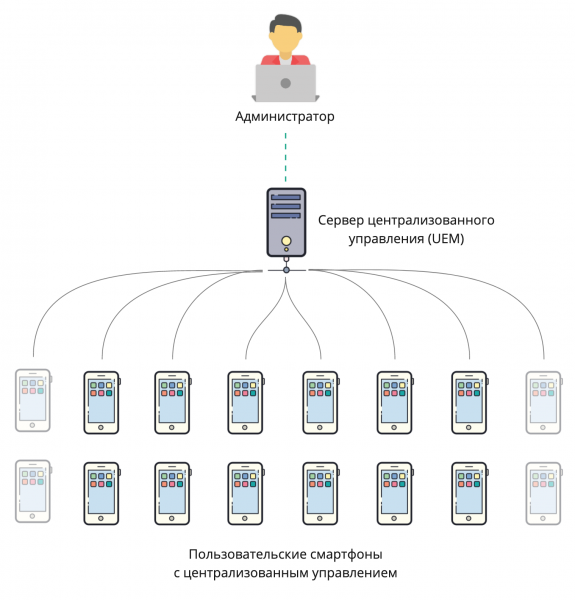
Centralized Management of User Devices (Unified Endpoint Management)
The UEM system administrator can set various policies for user devices. For instance, allowing users more or less control over their devices, installation of applications from third-party sources, etc.
What UEM can do:
Manage all settings The administrator can completely prohibit the user from changing settings on the device and modify them remotely.
Control software on the device — allow the installation of software on the device and automatically install programs without the user's knowledge. The administrator can also prohibit or allow installation from app stores or untrusted sources (from APK files in the case of Android).
Remote lock — in case the phone is lost, the administrator can lock the device or wipe the data. Some systems also allow setting automatic data deletion if the phone has not contacted the server for more than N hours, to eliminate the possibility of offline hacking attempts when attackers manage to remove the SIM card before the server sends the data wipe command.
Collect statistics — track user activity, application usage time, location, battery level, etc.
Types of UEM
There are two fundamentally different approaches to centralized management of employees' smartphones: in one case, the company purchases devices from a single manufacturer and usually chooses a management system from the same provider. In the other case, employees use their personal devices for work, which creates a mishmash of operating systems, versions, and platforms.
BYOD (Bring Your Own Device) — a concept in which employees use their personal devices and accounts for work. Some centralized management systems allow adding a second work account and fully separating personal and work data.
— Apple's native centralized management system. It can only manage Apple devices, computers running macOS, and phones on iOS. Supports BYOD, creating a second isolated environment with a different iCloud account.
— allows managing phones on Android and Apple iOS, as well as desktops on Windows 10. Support for BYOD is claimed.

— only supports Samsung mobile devices. Initially, it can only be used with .
In fact, there are many more UEM providers, but we won't cover them all in this article. The key point to keep in mind is that such systems already exist and allow administrators to configure user devices adequately according to the existing threat model.
Threat Model
Before choosing security tools, it's essential to understand what we are protecting against and what the worst-case scenario may be in our specific situation. For instance, our body is easily vulnerable to a bullet or even a fork with a nail, but we don't wear a bulletproof vest when leaving home. Therefore, the threat of being shot on the way to work doesn’t fall into our threat model, even though statistically, it's not that unlikely. However, under certain conditions, wearing a bulletproof vest is quite justified.
Threat models vary across different companies. Take, for example, a courier's smartphone that is delivering a package to a client. The smartphone only stores the address of the current delivery and the route on the map. The worst that can happen to its data is a leak of the delivery addresses.
Now consider the accountant's smartphone. It provides access to the corporate network through VPN, has a corporate banking app installed, and stores documents with valuable information. Clearly, the value of data on these two devices is significantly different, and they should be protected accordingly.
Will antivirus save us?
Unfortunately, the real tasks performed by antivirus software on mobile devices are often lost behind marketing slogans. Let's delve deeply into what antivirus does on a phone.
Security Audit
Most modern mobile antivirus solutions conduct a security settings audit on the device. Sometimes this audit is referred to as a "device reputation check." Antivirus software considers a device safe if four conditions are met:
- The device is not compromised (root, jailbreak).
- A password is set on the device.
- USB debugging is disabled on the device.
- Installation of apps from untrusted sources (sideloading) is not allowed on the device.
If the device is deemed unsafe as a result of the check, the antivirus will notify the owner and offer to disable the 'dangerous' functionality or revert to factory firmware if signs of root or jailbreak are detected.
According to corporate practices, it is not enough to just notify the user. Unsafe configurations must be eliminated. For this, security policies should be configured on mobile devices using a UEM system. In the event of discovering root or jailbreak, corporate data must be swiftly deleted from the device and its access to the corporate network must be blocked. This is also possible with the help of UEM. Only after these procedures can the mobile device be considered safe.
Virus detection and removal
Contrary to the common belief that there are no viruses for iOS, this is not true. Exploits for older versions of iOS are still prevalent in the wild, which by exploiting vulnerabilities in the browser. However, due to the architecture of iOS, developing antivirus solutions for this platform is not feasible. The main reason is that applications cannot access the list of installed applications and have many restrictions when accessing files. Only UEM can access the list of installed iOS applications, but even UEM cannot access the files.
The situation with Android is different. Applications can retrieve information about the applications installed on the device. They can even access their distributions (e.g., Apk Extractor and similar tools). Android applications can also access files (e.g., Total Commander, etc.). Android applications can be decompiled.
With such capabilities, a logical antivirus algorithm looks like this:
- Application check
- Obtain a list of installed applications and checksums (CS) of their distributions.
- Check the applications and their CS first against the local database, then against the global database.
- If the application is unknown, send its distribution to the global database for analysis and decompilation.
- File check, virus signature search
- Check the CS of files in the local database, then in the global database.
- Check for unsafe content in the files (scripts, exploits, etc.) first against the local database, and then against the global database.
- If malware is detected, inform the user and/or block the user's access to the malware and/or transmit information to UEM. It is essential to transmit the information to UEM because the antivirus cannot independently remove the malware from the device.
The greatest concerns stem from the possibility of transferring software distributions from the device to an external server. Without this, the behavioral analysis claimed by antivirus manufacturers cannot be implemented, as it is impossible to run an application in a separate 'sandbox' or decompile it (how effective this is when using obfuscation is a separate complex issue). On the other hand, corporate applications that are unknown to the antivirus may be installed on employees' mobile devices because they are not in Google Play. These mobile applications may contain sensitive data, which is why they are not available in the public store. Transmitting such distributions to the antivirus manufacturer seems incorrect from a security standpoint. It makes sense to add them to exceptions, but I am currently unaware of the existence of such a mechanism.
Malware without root privileges can
1. Draw its invisible window over the application or embed its keyboard to copy the data entered by the user – account credentials, bank card details, etc. A recent example is the vulnerability , which allows for replacing the active application screen, thereby granting access to the data entered by the user. For the user, this means the possibility of theft of their Google account with access to device backups and bank card information. For the organization, in turn, it is important not to lose its data. If the data is in the application's private storage and not included in the Google backup, the malware will not be able to access it.
2. Access data in public directories – downloads, documents, gallery. It is not recommended to store valuable company information in these directories, as any application can access them. Moreover, the user can always share a confidential document using any available application.
3. Annoying the user with ads, mining bitcoins, being part of a botnet, etc.. This can negatively affect the user's performance and/or device, but it won't pose a threat to corporate data.
Root-privileged malware can do anything. They are rare because hacking modern Android devices through an app is nearly impossible. The last such vulnerability was discovered in 2016. It was the infamous Dirty COW, which was assigned the number . The key point here is that upon detecting signs of hacking, the UEM client will wipe all corporate information from the device, so the likelihood of successful data theft via such malware in the corporate world is low.
Malicious files can harm both the mobile device and the corporate systems it has access to. Let's break down these scenarios in more detail.
A mobile device can be harmed, for example, by downloading an image that, upon opening or trying to set as wallpaper, turns the device into a "brick" or reboots it. This will likely damage the device or the user, but it won't affect data privacy. Though there are exceptions.
Recently, a vulnerability was discussed . It was claimed that it could allow access to the console of Samsung mobile devices via an infected image sent through email, messenger, or MMS. Although access to the console means only access to data in public directories where confidential information should not exist, the privacy of users' personal data is at risk, which scared users. In fact, attacking devices is only possible via MMS. To successfully attack, one needs to send between 75 to 450 (!) messages. Antivirus software, unfortunately, won't help here, as it doesn't have access to the message logs. To protect against this, there are only two options. Update the OS or disable MMS. The first option may take a long time, as device manufacturers do not release updates for all devices. Disabling MMS reception, in this case, is much simpler.
Files transferred from mobile devices can pose a threat to corporate systems. For example, a mobile device may have an infected file that doesn't harm the device itself but can infect a Windows computer. A user sends such a file via email to a colleague. The colleague opens it on their PC, potentially infecting it. However, there are at least two antivirus solutions in place to stop this attack vector – one on the email server and the other on the recipient's PC. Adding a third antivirus on the mobile device seems a bit excessive.
As can be seen, the greatest threat in the corporate digital world comes from malware without root privileges. Where can they originate from on a mobile device?
Most often, they are installed via sideloading, ADB, or third-party stores, which should be banned on mobile devices with access to the corporate network. This leaves two more options for malware to enter – from Google Play or from UEM.
Before being published on Google Play, all applications undergo mandatory checks. However, for applications with a low number of installations, these checks are often performed automatically, without human involvement. Thus, sometimes malware can make it onto Google Play, but it is still relatively rare. An antivirus with up-to-date databases can detect applications with malware on the device faster than Google Play Protect, which currently lags in updating antivirus databases.
UEM can install any application on a mobile device, including malware, so every application needs to be checked in advance. Applications can be tested during their development using static and dynamic analysis tools, as well as just before distribution using specialized "sandboxes" and/or antivirus solutions. Importantly, the application is checked only once before being uploaded to UEM. Therefore, even in this case, an antivirus on the mobile device is unnecessary.
Network Protection
As part of the network protection, depending on the antivirus manufacturer, one or more of the following features may be offered.
URL filtering is used for the purpose of:
- Blocking traffic based on resource categories. For example, to prohibit viewing news or other non-corporate content until after lunch, when the employee is most effective. In practice, blocking often comes with many limitations – antivirus manufacturers do not always manage to timely update category resource directories, given the existence of numerous ‘mirrors’. Additionally, there are anonymizers and Opera VPN, which are often unaffected by such blocking.
- Protection against phishing or host masquerading. To achieve this, the URLs accessed by the device are first checked against the antivirus database. Links, as well as the resources they lead to (including potential multiple redirects), are verified against a list of known phishing sites. There's also a check of the domain name, certificate, and IP address between the mobile device and the trusted server. If the client and server receive different data, it indicates either a MITM (man in the middle) attack or traffic blocking through the antivirus or various types of proxies and web filters in the network to which the mobile device is connected. It's difficult to confidently determine if someone is in the middle.
To access mobile traffic, the antivirus either builds a VPN or uses the Accessibility API (API for applications designed for people with disabilities). Simultaneous use of multiple VPNs on a mobile device is not possible, thus network protection from antivirus programs that create their own VPN is inapplicable in the corporate world. An antivirus VPN simply will not function alongside the corporate VPN used to access the corporate network.
Granting the antivirus access to the Accessibility API poses another risk. Access to the Accessibility API effectively means permission to do anything on behalf of the user — viewing what the user sees, performing actions with applications on behalf of the user, and so on. Considering that the user must explicitly grant this access to the antivirus, they are likely to refuse. Or, if forced to, they might buy another phone without antivirus.
Firewall
This general term encompasses three functions:
- Network usage statistics collection segmented by applications and network type (Wi-Fi, cellular operator). Most Android device manufacturers provide this data in the 'Settings' app. Redundancy in a mobile antivirus interface seems excessive. The aggregate information across all devices may be of interest. UEM systems successfully collect and analyze it.
- Mobile traffic limiting – setting a cap and notifying when it's reached. These features are available to users of most Android devices in the 'Settings' app. Centralized limit management is a task for UEM, not antivirus software.
- Essentially, a firewall. Or, in other words, blocking access to specific IP addresses and ports. Given the presence of DDNS on all popular resources and the need to enable VPN for these purposes, which, as mentioned earlier, cannot work alongside the primary VPN, this function seems inapplicable in corporate practice.
Wi-Fi trust verification
Mobile antivirus solutions can assess the security of Wi-Fi networks to which the mobile device connects. It can be assumed that they check for the presence and strength of encryption. At the same time, all modern applications use encryption for transmitting sensitive data. Therefore, if a program is vulnerable at the link layer, it is equally dangerous to use it over any internet channels, not just public Wi-Fi.
Thus, public Wi-Fi, including unencrypted ones, is no more dangerous and no less safe than any other untrusted data transmission channels without encryption.
Spam protection
Protection generally involves filtering incoming calls based on a user-specified list or a database of known spammers who persistently annoy with insurance offers, loans, and theater invitations. Although they don't call during self-isolation, they'll likely start again soon. Only calls are filtered. Messages on current Android devices are not filtered. Considering the regular number changes by spammers and the inability to protect text channels (SMS, messengers), the functionality is more of a marketing nature than a practical one.
Anti-theft protection
Perform remote actions on a mobile device in case of loss or theft. An alternative to Apple's Find My iPhone and Google's Find My Device, respectively. Unlike their counterparts, antivirus manufacturers' services cannot provide device locking if the attacker has reset it to factory settings. However, if this has not yet occurred, the following actions can be performed remotely on the device:
- Block it. Protection against a nearby thief, as this can easily be bypassed by resetting the device to factory settings through recovery.
- Locate the device's coordinates. Useful when the device has been recently lost.
- Activate a loud sound signal to find the device if it is on silent mode.
- Reset the device to factory settings. This makes sense when the user acknowledges that the device is irretrievably lost but does not want the data stored on it to be disclosed.
- Take a photo. Capture a picture of the attacker if they are holding the phone. This functionality is questionable – the likelihood that the attacker is admiring the phone in good lighting is low. However, the presence of an app on the device that can discreetly control the smartphone camera, take photos, and send them to a server raises justified concerns.
Remote command execution is fundamental in any UEM system. They lack only remote photography. This is a sure way for users to remove batteries from their phones after work and place them in a Faraday bag.
Anti-theft functions in mobile antivirus applications are only available for Android. For iOS, such actions can only be performed by UEM. There can only be one UEM on an iOS device – this is an architectural feature of iOS.
Conclusions
- A situation in which a user can install malicious software on a phone is UNACCEPTABLE.
- A properly configured UEM on a corporate device eliminates the need for antivirus.
- In the case of exploiting 0-day vulnerabilities in the operating system, antivirus is useless. It can only inform the administrator that the device is vulnerable.
- Determining whether a vulnerability exists is something that antivirus software cannot do. Likewise, it cannot deliver an update for devices for which the manufacturer no longer provides security updates. At best, this will last one to two years.
- If we abstract from regulatory and marketing requirements, corporate mobile antivirus software is only necessary on Android devices, where users have access to Google Play and can install applications from third-party sources. In other cases, the effectiveness of antivirus software is no more than a placebo.

Source: habr.com
