

The service Sentry allows remote monitoring of bugs in frontend applications written in JavaScript.

Trying to fix issues in frontend applications on JavaScript can be quite a challenge, as they occur in the user's browser, which you often do not have access to. However, Sentry provides the ability to remotely monitor bugs.
you can download the solutions discussed in this article.
What you need
If you want to take advantage of these examples, you will need:
- : A multifunctional development tool that is not part of the application. We downloaded the latest LTS version (8.12.0)
- Sentry: Either an account on Sentry (you can record up to 10,000 bugs per month for free) or a locally installed Sentry —
Installation on your server
To install Sentry On-Premise on your server, you can take 2 paths
Build the rpm and install them —
Use the official installer:
Install Docker and Docker Compose on the server
git clone https://github.com/getsentry/onpremise.git
./install.sh
Standard usage
To get started, add a new project for the application from the service's website. After selecting the desired language, you will receive the corresponding documentation. In our case, we selected SentryThe first example — the standard JavaScript.
. Here are two buttons: JavaScript“Hello” (Hello) and “Error” (Error). After you click the button
, the screen will refresh, and the block (Hello) andwill detect and catch the bug. After the bug is “caught”, a bug report is manually sent to the service try The “Error” button simply allows you to detect a bug. Sentry.
vanilla / index.html
Sentry is loaded from the CDN and displayed as a global variable
<!DOCTYPE html>
<html>
<head>
<meta charset="UTF-8">
<title>Vanilla</title>
</head>
<body>
  <button id="hello">Hello</button>
  <button id="error">Error</button>
  <div id="output"></div>
  <script src="https://browser.sentry-cdn.com/4.0.5/bundle.min.js" crossorigin="anonymous"></script>
  <script>
    (function () {
      'use strict';
      Sentry.init({ dsn: 'https://b5bf359072254626aba8e64368e77b7d@sentry.io/1289664' });
      var helloEl = document.getElementById('hello');
      var errorEl = document.getElementById('error');
      var outputEl = document.getElementById('output');
      helloEl.addEventListener('click', handleHelloClick);
      errorEl.addEventListener('click', handleErrorClick);
      function handleHelloClick() {
        outputEl.innerHTML = 'Hello World';
        try {
          throw new Error('Caught');
        } catch (err) {
          Sentry.captureException(err);
        }
      }
      function handleErrorClick() {
        throw new Error('Uncaught');
      }
    })();
  </script>
</body>
</html>
Notes:
- Earlier, we launched Sentry in our JavaScript
- To test this example, we can use a static web server platform
HTTP server Node.js: . Navigate to the folder where the file is stored, and enter (this option disables caching) the following line to open the address in the browser index.htmlHow caught bugs are displayed .
First, click the button
We caught a bug, so it won't propagate up the call stack, and therefore will not be monitored in the console. However, since we are manually sending (Hello) and.
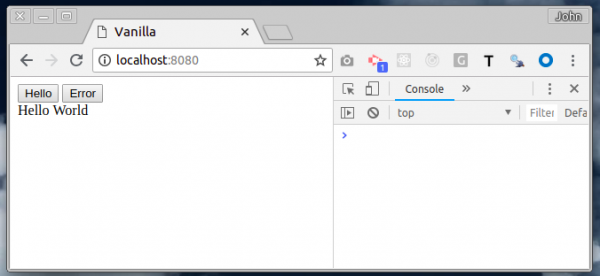
the bug report, we will see a message about it in the account. Sentry We can trace in which line (24) the bug sneaked in
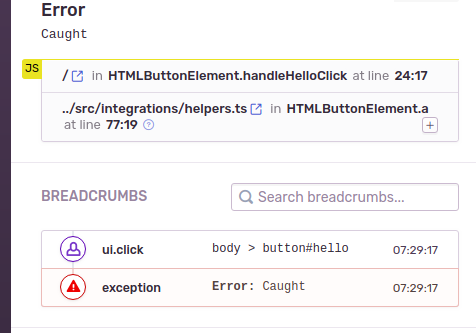
Notes:
- Moreover, the navigation chain displays the actions of the browser that led to the error.
- How uncaught bugs are displayed
How uncaught bugs are displayed
Click the button "Error."
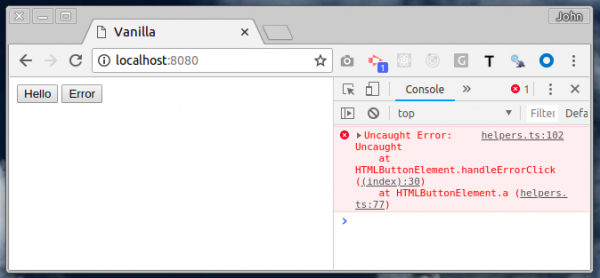
The bug bubbles up the call stack and thus displays an error message on the console. After that, Sentry automatically monitors the bug without any additional actions.
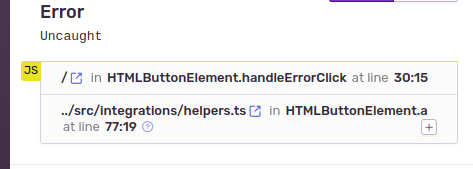
Notes:
- We can see on which line (30) the bug has been lost
- There is no navigation chain provided (I don’t quite understand why)
How to ensure project security
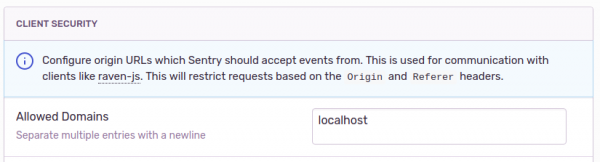
You may have noticed how we control the pages that can send error reports to our project Sentry; using dsn records. The problem is that anyone who views the source code of your page can see the input.
To prevent this, it is necessary to limit the number of domains that can submit error reports to our project. In this example, we used localhost (localhost). This option is configured in the settings tab Sentry-of the project, Sentry Project Setting.
Releases
If we think about how to use Sentry in different variations of our application, then there should be some mechanism that will label errors with a version number.
We don't want a bug we fixed to resurface, only for us to think that what we fixed didn't work. It's also possible that a user launched an older, cached version of the application.
To solve the problem, you need to write the identifier release (version) at startup Sentry.
Sentry is loaded from the CDN and displayed as a global variable
...
var RELEASE = '0.1.0';
Sentry.init({
  dsn: 'https://b5bf359072254626aba8e64368e77b7d@sentry.io/1289664',
  release: RELEASE,
});
...
After that, all new errors will be marked as release (0.1.0), meaning they will be tied to the correct version of the code.
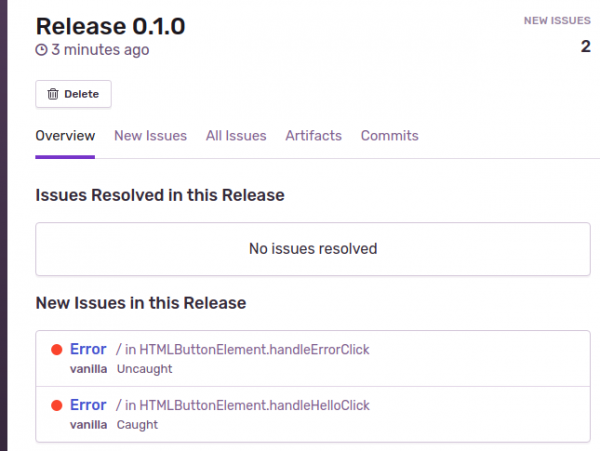
Notes:
- We discussed a simple way to use releases
- Sentry allows for a more , which is closely related to GitHub. This function allows tracking bugs before certain operations are performed.
P.S. The second part is longer, so it will be in a separate post.
P.S. Telegram chat Sentry
P.S. I forgot to mention that this is a translation of a post
Source: habr.com
