

Hello, Habr!
Today I want to share our experience in automating backups of large Nextcloud data storage in different configurations. I work as the CTO at 'Lightning AC', where we handle configuration management of IT systems, using Nextcloud for data storage. This includes distributed structures with redundancy.
The challenges stem from the specifics of the installations, as there is a large amount of data. The versioning provided by Nextcloud, backups, subjective reasons, and others create many duplicates.
Background
When administering Nextcloud, the need to organize an effective backup solution arises, which must be encrypted since the data is valuable.
We offer backup storage options either with us or with the client on their separate machines from Nextcloud, which requires a flexible automated approach to administration.
There are many clients, all with different configurations, each on their own premises with their own peculiarities. The standard method, when the entire site belongs to you and backups are taken from cron, is poorly applicable here.
First, let’s look at the initial data. We need:
- Scalability regarding one node or several. For large installations, we use minio as the storage solution.
- To be informed about issues with backup execution.
- Backups need to be stored with the clients and/or with us.
- Quickly and easily resolve issues.
- Clients and installations differ significantly from one another—achieving uniformity is not possible.
- Recovery speed must be minimal in two scenarios: full restoration (disaster), and one folder—accidentally deleted.
- Deduplication functionality is mandatory.
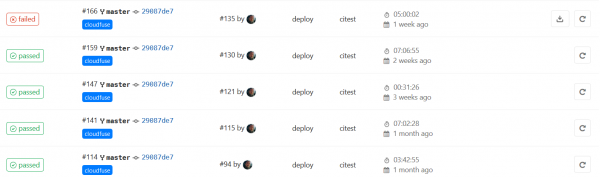
To address the task of backup management, we integrated GitLab. More details below.
Of course, we are not the first to tackle such a challenge, but we believe that our hard-earned practical experience could be interesting, and we are ready to share it.
Since our company follows an open-source policy, we sought a solution specifically with open source. In turn, we share our developments and publish them. For example, on GitHub there is , which we install for clients, enhancing data retention in case of accidental or intentional deletion.
Backup tools
We began searching for solutions by selecting a backup creation tool.
Regular tar + gzip works poorly — data gets duplicated. The increment often contains very few actual changes, and most of the data within a single file is repeated.
There is another issue — redundancy in the distributed data storage. We use minio and its data is inherently redundant. Backup needed to be done through minio itself — putting a load on it and utilizing all interspaces between the file system, and importantly, there's a risk of forgetting about some buckets and meta-information. Alternatively, deduplication could be used.
Deduplicating backup tools are available in open source (there was an article on Habr ) and our finalists became and . Below is our comparison of the two applications, but first, let's discuss how we organized the entire scheme.
Backup management
Borg and Restic are good, but neither product has a centralized management mechanism. For management and control purposes, we chose a tool that is already implemented with us, without which we cannot envision our work, including automation — this is the well-known CI/CD – GitLab.
The idea is as follows: a gitlab-runner is installed on each node storing Nextcloud data. The runner schedules a script that monitors the backup process, which then initiates Borg or Restic.
What do we gain? Feedback from executions, convenient change control, and details in case of errors.
Here we have provided script examples for different tasks, and we ultimately integrated it not only for Nextcloud backup but for many other services as well. There is also a scheduler included for those who prefer not to set it up manually (and we don’t want to) along with .gitlab-ci.yml.
In the GitLab API, there is currently no option to change the CI/CD timeout, and it is quite short. It needs to be increased, say to 1d.
Fortunately, GitLab can be triggered not only by commits but also by schedules, which is exactly what we need.
Now about the wrapper script.
We set the following conditions for this script:
- It should run both as a runner and manually from the console with the same functionality.
- Error handlers must be included:
- return code.
- search for a string in the log. For example, an error for us could be a message that the program does not consider fatal.
- Timeout processing. Execution time should be reasonable.
- We need a detailed log. But only in case of an error.
- A series of tests are also conducted before starting.
- Some handy features that we found useful during support:
- Start and finish are recorded in the local machine's syslog. This helps link system errors and backup operations.
- A portion of the error log, when present, is output to stdout, while the entire log is written to a separate file. It's convenient to check directly in CI and assess the error if it's trivial.
- Debugging modes.
The full log is saved as an artifact in GitLab; if there are no errors, the log is deleted. We write the script in bash.
We welcome any suggestions and feedback on open source.
How it works
A runner with a bash executor runs on the backed-up node. In the scheduler, a job CI/CD is launched in a special repo. The runner executes a universal wrapper script for such tasks, which checks the validity of the backup repository, mount points, and everything else we want, then backup and old data cleanup is performed. The completed backup is sent to S3.
We operate on this scheme — it’s an external provider like AWS or a Russian equivalent (this is faster and data does not leave Russia). Alternatively, we set up a separate MinIO cluster at the client's site for these purposes. Usually, we do this for security reasons when the client absolutely does not want their data to leave their perimeter.
We did not use the feature to send backups over SSH. It does not add security, and the network capabilities of the S3 provider are significantly higher than our single SSH machine.
To protect against hackers on the local machine — as they could erase data on S3, it is essential to enable versioning.
The backup tool always encrypts the backup.
Borg has a mode without encryption. none, but we strongly advise against enabling it. In this mode, not only is there no encryption, but checksums are not calculated for what is being written, meaning integrity can only be verified indirectly, through indexes.
A separate scheduler checks the integrity of backups for indexes and content. The check runs slowly and takes a long time, so we run it separately once a month. It can take several days.
Readme in Russian
Main features
preparePreparationtestcheckReadiness checkmaincommandMain commandforcepostscriptA function that is executed at the end or on error. Used to unmount the partition.
Service functions
CleanupWe record errors or erase the log file.Check logWe parse the log for occurrences of strings with errors.retExit handler.Check timeoutTimeout check.
Environment
VERBOSE=1Output errors to the screen immediately (stdout).SAVELOGSONSUCCES=1Save the log on success.INIT_REPO_IF_NOT_EXIST=1Create the repository if it does not exist. Off by default.TIMEOUTMaximum time for the main operation. You can set it as ‘m’, ‘h’ or ‘d’ at the end.
Old copy storage mode. By default:
KEEP_DAILY=7KEEP_WEEKLY=4KEEP_MONTHLY=6
Variables inside the script
ERROR_STRING— String for the check in the log for errors.EXTRACT_ERROR_STRING— Expression to show the string if there's an error.KILL_TIMEOUT_SIGNAL— Signal for killing if timeout.TAIL— How many strings with errors on the screen.COLORMSG— Color of the message (default yellow).
The script referred to as Wordpress is so called conditionally, its feature being that it also backs up the MySQL database. Hence, it can be used for one-time installations of Nextcloud, where you can also back up the database. The convenience lies not only in having everything in one place but also in the fact that the database content is close to the file content, since the time difference is minimal.
Restic vs Borg
Comparisons between Borg and Restic include , and we did not have the goal of making just another one, but our own. It was important for us how it would look on our data, with our specifics. We present them.
Our selection criteria, apart from the already mentioned ones (deduplication, quick recovery, etc.):
- Resistance to unfinished jobs. Check for kill -9.
- Size on disk.
- Resource requirements (CPU, memory).
- Size of stored blobs.
- Working with S3.
- Integrity checks.
For testing, we took one client with real data with a total size of 1.6TB.
Conditions.
Borg can't work directly with S3, so we mounted it as a fuse disk, via . Restic sent data directly to S3.
Goofys works very quickly and well, and it has a , which further speeds up operations. It is in beta stage, and frankly, we did experience crashes with data loss during tests (others). But the convenience is that the backup procedure does not require much reading, mostly writing, so we use the cache only during integrity checks.
To reduce network impact, a local provider was used — Yandex Cloud.
Comparison test results.
- Kill -9 followed by a restart both passed successfully.
- Disk size. Borg can compress, so the results are expected.
Backuper
Size
Borg
562Gb
Restic
628Gb
- By CPU
Borg itself consumes little, with default compression, but it should be evaluated together with the goofys process. In total, they are comparable and utilize about 1.2 cores on the same test virtual machine. - Memory. Restic roughly 0.5Gb, Borg about 200Mb. But this is all insignificant compared to the system's file cache. So it's advisable to allocate more memory.
- The difference in blob sizes was striking.
Backuper
Size
Borg
about 500Mb
Restic
about 5Mb
- S3 interaction from Restic is excellent. Borg via goofys raises no issues, but it has been noted that it is advisable to do an umount at the end of backup to fully reset the cache. The peculiarity of S3 is that incomplete chunks will never be sent to the bucket, and thus partially uploaded data leads to significant corruption.
- Integrity checks work well in both cases, but the speed differs significantly.
Restic – 3.5 hours.
Borg, with a 100Gb SSD file cache – 5 hours. Approximately the same speed result if the data is on a local disk.
Borg reads directly from S3 without cache 33 hours. Horribly long.
In summary, Borg can compress and has larger blobs — making storage and GET/PUT operations in S3 cheaper. But this comes at the cost of a more complex and slower verification process. As for recovery speed — we noticed no difference. Subsequent backups (after the first) take slightly longer with restic, but not significantly.
The size of the community was also a key factor in the choice.
And we chose Borg.
A few words about compression
Borg has a wonderful new compression algorithm in its arsenal — zstd. Its compression quality is no worse than gzip, but significantly faster. And comparable in speed to the default lz4.
For example, a MySQL database dump compresses about twice as well as lz4 at the same speed. However, experience with real data shows only a minimal difference in the compression degree of Nextcloud nodes.
Borg has a quite bonus compression mode — if a file has high entropy, no compression is applied at all, which increases work speed. It is enabled with an option during creation
-C auto,zstd
for the zstd algorithm.
So with this option compared to the default compression, we got
560Gb and 562Gb respectively. The data from the example above, reminds me, without compression the result is 628Gb. The 2Gb difference surprised us somewhat, but we decided that we would still choose auto,zstd.
Backup verification methodology
The virtual machine is launched either at the provider's site or at the client's, which significantly reduces network load. At the very least, this is cheaper than hosting it on our end and pushing traffic.
goofys --cache "--free:5%:\/mnt\/cache" -o allow_other --endpoint https:\/\/storage.yandexcloud.net --file-mode=0666 --dir-mode=0777 xxxxxxx.com \/mnt\/goofys
export BORG_PASSCOMMAND="cat \/home\/borg\/.borg-passphrase"
borg list \/mnt\/goofys\/borg1\/
borg check --debug -p --verify-data \/mnt\/goofys\/borg1\/
We verify files with antivirus in the same manner (post factum). After all, users upload different files to Nextcloud, and not all of them have antivirus. Checking at the moment of upload takes too much time and interferes with business.
Scalability is achieved by launching runners on different nodes with different tags.
In our monitoring system, backup statuses are collected through the GitLab API in one window; if necessary, problems are easily identified and localized.
Conclusion
As a result, we know for sure that we are making backups, that our backups are valid, and the problems that arise with them take little time and are resolved at the duty administrator level. Backups really take up little space compared to tar.gz or Bacula.
Source: habr.com
