

As your IT infrastructure grows too quickly, you will sooner or later face the choice of either linearly increasing human resources to support it or starting automation. For some time, we lived in the first paradigm, and then began a long journey towards Infrastructure-as-Code.

Of course, NSPK is not a startup, but that atmosphere prevailed in the company during its early years, and those were very interesting years. My name is , for over 10 years I have maintained high-availability Linux infrastructure. I joined the NSPK team in January 2016 and, unfortunately, did not witness the very beginning of the company's existence, but I came at a time of significant changes.
In general, it can be said that our team delivers two products for the company. The first is the infrastructure. Email needs to go through, DNS must work, and domain controllers must allow you access to servers that must not go down. The IT landscape of the company is vast! These are business & mission-critical systems, with some availability requirements reaching 99.999%. The second product is the servers themselves, both physical and virtual. We need to monitor existing ones while regularly supplying new servers to various departments. In this article, I want to emphasize how we developed the infrastructure that supports the life cycle servers.
The Beginning of the Journey
At the beginning of our journey, our technology stack looked like this:
OS CentOS 7
Domain controllers FreeIPA
Automation - Ansible(+Tower), Cobbler
All of this was located across three domains spread over several data centers. In one data center - office systems and test environments, while the others were PROD.
At some point, creating servers looked like this:
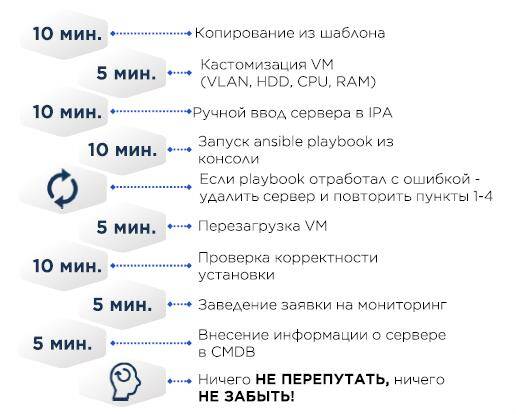
In the VM template, CentOS minimal was used along with the necessary minimum such as a correct /etc/resolv.conf; the rest comes via Ansible.
CMDB – Excel.
If the server is physical, instead of copying a virtual machine, the OS was installed using Cobbler – the MAC addresses of the target server are added to the Cobbler config, the server receives an IP address via DHCP, and then the OS is installed.
Initially, we even tried to implement some configuration management in Cobbler. However, over time, this became problematic regarding configuration portability both to other data centers and to Ansible code for preparing VM.
At that time, many of us perceived Ansible as a convenient extension of Bash and were generous with constructions using shell, sed. Basically, Bashsible. This ultimately meant that if the playbook didn't execute on the server for any reason, it was easier to delete the server, fix the playbook, and run it again. There was essentially no versioning of scripts or portability of configurations.
For example, we wanted to change some configuration on all servers:
- Changing configurations on existing servers in the logical segment/data center. Sometimes not in one day—the requirements for availability and the law of large numbers do not allow applying all changes at once. Some changes can be potentially destructive and require restart of something—from services to the operating system itself.
- Fixing in Ansible
- Fixing in Cobbler
- Repeating N times for each logical segment/data center
To ensure that all changes go smoothly, it was necessary to consider many factors, and changes happen constantly.
- Refactoring Ansible code, configuration files
- Changing internal best practices
- Changes based on incident/emergency analysis
- Changes in security standards, both internal and external. For example, PCI DSS is supplemented with new requirements every year
Growth of infrastructure and the beginning of the journey
The number of servers/logical domains/data centers increased, along with the number of errors in configurations. At some point, we identified three directions in which configuration management needed to develop:
- Automation. As much as possible, human factors should be avoided in repetitive operations.
- Repeatability. Managing infrastructure is much easier when it is predictable. The configuration of servers and the tools used for their setup should be identical everywhere. This is also important for product teams—an application must reliably transition to the production environment after testing, configured similarly to the test environment.
- Simplicity and transparency of making changes in configuration management.
We just need to add a couple of tools.
As a code repository, we chose GitLab CE, not least because of the presence of built-in CI/CD modules.
Secret storage—Hashicorp Vault, including its excellent API.
Testing configurations and Ansible roles – Molecule + Testinfra. Tests run significantly faster when you connect mitogen to Ansible. Simultaneously, we started developing our own CMDB and orchestrator for automatic deployment (as shown above Cobbler), but that's a whole different story that my colleague and the lead developer of these systems will share in the future.
Our choice:
Molecule + Testinfra
Ansible + Tower + AWX
World of Servers + DITNET (In-house Development)
Cobbler
GitLab + GitLab Runner
HashiCorp Vault

Speaking of Ansible roles. At first, there was one, but after several refactorings, there became 17. I highly recommend breaking a monolith into idempotent roles that can be run separately, and you can also add tags. We divided the roles by functionality – network, logging, packages, hardware, molecule, etc. Overall, we adhered to the strategy below. I don't claim this is the ultimate truth, but it worked for us.
- Copying servers from a 'golden image' is evil!Among the key drawbacks – you are not sure what state the images are currently in, and all changes will affect all images across all virtualization farms.
- Use default configuration files minimally and agree with other departments that you are responsible for the main system files., for example:
- Keep /etc/sysctl.conf empty; settings should only reside in /etc/sysctl.d/. Your defaults in one file, custom application settings in another.
- Use override files for editing systemd units.
- Template all configs and load them as a whole; avoid using sed and its equivalents in playbooks when possible.
- Refactoring the configuration management system code:
- Break tasks into logical entities and rewrite the monolith into roles.
- Use linters! Ansible-lint, yaml-lint, etc.
- Change your approach! No more bashsible. You need to describe the state of the system.
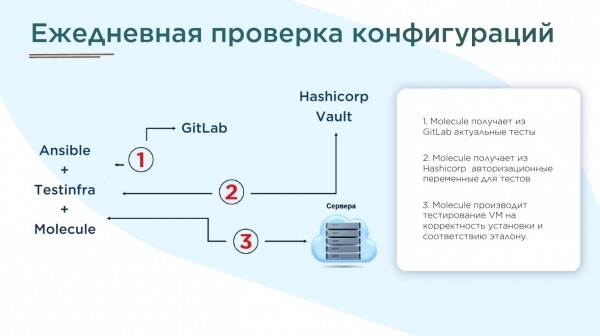
- For all Ansible roles, you need to write tests in Molecule and generate reports daily.
- In our case, after preparing the tests (of which there are over 100), around 70,000 errors were found. We corrected them over several months.

Our implementation
So, Ansible roles were ready, templated, and checked with linters. And even Git repositories were set up everywhere. However, the question of reliable code delivery to different segments remained open. We decided to synchronize via scripts. It looks like this:
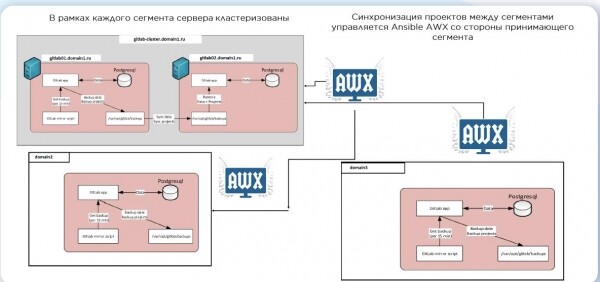
Once the changes arrive, CI is triggered, a test server is created, roles are applied, and molecule is used for testing. If everything is fine, the code is pushed to the production branch. However, we do not automatically apply new code to existing servers. This serves as a kind of safeguard necessary for the high availability of our systems. And when infrastructure becomes vast, the law of large numbers comes into play – even if you believe the change is harmless, it may lead to unfortunate consequences.
There are also many options for creating servers. Ultimately, we chose custom scripts written in Python, and for CI, we use Ansible:
- name: create1.yml - Create a VM from a template
  vmware_guest:
    hostname: "{{datacenter}}".domain.ru
    username: "{{ username_vc }}"
    password: "{{ password_vc }}"
    validate_certs: no
    cluster: "{{cluster}}"
    datacenter: "{{datacenter}}"
    name: "{{ name }}"
    state: poweredon
    folder: "/{{folder}}"
    template: "{{template}}"
    customization:
      hostname: "{{ name }}"
      domain: domain.ru
      dns_servers:
        - "{{ ipa1_dns }}"
        - "{{ ipa2_dns }}"
    networks:
      - name: "{{ network }}"
        type: static
        ip: "{{ip}}"
        netmask: "{{netmask}}"
        gateway: "{{gateway}}"
        wake_on_lan: True
        start_connected: True
        allow_guest_control: True
    wait_for_ip_address: yes
    disk:
      - size_gb: 1
        type: thin
        datastore: "{{datastore}}"
      - size_gb: 20
        type: thin
        datastore: "{{datastore}}"
This is what we have come to, the system continues to live and evolve.
- 17 Ansible roles for server configuration. Each role is designed to solve a specific logical task (logging, auditing, user authorization, monitoring, etc.).
- Testing roles. Molecule + TestInfra.
- In-house development: CMDB + Orchestrator.
- Server creation time is approximately 30 minutes, automated and practically independent of the task queue.
- Uniform state/naming of infrastructure across all segments – playbooks, repositories, virtualization elements.
- Daily checks of server states with reports generated about discrepancies from the baseline.
I hope my story will be useful to those who are just starting out. What automation stack do you use?
Source: habr.com
