

Hello, Habr! I present to your attention the translation of the article. author Bernd Rücker.
July 7, 2020, translation Bernd Rücker
I often discuss microservices architecture with people who are far from Java: C#, Node.JS/JavaScript developers or Golang enthusiasts. They all encounter the need for an orchestration mechanism in microservices architecture or just a tool to optimize workflow and gain the ability to orchestrate, handle timeouts, Saga, and compensating transactions.
An open-source BPM platform from Camunda No! In fact, you can easily run Camunda without any knowledge of Java and set up the architecture for code in any language of your choice. In this article, we will cover:
The basic architecture;
- REST API;
- Tips on existing client libraries for languages other than Java;
- Examples of using C# and Node.JS;
- Ways to run the Camunda server (Docker or Tomcat).
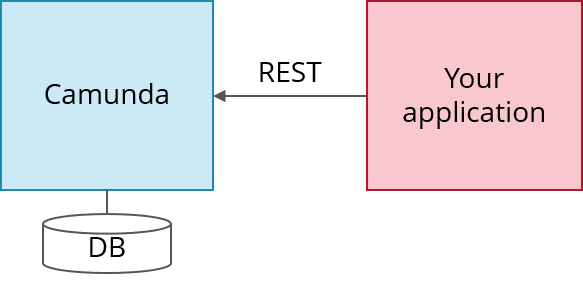
- Camunda is written in Java and requires a Java Virtual Machine (JVM) to run. Camunda provides a REST API that allows you to write in any language you prefer and use REST with Camunda:
Architecture
Workflows in Camunda are defined in BPMN, which is essentially an XML file. It can be modeled using
Camunda Modeler .
The easiest way to run Camunda is to use Docker. Alternative methods to run Camunda are described later in this article.
In this case, you just need to run:
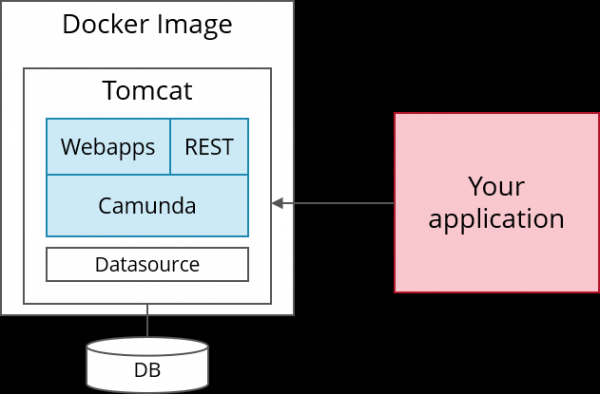
docker run -d -p 8080:8080 camunda/camunda-bpm-platform:latest
You don’t need to worry about Linux, Java Virtual Machines, or Tomcats. Dockerfiles and the main documentation (e.g., instructions for connecting to the required databases) are available at
If you want to run Camunda Enterprise Edition, you can easily change .
If you want to run Camunda Enterprise Edition, you can easily change .
However, there is one drawback to launching Camunda with Docker: you will get a version of Tomcat that does not always include the latest fixes. To work around this, you can create a Docker image based on the required Tomcat distribution yourself, as shown in this example, or use one of the solutions described below.
Deploying the process model
Let’s consider an example using the Saga pattern for a classic trip booking, where you want to call three actions in sequence and properly compensate for successfully completed actions in the event of a later failure. Presented in BPMN format, it looks as follows:
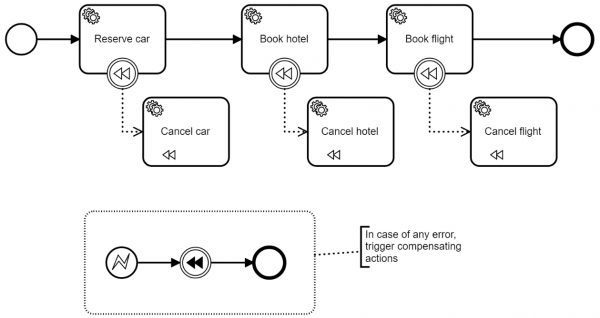
Now you can use . Suppose you saved it with the name trip.bpmn and launched Camunda via Docker so it's accessible at localhost:8080:
  curl -w "n"
-H "Accept: application/json"
-F "deployment-name=trip"
-F "enable-duplicate-filtering=true"
-F "deploy-changed-only=true"
-F "trip.bpmn=@trip.bpmn"
http://localhost:8080/engine-rest/deployment/create
Now you can start using the REST API and pass the data you want to see as workflow instance variables:
  curl
-H "Content-Type: application/json"
-X POST
-d '{"variables":{"someData" : {"value" : "someValue", "type": "String"}},"businessKey" : "12345"}}'
http://localhost:8080/engine-rest/process-definition/key/FlowingTripBookingSaga/start
The next interesting question is: how does Camunda invoke procedures like car booking? Camunda can not only call services immediately (Push Principle) using some built-in , but also place work items in a sort of built-in queue. After that, a worker can fetch work items via REST, perform the task, and notify Camunda of completion (Pull Principle).
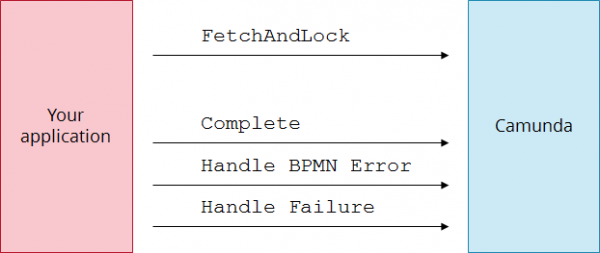
So first you need to execute since other workers may receive tasks simultaneously for system scaling:
  curl
-H "Content-Type: application/json"
-X POST
-d '{"workerId":"worker123","maxTasks":1,"usePriority":true,"topics":[{"topicName": "reserve-car"}, "lockDuration": 10000, "variables": ["someData"]}]}'
http://localhost:8080/engine-rest/external-task/fetchAndLock
Then notify Camunda that (note that you need to provide the external task ID obtained from the first request):
  curl
-H "Content-Type: application/json"
-X POST
-d '{"workerId":"worker123", "variables": {}}'
http://localhost:8080/engine-rest/external-task/EXTERNAL_TASK_ID/complete
That's it — you still haven't needed any Java, right? And that's enough to get started!
Client Libraries
Calling the REST API is easy in any programming language. In JavaScript, it's convenient to do it using jQuery, while in C# you can use System.Net.Http and Newtonsoft.Json. However, this will take some time. So you might just want to use some client library.
Currently, several ready-made client libraries are available:
- JavaScript: . Camunda is supported;
- Java: . Camunda is supported;
- C#: and . Both of these projects are in a state of limbo and hardly active, but they can serve as a good starting point;
- PHP: — a not very complete library that does not include the latest API changes, but I know of projects using it.
Except for JavaScript and Java, client libraries are not part of the Camunda product itself. Don't expect them to support all features of the Camunda REST API. If a library doesn't provide a specific function, it doesn't mean it's not there as always refer to the Camunda REST API. Typical projects use libraries as a starting point and template.
Example with C#
Using the client library mentioned above, we can simply write:
var camunda = new CamundaEngineClient("http://localhost:8080/engine-rest/engine/default/", null, null);
// Deploy the BPMN XML file from the resources
camunda.RepositoryService.Deploy("trip-booking", new ListYou can find fully working source code online: Another example is available at .
Пример с Node.js
  var Workers = require('camunda-worker-node');
  var workers = Workers('http://localhost:8080/engine-rest', {
    workerId: 'some-worker-id'
  });

  workers.registerWorker('reserve-car', [ 'someData' ], function(context, callback) {
    var someNewData = context.variables.someData + " - added something";
    callback(null, {
      variables: {
        someNewData: someNewData
      }
    });
  });

  workers.shutdown();
More detailed information can be found on the website
Alternative ways to run Camunda
User Docker image with 'Camunda standalone WAR'
As an alternative to the ready-made Docker image from Camunda, you can prepare Tomcat yourself (for example, based on the official Docker Tomcat images), and then copy Camunda into it as one of the so-called WAR files.
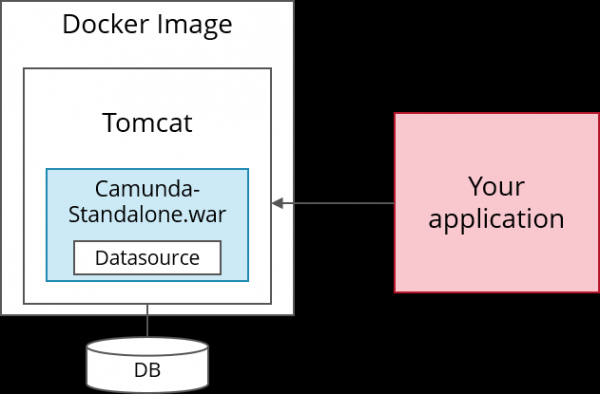
If you have many additional requirements and can set up the Java build environment, you can also set up the Camunda standalone WAR. Configure the Maven build as shown in these examples: build or build .
Running the Camunda Tomcat distribution
Another option is to simply download the Camunda Tomcat distribution, unzip it, and run it. All you need is the Java Runtime Environment (JRE) installed on your computer. It can be easily .
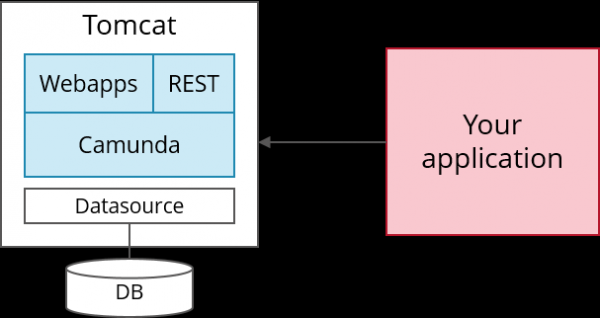
To change the database or do anything else, you need to configure Tomcat as . I know that Tomcat can seem complex, but it's actually very simple. And Google knows the answers to all questions you might have during the process.
Running Camunda using Tomcat
The last alternative is to set up Tomcat yourself and install Camunda in it, . This will allow you to use any version of Tomcat you prefer or, for example, to set it up as a Windows service.
Running Camunda in production
Typically, some final configurations will be necessary to run Camunda. Camunda provides recommendations detailing this, but I won't delve into them in this article—I'll mention just one example: the default distribution's REST API is not set up for authentication. You may want to change that.
Summary
As you may have noticed, it's very easy to start working with Camunda, regardless of the language you are using. The key point is that all interactions are done via the REST API. The installation is also quite simple, especially when using Docker.
Source: habr.com
