

Continued article about how I managed to set up a direct VPN-tunnel between two computers located behind their providers' NATs. The previous article described the process of establishing a connection using a third party — an intermediary (rented VPS acting as something like a STUN server and data node transmitter for the connection). In this article, I will explain how I managed without a VPS, but the intermediaries remained, and they were the STUN server and Yandex.Disk…
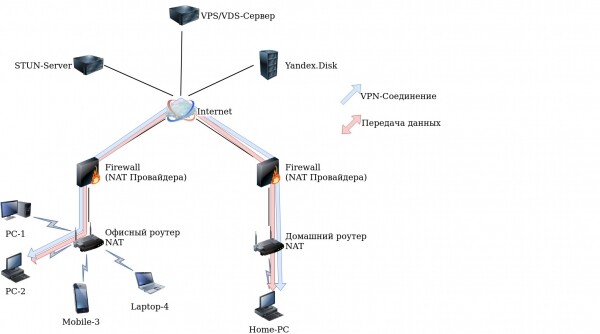
Introduction
After reading the comments on the previous post, I realized that the main drawback of the implementation was the use of an intermediary — a third party (VPS) that indicated the current parameters of the node and where and how to connect. Considering the recommendations to use a real STUN (of which there are many) to determine the current connection parameters. First of all, I decided to see the contents of the packets in operation of the STUN server with the clients using TCPDump and received completely unreadable content. After googling the protocol, I came across an article describing the protocol. I understood that I could not implement the request to the STUN server myself and shelved the idea into the 'distant drawer'.
Theory
Recently, I had to install a STUN server on Debian from the package
# apt install stun-server, and in the dependencies, I noticed the stun-client package, but didn’t think much of it. However, later I remembered about the stun-client package and decided to figure out how it works; googling and using Yandex, I got:
# apt install stun-client
# stun stun.ekiga.net -p 21234 -v
In response, I received:
STUN client version 0.97
Opened port 21234 with fd 3
Opened port 21235 with fd 4
Encoding stun message:
Encoding ChangeRequest: 0About to send msg of len 28 to 216.93.246.18:3478
Encoding stun message:
Encoding ChangeRequest: 4About to send msg of len 28 to 216.93.246.18:3478
Encoding stun message:
Encoding ChangeRequest: 2About to send msg of len 28 to 216.93.246.18:3478
Received stun message: 92 bytes
MappedAddress = :2885
SourceAddress = 216.93.246.18:3478
ChangedAddress = 216.93.246.17:3479
Unknown attribute: 32800
ServerName = Vovida.org 0.98-CPC
Received message of type 257 id=1
Encoding stun message:
Encoding ChangeRequest: 0About to send msg of len 28 to 216.93.246.17:3478
Encoding stun message:
Encoding ChangeRequest: 4About to send msg of len 28 to 216.93.246.18:3478
Encoding stun message:
Encoding ChangeRequest: 2About to send msg of len 28 to 216.93.246.18:3478
Encoding stun message:
Encoding ChangeRequest: 0About to send msg of len 28 to :2885
Received stun message: 28 bytes
ChangeRequest = 0
Received message of type 1 id=11
Encoding stun message:
Encoding ChangeRequest: 0About to send msg of len 28 to 216.93.246.17:3478
Encoding stun message:
Encoding ChangeRequest: 4About to send msg of len 28 to 216.93.246.18:3478
Encoding stun message:
Encoding ChangeRequest: 2About to send msg of len 28 to 216.93.246.18:3478
Received stun message: 92 bytes
MappedAddress = :2885
SourceAddress = 216.93.246.17:3479
ChangedAddress = 216.93.246.18:3478
Unknown attribute: 32800
ServerName = Vovida.org 0.98-CPC
Received message of type 257 id=10
Encoding stun message:
Encoding ChangeRequest: 4About to send msg of len 28 to 216.93.246.18:3478
Encoding stun message:
Encoding ChangeRequest: 2About to send msg of len 28 to 216.93.246.18:3478
Encoding stun message:
Encoding ChangeRequest: 4About to send msg of len 28 to 216.93.246.18:3478
Encoding stun message:
Encoding ChangeRequest: 2About to send msg of len 28 to 216.93.246.18:3478
Encoding stun message:
Encoding ChangeRequest: 4About to send msg of len 28 to 216.93.246.18:3478
Encoding stun message:
Encoding ChangeRequest: 2About to send msg of len 28 to 216.93.246.18:3478
Encoding stun message:
Encoding ChangeRequest: 4About to send msg of len 28 to 216.93.246.18:3478
Encoding stun message:
Encoding ChangeRequest: 2About to send msg of len 28 to 216.93.246.18:3478
Encoding stun message:
Encoding ChangeRequest: 4About to send msg of len 28 to 216.93.246.18:3478
Encoding stun message:
Encoding ChangeRequest: 2About to send msg of len 28 to 216.93.246.18:3478
test I = 1
test II = 0
test III = 0
test I(2) = 1
is nat = 1
mapped IP same = 1
hairpin = 1
preserver port = 0
Primary: Independent Mapping, Port Dependent Filter, random port, will hairpin
Return value is 0x000006
String with value
MappedAddress = :2885
just what I needed! It displayed the current status for the connection on local UDP port 21234. But that's only half the job, the question arose of how to transmit this data to a remote node and establish a VPN connection. Using the mail protocol, or maybe Telegram?! There are many options, and I decided to use Yandex.Disk since it came to my mind an article on how to use Curl via WebDav with Yandex.Disk. After thinking through the implementation, I came up with the following scheme:
- Signal the readiness of nodes to establish a connection by having a specific file with a timestamp on Yandex.Disk;
- If the nodes are ready, then obtain the current parameters from the STUN server;
- Upload the current parameters to Yandex.Disk;
- Check for the presence and read parameters of the remote node from the file on Yandex.Disk;
- Establish a connection with the remote node using OpenVPN.
Practice
After some thought, taking into account the experience from the previous article, I quickly wrote a script. We will need:
# apt install openvpn stun-client curl The script itself:
Initial version
# cat vpn8.sh
#!/bin/bash
######################## Задаем цветной текст ###
WARN='33[37;1;41m'				#
END='33[0m'					#
RED='33[0;31m'         #  ${RED}		#
GREEN='33[0;32m'      #  ${GREEN}		#
#################################################
####################### Проверяем наличие необходымих приложений #########################################################
al="echo readlink dirname grep awk md5sum shuf nc curl sleep openvpn cat stun"
ch=0
for i in $al; do which $i > /dev/null || echo -e "${WARN}Для работы необходим $i ${END}"; which $i > /dev/null || ch=1; done
if (( $ch > 0 )); then echo -e "${WARN}Ой, отсутствуют необходимые для корректной работы приложения${END}"; exit; fi
#######################################################################################################################

if [[ $1 == '' ]]; then echo -e "${WARN}Введите идентификатор соединения (любое уникальное слово, должно быть одинаковое с двух сторон!) ${END} t
${GREEN}Для запуска в автоматическом режиме при включении компьютера можно прописать в /etc/rc.local строку nohup /<путь к файлу>/vpn8.sh  > /var/log/vpn8.log 2>/dev/hull & ${END}"; exit; fi
ABSOLUTE_FILENAME=`readlink -f "$0"`                                                    # полный путь до скрипта
DIR=`dirname "$ABSOLUTE_FILENAME"`                                                      # каталог в котором лежит скрипт
############################### Проверка наличия секретного ключа ##################################
key="$DIR/secret.key"
if [ ! -f "$key" ]; then
				echo -e "${WARN}Секретный ключ VPN-соединения не найден, для генерации ключа выполните:
openvpn --genkey --secret secret.key Внимание: ключ используется для авторизации и должен
быть одинаковым с двух сторон!!!${END}
 # ls -l secret.key
 -rw------- 1 root root 637 ноя 27 11:12 secret.key
 # chmod 600 secret.key";
				exit;
				fi
########################################################################################################################

ABSOLUTE_FILENAME=`readlink -f "$0"`                                                    # полный путь до скрипта
DIR=`dirname "$ABSOLUTE_FILENAME"`                                                      # каталог в котором лежит скрипт
name=$(uname -n | md5sum | awk '{print $1}')
vpn=$(echo $1 | md5sum | awk '{print $1}')
stun="stun.ekiga.net" 	# STUN сервер
username="Yandex"	# Логин от Яндекс.диска
password="Password"	# Пароль от Яндекс.диска
localport=`shuf -i 20000-65000 -n 1`	# генерация локального порта

echo "$(date) Создаю папку на Яндекс.диске"
curl -X MKCOL --user "${username}:${password}" https://webdav.yandex.ru/vpn-$vpn
echo "$(date) Очищаю папку от всякого мусора"
for i in `curl --silent --user "$username:$password" -X PROPFIND -H "Depth: 1" https://webdav.yandex.ru/vpn-$vpn/ | sed 's/></n/g' | grep "d:displayname" | sed 's/d:displayname//g' | sed 's/>//g' | sed 's/<//' | sed 's////g' | grep -v $(date +%Y-%m-%d-%H-%M)`; do
	echo "$(date) Delete: $i"
	curl -X DELETE --user "${username}:${password}" https://webdav.yandex.ru/vpn-$vpn/$i
	done

until [ $c ];do

	until [[ $b ]]; do
		echo "$(date) Проверяю папку"
		date=`date +%Y-%m-%d-%H-%M`
		mydata=`curl --silent --user "${username}:${password}" -X PROPFIND -H "Depth: 1" https://webdav.yandex.ru/vpn-$vpn/ | sed 's/></>n</g' | grep $name | grep $date | grep "d:displayname"`
		if [[ -z $mydata ]]; 	then
						echo "$(date) Файл готовности создан"
					        echo "$date" > "/tmp/$date-$name-ready.txt"
					        curl -T "/tmp/$date-$name-ready.txt" --user "$username:$password" https://webdav.yandex.ru/vpn-$vpn/$date-$name-ready.txt
					else
						echo "$(date) Файл готовности уже существует - $date"
					fi
		remote=`curl --silent --user "${username}:${password}" -X PROPFIND -H "Depth: 1" https://webdav.yandex.ru/vpn-$vpn/ | sed 's/></>n</g' | grep -v $name | grep $date | grep "d:displayname"`
		if [[ -z $remote ]];	then
						echo -e "$(date) ${RED} Удаленный узел не готов ${END}"
						echo "$(date) Жду"
						sleep 20
					else
						echo -e "$(date) ${GREEN} Удаленный узел готов ${END}"
						b=1
						a=''
					fi
	done

	until [ $a ]; do
		echo "$(date) Подключение и получение данных от STUN сервера: $stun"
                mydata=`stun $stun -p $localport -v 2>&1 | grep MappedAddress | sort | uniq`
                echo -e "$(date) ${GREEN}Мои данные соединения: $mydata${END}"
                echo "$mydata" > "$DIR/mydata"
                echo "$(date) Загрузка данных на Яндекс.диск"
                curl -T "$DIR/mydata" --user "$username:$password" https://webdav.yandex.ru/vpn-$vpn/$name.txt
		echo "$(date) Получение файла данных удаленного узла"
		filename=$(curl --silent --user "${username}:${password}" -X PROPFIND -H "Depth: 1" https://webdav.yandex.ru/vpn-$vpn/ | sed 's/></n/g' | grep "d:displayname>" | grep "txt" | grep -v "$name" | grep -v "ready" | sed 's|.*d:displayname>||' | sed 's/</ /g' | awk '{print $1}')
		echo "$(date) Чтение файла данных удаленного узла: $filename"
		address=$(curl --silent --user "$username:$password" https://webdav.yandex.ru/vpn-$vpn/$filename | sort | uniq | head -n1 | sed 's/:/ /g')
		echo "$(date) Определение IP-адреса и порта"
		ip=$(echo "$address" | awk '{print $3}')
		port=$(echo "$address" | awk '{print $4}')
		if [[ -n "$ip" && -n "$port" ]]; then
			echo -e "$(date) ${GREEN} Соединение $ip $port ${END}"
       		 	openvpn --remote $ip --rport $port --lport $localport
	       	 	    --proto udp --dev tap --float --auth-nocache --verb 3 --mute 20
	       	 	    --ifconfig 10.45.54.2 255.255.255.252
	       		    --secret "$DIR/secret.key"
	       		    --auth SHA256 --cipher AES-256-CBC
	        	    --ncp-disable --ping 10  --ping-exit 30
	        	    --comp-lzo yes
			echo -e "$(date) ${WARN} Соединение разорвано${END}"
			a=1
			b=''
			else
			a=1
			b=''
			fi
	done
done
To run the script, you need to:
- Copy it to the clipboard and paste it into an editor, for example:
# nano vpn8.sh - specify the login and password for Yandex.Disk.
- in the field "--ifconfig 10.45.54.(1 or 2) 255.255.255.252" specify the internal IP address of the interface
- create secret.key with the command:
# openvpn --genkey --secret secret.key - make the script executable:
# chmod +x vpn8.sh - run the script:
# ./vpn8.sh nZbVGBuX5dtturDwhere nZbVGBuX5dtturD is the generated connection ID here
On the remote node, do everything the same except for generating secret.key and the connection ID, which must be identical.
Updated version (for proper operation, the time must be synchronized):
cat vpn10.sh
#!/bin/bash
stuns="stun.sipnet.ru stun.ekiga.net"   		# Список STUN серверов через пробел
username=" Login "		# Логин от Яндекс.диска
password=" Password "   	# Пароль от Яндекс.диска
intip="10.23.22.1"		# IP-адрес внутреннего интерфейса

WARN='33[37;1;41m'
END='33[0m'
RED='33[0;31m'
GREEN='33[0;32m'
al="ip echo readlink dirname grep awk md5sum openssl sha256sum shuf curl sleep openvpn cat stun"
ch=0
for i in $al; do which $i > /dev/null || echo -e "${WARN}Для работы необходим $i ${END}"; which $i > /dev/null || ch=1; done
if (( $ch > 0 )); then echo -e "${WARN}Ой, отсутствуют необходимые для корректной работы приложения${END}"; exit; fi
if [[ $1 == '' ]];
	then
		echo -e "${WARN}Введите идентификатор соединения (любое уникальное слово, должно быть одинаковое с двух сторон!) ${END} t
		${GREEN}Для запуска в автоматическом режиме при включении компьютера можно прописать в /etc/rc.local строку nohup /<путь к файлу>/vpn10.sh  > /var/log/vpn10.log 2>/dev/hull & ${END}"
		exit
fi
ABSOLUTE_FILENAME=`readlink -f "$0"`                                                    # полный путь до скрипта
DIR=`dirname "$ABSOLUTE_FILENAME"`                                                      # каталог в котором лежит скрипт
key="$DIR/secret.key"
until [[ -n "$iftosrv" ]]
	do
		echo "$(date) Определяю сетевой интерфейс"; iftosrv=`ip route get 8.8.8.8 | head -n 1 | sed 's|.*dev ||' | awk '{print $1}'`
		sleep 5
done
timedatectl
name=$(uname -n | md5sum | awk '{print $1}')
vpn=$(echo $1 | md5sum | awk '{print $1}')
echo "$(date) Создаю папку на Яндекс.диске"
curl -X MKCOL --user "${username}:${password}" https://webdav.yandex.ru/vpn-$vpn
echo "$(date) ID на диске: $vpn"
until [ $c ];do
	echo "$(date) Очищаю папку от всякого мусора"
	for i in `curl --silent --user "$username:$password" -X PROPFIND -H "Depth: 1" https://webdav.yandex.ru/vpn-$vpn/ | sed 's/></n/g' | grep "d:displayname" | sed 's/d:displayname//g' | sed 's/>//g' | sed 's/<//' | sed 's////g' | grep -v $(date +%Y-%m-%d-%H-%M)`
               do
               echo -e "$(date)${RED} Удаляю старый файл: $i${END}"
               curl -X DELETE --user "${username}:${password}" https://webdav.yandex.ru/vpn-$vpn/$i
               done
	echo "$(date) ID на диске: $vpn"
        openvpn --genkey --secret "$key"
        passwd=`echo "$vpn-tt" | sha256sum | awk '{print $1}'`
        openssl AES-256-CBC -e -in "$key" -out "$DIR/file.enc" -k "$passwd" -base64
        curl -T "$DIR/file.enc" --user "$username:$password" https://webdav.yandex.ru/vpn-$vpn/key.enc
        rm "$DIR"/file.enc
	echo -e "$(date) ${GREEN}Фаза 1 - Получение готовности удаленного узла${END}"
	go=3
	localport=`shuf -i 20000-65000 -n 1`    # генерация локального порта
	start=''
	remote=''
	timeout1=''
	nextcheck=''
	timestart=''
	until [[ $b ]]
		do
		echo "$(date) Проверяю папку"
		date=`date +%s`
		timeout1=60
		echo "$(date) Создание файла готовности $date"
		echo "$date" > "/tmp/ready-$date-$name.txt"
		curl -T "/tmp/ready-$date-$name.txt" --user "$username:$password" https://webdav.yandex.ru/vpn-$vpn/ready-$name.txt
		readyfile=`curl --silent --user "${username}:${password}" -X PROPFIND -H "Depth: 1" https://webdav.yandex.ru/vpn-$vpn/ | sed 's/></>n</g' | grep -v $name | grep "ready" | grep "d:displayname" | sed 's/<d:displayname>//g' | sed 's/</d:displayname>//g'`
		if [[ -z $readyfile ]]
			then
				echo -e "$(date) ${RED} Удаленный узел не готов ${END}"
				echo "$(date) Жду 60 секунд"
				sleep $timeout1
			else
				remote=$(curl --silent --user "$username:$password" https://webdav.yandex.ru/vpn-$vpn/$readyfile)
				echo -e "$(date) ${GREEN} Удаленный узел готов ${END}"
				start=`curl --silent --user "${username}:${password}" -X PROPFIND -H "Depth: 1" https://webdav.yandex.ru/vpn-$vpn/ | sed 's/></>n</g' | grep "start" | grep "d:displayname" | sed 's/-/ /g' | awk '{print $2}'`
				if [[ -z $start ]]
					then
                                                let nextcheck=$timeout1-$date+$remote
						let timestart=$date+$timeout1-$nextcheck
						go=$nextcheck
						echo "$timestart" > "/tmp/start-$date-$name.txt"
						curl -T "/tmp/start-$date-$name.txt" --user "$username:$password" https://webdav.yandex.ru/vpn-$vpn/start-$date-$name.txt
					else
						echo "$(date) жду $go секунд"
						sleep $go
						b=1
						a=''

					fi

			fi
	done
echo -e "$(date) ${GREEN}Фаза 2 - Обмен данными и установка соединения${END}"
mydata=''
filename=''
address=''
myip=''
ip=''
port=''
ex=0
	until [ $a ]; do
                until [[ -n "$mydata" ]]; do
				k=`echo "$stuns" | wc -w`
				x=1
				z=`shuf -i 1-$k -n 1`
				for st in $stuns; do
					if [[ $x == $z ]]; then
						stun=$st;
					fi;
					(( x++ ));
				done
                                echo "$(date) Подключение и получение данных от STUN сервера: $stun"
				sleep 5 && for pid in $(ps xa | grep "stun "$stun" 1 -p "$localport" -v" | grep -v grep | awk '{print $1}'); do kill $pid; done &
                                mydata=`stun "$stun" 1 -p "$localport" -v 2>&1 | grep "MappedAddress" | sort | uniq`
                done
			echo -e "$(date) ${GREEN}Мои данные соединения: $mydata${END}"
               	 	echo "$(date) Загрузка данных на Яндекс.диск"
			echo "$mydata" > "$DIR/mydata"
			echo "IntIP $intip" >> "$DIR/mydata"
			curl -T "$DIR/mydata" --user "$username:$password" https://webdav.yandex.ru/vpn-$vpn/$name-ipport.txt
			rm "$DIR/mydata"
			sleep 5
			echo "$(date) Получение файла данных удаленного узла"
			filename=$(curl --silent --user "${username}:${password}" -X PROPFIND -H "Depth: 1" https://webdav.yandex.ru/vpn-$vpn/ | sed 's/></n/g' | grep "d:displayname>" | grep "ipport" | grep -v "$name" |  sed 's|.*d:displayname>||' | sed 's/</ /g' | awk '{print $1}')
			if [[ -n "$filename" ]]
				then
					echo "$(date) Чтение файла данных удаленного узла: $filename"
					address=$(curl --silent --user "$username:$password" https://webdav.yandex.ru/vpn-$vpn/$filename | grep "MappedAddress" | head -n1 | sed 's/:/ /g')
					intip2=$(curl --silent --user "$username:$password" https://webdav.yandex.ru/vpn-$vpn/$filename | grep "IntIP" | head -n1 | awk '{print $2}')
					echo "$(date) Определение IP-адреса и порта: $address $sesid2 $tunid2"
					ip=$(echo "$address" | awk '{print $3}')
					port=$(echo "$address" | awk '{print $4}')
					myip=`ip route get "$ip" | head -n 1 | sed 's|.*src ||' | awk '{print $1}'`
					if [[ -n "$ip" && -n "$port" && -n "$myip" && -n "$localport" ]];
						then
							echo -e "$(date) ${GREEN} Соединение $ip $port ${END}"
							echo -e  "`date` ${GREEN} $myip:$localport -> $ip:$port ${END}"
	                	        		curl --silent --user "$username:$password" https://webdav.yandex.ru/vpn-$vpn/key.enc > "$DIR/secret.enc"
	                        			openssl AES-256-CBC -d -in "$DIR/secret.enc" -out "$key" -k "$passwd" -base64
	                        			chmod 600 "$key"
	                        			rm "$DIR/secret.enc"
	                        			openvpn --remote $ip --rport $port --lport $localport
	                        			--proto udp --dev tun --float --auth-nocache --verb 3 --mute 20
	                        			--ifconfig "$intip" "$intip2"
	                        			--secret "$key"
	                        			--auth SHA256 --cipher AES-256-CBC
	                        			--ncp-disable --ping 10 --ping-exit 20
	                        			--comp-lzo yes
							a=1
							b=''
                                         fi
						else
							if (( $ex >= 5 ))
								then
									echo "$(date) Сброс"
									a=1
									b=''
							fi
							(( ex++ ))
					sleep 5
			fi
		done
done
To run the script, you need to:
- Copy it to the clipboard and paste it into an editor, for example:
# nano vpn10.sh - specify the login (2nd line) and password for Yandex.Disk (3rd line).
- specify the internal tunnel IP address (4th line).
- make the script executable:
# chmod +x vpn10.sh - run the script:
# ./vpn10.sh nZbVGBuX5dtturDwhere nZbVGBuX5dtturD is the generated connection ID here
On the remote node, do everything the same, specify the corresponding internal IP address tunnel and connection ID.
To auto-start the script on boot, I use the command "nohup //vpn10.sh nZbVGBuX5dtturD > /var/log/vpn10.log 2>/dev/null &" contained in the file /etc/rc.local
Conclusion
The script works, tested on Ubuntu (18.04, 19.10, 20.04) and Debian 9. Any other service can be used as a transmitter, but for this experiment, I used Yandex.Disk.
During the experiments, it was discovered that some types of NAT providers do not allow establishing a connection. This is mainly with mobile operators, where torrents are blocked.
I plan to improve in the following aspects:
- Automatic generation of secret.key each time on startup, encryption, and copying to Yandex.Disk for transmission to a remote node (considered in the updated version)
- Automatic assignment of IP addresses to interfaces
- Data encryption before uploading to Yandex.Disk
- Code optimization
May IPv6 be in every home!
Updated! Latest files and DEB package here — yandex.disk
Source: habr.com
