


Less than a year ago, we introduced a free CRM system integrated with a free PBX. During this time, it has been used by 14,000 companies and 64,000 employees.
We now offer an open API interface that provides access to most ZCRM functions. The API allows CRM use for any sales channels.
Below, we will briefly describe how to work with the API and the available functionality. A simple yet useful working example is also provided: a script for creating a lead from a form on the website.
A Brief Overview of the Free CRM
Let's refrain from explaining what a CRM is. Zadarma supports all standard functions for storing client data. Information is saved in the client's feed. Additionally, besides client information, there is a convenient task manager with various display options (calendar, kanban, list). All of this is available for 50+ employees and is fully integrated with telephony (including browser calls via WebRTC technology).
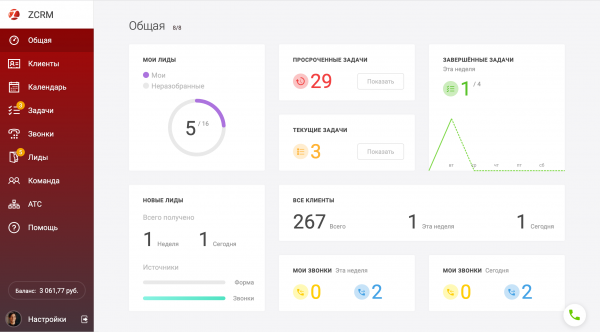
What does free mean? There is not a single tariff or service in ZCRM that requires payment. The only things that incur charges are phone calls and numbers (at special rates, for example, the subscription fee for a Moscow number is 95 rubles or 1 euro for London). And if there are hardly any calls? Then you hardly need to pay anything.
The free CRM remains active as long as the Zadarma free PBX is active. After registration, the PBX is active for 2 weeks; thereafter, a top-up of any amount is required once every 3 months. It's hard to imagine an office that needs a CRM and a PBX but doesn't require a number or calls.
Why is an API needed for the free CRM?
The development of ZCRM never stops; many large and small features have emerged. However, we understand that to present a truly functional system, rather than just a smart notebook, integration with telephony alone is not enough.
The more interactions with the client, the better, and these interactions can vary widely. Thanks to the API, you can effortlessly automatically input (or conversely, retrieve) information about clients/leads and tasks. This creates the opportunity to connect any communication channels with clients and any other automation systems.
Thanks to the API, the free ZCRM can be used in any way, either completely or partially. For example, it can serve as a convenient interface for working with the corporate client database or as a simple planner.
Below, we will provide an example of such a channel — connecting a lead form to the CRM on the website. Later, we will provide other examples on the website, such as creating a task to call the client back (a delayed call).
Main ZCRM API Methods
As the ZCRM API offers 37 methods, we will refrain from describing all of them and will only focus on the main groups with examples.
A complete list with examples is available on the website in .
The following groups of methods can be used:
- Clients (general list, individual selections, editing, deletion)
- Tags and additional properties of clients
- Client feed (viewing, editing, deleting records in client feeds)
- Client employees (as a client is usually a legal entity, they may have many employees)
- Tasks (all functionality for working with tasks)
- Leads (similarly, all functions)
- CRM Users (displaying the list of users, their rights, settings, contacts, and working hours)
- Calls (returns the list of calls)
Since the existing API structure of Zadarma is used, libraries for it are already available on GitHub in PHP, C#, and Python.
Example of API Usage
The simplest yet useful example is creating a lead from a form. To minimize the code, this example contains only the basic lead data. A similar example, but with comments from the client (which are usually present in every form), is available on the website. The script examples are written in PHP without frameworks, making them easy to integrate.
Example HTML form for creating a lead:
<form method="POST" action="/en/zcrm_leads/" data-trp-original-action="/zcrm_leads">
   <label for="name">Name:</label>
   <br>
   <input type="text" id="name" name="name" value="">
   <br>
   <label for="phone">Phone:</label><br>
   <input type="text" id="phone" name="phones[0][phone]" value="">
   <br>
   <label for="phone">Email:</label><br>
   <input type="text" id="email" name="contacts[0][value]" value="">
   <br>
   <br>
   <input type="submit" value=", which takes us back to the page">
<input type="hidden" name="trp-form-language" value="en"/></form>
This form is extremely simple to avoid overloading the article. It has no design, no CAPTCHA, and no comment field. A version with a comment field (the comment is added to the client feed after the lead is created) is available in our blog.
And here’s the PHP example for creating a lead with data from the form:
$postData];
   $params['lead']['lead_source'] = 'form';

   $leadData = makePostRequest('\/v1\/zcrm\/leads', $params);
   var_dump($leadData);
}
exit();

function makePostRequest($method, $params)
{
   \/\/ replace userKey and secret with yours from the personal account
   $userKey = '';
   $secret = '';
   $apiUrl = 'https:\/\/api.zadarma.com';

   ksort($params);

   $paramsStr = makeParamsStr($params);
   $sign = makeSign($paramsStr, $method, $secret);

   $curl = curl_init();
   curl_setopt($curl, CURLOPT_URL, $apiUrl . $method);
   curl_setopt($curl, CURLOPT_CUSTOMREQUEST, 'POST');
   curl_setopt($curl, CURLOPT_POST, true);
   curl_setopt($curl, CURLOPT_CONNECTTIMEOUT, 10);
   curl_setopt($curl, CURLOPT_RETURNTRANSFER, true);
   curl_setopt($curl, CURLOPT_SSL_VERIFYPEER, false);
   curl_setopt($curl, CURLOPT_SSL_VERIFYHOST, false);
   curl_setopt($curl, CURLOPT_POSTFIELDS, $paramsStr);
   curl_setopt($curl, CURLOPT_HTTPHEADER, [
       'Authorization: ' . $userKey . ':' . $sign
   ]);

   $response = curl_exec($curl);
   $error = curl_error($curl);

   curl_close($curl);

   if ($error) {
       return null;
   } else {
       return json_decode($response, true);
   }
}

/**
* @param array $params
* @return string
*\/
function makeParamsStr($params)
{
   return http_build_query($params, null, '&', PHP_QUERY_RFC1738);
}

/**
* @param string $paramsStr
* @param string $method
* @param string $secret
*\n* @return string
*\/
function makeSign($paramsStr, $method, $secret)
{
   return base64_encode(
       hash_hmac(
           'sha1',
           $method . $paramsStr . md5($paramsStr),
           $secret
       )
   );
}
As you can see, working with the API is quite straightforward, and there are examples of usage available on , , . Thus, you can easily integrate a simple free CRM into any workflow, achieving automation with minimal effort.
ZCRM is continuously evolving, and nearly all new features will also be available via the API.
We also invite you to integrate your existing systems with the free CRM and Asterisk system from Zadarma.
Source: habr.com
