


Previously we talked about Nemesida WAF Free — a free tool for protecting websites and APIs from hacker attacks, and in this article, we will review a popular vulnerability scanner .
Scanning a website for vulnerabilities is a necessary measure that, along with source code analysis, helps assess its security level against compromise threats. Vulnerability scanning of a web resource can be conducted using specialized tools.
Nikto, W3af (written in Python 2.7, which is no longer supported) or Arachni (no longer supported since February) are among the most popular solutions available in the free segment. Of course, there are others, such as Wapiti, which we have decided to focus on.
Wapiti works with the following types of vulnerabilities:
- file disclosure (local and remote, fopen, readfile);
- injections (PHP / JSP / ASP / SQL injections and XPath injections);
- XSS (cross-site scripting) (reflected and persistent);
- command detection and execution (eval(), system(), passtru());
- CRLF injections (HTTP response splitting, session fixation);
- XXE (XML External Entity) injection;
- SSRF (Server-Side Request Forgery);
- use of known potentially dangerous files (thanks to the Nikto database);
- weak .htaccess configurations that can be bypassed;
- the presence of backup files exposing sensitive information (source code disclosure);
- Shellshock;
- open redirects;
- non-standard HTTP methods that may be allowed (PUT).
Features:
- support for HTTP, HTTPS, and SOCKS5 proxies;
- authentication using multiple methods: Basic, Digest, Kerberos, or NTLM;
- the ability to limit the scan scope (domain, folder, page, URL);
- automatic removal of one parameter in the URL;
- multiple precautions against infinite scanning loops (for example: ifor, limiting values for parameters);
- the ability to set priority for exploring URLs (even if not within the scan scope);
- the ability to exclude certain URLs from scanning and attacks (e.g., logout URL);
- importing cookies (obtaining them using the wapiti-getcookie tool);
- the option to enable/disable SSL certificate verification;
- the ability to extract URLs from JavaScript (a very simple JS interpreter);
- interaction with HTML5;
- several options for managing the behavior and limitations of the crawler;
- setting a maximum time for the scanning process;
- adding some customizable HTTP headers or configuring a custom User-Agent.
Additional capabilities:
- generating vulnerability reports in various formats (HTML, XML, JSON, TXT);
- pausing and resuming scans or attacks (session mechanism using SQLite3 databases);
- highlighting vulnerabilities in the terminal;
- various logging levels;
- a quick and easy way to enable/disable attack modules.
Installation
The latest version of Wapiti can be installed in 2 ways:
- download the source from the official and run the installation script after installing Python3;
- using the command pip3 install wapiti3.
After that, Wapiti will be ready for use.
Working with the tool
To demonstrate Wapiti's functionality, we will use a specially prepared environment sites.vulns.pentestit.ru (internal resource), containing various vulnerabilities (Injection, XSS, LFI/RFI) and other web application shortcomings.
The information is provided for informational purposes only. Do not violate the law!
The basic command to run the scanner:
# wapiti -u <target> <options>There is quite detailed help available with a huge number of startup options, for example:
--scope -- the scope of application
If you specify the scope parameter along with the URL for scanning, you can regulate the scope of the site being scanned, indicating either a specific page or all pages that can be found on the site.
-s and -x -- parameters to add or remove specific URLs. These parameters are useful when it's necessary to add or remove a specific URL during the scanning process.
--skip -- the specified parameter with this key will be scanned but not attacked. Useful if there are any dangerous parameters that are better to exclude during the scan.
--verify-ssl -- enable or disable certificate verification.
The Wapiti scanner is modular. However, to run specific modules among those that are automatically activated during the scanner's operation, you need to use the -m key and list the required ones separated by commas. If the key is not used, all modules will run by default. In the simplest case, this would look as follows:
# wapiti -u http://sites.vulns.pentestit.ru/ -m sql,xss,xxeThis usage example means that we will use only the SQL, XSS, and XXE modules when scanning the target. Additionally, the operation of the modules can be filtered based on the desired method. For example, -m “xss: get, blindsql: post, xxe: post”. In this case, the module xss will be applied to requests sent using the GET method, while the module blibdsql will be used for POST requests, etc. By the way, if any module included in the list is not needed during the scanning or is taking too long, pressing Ctrl+C allows you to skip the current module by choosing the appropriate option in the interactive menu.
Wapiti supports sending requests through a proxy server using the key -p and authentication on the target site through the parameter -a. You can also specify the type of authentication: Basic, Digest, Kerberos and NTLM. For the last two, additional modules may be required. Moreover, you can insert any headers (including arbitrary User-Agent) into the requests and much more.
To use authentication, you can use the tool wapiti-getcookie. With it, we generate cookie, which Wapiti will use during the scan. The formation of cookie is done using the command:
# wapiti-getcookie -u http://sites.vulns.pentestit.ru/login.php -c cookie.jsonIn interactive mode, we respond to questions and provide necessary information such as: login, password, and more:
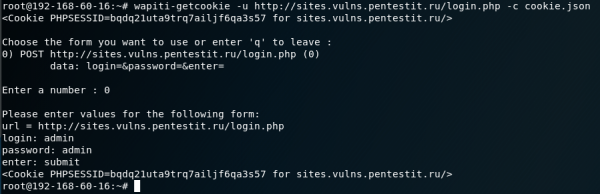
The output is a file in JSON format. Another option is to add all the necessary information through the parameter -d:
# wapiti-getcookie - http://sites.vulns.pentestit.ru/login.php -c cookie.json -d "username=admin&password=admin&enter=submit"The result will be similar:
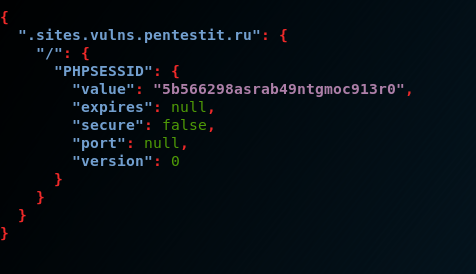
When considering the main functionality of the scanner, the final request for testing the web application in our case was:
# wapiti --level 1 -u http://sites.vulns.pentestit.ru/ -f html -o /tmp/vulns.html -m all --color -с cookie.json --scope folder --flush-session -A 'Pentestit Scans' -p http://proxy.office.pentestit.ru:3128where among other parameters:
-f and -o — format and path for saving the report;
-m — connecting all modules — not recommended, as it will affect testing time and report size;
—color — to highlight found vulnerabilities according to their criticality in the version of Wapiti itself;
-c — using a file with cookie, generated using wapiti-getcookie;
--scope — selecting a target for the attack. Choosing this option folder will scan and attack each URL starting from the base. The base URL must have a trailing slash (without the filename);
—flush-session — allows for re-scanning, during which previous results will not be taken into account;
-A — custom User-Agent;
-p - the proxy server address, if needed.
A bit about the report
The scan results are presented in a detailed report format, highlighting all discovered vulnerabilities in an easily understandable and accessible manner. The report will specify categories and the number of vulnerabilities found, their descriptions, queries, commands for curl and advice on how to fix them. For ease of navigation, clickable links to category titles will be included:
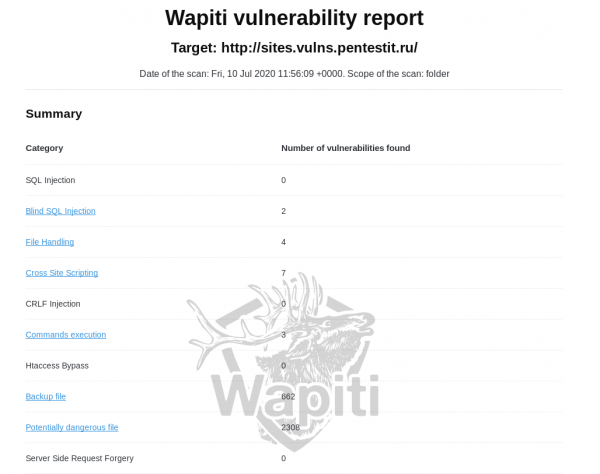
A significant downside of the report is the lack of a map of the web application, which makes it unclear whether all addresses and parameters were analyzed. There is also a risk of false positives. In our case, the report lists "backup files" and "potentially dangerous files." Their quantity does not match reality, as there were no such files on the server:
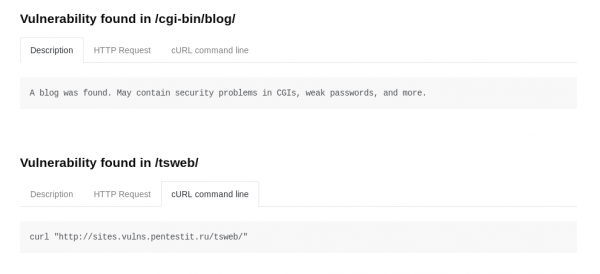
Modular issues may be fixed over time. Another drawback of the report is that it lacks color coding of found vulnerabilities (depending on their criticality), or at least their separation into categories. The only way we can indirectly understand the criticality of a found vulnerability is by using the parameter —color during scanning, which will color the found vulnerabilities in various colors:
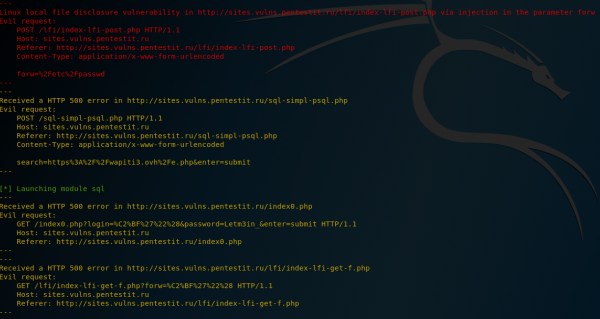
However, such color coding is not provided in the report itself.
Vulnerabilities
SQLi
The scanner partially succeeded in finding SQLi. When searching for SQL vulnerabilities on pages that do not require authentication, no issues arise:
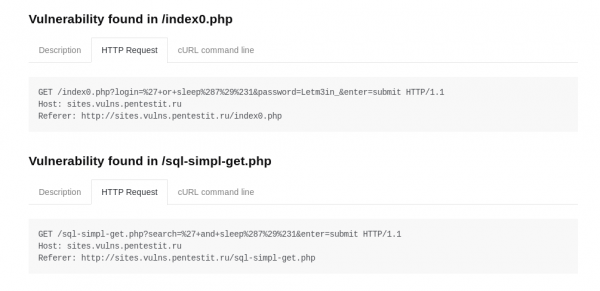
It was unable to find vulnerabilities on pages accessible only after authentication, even using valid cookie, as after successful authentication, a "session logout" will likely occur and cookie become invalid. If the deauthorization function were implemented as a separate script handling this procedure, it could be fully excluded using the -x parameter, thereby preventing its triggering. Otherwise, excluding its processing will not be possible. This is not an issue of a specific module but of the tool as a whole; however, due to this nuance, several injections in the restricted area of the resource could not be detected.
XSS
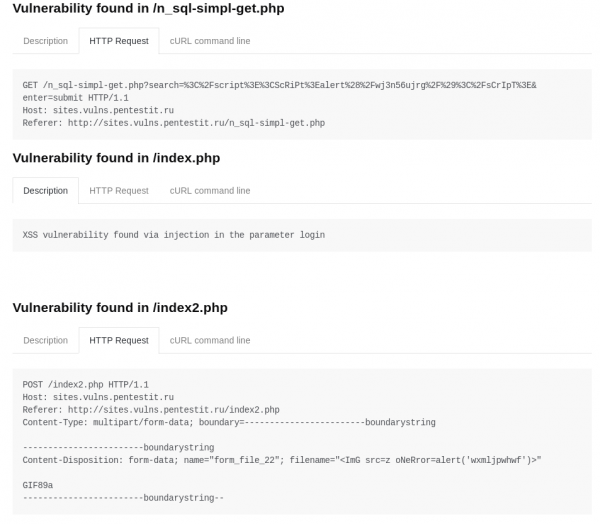
The scanner performed excellently on the assigned task and found all prepared vulnerabilities:
LFI/RFI
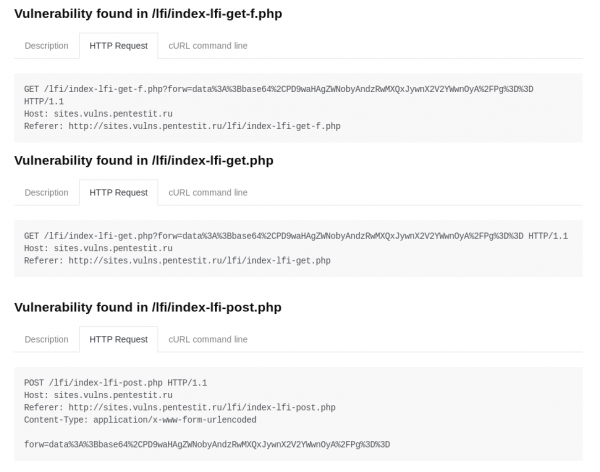
The scanner found all embedded vulnerabilities:
Overall, despite false positives and missing vulnerabilities, Wapiti, as a free tool, shows quite good performance. In any case, it is worth acknowledging that the scanner is quite powerful, flexible, and multifunctional, and most importantly — free, hence it deserves use, assisting administrators and developers in obtaining basic information about the security status of their web application.
Stay healthy and protected!
Source: habr.com
