

Blocking traffic from certain countries may seem simple, but first impressions can be misleading. Today, we will discuss how this can be implemented.
Background
The search results on Google regarding this topic are disappointing: most solutions are outdated, and it often feels like this issue has been put on the back burner and forgotten. We have 'scoured' many old records and are ready to share a modern version of the instructions.
We recommend reading the entire article before executing the commands provided.
Preparing the operating system
Filtering will be configured using the utility iptables, which requires an extension to work with GeoIP data. Such an extension can be found in . xtables-addons installs extensions for iptables as standalone kernel modules, which means there is no need to recompile the OS kernel.
At the time of writing, the current version of xtables-addons is 3.9. However, in the standard repositories for Ubuntu 20.04 LTS, only version 3.8 can be found, while Ubuntu 18.04 has version 3.0. You can install the extension from the package manager using the following command:
apt install xtables-addons-common libtext-csv-xs-perlIt is worth noting that there are small but important differences between version 3.9 and the current state of the project, which we will discuss later. To compile from source, install all necessary packages:
apt install git build-essential autoconf make libtool iptables-dev libxtables-dev pkg-config libnet-cidr-lite-perl libtext-csv-xs-perlClone the repository:
git clone https://git.code.sf.net/p/xtables-addons/xtables-addons xtables-addons-xtables-addons
cd xtables-addons-xtables-addonsxtables-addons contains many extensions, but we are only interested in xt_geoip. If you do not want to bring unnecessary extensions into the system, you can exclude them from the build. To do this, you need to edit the file mconfig. For all desired modules, mark them y, and for all unnecessary ones, mark n. We build:
./autogen.sh./configuremakeAnd install with superuser privileges:
make installDuring the installation of kernel modules, an error may occur that resembles the following:
INSTALL /root/xtables-addons-xtables-addons/extensions/xt_geoip.ko
At main.c:160:
- SSL error:02001002:system library:fopen:No such file or directory: ../crypto/bio/bss_file.c:72
- SSL error:2006D080:BIO routines:BIO_new_file:no such file: ../crypto/bio/bss_file.c:79
sign-file: certs/signing_key.pem: No such file or directory
This situation occurs because the kernel modules cannot be signed, as there is nothing to sign them with. You can resolve this issue with a couple of commands:
cd /lib/modules/(uname -r)/build/certscat < x509.genkey[ req ]
default_bits = 4096
distinguished_name = req_distinguished_name
prompt = no
string_mask = utf8only
x509_extensions = myexts
[ req_distinguished_name ]
CN = Modules
[ myexts ]
basicConstraints=critical,CA:FALSE
keyUsage=digitalSignature
subjectKeyIdentifier=hash
authorityKeyIdentifier=keyid
EOFopenssl req -new -nodes -utf8 -sha512 -days 36500 -batch -x509 -config x509.genkey -outform DER -out signing_key.x509 -keyout signing_key.pemThe compiled kernel module is installed, but the system does not recognize it. We will ask the system to create a dependency map considering the new module, and then we will load it:
depmod -amodprobe xt_geoipLet's ensure that xt_geoip is loaded into the system:
# lsmod | grep xt_geoip
xt_geoip               16384  0
x_tables               40960  2 xt_geoip,ip_tables
Additionally, let's verify that the extension has loaded into iptables:
# cat /proc/net/ip_tables_matches
geoip
icmp
We are satisfied, and now we just need to add the module name to /etc/modules, so that the module works after the OS reboots. At this point, iptables understands geoip commands, but it lacks data to operate. We will proceed to load the geoip database.
Retrieving the GeoIP database
We will create a directory where the information understandable to the iptables extension will be stored:
mkdir /usr/share/xt_geoipAt the beginning of the article, we mentioned that there are differences between the version from source code and the version from the package manager. The most noticeable difference is the change of database provider and the script xt_geoip_dl, which downloads the current data.
The version from the package manager
The script is located at /usr/lib/xtables-addons, but when attempting to run it, one can see a rather uninformative error:
# ./xt_geoip_dl
unzip:  cannot find or open GeoLite2-Country-CSV.zip, GeoLite2-Country-CSV.zip.zip or GeoLite2-Country-CSV.zip.ZIP.
Previously, the GeoLite product was used as a database, now known as GeoLite Legacy, distributed under the license by . With this product, two events occurred that "broke" compatibility with the iptables extension.
First, in January 2018, the support for the product was discontinued, and on January 2, 2019, all links to download the old version of the database were removed from the official website. New users are recommended to use the GeoLite2 product or its paid version GeoIP2.
Secondly, in December 2019, MaxMind made significant changes to access to their databases. To comply with California's Consumer Privacy Act, MaxMind decided to "restrict" the distribution of GeoLite2 by requiring registration.
Since we want to use their product, we will register on this page.
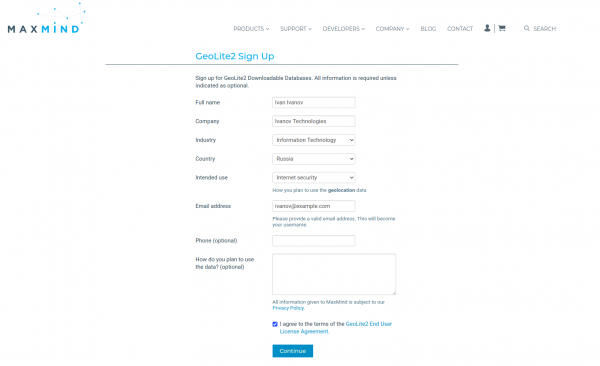
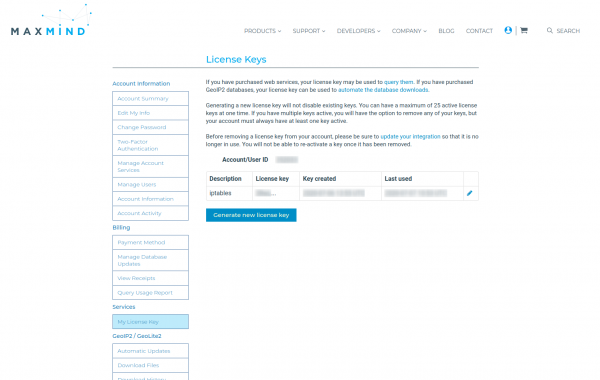
After that, you will receive an email with a request to set your password. Now that we have created an account, we need to generate a license key. In your personal account, find the item My License Keys, and then click the button Generate new License Key.
When creating the key, we will be asked only one question: will we use this key in the GeoIP Update program? Answer negatively and click the button Confirm. The key will be displayed in a pop-up window. Save this key in a safe place, as after closing the pop-up window you will no longer be able to view the key completely.
We have the option to download the GeoLite2 databases manually, but their format is not compatible with the format expected by the xt_geoip_build script. This is where the GeoLite2xtables scripts come into play. To work with the scripts, install the perl module NetAddr::IP:
wget https://cpan.metacpan.org/authors/id/M/MI/MIKER/NetAddr-IP-4.079.tar.gztar xvf NetAddr-IP-4.079.tar.gzcd NetAddr-IP-4.079perl Makefile.PLmakemake installNext, clone the repository with the scripts and save the license key obtained earlier in a file:
git clone https://github.com/mschmitt/GeoLite2xtables.gitcd GeoLite2xtablesecho YOUR_LICENSE_KEY='123ertyui123' > geolite2.licenseNow let's run the scripts:
# Скачиваем данные GeoLite2
./00_download_geolite2
# Скачиваем информацию о странах (для соответствия коду)
./10_download_countryinfo
# Конвертируем GeoLite2 базу в формат GeoLite Legacy
cat /tmp/GeoLite2-Country-Blocks-IPv{4,6}.csv |
./20_convert_geolite2 /tmp/CountryInfo.txt > /usr/share/xt_geoip/dbip-country-lite.csv
MaxMind imposes a limit of 2000 downloads per day, and with a large number of servers, it is recommended to cache updates on a proxy server.
Please note that the output file must be named dbip-country-lite.csv. Unfortunately, 20_convert_geolite2 produces an imperfect file. The script xt_geoip_build expects three columns:
- start of address range;
- end of address range;
- country code in iso-3166-alpha2.
And the output file contains six columns:
- start of address range (string representation);
- end of address range (string representation);
- start of address range (numeric representation);
- end of address range (numeric representation);
- country code;
- country name.
This discrepancy is critical and can be fixed in one of two ways:
- edit 20_convert_geolite2;
- edit xt_geoip_build.
In the first case, we reduce to the required format, and in the second — we change the assignment of the variable $cc to $row->[4]. After that, we can perform the build:
/usr/lib/xtables-addons/xt_geoip_build -S /usr/share/xt_geoip/ -D /usr/share/xt_geoip. . .
2239 IPv4 ranges for ZA
348 IPv6 ranges for ZA
56 IPv4 ranges for ZM
12 IPv6 ranges for ZM
56 IPv4 ranges for ZW
15 IPv6 ranges for ZWNote that the author does not consider his scripts ready for production and suggests for the development of original scripts xt_geoip_*. Therefore, we will move on to building from the source code where these scripts have already been updated.
Version from source code
When installing from the source code, the scripts xt_geoip_* are located in the directory /usr/local/libexec/xtables-addons. This version of the script uses a database . License — Creative Commons Attribution License, and from the available data, the three necessary columns are included. Let's download and compile the database:
cd /usr/share/xt_geoip//usr/local/libexec/xtables-addons/xt_geoip_dl/usr/local/libexec/xtables-addons/xt_geoip_buildAfter these actions, iptables is ready to operate.
Using geoip in iptables
Module xt_geoip adds only two options:
geoip match options:
[!] --src-cc, --source-country country[,country...]
	Match packets coming from (one of) the specified country(ies)
[!] --dst-cc, --destination-country country[,country...]
	Match packets going to (one of) the specified country(ies)

NOTE: The country is inputted by its ISO3166 code.
The methods for forming rules for iptables, in general, remain unchanged. To use keys from additional modules, you must explicitly specify the module name with the -m key. For example, a rule for blocking incoming TCP connections on port 443 not from the USA on all interfaces:
iptables -I INPUT ! -i lo -p tcp --dport 443 -m geoip ! --src-cc US -j DROPFiles created by xt_geoip_build are only used when creating rules, but are not taken into account during filtering. Therefore, to correctly update the geoip database, one must first update the iv*-files and then recreate all rules that use geoip in iptables.
Conclusion
Packet filtering based on country affiliation is a somewhat forgotten strategy over time. Nevertheless, software tools for such filtering are evolving and, perhaps soon, a new version of xt_geoip with a new geoip data provider will appear in package managers, significantly simplifying life for system administrators.
Only registered users can participate in the survey. , please.
Have you ever had to use country-based filtering?
59,1%Yes13
40,9%No9
22 users voted. 3 users abstained.
Source: habr.com
