

Good day, everyone! I would like to dedicate my debut article on Habr to a very interesting topic – the Internet Quality Control System RIPE Atlas. Part of my interests covers issues related to the study of the Internet or cyberspace (a term that is rapidly gaining popularity, especially in academic circles). There is plenty of material on RIPE Atlas available on the internet, including on Habr, but I found them to be insufficiently comprehensive. For the most part, this article uses information from the official website and my own thoughts.

Instead of a preface
The regional internet registry (RIR) responsible for Europe, Central Asia, and the Middle East is the RIPE NCC (Réseaux IP Européens Network Coordination Centre). RIPE NCC is a non-profit organization located in the Netherlands. It supports the operation of the Internet. It provides IP addresses and autonomous system numbers to local internet providers and large organizations.
One of the leading projects of RIPE NCC aimed at researching the state of the Internet is RIPE Atlas (launched in late 2010), which evolved from the Test Traffic Measurement Service that ceased operations in 2014.
RIPE Atlas is a global network of probes that perform active measurements of the Internet's state. Currently, there are thousands of probes in the RIPE Atlas network, and their number is constantly growing. RIPE NCC aggregates the collected data and provides it to users in a convenient form, conditionally free of charge.
The network's growth is based on the principle of voluntary installation of probes by users in their infrastructure, for which they are awarded 'credits' that can be spent on conducting interesting measurements using other probes.
Typically, RIPE Atlas is used for:
- monitoring the availability of one's network from various points on the Internet;
- researching and troubleshooting network issues through quick and flexible connection tests;
- monitoring one's own network;
- monitoring the availability of DNS infrastructure;
- checking connectivity over the IPv6 protocol.
RIPE Atlas
As previously mentioned, RIPE Atlas is a system of sensors located throughout the Internet and managed under a single administration. In addition to regular sensors (Probes), there are more advanced ones called Anchors.
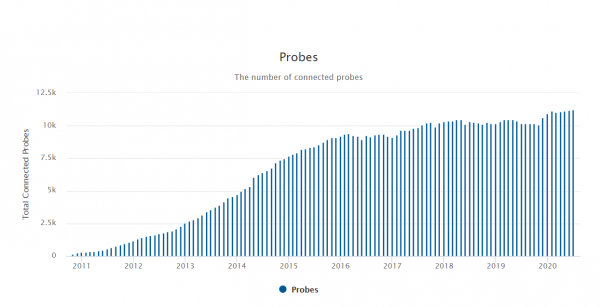
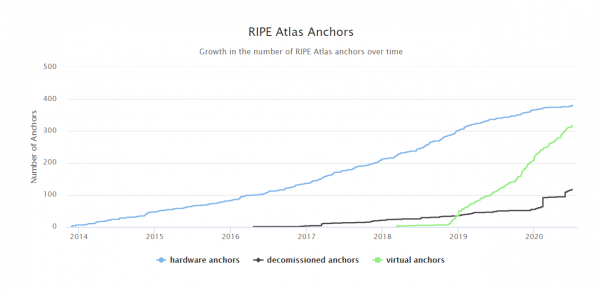
As of mid-2020, the RIPE Atlas system has over 11,000 active sensors and more than 650 active anchors, collectively producing over 25,000 measurements and receiving more than 10,000 results per second.
The graphs below show the growth in the number of sensors and anchors.
The following figures present a world map showing the locations of sensors and anchors, respectively.
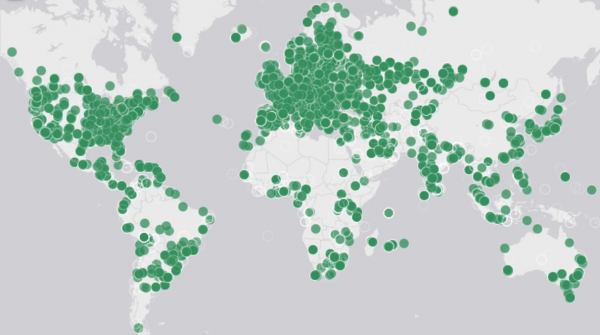
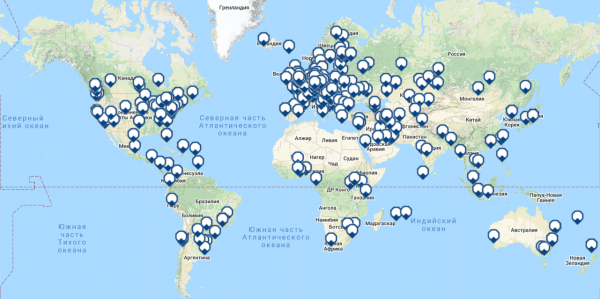
Despite the regional status of RIPE NCC, the RIPE Atlas network covers almost the entire world, with Russia ranking in the top 5 for the number of installed sensors (568), alongside Germany (1562), the USA (1440), France (925), and the United Kingdom (610).
Management Servers
When studying the operations of a sensor, it was discovered that it periodically (every 4 minutes) checks connectivity with several entities in the network, including root DNS servers and nodes with domain names like "ctr-sin02.atlas.ripe.net," which I believe are the management servers of the RIPE Atlas network.
I couldn't find information about the management servers on the official website, but it can be assumed that their role includes managing sensors, as well as aggregating and processing data. If my assumption is correct, there are at least 6 management servers, 2 of which are located in the USA, 2 in the Netherlands, 1 in Germany, and 1 in Singapore. Port 443 is open on all servers.
If anyone has more information about the management servers of the RIPE Atlas network, please clarify this matter.
Sensor
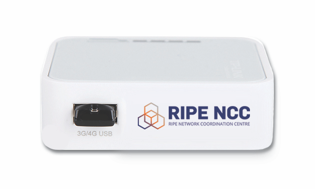
The RIPE Atlas sensor is a small device (TP-Link 3020) powered by USB and connected to a router's Ethernet port via a network cable. Depending on the model, the sensor may have an Atheros AR9331 chipset, 400 MHz, 4 MB of flash, and 32 MB of RAM or a MediaNek MT7628NN chipset, 575 MHz, 8 MB of flash, and 64 MB of RAM.
Anchor
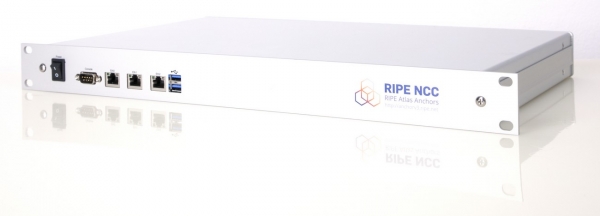
The anchor is an advanced sensor with significantly greater performance and measurement capability. It is a device in a standard 19-inch design built on the APU2C2 or APU2E2 hardware platform equipped with a quad-core 1 GHz processor, 2 GB of RAM, 3 Gigabit Ethernet ports, and a 250 GB SSD. .
Installation and management of the sensor.
As mentioned earlier, sensors are distributed for free for installation in your infrastructure. When requesting a sensor, please specify the country, city, and autonomous system number where it will be located. In response to my request, RIPE NCC sent the following message.
Unfortunately, your application does not meet our criteria for receiving a hardware sensor at this time. While our goal is to disseminate RIPE Atlas sensors as widely as possible, it appears that there are already enough devices connected either within your specified ASN, the network you applied to, or in the country where you applied.
No worries. In this case, a software sensor can be installed, for example, on a virtual machine, home server, or router—there are no restrictions on location and autonomous system. CentOS, Debian, Raspbian, and Turris OS are supported. To deploy it, you need to download and install the appropriate software, for example from .
Installing a software sensor is quite straightforward. For installation on CentOS 8, you need to run the following commands:
curl -O 'https://ftp.ripe.net/ripe/atlas/software-probe/centos8/noarch/ripe-atlas-repo-1-2.el8.noarch.rpm'yum install ripe-atlas-repo-1-2.el8.noarch.rpm and register the sensor, providing the SSH key found in /var/atlas-probe/etc/probe_key.pub, as well as specifying the autonomous system number and your city. The email reminded to accurately specify the sensor's location.
Sensor management is limited to the ability to share measurement resources with other users, configure downtime notifications, and standard network settings (address, default gateway, etc.).
Measurements
Finally, we have reached the measurement phase. Task settings for conducting measurements are done from the personal account. You can also access the results there.
The measurement task formation consists of three steps: selecting the measurement type, selecting the sensor, and selecting the measurement period.
Measurements can be of the following types: ping, traceroute, DNS, SSL, HTTP, NTP. Detailed settings for a specific type of measurement, excluding those dictated by a specific protocol or utility, include: target address, network layer protocol, number of packets in the measurement and time between measurements, packet size and time between packets, degree of random offset for the start time of packet transmission.
Sensor selection is possible by their identifier or by country of location, region, autonomous system, tag, etc.
The measurement period is defined by the start and end time.
Measurement results are available on the website in the personal account, which can also be obtained in JSON format. Generally, the measurement results represent quantitative indicators that characterize the availability of a node or service.
For the user, measurement capabilities are represented by a wide but quite limited spectrum. However, it is clear that the system's capabilities assume the generation of packets of practically any configuration, which opens up much broader possibilities for measuring the state of the Internet.
Below is an example of unprocessed results from single measurements with default settings. In ping, traceroute, and SSL measurements, the target was the IP address habr.com, for DNS — the IP address of Google's DNS server, and for NTP — the IP address of the NTP server ntp1.stratum2.ru. One sensor located in Vladivostok was used for all measurements.
Ping
[{"fw":4790,"lts":18,"dst_name":"178.248.237.68","af":4,"dst_addr":"178.248.237.68","src_addr":"192.168.0.10","proto":"ICMP","ttl":55,"size":48,"result":[{"rtt":122.062873},{"rtt":121.775641},{"rtt":121.807897}],"dup":0,"rcvd":3,"sent":3,"min":121.775641,"max":122.062873,"avg":121.882137,"msm_id":26273241,"prb_id":4428,"timestamp":1594622562,"msm_name":"Ping","from":"5.100.99.178","type":"ping","group_id":26273241,"step":null,"stored_timestamp":1594622562}]Traceroute
[{"fw":4790,"lts":19,"endtime":1594622643,"dst_name":"178.248.237.68","dst_addr":"178.248.237.68","src_addr":"192.168.0.10","proto":"ICMP","af":4,"size":48,"paris_id":1,"result":[{"hop":1,"result":[{"from":"192.168.0.1","ttl":64,"size":76,"rtt":7.49},{"from":"192.168.0.1","ttl":64,"size":76,"rtt":1.216},{"from":"192.168.0.1","ttl":64,"size":76,"rtt":1.169}]},{"hop":2,"result":[{"from":"5.100.98.1","ttl":254,"size":28,"rtt":1.719},{"from":"5.100.98.1","ttl":254,"size":28,"rtt":1.507},{"from":"5.100.98.1","ttl":254,"size":28,"rtt":1.48}]},---DATA OMITED---,{"hop":10,"result":[{"from":"178.248.237.68","ttl":55,"size":48,"rtt":121.891},{"from":"178.248.237.68","ttl":55,"size":48,"rtt":121.873},{"from":"178.248.237.68","ttl":55,"size":48,"rtt":121.923}]}],"msm_id":26273246,"prb_id":4428,"timestamp":1594622637,"msm_name":"Traceroute","from":"5.100.99.178","type":"traceroute","group_id":26273246,"stored_timestamp":1594622649}]DNS
[{\"fw\":4790,\"lts\":146,\"dst_addr\":\"8.8.8.8\",\"af\":4,\"src_addr\":\"192.168.0.10\",\"proto\":\"UDP\",\"result\":{\"rt\":174.552,\"size\":42,\"abuf\":\"5BGAgAABAAEAAAAABGhhYnIDY29tAAABAAHADAABAAEAAAcmAASy+O1E\",\"ID\":58385,\"ANCOUNT\":1,\"QDCOUNT\":1,\"NSCOUNT\":0,\"ARCOUNT\":0},\"msm_id\":26289620,\"prb_id\":4428,\"timestamp\":1594747880,\"msm_name\":\"Tdig\",\"from\":\"5.100.99.178\",\"type\":\"dns\",\"group_id\":26289620,\"stored_timestamp\":1594747883}]SSL
[{"fw":4790,"lts":63,"dst_name":"178.248.237.68","dst_port":"443","method":"TLS","ver":"1.2","dst_addr":"178.248.237.68","af":4,"src_addr":"192.168.0.10","ttc":106.920213,"rt":219.948332,"cert":["-----BEGIN CERTIFICATE-----nMIIGJzCCBQ+gAwIBAg ---DATA OMITED--- yd/teRCBaho1+Vn-----END CERTIFICATE-----"],"msm_id":26289611,"prb_id":4428,"timestamp":1594747349,"msm_name":"SSLCert","from":"5.100.99.178","type":"sslcert","group_id":26289611,"stored_timestamp":1594747352}]NTP
[{"fw":4790,"lts":72,"dst_name":"88.147.254.230","dst_addr":"88.147.254.230","src_addr":"192.168.0.10","proto":"UDP","af":4,"li":"no","version":4,"mode":"server","stratum":2,"poll":8,"precision":0.0000076294,"root-delay":0.000518799,"root-dispersion":0.0203094,"ref-id":"5893fee5","ref-ts":3803732581.5476198196,"result":[{"origin-ts":3803733082.3982748985,"receive-ts":3803733082.6698465347,"transmit-ts":3803733082.6698560715,"final-ts":3803733082.5099263191,"rtt":0.111643,"offset":-0.21575},{"origin-ts":3803733082.5133042336,"receive-ts":3803733082.7847337723,"transmit-ts":3803733082.7847442627,"final-ts":3803733082.6246700287,"rtt":0.111355,"offset":-0.215752},{"origin-ts":3803733082.6279149055,"receive-ts":3803733082.899283886,"transmit-ts":3803733082.8992962837,"final-ts":3803733082.7392635345,"rtt":0.111337,"offset":-0.2157}],"msm_id":26289266,"prb_id":4428,"timestamp":1594744282,"msm_name":"Ntp","from":"5.100.99.178","type":"ntp","group_id":26289266,"stored_timestamp":1594744289}]Conclusion
The RIPE Atlas network is a useful tool for monitoring the availability of network resources and services in real time.
Data obtained through the RIPE Atlas network can be beneficial for network operators, researchers, the technical community, and anyone interested in the healthy functioning of the Internet who wants to learn more about the fundamental network structures and data flows that support the operation of the Internet on a global scale.
P.S. RIPE Atlas is not alone; there are alternatives, for example, .
Source: habr.com
