


What to consider when choosing a VPN router for a distributed network? And what features should it have? This is the focus of our review of the ZyWALL VPN1000.
Introduction
Previously, most of our publications have been dedicated to junior VPN devices for network access from remote sites. For instance, for connecting various branches to headquarters, enabling small independent companies to access the Internet, or even individual homes. It’s time to talk about a central node for a distributed network.
It is clear that building a modern network for a large enterprise solely on budget-class devices is not feasible. Similarly, organizing a cloud service to provide services to consumers cannot be done that way. Some equipment must be installed that can serve a large number of clients simultaneously. This time, we will discuss such a device — the Zyxel VPN1000.
For both large and small participants in network exchange, criteria can be identified for assessing the suitability of a particular device for solving the task.
Below are the main criteria:
- technical and functional capabilities;
- management;
- security;
- fault tolerance.
It is difficult to identify what is more important and what can be overlooked. Everything is necessary. If a device falls short of specific requirements in any respect, it can lead to problems later on.
However, certain features of devices intended to support central nodes and equipment primarily operating on the periphery can vary significantly.
For a central node, computing power takes precedence — this necessitates forced cooling and, consequently, noise from the fan. For peripheral devices, which are usually located in offices and residential areas, noisy operation is practically unacceptable.
Another interesting point is the distribution of ports. In peripheral devices, it is more or less clear how ports will be used and how many clients will be connected. Therefore, strict port division can be set for WAN, LAN, DMZ, with strict binding to the protocol, and so on. In the central node, such certainty is lacking. For example, a new network segment has been added that requires connection through its own interface—how should this be done? A more versatile solution is required here, with flexible interface customization options.
An important nuance is the device's saturation with various functions. Of course, the approach where one piece of equipment performs one specific task well has its advantages. But the most interesting situation occurs when a step to the left or right needs to be made. Of course, additional target devices can be purchased for each new task. And this continues until the budget or space in the rack runs out.
In contrast, an extended set of features allows for one device to address multiple issues. For example, the ZyWALL VPN1000 supports several types of VPN connections, including SSL and IPsec VPN, as well as remote connections for employees. This means that one piece of hardware addresses both site-to-site and client connections. But there is one catch. For this to work, performance headroom is needed. For instance, in the case of the ZyWALL VPN1000, the hardware core of the IPsec VPN provides high VPN tunnel performance, while load balancing/redundancy via SHA‑2 and IKEv2 algorithms ensures high reliability and security for businesses.
Below are some useful features that cover one or more of the areas described above.
SD-WAN provides a platform for cloud management, gaining the benefits of centralized management of communication between sites with remote control and monitoring capabilities. The ZyWALL VPN1000 also supports the relevant operating mode where advanced VPN functions are required.
Support for cloud platforms for mission-critical services. ZyWALL VPN1000 is verified for use with Microsoft Azure and AWS. Using pre-validated devices is preferable for organizations of any size, especially if the IT infrastructure includes a combination of local and cloud networks.
Content Filtering enhances security by blocking access to malicious or unwanted websites. It prevents malware downloads from unreliable or hacked sites. In the case of ZyWALL VPN1000, an annual license for this service is included right out of the box.
Geo-Policies (Geo IP) allow the monitoring of traffic and analysis of IP address locations, denying access from unwanted or potentially dangerous regions. An annual license for this service is also included when purchasing the device.
Wireless Network Management in ZyWALL VPN1000 includes a wireless controller that allows management of up to 1032 access points from a centralized user interface. Businesses can deploy or expand a managed Wi-Fi network with minimal effort. It’s worth noting that 1032 is indeed a significant number. Assuming that one access point can support up to 10 users, that results in quite an impressive figure.
Load Balancing and Failover. The VPN series supports load balancing and failover across multiple external interfaces. This means that multiple channels from several providers can be connected, thus shielding against connectivity issues.
Device High Availability (Device HA) for uninterrupted connectivity, even when one of the devices fails. This is crucial for organizing 24/7 operations with minimal downtime.
Zyxel Device HA Pro operates in an active/passivemode, which does not require a complex setup procedure. This lowers the entry barrier and allows immediate utilization of failover capabilities. Unlike active/active, where the system administrator must undergo additional training, be able to configure dynamic routing, understand asymmetric packets, etc.—the configuration for the active/passive mode is significantly simpler and requires less time investment.
When using the Zyxel Device HA Pro, the devices exchange signals heartbeat through a dedicated port. The active and passive device ports are connected via an Ethernet cable. The passive device fully synchronizes information with the active device. In particular, all sessions, tunnels, and user accounts are synchronized between the devices. Additionally, the passive device retains a backup of the configuration file in case the active device fails. Thus, in the event of a primary device failure, the switch is seamless. heartbeat It is worth noting that in active systems,
20-25% of system resources still need to be reserved for failover switching. In case/active one device is entirely in standby mode, ready to immediately handle network traffic and maintain normal network operation. active/passive Putting it simply: 'When using the Zyxel Device HA Pro and having a backup channel, businesses are protected from both provider connection loss and issues arising from router failures.
To summarize all of the above,
For the central node of a distributed network, it is better to use a device with some surplus ports (connection interfaces). It is desirable to have interfaces both RJ45 for simplicity and cost-effectiveness of the connection, as well as SFP for choosing between fiber optic and twisted pair connections.
This device should be:
efficient, adapted to sudden changes in load;
- with a user-friendly interface;
- with a rich, but not excessive set of built-in features, including those related to security;
- with the capability to create fault-tolerant schemes—channel duplication and device duplication;
- supporting management, so that the entire branched infrastructure in the form of a central node and peripheral devices can be managed from a single point;
- as a 'cherry on top'—support for modern trends such as integration with cloud resources and so on.
- ZyWALL VPN1000 as the central node of the network
At first glance at the ZyWALL VPN1000, it is clear that Zyxel didn't hold back on ports.
We have:
12 configurable RJ-45 ports (GBE);
2 configurable SFP ports (GBE);
2 USB 3.0 ports supporting 3G/4G modems.
Figure 1. Overall view of the ZyWALL VPN1000.
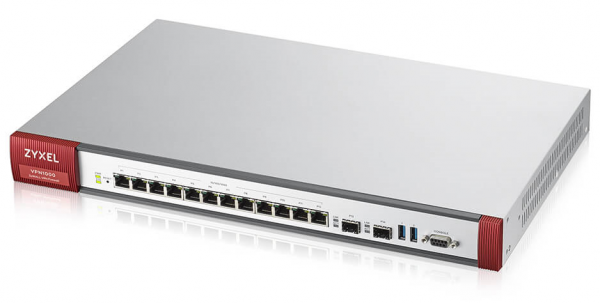
Figure 1. General view of the ZyWALL VPN1000.
It should be noted right away that this device is not meant for home office use, primarily due to its powerful fans. There are four of them.

Figure 2. Rear panel of the ZyWALL VPN1000.
Let's take a look at the interface.
It is essential to point out an important detail. There are many functions, and describing them all within a single article isn't feasible. However, what's great about Zyxel products is that they come with very detailed documentation, primarily the user (administrator) manual. Therefore, to get an idea of the richness of features, let’s quickly go through the tabs.
By default, port 1 and port 2 are allocated for WAN. Starting from the third port, we have interfaces for the local network.
Port 3 with the default IP 192.168.1.1 is quite suitable for connection.
We connect the patch cable, go to the address and can see the user registration window of the web interface.
Note. The cloud management system for SD-WAN can be utilized for management.
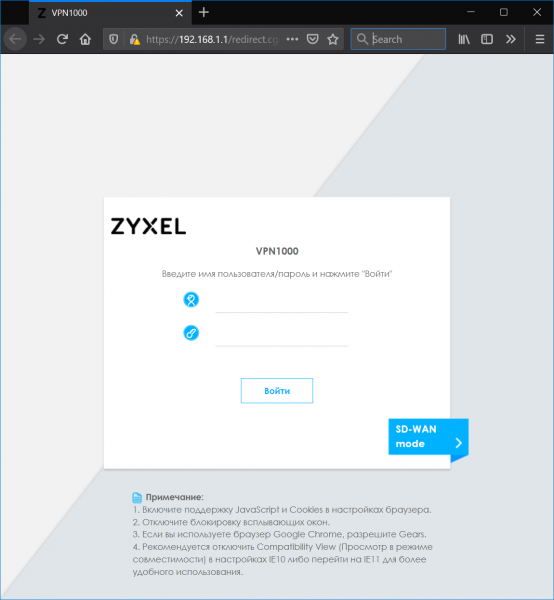
Figure 3. Login and password entry window
We go through the login and password entry process and get the Dashboard window on the screen. As is typical for a Dashboard, it provides maximum operational information in every bit of screen space.
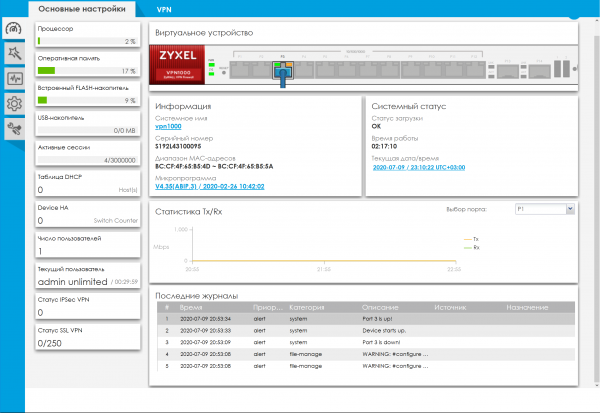
Figure 4. ZyWALL VPN1000 — Dashboard.
The "Quick Setup" tab (Wizards)
There are two wizards in the interface: for setting up WAN and configuring VPN. In fact, wizards are a great feature, allowing for template settings without prior experience with the device. For those who want more, as mentioned above, detailed documentation exists.
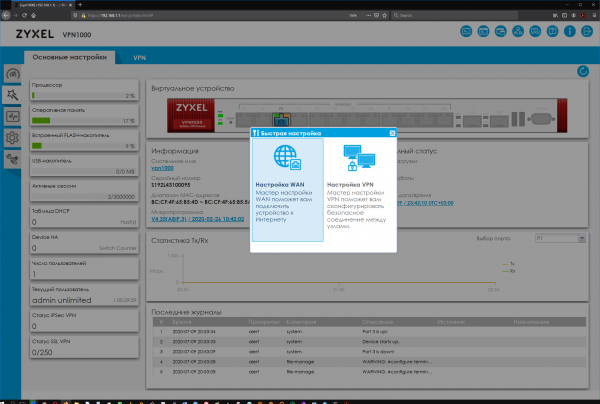
Figure 5. "Quick Setup" tab.
Monitoring Tab
Apparently, Zyxel's engineers decided to adopt the principle of monitoring everything possible. Naturally, for a device acting as a central hub, comprehensive control is quite beneficial.
Even simply expanding all the items on the sidebar makes the wealth of options evident.
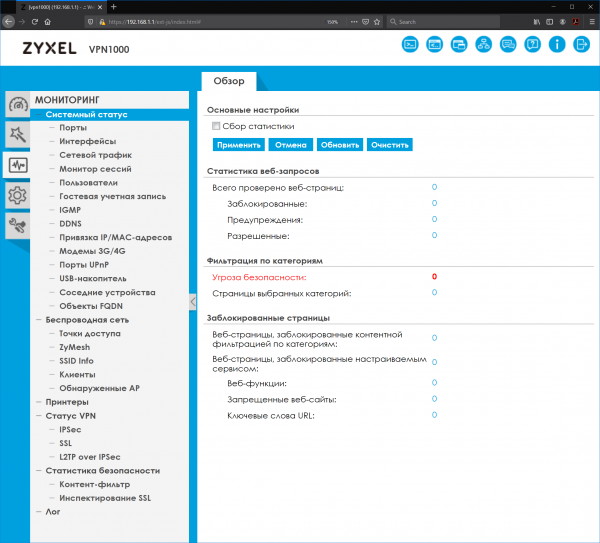
Figure 6. Monitoring tab with expanded sub-items.
Configuration Tab
Here, the richness of features is even more apparent.
For example, the port management of the device is very nicely designed.
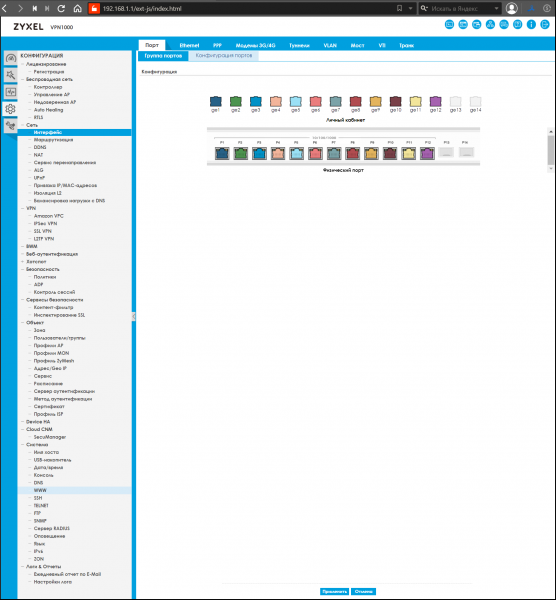
Figure 7. Configuration tab with expanded sub-items.
Maintenance Tab
Contains subsections for firmware updates, diagnostics, viewing routing rules, and shutting down.
These features are auxiliary and are present to some degree in almost every network device.
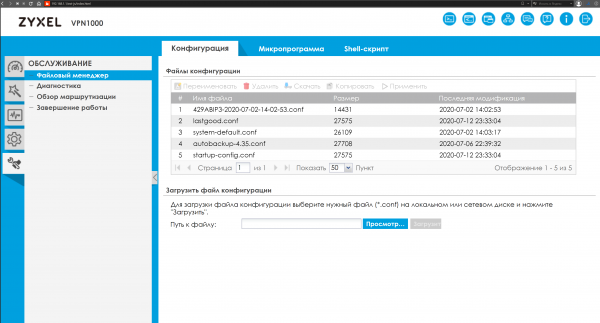
Figure 8. Maintenance tab with expanded sub-items.
Comparative characteristics
Our review would be incomplete without a comparison to other analogs.
Below is a table of devices similar to the ZyWALL VPN1000 and a list of features for comparison.
Table 1. Comparison of ZyWALL VPN1000 with its analogs.
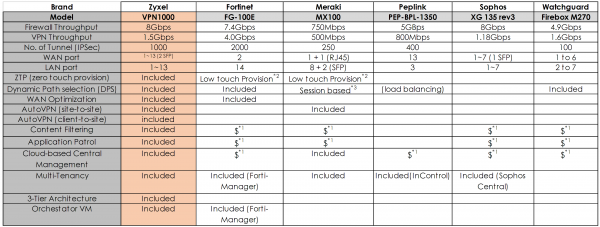
Notes on Table 1:
*1: A license is required
* 2: Low Touch Provision: the administrator must first configure the device locally before ZTP.
* 3: based on sessions: DPS will apply only to a new session; it will not affect the current session.
As we can see, in some ways the analogs catch up with the hero of our review; for example, the Fortinet FG-100E also has built-in WAN optimization, and the Meraki MX100 has a built-in AutoVPN (site-to-site) feature, but overall, the ZyWALL VPN1000 clearly leads with its comprehensive set of features.
Recommendations for choosing devices for a central node (not only Zyxel)
When selecting devices to organize a central node of a branched network with many branches, it is essential to consider a range of factors: technical capabilities, ease of management, security, and fault tolerance.
A wide range of features, a large number of physical ports with flexible configuration options: WAN, LAN, DMZ, and the availability of other useful features, such as access point controller management, can address many tasks at once.
The availability of documentation and a user-friendly management interface also play a significant role.
With seemingly simple tools at hand, it is not difficult to create network infrastructures that span various sites and locations, and the use of cloud SD-WAN allows for maximum flexibility and security.
Useful links
Source: habr.com
