

We will use the k8s-native deployment controller Argo Rollouts and GitlabCI to launch a Canary deployment in Kubernetes

Articles in this series
- (This article)
- Canary Deployment using Istio
- Canary Deployment using Jenkins-X Istio Flagger
Canary Deployment
We hope you read , where we briefly explained what Canary Deployments are. We also showed how to implement it using standard Kubernetes resources.
Argo Rollouts
Argo Rollouts is a Kubernetes-native deployment controller. It provides a CRD (Custom Resource Definition) for Kubernetes. With it, we can use a new entity: Rollout, which manages blue-green and canary deployments with various configuration options.
The Argo Rollouts controller, using the custom resource
Rollout,allows for additional deployment strategies like blue-green and canary for Kubernetes. The resourceRolloutprovides functionality equivalent toDeployment, just with additional deployment strategies.
The resourceDeploymentshas two strategies for deployment:RollingUpdateandRecreate. Although these strategies are suitable for most cases, additional strategies like blue-green or canary, which are not available in the Deployment controller, are used for deployments on a very large scale. To use these strategies in Kubernetes, users had to write scripts on top of their Deployments. The Argo Rollouts controller provides these strategies as simple declarative configurable parameters.
There is also Argo CI, which provides a convenient web interface to use alongside Rollouts; we will take a look at it in the next article.
Installing Argo Rollouts
On the server side
kubectl create namespace argo-rollouts kubectl apply -n argo-rollouts -f https://raw.githubusercontent.com/argoproj/argo-rollouts/stable/manifests/install.yaml
In our infrastructure repo (see below), we have already added install.yaml as i/k8s/argo-rollouts/install.yaml. Thus GitlabCI will install it in the cluster.
On the client side (kubectl plugin)
Sample application
A good practice is to have separate repositories for application code and infrastructure.
Repository for the application
This is a very simple API in Python+Flask that returns a response in JSON format. We will build a package using GitlabCI and push the result to the Gitlab Registry. We have two different release versions in the registry:
- wuestkamp/k8s-deployment-example-app:v1
- wuestkamp/k8s-deployment-example-app:v2
The only difference between them is the returned JSON file. We use this application for the simplest possible visualization of which version we are interacting with.
Infrastructure Repository
In this repository, we will use GitlabCI for deployment to Kubernetes, .gitlab-ci.yml looks as follows:
image: traherom/kustomize-dockerbefore_script:
   - printenv
   - kubectl versionstages:
 - deploydeploy test:
   stage: deploy
   before_script:
     - echo $KUBECONFIG
   script:
     - kubectl get all
     - kubectl apply -f i/k8s    only:
     - master
To run it yourself, you will need a cluster, Gcloud can be used:
gcloud container clusters create canary --num-nodes 3 --zone europe-west3-b
gcloud compute firewall-rules create incoming-80 --allow tcp:80
You need to make a fork and create a variable KUBECONFIG in GitlabCI, which will contain the config for access kubectl to your cluster.
You can read about how to obtain credentials for the cluster (Gcloud).
Infrastructure Yaml
Inside the infrastructure repository, we have a service:
apiVersion: v1
kind: Service
metadata:
 labels:
   id: rollout-canary
 name: app
spec:
 ports:
 - port: 80
   protocol: TCP
   targetPort: 5000
 selector:
   id: app
 type: LoadBalancer
and rollout.yaml :
apiVersion: argoproj.io/v1alpha1
kind: Rollout
metadata:
 name: rollout-canary
spec:
 replicas: 10
 revisionHistoryLimit: 2
 selector:
   matchLabels:
     id: rollout-canary
 template:
   metadata:
     labels:
       id: rollout-canary
   spec:
     containers:
     - name: rollouts-demo
       image: registry.gitlab.com/wuestkamp/k8s-deployment-example-app:v1
       imagePullPolicy: Always
 strategy:
   canary:
     steps:
     - setWeight: 10
     # Rollouts can be manually resumed by running `kubectl argo rollouts promote ROLLOUT`
     - pause: {}
     - setWeight: 50
     - pause: { duration: 120 } # two minutes
Rollout Works similarly to a Deployment. If we do not specify an update strategy (like canary here), it will behave like the default rolling-update Deployment.
We define two steps in the yaml for canary deployment:
- 10% traffic to canary (wait for manual OK)
- 50% traffic to canary (wait 2 minutes then continue to 100%)
Executing the initial deployment
After the initial deployment, our resources will look like this:
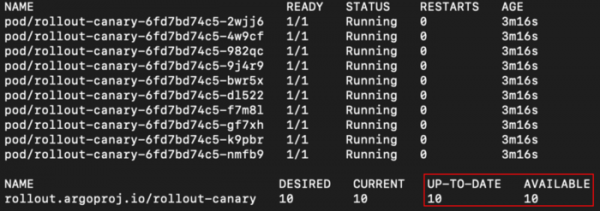
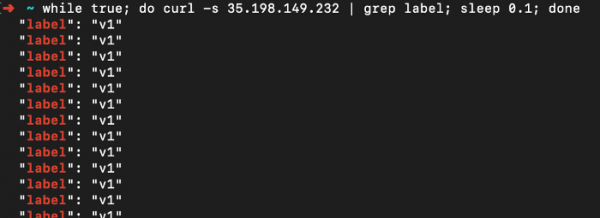
And we get a response only from the first version of the application:
Executing Canary Deployment
Step 1: 10% traffic
To begin the canary deployment, we simply need to change the image version, just as we usually do with deployments:
apiVersion: argoproj.io/v1alpha1
kind: Rollout
metadata:
 name: rollout-canary
spec:
...
 template:
   metadata:
     labels:
       id: rollout-canary
   spec:
     containers:
     - name: rollouts-demo
       image: registry.gitlab.com/wuestkamp/k8s-deployment-example-app:v2
...
And we push the changes, so Gitlab CI performs the deployment and we see the changes:
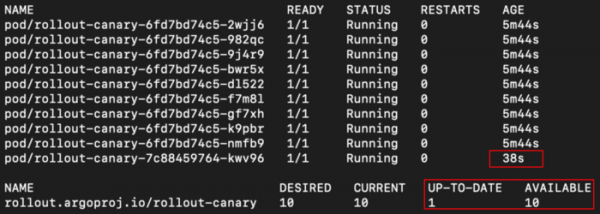
Now, if we call the service:
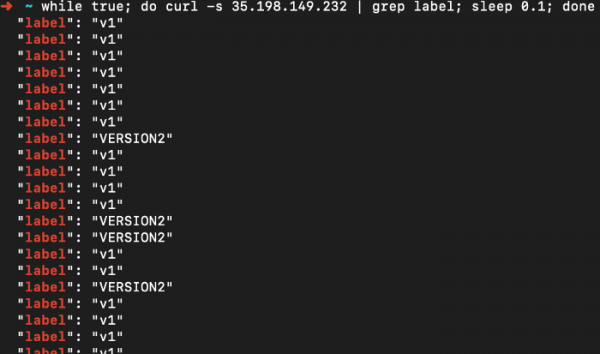
Great! We're in the middle of our canary deployment. We can see the progress by running:
kubectl argo rollouts get rollout rollout-canary
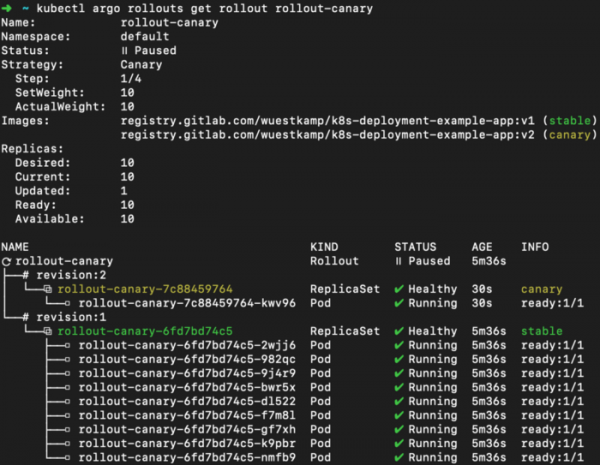
Step 2: 50% traffic:
Now we move on to the next step: redirecting 50% of the traffic. We've set this step to be initiated manually:
kubectl argo rollouts promote rollout-canary # continue to step 2
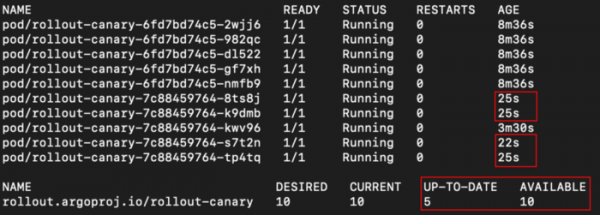
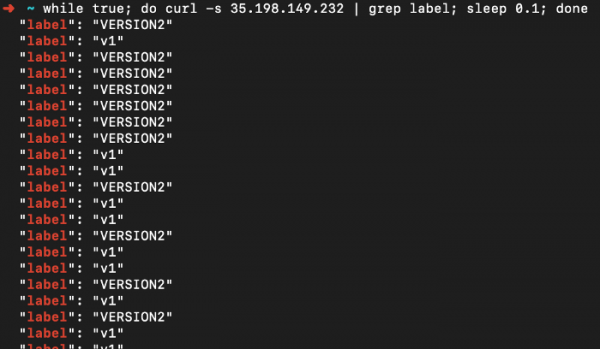
And our application returned 50% responses from the new versions:
And the rollout overview:
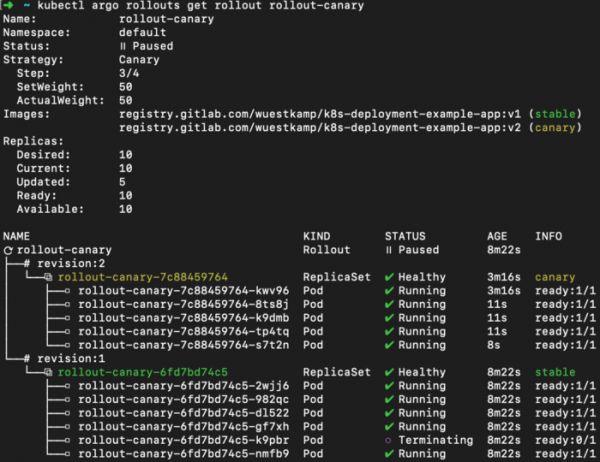
Excellent.
Step 3: 100% traffic:
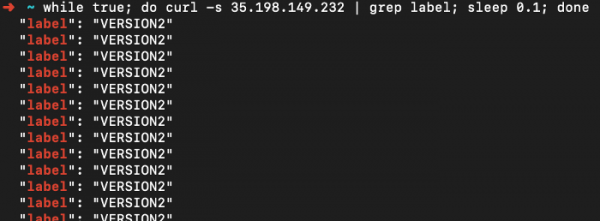
We've configured it so that after 2 minutes, the 50% step automatically completes and the 100% step begins:
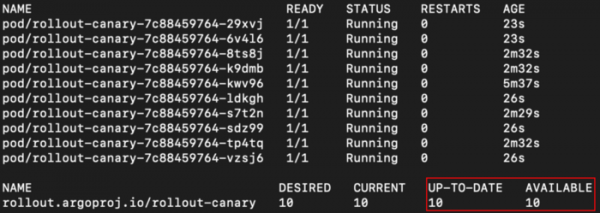
And the application output:
And the rollout overview:
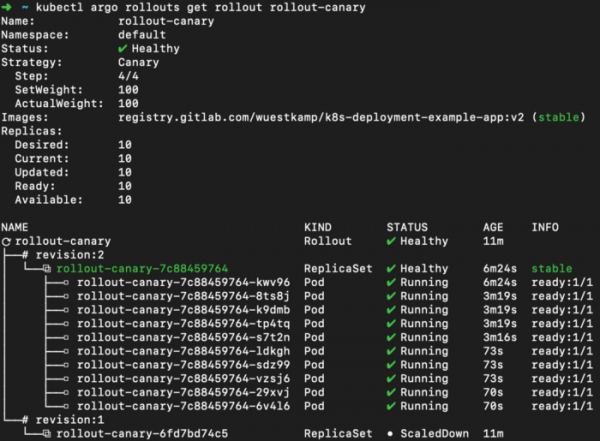
Canary deployment completed.
More examples with Argo Rollouts
Here are more examples, such as setting up environment previews and comparisons based on canary:
Video on Argo Rollouts and Argo CI
I really recommend this video; it shows how Argo Rollouts and Argo CI work together:

Summary
I really like the idea of using CRDs that manage the creation of additional types of deployments or replicasets, redirect traffic, etc. Working with them goes smoothly. Next, I would like to test the integration with Argo CI.
However, it seems that a major merge of Argo CI and Flux CI is coming, so I might wait until the new release: .
Have you had experience with Argo Rollouts or Argo CI?
Also, read other articles in our blog:
Source: habr.com
