

The year was coming to a close. Children all over the country had already sent their letters to Santa Claus or made their gift wishes, while the main performer — one of the major retailers — was preparing for the peak of sales. During December, the load on its data center increases several times. Therefore, the company decided to upgrade the data center and bring several dozen new servers online to replace equipment that had reached the end of its life cycle. This marks the end of a whimsical narrative against the backdrop of swirling snowflakes and the beginning of a thriller.

The equipment arrived on-site several months before the sales peak. The operations team, of course, knows how to configure servers for integration into the production environment. However, we needed to automate this process and eliminate the human factor. Moreover, the servers were replacing a suite of SAP systems, which are critical for the company, before the migration.
The activation of the new servers was tightly bound to a deadline. Moving it would jeopardize both the delivery of a billion gifts and the migration of systems. Even Santa Claus’s team couldn’t have changed the date — migrating the SAP system for warehouse management can only be done once a year. From December 31st to January 1st, the retailer’s enormous warehouses, cumulatively the size of 20 football fields, halt operations for 15 hours. This is the only window of time for the system relocation. We had no margin for error in bringing the servers online.
Let me clarify: my story reflects the tools and configuration management processes our team utilizes.
The configuration management suite consists of several layers. The key component is the CMS system. In industrial operation, the absence of any single layer would inevitably lead to unpleasant surprises.
Operating System Installation Management
The first layer is the system for managing the installation of operating systems on physical and virtual servers. It creates baseline OS configurations, eliminating human error.
With this system, we obtained standard and reusable instances of servers with an OS. During the 'spilling' process, they received a basic set of local users and SSH public keys, as well as a consistent OS configuration. We could reliably manage the servers through the CMS and were confident that there were no surprises 'down there' at the OS level.
The 'maximum' task for the installation management system is to automatically configure servers from the BIOS/Firmware level to the OS. Much depends here on the hardware and configuration tasks. For heterogeneous hardware, you might consider . If all the 'hardware' comes from one vendor, it is often easier to use ready-made management tools (for example, HP ILO Amplifier, DELL OpenManage, etc.).
To install the OS on physical servers, we used the well-known Cobbler, which has a set of agreed installation profiles with the operations department. When adding a new server to the infrastructure, the engineer would bind the server's MAC address to the required profile in Cobbler. Upon the first network boot, the server would receive a temporary address and a fresh OS. It was then moved to the target VLAN/IP addressing and continued its work there. Yes, changing VLAN takes time and requires coordination, but it offers additional protection against accidental installation of a server in the production environment.
We created virtual servers based on templates prepared using HashiCorp Packer. The reason was the same: to prevent possible human errors during OS installation. But, unlike physical servers, Packer allows for not using PXE, network booting, and VLAN changes. This simplified and eased the creation of virtual servers.
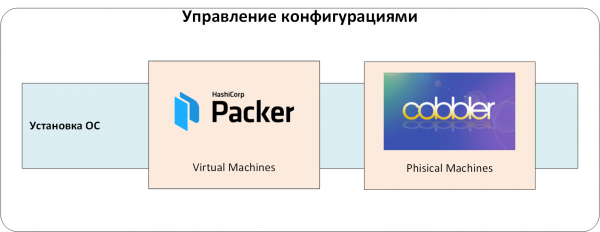
Fig. 1. Management of operating system installations.
Secret Management
Any configuration management system contains data that must be hidden from ordinary users but is needed for system preparation. This includes passwords for local users and service accounts, certificate keys, various API Tokens, etc. They are commonly referred to as 'secrets.'
If the location and method for storing these secrets are not determined from the start, depending on the strictness of the information security requirements, the following storage methods are likely:
- directly in the configuration management code or in the files in the repository;
- in specialized configuration management tools (e.g., Ansible Vault);
- in CI/CD systems (Jenkins/TeamCity/GitLab, etc.) or in configuration management systems (Ansible Tower/Ansible AWX);
- secrets can also be managed manually. For example, they can be placed in a designated location, and then used by configuration management systems;
- various combinations of the above.
Each method has its drawbacks. The main one is the lack of access policies for secrets: it is impossible or difficult to determine who can use certain secrets. Another downside is the lack of access auditing and a complete lifecycle. How quickly can a public key, for instance, be replaced if it is hardcoded and used in several associated systems?
We used a centralized secret storage solution, HashiCorp Vault. This allowed us to:
- store secrets securely. They are encrypted, and even if someone gains access to the Vault storage database (e.g., by restoring it from a backup), they will not be able to read the secrets stored there;
- organize access policies for secrets. Users and applications have access only to the secrets 'designated' to them;
- conduct audits of access to secrets. Any actions involving secrets are logged in the Vault audit log;
- establish a full-fledged 'lifecycle' for managing secrets. They can be created, revoked, have expiration periods set, etc.
- easily integrate with other systems that require access to secrets;
- and also apply end-to-end encryption, one-time passwords for operating systems and databases, certificates from authorized centers, etc.
Now let's move on to the central authentication and authorization system. It could have been avoided, but managing users across multiple associated systems is too non-trivial. We configured authentication and authorization through an LDAP service. Otherwise, in Vault, we would have to continuously issue and track authentication tokens for users. Adding and removing users would turn into a quest of 'have I created/deleted this account everywhere?'
We add another level to our system: secret management and central authentication/authorization:
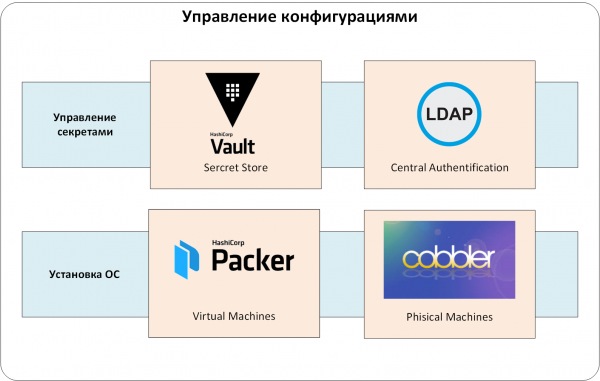
Fig. 2. Secret Management.
Configuration Management
We have reached the heart of the matter — the CMS system. In our case, this is a combination of Ansible and Red Hat Ansible AWX.
Chef, Puppet, and SaltStack can also serve as alternatives to Ansible. We chose Ansible based on several criteria.
- First, it is versatile. The collection of ready-made modules for management . And if it’s lacking, you can search for additional modules on GitHub and Galaxy.
- Secondly, there's no need to install and maintain agents on managed equipment, prove that they don't interfere with workloads, or confirm the absence of 'backdoors'.
- Thirdly, Ansible has a low barrier to entry. A qualified engineer can write a working playbook literally on their first day with the product.
But Ansible alone was not enough for us in an industrial environment. Otherwise, we would face many issues with access restrictions and admin action auditing. How to manage access? Each department needed to control (i.e., execute Ansible playbooks) its own set of servers. How to allow only certain employees to run specific Ansible playbooks? Or how to trace who executed a playbook without creating numerous local user accounts on the Ansible-managed servers and equipment?
A significant portion of such questions is addressed by Red Hat , or its open-source upstream project . That’s why we preferred it for our customer.
And one more detail about our CMS system. Ansible playbooks must be stored in code repository management systems. In our case, this is .
So, the configurations are managed by the combination of Ansible/Ansible AWX/GitLab (see Fig. 3). Naturally, AWX/GitLab are integrated with a unified authentication system, and Ansible playbooks are integrated with HashiCorp Vault. Configurations enter the production environment only through Ansible AWX, where all the 'rules of the game' are set: who and what can configure, where to source code for configuration management for the CMS, etc.
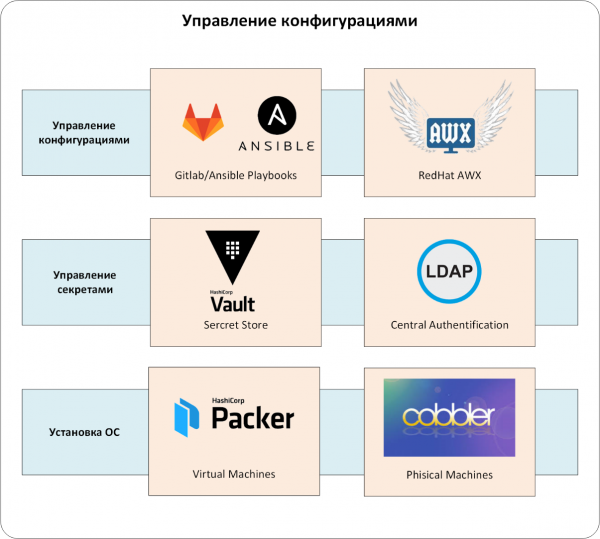
Fig. 3. Configuration Management.
Testing Management
Our configuration is presented as code. Therefore, we have to play by the same rules as software developers. We needed to organize the processes of development, continuous testing, delivery, and application of configuration code on production servers.
If this is not done right away, the roles written for configuration would either stop being supported and updated or cease to run in production. The remedy for this pain is well-known and has proven effective in this project:
- each role is covered by modular tests;
- tests are automatically run with any changes in the code managing the configurations;
- changes in the configuration management code enter the production environment only after passing all tests and a code review successfully.
The development of code and configuration management has become calmer and more predictable. To enable continuous testing, we used GitLab CI/CD tools, and as a framework for organizing tests, we took .
With any change in the configuration management code, GitLab CI/CD invokes Molecule:
- it checks the syntax of the code,
- spins up a Docker container,
- applies the modified code to the created container,
- checks the role for idempotency and runs tests for this code (granularity is at the level of ansible role, see Fig. 4).
We delivered configurations to the production environment using Ansible AWX. Engineers responsible for operations applied changes to the configuration through predefined templates. AWX automatically 'requested' the latest version of the code from the master branch of GitLab with each application. This prevented the use of unverified or outdated code in the production environment. Naturally, the code reached the master branch only after testing, review, and approval.
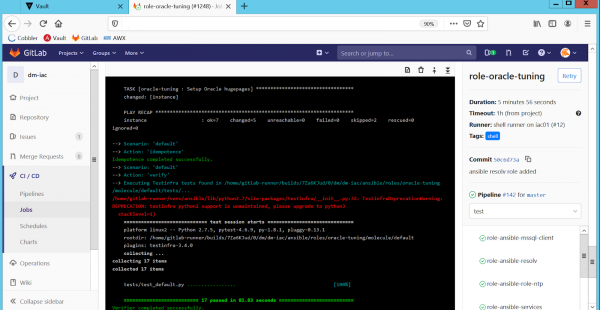
Fig. 4. Automated testing of roles in GitLab CI/CD.
There is also a problem related to the operation of production systems. In real life, it is very difficult to make changes to the configuration only through CMS code. Emergency situations arise when an engineer needs to change the configuration 'here and now,' without waiting for code revisions, testing, approval, etc.
As a result, due to manual changes, discrepancies in configuration appear on identical hardware (for example, different sysctl settings on HA cluster nodes). Or the actual configuration on the hardware differs from what is specified in the CMS code.
Therefore, in addition to continuous testing, we check production environments for configuration discrepancies. We chose the simplest option: running the CMS configuration code in 'dry run' mode, meaning without applying changes but with notifications of all discrepancies between the planned and actual configurations. We implemented this by periodically executing all Ansible playbooks with the '--check' option on production servers. As always, Ansible AWX is responsible for the execution and relevance of the playbooks (see Fig. 5):
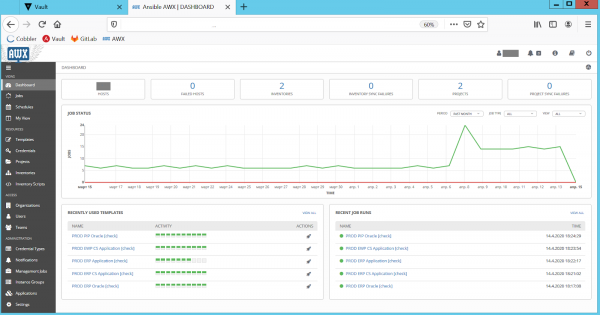
Fig. 5. Configuration discrepancy checks in Ansible AWX.
After checks, AWX sends a report on discrepancies to the administrators. They examine the problematic configuration and then correct it via the adjusted playbooks. This way, we maintain configuration in the production environment and the CMS is always up-to-date and synchronized. This eliminates unpleasant 'surprises' when CMS code is applied to 'live' servers.
Now we have an important level of testing consisting of Ansible AWX/GitLab/Molecule (Fig. 6).
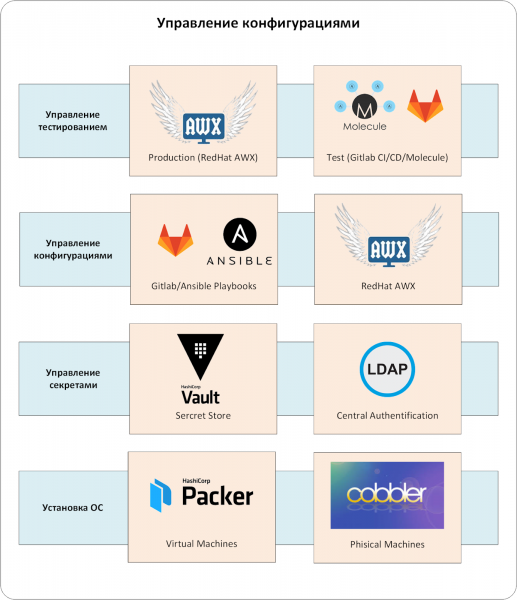
Fig. 6. Test management.
Difficult? I won't argue. But this comprehensive configuration management system has become a definitive answer to many questions related to server setup automation. Now the retailer's standard servers always have a strictly defined configuration. Unlike an engineer, the CMS will not forget to add necessary settings, create users, and perform dozens or hundreds of required configurations.
There are no 'secret knowledge' secrets in server and environment configurations today. All necessary features are reflected in the playbooks. No more creativity or vague instructions: 'install like a regular Oracle, but a couple of sysctl settings need to be specified, and users with the necessary UID should be added. Ask the operations guys, they know.».
The ability to detect configuration discrepancies and correct them in advance provides peace of mind. Without a configuration management system, it usually looks different. Problems accumulate until they 'explode' in production one day. Then a post-mortem is conducted, configurations are checked and corrected. And the cycle repeats itself.
And of course, we have accelerated server deployment from several days to hours.
On New Year's night, as children joyfully unwrapped their gifts and adults made wishes under the chimes of the clock, our engineers migrated the SAP system to new servers. Even Santa Claus would agree that the best miracles are well-prepared.
P.S. Our team often encounters clients who want to simplify configuration management tasks as much as possible. Ideally, as if by magic — with just one tool. But in reality, it’s more complex (yes, once again no silver bullets): it’s necessary to create an entire process using the tools that are convenient for the client’s team.
Author: Sergey Artemov, Department Architect Infostech Jet
Source: habr.com
