

Hello everyone! Today let's talk about Power Automate and Logic Apps. Often, people do not understand the differences between these services and which one to choose for their tasks. Let's figure it out.
Microsoft Power Automate
Microsoft Power Automate is a cloud service that enables users to create flows for automating time-consuming business tasks and processes. This service is designed for Citizen Developers – users who are not 100% developers, but are involved in application development and process automation.
Microsoft Power Automate is part of the Microsoft Power Platform, which additionally includes services such as Power Apps, Power BI, and Power Virtual Agents. This platform allows easy access to all necessary information from related Office 365 services and integrates it into applications, data flows, reports, and supporting assistant services.
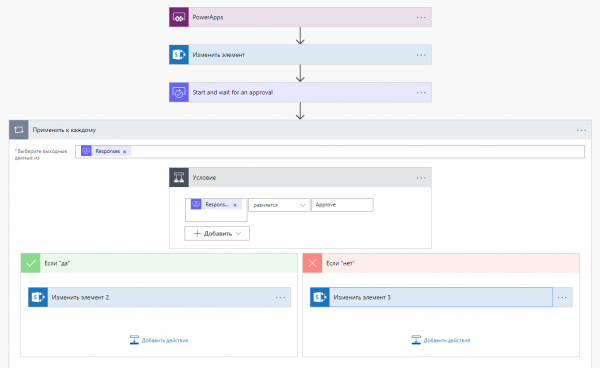
Creating Power Automate flows is based on the concept of "trigger" => "set of actions." The flow starts based on a specific trigger, which could be, for example, the creation of an item in a SharePoint list, receiving an email notification, or an HTTP request. After starting, the processing of the actions configured in this flow begins. Actions can utilize connectors to various services. Currently, Microsoft Power Automate supports over 200 different third-party services and platforms from giants like Google, Dropbox, Slack, WordPress, as well as various social services: Blogger, Instagram, Twitter, YouTube, Facebook, and many others. In addition, integration with Office 365 applications is available. To simplify the use of Microsoft Power Automate, Microsoft provides a large number of standard templates for various applications and events that we can use simply by filling out a set of required parameters. Users can also create their own templates in the designer and publish them for use by others.
Distinctive features of Microsoft Power Automate include:
- A large number of connectors to various third-party services.
- Support for integration with Office 365 services.
- The ability to trigger flows based on specific triggers, for instance, an integration scenario where receiving an email in Gmail necessitates initiating a series of actions in another service, such as sending a message in Teams and creating an entry in a SharePoint list.
- The ability to debug flows, with detailed information on the flow's status at each of its stages.
However, Microsoft Power Automate is a simplified version of the Logic Apps service. This means that when you create a Power Automate flow, a Logic Apps flow is created under the hood, which processes the configured logic. In simpler terms, Power Automate uses the Logic Apps engine to implement flows.
Microsoft Power Automate is currently available as part of an Office 365 subscription or as a standalone plan, purchased either per user or per flow.
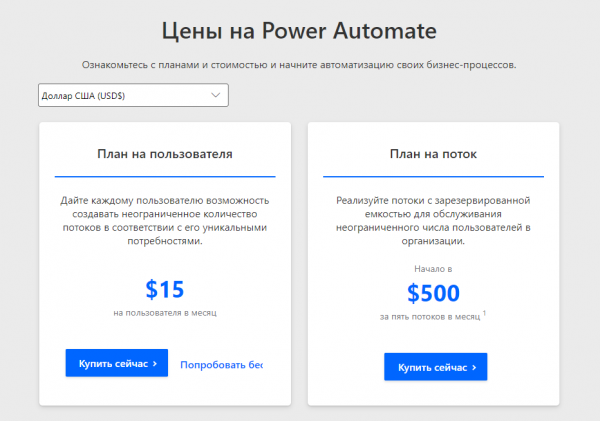
It is worth noting that premium connectors are only available with the purchase of a separate plan. An Office 365 subscription does not provide access to premium connectors.
Logic Apps
Logic Apps is a service that is part of the Azure App Service. Azure Logic Apps is part of the Azure Integration Services platform, which includes the ability to access the Azure API. Like Power Automate, Logic Apps is a cloud service designed for automating business tasks and processes. However, while Microsoft Power Automate is focused on business process flows, Logic Apps is more oriented towards business logic blocks that are part of a comprehensive integration solution. Such solutions require more meticulous management and control. One of the main differences of Logic Apps is the ability to specify the frequency of checking the trigger's firing. This setting is absent in Power Automate.
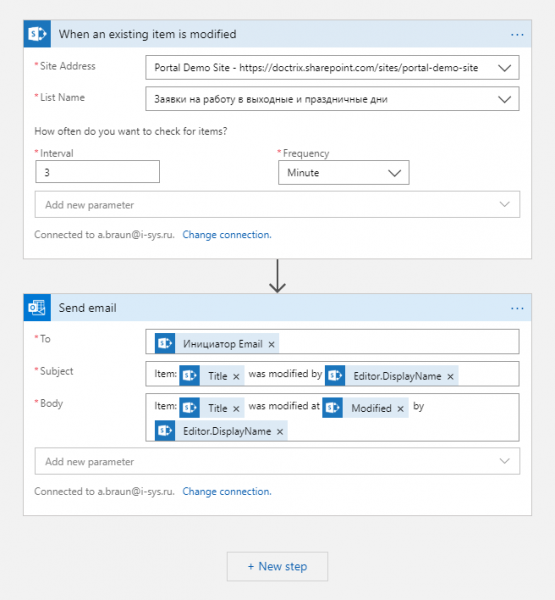
For example, with Logic Apps you can automate scenarios such as:
- Processing and redirecting orders to cloud services and on-premises systems.
- Sending notifications via email using Office 365 when events occur in various systems, applications, and services.
- Moving transferred files from server FTP to Azure storage service.
- Monitoring social media posts on a specific topic and much more.
Alongside Microsoft Power Automate, Logic Apps allows the creation of workflows of varying complexity without any coding. However, the pricing model is slightly different here. Logic Apps uses a 'pay-as-you-go' approach. This means there’s no need to purchase separate subscriptions, and all connectors are available immediately. However, each action performed within the workflow incurs specific costs.
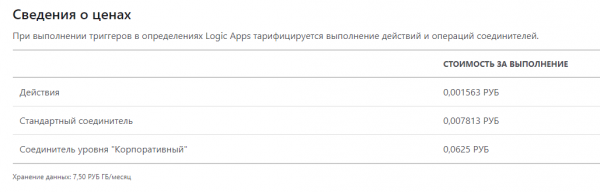
When developing workflows in Logic Apps, it’s essential to consider that the costs for executing standard connectors and 'Enterprise' level connectors differ.
In the next article, we will explore the other differences between Power Automate and Logic Apps, as well as the various interesting ways these two services can interact.
Source: habr.com
