

This article's translation was prepared in anticipation of the course launch .
If you’re reading this, you’ve probably heard something about Kubernetes (and if not, how did you end up here?). But what exactly is Kubernetes? It’s ? Или ? Что вообще это значит?
Honestly, I'm not 100% sure. But I think it's interesting to dig into the internals and see what really happens in Kubernetes beneath its many layers of abstraction. So for curiosity's sake, let's take a look at what a minimal "Kubernetes cluster" actually looks like. (This will be much simpler than .)
I assume you have some basic knowledge of Kubernetes, Linux, and containers. Everything we will discuss here is intended solely for exploration/study; do not run anything from this in production!
Overview
Kubernetes contains many components. According to , the architecture looks as follows:
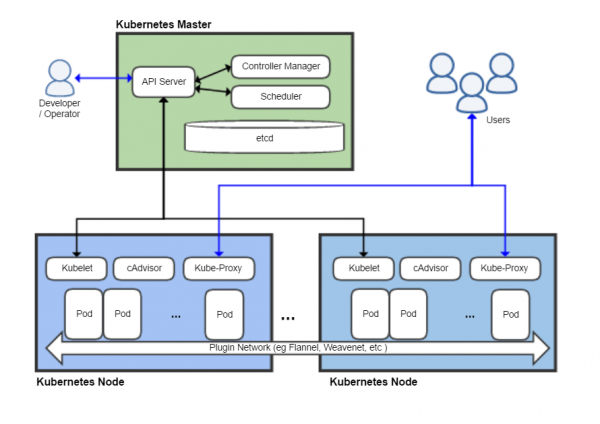
Here are shown at least eight components, but we will ignore most of them. I want to assert that the minimal thing that can reasonably be called Kubernetes consists of three main components:
- kubelet
- kube-apiserver (which relies on etcd — its database)
- container runtime (in this case, Docker)
Let's see what documentation says about each of them (., ). First, kubelet:
An agent running on each node in the cluster. It makes sure that containers are running in the pod.
Sounds quite simple. What about the container runtime? (container runtime)?
The container runtime is a program designed to execute containers.
Very informative. But if you're familiar with Docker, you should have a general idea of what it does. (The details of the division of responsibilities between the container runtime and kubelet are actually quite subtle, and I won't delve into them here.)
I can use API Server?
The API server is the Kubernetes control plane component that exposes the Kubernetes API. The API server is the client-facing part of the Kubernetes control plane.
Anyone who has ever done anything with Kubernetes has had to interact with the API either directly or through kubectl. This is the heart of what makes Kubernetes Kubernetes — the brain that turns mountains of YAML into the functioning infrastructure we all know and love (?), and it's clear that the API must be present in our minimal configuration.
Prerequisites
- A Linux virtual or physical machine with root access (I am using Ubuntu 18.04 on a virtual machine).
- And that’s it!
Boring installation
We need to install Docker on the machine we will be using. (I am not going to explain how Docker and containers work in detail; if you're interested, there are ). Let's just install it using apt:
$ sudo apt install docker.io
$ sudo systemctl start docker
After that, we need to obtain the Kubernetes binaries. In fact, for the initial start of our 'cluster', we only need kubelet, as we will be able to use kubeletto run the other server components. To interact with our cluster once it is up and running, we will also use kubectl.
$ curl -L https://dl.k8s.io/v1.18.5/kubernetes-server-linux-amd64.tar.gz > server.tar.gz
$ tar xzvf server.tar.gz
$ cp kubernetes/server/bin/kubelet .
$ cp kubernetes/server/bin/kubectl .
$ ./kubelet --version
Kubernetes v1.18.5
What happens if we just run kubelet?
$ ./kubelet
F0609 04:03:29.105194 4583 server.go:254] mkdir /var/lib/kubelet: permission denied
kubelet must run as root. This makes sense because it needs to manage the entire node. Let's take a look at its options:
$ ./kubelet -h

$ ./kubelet -h | wc -l
284
Wow, that's a lot of options! Fortunately, we will only need a couple of them. Here is one of the parameters that interests us:
--pod-manifest-path stringPath to the directory containing the files for the static pods, or path to a file containing the definitions of static pods. Files beginning with a dot are ignored. (DEPRECATED: this parameter should be set in the configuration file passed to Kubelet via the --config option. For more information, see .)
This parameter allows us to run — pods that are not managed through the Kubernetes API. Static pods are rarely used but are very convenient for quickly setting up a cluster, which is exactly what we need. We'll ignore this loud warning (again, don't run this in production!) and see if we can start the pod.
First, we will create a directory for the static pods and start it. kubelet:
$ mkdir pods
$ sudo ./kubelet --pod-manifest-path=pods
Then in another terminal/window tmux/somewhere else, we will create the pod manifest:
$ cat < pods/hello.yaml
apiVersion: v1
kind: Pod
metadata:
  name: hello
spec:
  containers:
  - image: busybox
    name: hello
    command: ["echo", "hello world!"]
EOF
kubelet starts writing some warnings and seems like nothing is happening. But that's not true! Let's look at Docker:
$ sudo docker ps -a
CONTAINER ID        IMAGE                  COMMAND                 CREATED             STATUS                      PORTS               NAMES
8c8a35e26663        busybox                "echo 'hello world!'"   36 seconds ago      Exited (0) 36 seconds ago                       k8s_hello_hello-mink8s_default_ab61ef0307c6e0dee2ab05dc1ff94812_4
68f670c3c85f        k8s.gcr.io/pause:3.2   "pause"                2 minutes ago       Up 2 minutes                                    k8s_POD_hello-mink8s_default_ab61ef0307c6e0dee2ab05dc1ff94812_0
$ sudo docker logs k8s_hello_hello-mink8s_default_ab61ef0307c6e0dee2ab05dc1ff94812_4
hello world!
kubelet read the pod manifest and told Docker to run a couple of containers according to our specification. (If you're curious about the 'pause' container, that's a Kubernetes hack—details can be found in .) Kubelet will launch our container busybox with the specified command and will restart it indefinitely until the static pod is removed.
Congratulations! We've just devised one of the most convoluted ways to output text to the terminal!
Starting etcd
Our ultimate goal is to run the Kubernetes API, but first, we need to start . Let's run a minimal etcd cluster by placing its configuration in the pods directory (for example, pods/etcd.yaml):
apiVersion: v1
kind: Pod
metadata:
  name: etcd
  namespace: kube-system
spec:
  containers:
  - name: etcd
    command:
    - etcd
    - --data-dir=/var/lib/etcd
    image: k8s.gcr.io/etcd:3.4.3-0
    volumeMounts:
    - mountPath: /var/lib/etcd
      name: etcd-data
  hostNetwork: true
  volumes:
  - hostPath:
      path: /var/lib/etcd
      type: DirectoryOrCreate
    name: etcd-data
If you have ever worked with Kubernetes, then such YAML files should be familiar to you. Here, it's worth noting just two points:
We mounted the host folder /var/lib/etcd in the pod to ensure that etcd data is preserved after a restart (failing to do so means the cluster state will be erased with each pod restart, which is undesirable even for a minimal Kubernetes installation).
We installed hostNetwork: true. This parameter, not surprisingly, configures etcd to use the host network instead of the pod's internal network (this will facilitate the API server in locating the etcd cluster).
A simple check shows that etcd is indeed running on localhost and saving data to disk:
$ curl localhost:2379/version
{"etcdserver":"3.4.3","etcdcluster":"3.4.0"}
$ sudo tree /var/lib/etcd/
/var/lib/etcd/
└── member
    ├── snap
    │   └── db
    └── wal
        ├── 0.tmp
        └── 0000000000000000-0000000000000000.wal
Starting the API server
Starting the Kubernetes API server is even simpler. The only parameter you need to pass is --etcd-servers, which does what you expect:
apiVersion: v1
kind: Pod
metadata:
  name: kube-apiserver
  namespace: kube-system
spec:
  containers:
  - name: kube-apiserver
    command:
    - kube-apiserver
    - --etcd-servers=http://127.0.0.1:2379
    image: k8s.gcr.io/kube-apiserver:v1.18.5
  hostNetwork: true
Place this YAML file in the pods, and the API server will start up. A check using curl shows that the Kubernetes API is listening on port 8080 with full open access—authentication is not required!
$ curl localhost:8080/healthz
ok
$ curl localhost:8080/api/v1/pods
{
  "kind": "PodList",
  "apiVersion": "v1",
  "metadata": {
    "selfLink": "/api/v1/pods",
    "resourceVersion": "59"
  },
  "items": []
}
(Again, do not run this in production! I was somewhat surprised that the default setup is so insecure. But I assume this is done to ease development and testing.)
And, a pleasant surprise, kubectl works out of the box without any additional setup!
$ ./kubectl version
Client Version: version.Info{Major:"1", Minor:"18", GitVersion:"v1.18.5", GitCommit:"e6503f8d8f769ace2f338794c914a96fc335df0f", GitTreeState:"clean", BuildDate:"2020-06-26T03:47:41Z", GoVersion:"go1.13.9", Compiler:"gc", Platform:"linux/amd64"}
Server Version: version.Info{Major:"1", Minor:"18", GitVersion:"v1.18.5", GitCommit:"e6503f8d8f769ace2f338794c914a96fc335df0f", GitTreeState:"clean", BuildDate:"2020-06-26T03:39:24Z", GoVersion:"go1.13.9", Compiler:"gc", Platform:"linux/amd64"}
$ ./kubectl get pod
No resources found in default namespace.
The Problem
But if you dig a little deeper, it seems that something is going wrong:
$ ./kubectl get pod -n kube-system
No resources found in kube-system namespace.
The static pods we created have disappeared! In fact, our kubelet node is not detected at all:
$ ./kubectl get nodes
No resources found in default namespace.
What's the matter? If you remember, a few paragraphs ago we launched kubelet with a very simple set of command line parameters, so kubelet doesn't know how to connect to the API server and notify it of its status. By reviewing the documentation, we find the corresponding flag:
--kubeconfig string
Path to the file kubeconfig, which indicates how to connect to the API server. Having --kubeconfig enables API server mode, while the absence of it --kubeconfig enables standalone mode.
All this time, unknowingly, we were running kubelet in 'standalone mode.' (If we were pedantic, we could consider kubelet's standalone mode as 'minimally viable Kubernetes,' but that would be quite boring). To get a 'real' configuration to work, we need to pass the kubeconfig file to kubelet so that it knows how to communicate with the API server. Fortunately, this is quite simple (as we don’t have any authentication or certificate issues):
apiVersion: v1
kind: Config
clusters:
- cluster:
    server: http://127.0.0.1:8080
  name: mink8s
contexts:
- context:
    cluster: mink8s
  name: mink8s
current-context: mink8s
Save this as kubeconfig.yaml, kill the process kubelet and restart with the necessary parameters:
$ sudo ./kubelet --pod-manifest-path=pods --kubeconfig=kubeconfig.yaml(By the way, if you try to access the API via curl when kubelet is not running, you will find that it is still up! Kubelet is not the 'parent' of its pods, like Docker; it is more like a 'management daemon.' The containers managed by kubelet will keep running until kubelet stops them.)
In a few minutes kubectl should show us the pods and nodes as we expect:
$ ./kubectl get pods -A
NAMESPACE     NAME                    READY   STATUS             RESTARTS   AGE
default       hello-mink8s            0/1     CrashLoopBackOff   261        21h
kube-system   etcd-mink8s             1/1     Running            0          21h
kube-system   kube-apiserver-mink8s   1/1     Running            0          21h
$ ./kubectl get nodes -owide
NAME     STATUS   ROLES    AGE   VERSION   INTERNAL-IP    EXTERNAL-IP   OS-IMAGE             KERNEL-VERSION       CONTAINER-RUNTIME
mink8s   Ready       21h   v1.18.5   10.70.10.228           Ubuntu 18.04.4 LTS   4.15.0-109-generic   docker://19.3.6
Let’s really congratulate ourselves this time (I know I already have) — we’ve got a minimal 'Kubernetes' cluster running with a fully functional API!
Launching a Pod
Now let's see what the API can do. Let's start with an nginx pod:
apiVersion: v1
kind: Pod
metadata:
  name: nginx
spec:
  containers:
  - image: nginx
    name: nginx
Here we will get a rather interesting error:
$ ./kubectl apply -f nginx.yaml
Error from server (Forbidden): error when creating "nginx.yaml": pods "nginx" is
forbidden: error looking up service account default/default: serviceaccount
"default" not found
$ ./kubectl get serviceaccounts
No resources found in default namespace.
Here we can see how horribly incomplete our Kubernetes environment is — we have no service accounts. Let's try again by creating a service account manually and see what happens:
$ cat <<EOS | ./kubectl apply -f -
apiVersion: v1
kind: ServiceAccount
metadata:
  name: default
  namespace: default
EOS
serviceaccount/default created
$ ./kubectl apply -f nginx.yaml
Error from server (ServerTimeout): error when creating "nginx.yaml": No API
token found for service account "default", retry after the token is
automatically created and added to the service account
Even when we manually created the service account, the authentication token isn't created. As we continue to experiment with our minimalist "cluster," we'll find that much of the useful stuff that usually happens automatically will be missing. The Kubernetes API server is quite minimalistic; most of the heavy automatic setups happen in various controllers and background jobs that are not running yet.
We can workaround this issue by setting the option automountServiceAccountToken for the service account (as we won't need to use it anyway):
$ cat <<EOS | ./kubectl apply -f -
apiVersion: v1
kind: ServiceAccount
metadata:
  name: default
  namespace: default
automountServiceAccountToken: false
EOS
serviceaccount/default configured
$ ./kubectl apply -f nginx.yaml
pod/nginx created
$ ./kubectl get pods
NAME    READY   STATUS    RESTARTS   AGE
nginx   0/1     Pending   0          13m
Finally, the pod has appeared! But it won't really start, as we don't have a — another important component of Kubernetes. Again, we see that the Kubernetes API is surprisingly "dumb" — when you create a pod in the API, it registers it but does not try to figure out on which node to run it.
In fact, a scheduler is not needed to launch a pod. You can manually add a node to the manifest in the parameter nodeName:
apiVersion: v1
kind: Pod
metadata:
  name: nginx
spec:
  containers:
  - image: nginx
    name: nginx
  nodeName: mink8s
(Replace mink8s with the node name.) After delete and apply, we see that nginx has started and is listening on the internal IP address:
$ ./kubectl delete pod nginx
pod "nginx" deleted
$ ./kubectl apply -f nginx.yaml
pod/nginx created
$ ./kubectl get pods -owide
NAME    READY   STATUS    RESTARTS   AGE   IP           NODE     NOMINATED NODE   READINESS GATES
nginx   1/1     Running   0          30s   172.17.0.2   mink8s   <none>           <none>
$ curl -s 172.17.0.2 | head -4
<!DOCTYPE html>
<html>
<head>
<title>Welcome to nginx!</title>
To ensure that the network between the pods is working correctly, we can run curl from another pod:
$ cat <<EOS | .\/kubectl apply -f -\napiVersion: v1\nkind: Pod\nmetadata:\n  name: curl\nspec:\n  containers:\n  - image: curlimages\/curl\n    name: curl\n    command: ["curl", "172.17.0.2"]\n  nodeName: mink8s\nEOS\npod\/curl created\n$ .\/kubectl logs curl | head -6\n  % Total    % Received % Xferd  Average Speed   Time    Time     Time  Current\n                                 Dload  Upload   Total   Spent    Left  Speed
<!DOCTYPE html>
<html>
<head>
<title>Welcome to nginx!</title>
It's quite interesting to dig around in this environment and see what works and what doesn't. I found that ConfigMap and Secret work as expected, while Service and Deployment do not.
Success!
This post is getting long, so I'm going to declare the victory and state that this is a viable configuration that can be called “Kubernetes.” To summarize: four binary files, five command-line parameters, and “only” 45 lines of YAML (not so many by Kubernetes standards) and we have a lot of things working:
- Pods are managed using the standard Kubernetes API (with a few hacks)
- You can load and manage public container images
- Pods stay alive and are automatically restarted
- The network between the pods on a single node works quite well
- ConfigMap, Secret, and basic storage mounting work as intended
But much of what makes Kubernetes truly useful is still missing, for example:
- Pod scheduler
- Authentication / authorization
- Multiple nodes
- Service networking
- Cluster internal DNS
- Controllers for service accounts, deployments, cloud provider integration, and most other “features” that Kubernetes brings
So what have we actually got? The self-contained Kubernetes API is actually just a platform for container automation.It doesn't do much — that's the job for various controllers and operators using the API — but it provides a consistent environment for automation.
Read more:
Source: habr.com
