

We present the first update for the Windows Package Manager. If you are a participant in the program or Package Manager Insider, you should already have the latest updates installed. If you are an insider and do not have them, please open the store and check for updates. If you prefer to simply download the client, visit the releases page at . If you want to receive automatic updates from the store, you can join the .
What's New
This version of the client allows you to create and save your favorite settings, as well as includes new packages and bug fixes.
Parameters
The client now has a settings.json file. To open the JSON file in your default editor, simply run winget settings. Currently, in the file, you can customize a couple of things to your liking. For example, I have set the style to 'rainbow' for the progress indicator. Options such as 'accent' (default) and 'retro' are also available.
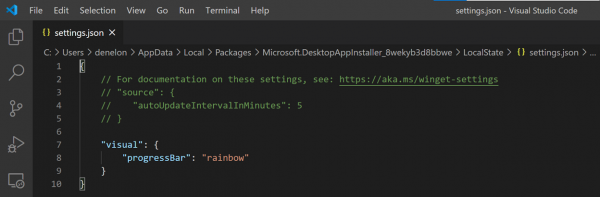
Another parameter that may interest you is 'autoUpdateIntervalInMinutes'. It allows you to change the frequency with which the client checks the list of available packages. This can be particularly useful if you have a slow internet connection. By default, the interval is set to five minutes.
Note: it does not run in the background, but occurs only during command execution. If desired, you can disable this by setting the value to '0'. In that case, you will need to manually check for updates by running the command
winget source updateBug fixes
We have begun addressing issues with 'non-us-ASCII characters' and case sensitivity. There was also a problem with support for interactive installation, but that has now been resolved.
winget install -iCommunity Heroes
The response to the project has been incredible. A huge number of people contributed to the discussion and formation of the list of available packages, with over 800 packages added to the community repository. Special thanks to , , , , , , , , , , , , , and .
What happens next
Feature Toggle
We needed a way to release experimental features without causing issues for you. Working with feature toggles was the first step, allowing us to test in practice that client behavior would be within expectations while you also have the opportunity to test new features.
Microsoft Store
Our initial support will likely be limited to free apps rated 'E' (for Everyone). This will be the first release with feature toggles, so you can experience what it's like to test experimental features. We'll start with the basics and add more over time.
Key Features
One way we determine what to implement next is by filtering known proposals on GitHub based on '+1' (the thumbs-up icon). This allows us to see high demand for topics such as 'Update,' 'Delete,' and 'List of Available Apps,' as well as support for installing .zip files, store apps, and standalone applications (e.g., adding .exe to your path). Built-in support for PowerShell also ranks high on this list.
Microsoft Community Package Repository
Our bot is working diligently to approve more packages. It’s not as smart as we’d like, but it's learning. We've just taught it to provide more accurate error messages for various situations. Now it will inform you of hash mismatches or errors related to accessing the installer file. We will continue to develop our bot as our goal is to simplify the addition of your packages.
Be sure to check out the client proposals on and give a '+1' to any features you would really like to see.
Source: habr.com
