


Tikhon Uskov, Integration Team Engineer of Zabbix
Zabbix is a customizable platform used for monitoring any data. Since the earliest versions of Zabbix, monitoring administrators have been able to run various scripts through Actions for checks on target nodes in the network. However, running scripts led to several complexities, including the need to support the scripts, deliver them to communication nodes and proxies, as well as support for different versions.
JavaScript for Zabbix
In April 2019, Zabbix 4.2 was introduced with the pre-processing feature on JavaScript. Many were excited about the idea of abandoning the writing of scripts that collect data from various sources, process it, and present it in a format understandable to Zabbix, instead of performing simple checks to receive data that isn’t ready for storage and processing by Zabbix, and then processing this data stream using Zabbix's tools and JavaScript. Coupled with low-level discovery and dependent data elements introduced in Zabbix 3.4, this resulted in a sufficiently flexible concept for sorting and managing received data.
In Zabbix 4.4, as a logical continuation of JavaScript pre-processing, a new notification method called Webhook was introduced, which can be used for simple integration of Zabbix notifications with third-party applications.
JavaScript and Duktape
Why were JavaScript and Duktape specifically chosen? Various programming languages and engines were considered:
- Lua – Lua 5.1
- Lua – LuaJIT
- Javascript – Duktape
- Javascript – JerryScript
- Embedded Python
- Embedded Perl
The main criteria for selection were prevalence, ease of engine integration into the product, low resource consumption, overall engine performance, and security of code deployment in monitoring. Based on these factors, JavaScript on the Duktape engine emerged as the winner.

Selection Criteria and Performance Testing
Duktape Features:
— Standard
— Zabbix Modules for Duktape:
- Zabbix.log() — allows writing messages of various detail levels directly to the Zabbix Server log, making it possible to correlate errors, for example, in Webhook with the server’s state.
- CurlHttpRequest() — allows making HTTP requests to the network, which is the foundation for using Webhook.
- atob() and btoa() — allows encoding and decoding strings in Base64 format.
NOTE. Duktape conforms to ACME standards. Zabbix uses the 2015 script version. Subsequent changes are minor, so they can be ignored..
The Magic of JavaScript
All the magic of JavaScript lies in dynamic typing and type coercion: string, numeric, and boolean types.
This means there is no need to declare in advance what type a variable should return.
In mathematical operations, values returned by operator functions are converted to numbers. The exception to such operations is addition, as if any of the addends is a string, string conversion is applied to all addends.
NOTE. Methods responsible for such conversions are usually implemented in the parent prototypes of objects. valueOf and toString. valueOf is called during numeric conversion and always before the method toString. The method valueOf must return primitive values, otherwise its result is ignored.
For an object, the method is called valueOf. If it is not found or does not return a primitive value, the method is called. toString. If the method toString is not found, a search is made valueOf in the object's prototype, and the whole process repeats until the value handling is completed and all values in the expression are coerced to a single type.. If a method is implemented for the object toString, which returns a primitive value, it is used for string conversion. In this case, the result of applying this method is not necessarily a string.
For example, if the method is defined for the object ‘obj‘ as toString,
`var obj = { toString() { return "200" }}` the method toString returns a string, and when adding a string to a number, we get a concatenated string:
`obj + 1 // '2001'`

`obj + 'a' // ‘200a'`
But if we rewrite toString, so that the method returns a number, when adding the object, a mathematical operation with numeric conversion will be performed, resulting in mathematical addition.
`var obj = { toString() { return 200 }}`

`obj + 1 // '2001'`
In this case, if we perform addition with a string, string conversion takes place, and we get a concatenated string.
`obj + 'a' // ‘200a'`This is precisely the reason for the numerous errors by novice JavaScript users.
A function can be included in the method toString that will increment the current value of the object by 1.
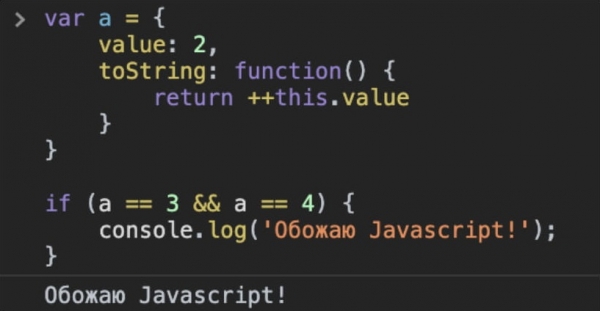
Execute the script when the variable equals 3 and it also equals 4.
When comparing with type coercion (==), the method is executed each time. toString with the value incrementing function. Consequently, with each subsequent comparison, the value increases. This can be avoided by using strict comparison (===).
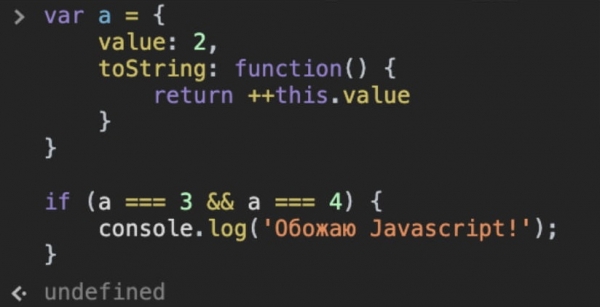
Strict comparison
NOTE. Do not use type coercion comparison without need.
For complex scripts, such as a Webhook with intricate logic, where type coercion comparison is necessary, it is advisable to first implement checks for the values returned by variables and handle mismatches and errors.
Webhook Media
At the end of 2019 and the beginning of 2020, the Zabbix integration team was actively developing Webhooks and out-of-the-box integrations that are included in the Zabbix distribution.

alternative APK source
Preprocessing
- The introduction of preprocessing in JavaScript has allowed for the elimination of most external scripts, and now any value can be obtained and transformed into any other value within Zabbix.
- Preprocessing in Zabbix is implemented with JavaScript code, which is compiled into bytecode that transforms it into a function that takes a single value as a parameter value in the form of a string (the string can contain both numbers and digits).
- Since a function is produced as output, it is mandatory to have return.
- The use of user macros in the code is possible.
- Resources can be limited not only at the operating system level but also programmatically. For the preprocessing step, a maximum of 10 megabytes of RAM and a time limit of 10 seconds are allocated.

NOTE. The timeout values of 10 seconds are quite generous because collecting conditional thousands of data elements in 1 second under a sufficiently 'heavy' preprocessing scenario can slow down Zabbix. Therefore, it is not recommended to use preprocessing for executing full-fledged JavaScript scripts via so-called dummy items, which are launched solely for preprocessing purposes..
You can check your code through the preprocessing test or with the utility zabbix_js:
`zabbix_js -s *script-file -p *input-param* [-l log-level] [-t timeout]`

`zabbix_js -s script-file -i input-file [-l log-level] [-t timeout]`

`zabbix_js -h`

`zabbix_js -V`
Practical tasks
Task 1
Replace computed data items with preprocessing.
Condition: we obtain the temperature from the sensor in degrees Fahrenheit for storage in degrees Celsius.
Previously, we would have created a data item that collects the temperature in degrees Fahrenheit. After that, we created another data item (computed) that would convert the Fahrenheit degrees to Celsius using a formula.
Issues:
- It is necessary to duplicate data items and store all values in the database.
- The intervals for the 'parent' data item, which is computed and used in the formula, must be coordinated with the computed data item. Otherwise, the computed data item may enter an unsupported state or calculate the previous value, which will affect the reliability of the monitoring results.
One of the solutions was to abandon flexible check intervals in favor of fixed intervals to guarantee that the computed data item is calculated after the data item that receives the data (in our case—temperature in degrees Fahrenheit).
But if, for example, we use the template to check a large number of devices, and the check is performed every 30 seconds, for 29 seconds Zabbix is 'idling', and in the last second, it starts the checks and calculations. This leads to the creation of a queue and affects performance. Therefore, it is recommended to use fixed intervals only when truly necessary.
In this task, the optimal solution is a one-line preprocessing with JavaScript that converts degrees Fahrenheit to degrees Celsius:
`return (value - 32) * 5 / 9;`This is quick and simple, no need to create extra data items and store history for them, and it can also be used for checks with flexible intervals.
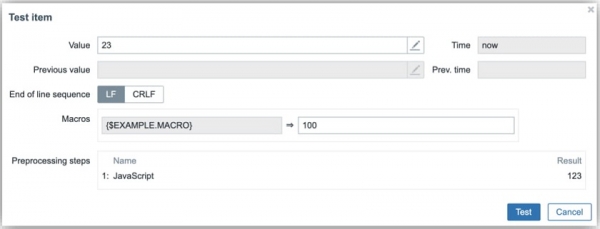
`return (parseInt(value) + parseInt("{$EXAMPLE.MACRO}"));`However, if in a hypothetical situation the obtained data item needs to be added to a constant defined in a macro, it must be considered that the parameter value expands to a string. When performing string addition, two strings are simply concatenated into one.
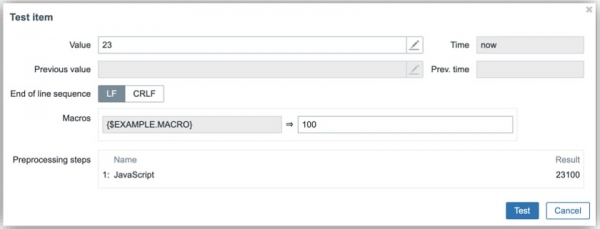
`return (value + "{$EXAMPLE.MACRO}");`To obtain the result of a mathematical operation, it is necessary to convert the types of the obtained values into numerical format. This can be done using the function parseInt(), which returns an integer, the function parseFloat(), which returns a decimal number, or the function number, which returns either an integer or a decimal number.
Task 2
Obtain the time in seconds until the certificate expires.
Condition: a certain service outputs the expiration date of the certificate in the format "Feb 12 12:33:56 2022 GMT".
In ECMAScript5 Date.parse() takes a date in ISO 8601 format (YYYY-MM-DDTHH:mm:ss.sssZ). It is necessary to convert the string into the format MMM DD YYYY HH:mm:ss ZZ
The Problem: the month value is expressed in text, not as a number. Data in this format is not accepted by Duktape.
Example solution:
First, a variable is declared which takes a value (the entire script consists of declaring variables that are listed in a comma-separated manner).
In the first line, we retrieve the date in the parameter value and split it by spaces using the method splits. Thus, we get an array where each element of the array, starting from index 0, corresponds to one part of the date before and after the space. split(0) — month, split(1) — day, split(2) — time string, etc. After this, we can access each date element by its index in the array.
`var split = value.split(' '),`- Each month (in chronological order) corresponds to its index position in the array (from 0 to 11). To convert the textual value into a numerical one, we add one to the month index (because month numbering starts from 1). The expression with adding one is placed in parentheses because otherwise a string would be obtained instead of a number. Finally, we perform slice() — slicing the array from the end to keep only two digits (which is important for months with a two-digit number).
`MONTHS_LIST = ['Jan', 'Feb', 'Mar', 'Apr', 'May', 'Jun', 'Jul', 'Aug', 'Sep', 'Oct', 'Nov', 'Dec'],`

`month_index = ('0' + (MONTHS_LIST.indexOf(split[0]) + 1)).slice(-2),`- We form a string from the obtained values in ISO format by simply concatenating strings in the appropriate order.
`ISOdate = split[3] + '-' + month_index + '-' + split[1] + 'T' + split[2],`The data in the obtained format is the number of seconds from 1970 until some point in the future. Using data in this format in triggers is practically impossible because Zabbix allows operations only with macros {Date} and {Time}, which returns the date and time in a user-friendly format.
- After that, we can get the current date in JavaScript in Unix Timestamp format and subtract it from the obtained expiration date of the certificate to get the number of milliseconds from the current moment until the certificate expires.
`now = Date.now();`- We divide the obtained value by a thousand to get seconds in Zabbix.
`return parseInt((Date.parse(ISOdate) - now) / 1000);`In the trigger, you can specify the expression ‘last<’ and a set of digits that corresponds to the number of seconds in the period to react to, for example, in weeks. Thus, the trigger will notify that the certificate will expire in a week.
NOTE. Note the use of parseInt() in the function return, to convert the fractional number obtained from the division of milliseconds into an integer. You can also use parseFloat() and store fractional data..
Source: habr.com
