

I have worked in IT for over 20 years, but I never got around to containers. I understood in theory how they are structured and how they work. However, since I had never encountered them in practice, I wasn't sure how their mechanisms operated behind the scenes.
Moreover, I had no idea about their security. But once again, theory sounds nice, and the old saying "as security grows, usability decreases" lingered in my mind. So, I thought that since it was so easy to work with containers, their security must be subpar. As it turned out, I was right.
To get started quickly, I enrolled in courses 2020 titled "».
The course, taught by Sheila A. Berta and Sol Ozzan, immediately began with an explanation of how Docker containers work and the path they take when deployed in Kubernetes. It was entirely a hands-on session—students were required to install Docker and microk8s on their machines before classes—an excellent way to see how the tools interact, identify vulnerabilities, and, most importantly, practice blocking them.
Unfortunately, even though the courses promised to make me a "prince" in just two days, I felt like everything was just beginning, and I still had a lot to learn.
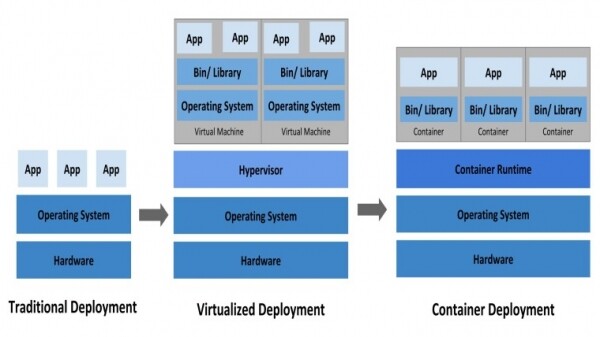
Before diving into my lofty observations, it is important to explain what a container is. In the development world, it is considered normal for code written on your personal machine to work perfectly, but when you try to run it somewhere on a server, it just doesn't work. Containers attempt to overcome this problem by providing self-contained machines that you can easily move from one server to another, knowing they will always work. As the name suggests, they contain the code, libraries, and other software necessary for operation. Kubernetes, on the other hand, is In principle, it allows seamless management of hundreds or thousands of different containers.
Below are some of my insights from the perspective of the red and blue teams.
Red Team
Most of the contents of the containers run under root.: this means that if the container is compromised, you will gain full access to the container. This makes subsequent steps significantly easier.
Mounting docker.sock inside the container is dangerous: if you obtain root access inside the container and have also installed Docker within the container that has the Docker socket (\/var\/run\/docker.sock), you have the potential to explore the entire cluster, including access to any other containers. Such access cannot be prevented by network isolation or any other means.
Environment variables often contain secret data: in most cases, people transfer passwords to the container using regular environment variables. So if you have access to the account, you can peek at these environment variables in order to later escalate your privileges.
The Docker API can reveal a lot of information: the Docker API, when set up by default, works without authorization and can provide a lot of information. Using Shodan, you can easily find a list of open ports, then gather detailed information about the cluster — and proceed to a full compromise. TrendMicro wrote about this .
Blue team
Do not run container contents as root: although it's easier to run as root, you should not do this. Instead, run applications with dropped privileges by specifying the uid either with the --user parameter when using the CLI or by specifying USER in the Dockerfile.
Do not allow program installation in containers: almost every attack starts with installing something. From nmap to ifconfig and even Docker itself (inside the container), installing anything in the container has been a common practice. For this reason, you should always block all unused ports. This also helps prevent the transmission of control commands when your machine is compromised. Besides preventing program installation, ensure that the container has a minimal number of applications necessary to perform the task.
Protect docker.sock: it needs to be protected as this socket handles communication between the container and the cluster. As I do not want to delve into details in this article, please read , about what can happen, as well as how to block it all.
Use Docker secrets instead of environment variables: Secrets are available . While it's not entirely secure, it's still better than using environment variables to pass sensitive data in containers.
If this article sparked your interest in containers, you can easily install Docker and/or microk8s (a lightweight version of Kubernetes). There are installation instructions for Docker for Linux and MacOS, and — instructions for installing microk8s for Windows, Linux, and MacOS.
After installation, you can follow from Docker, a similar option is available for microk8s.
If you wish or need to take a comprehensive Docker course where practical speakers cover all its tools: from basic abstractions to network options, nuances of working with various OS and programming languages, then check out “.” You will get acquainted with the technology and understand where and how best to use Docker. At the same time, you will receive best practice cases — it’s better to learn securely and with the support of practitioners through stories about pitfalls than personally encountering them with prickly handles.
Source: habr.com
