

Situation
I'm out. Drinking coffee. The student set up a VPN connection between two points and disappeared. Checking: there is indeed a tunnel, but there is no traffic in the tunnel. The student is not answering calls.
I'm boiling the kettle and diving into troubleshooting the C-TERRA Gateway. Sharing my experience and methodology.
Source Data
Two geographically separated sites are connected by a GRE tunnel. GRE needs to be encrypted:
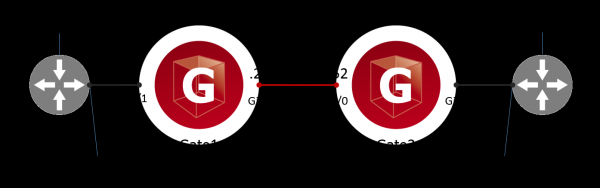
I'm checking the functionality of the GRE tunnel. To do this, I'm pinging from device R1 to the GRE interface of device R2. This is the target traffic for encryption. No response:
root@R1:~# ping 1.1.1.2 -c 4
PING 1.1.1.2 (1.1.1.2) 56(84) bytes of data.

--- 1.1.1.2 ping statistics ---
4 packets transmitted, 0 received, 100% packet loss, time 3057ms
I'm looking at the logs on Gate1 and Gate2. The log happily reports that the IPsec tunnel has been successfully established, no issues:
root@Gate1:~# cat /var/log/cspvpngate.log
Aug 5 16:14:23 localhost vpnsvc: 00100119  IPSec connection 5 established, traffic selector 172.17.0.1->172.16.0.1, proto 47, peer 10.10.10.251, id "10.10.10.251", Filter
IPsec:Protect:CMAP:1:LIST, IPsecAction IPsecAction:CMAP:1, IKERule IKERule:CMAP:1
In the statistics of the IPsec tunnel on Gate1, I see that the tunnel is indeed there, but the Rcvd counter is reset:
root@Gate1:~# sa_mgr show
ISAKMP sessions: 0 initiated, 0 responded

ISAKMP connections:
Num Conn-id (Local Addr,Port)-(Remote Addr,Port) State Sent Rcvd
1 3 (10.10.10.251,500)-(10.10.10.252,500) active 1070 1014

IPsec connections:
Num Conn-id (Local Addr,Port)-(Remote Addr,Port) Protocol Action Type Sent Rcvd
1 3 (172.16.0.1,*)-(172.17.0.1,*) 47 ESP tunn 480 0
I'm troubleshooting C-TERRA this way: I'm looking for where the target packets are being lost on the way from R1 to R2. In the process (spoiler), I will find an error.
Troubleshooting
Step 1. What Gate1 receives from R1
I'm using the built-in packet sniffer – tcpdump. I start the sniffer on the internal (Gi0/1 in Cisco-like notation or eth1 in Debian OS notation) interface:
root@Gate1:~# tcpdump -i eth1

tcpdump: verbose output suppressed, use -v or -vv for full protocol decode
listening on eth1, link-type EN10MB (Ethernet), capture size 262144 bytes
14:53:38.879525 IP 172.16.0.1 > 172.17.0.1: GREv0, key=0x1, length 92: IP 1.1.1.1 > 1.1.1.2: ICMP echo request, id 2083, seq 1, length 64
14:53:39.896869 IP 172.16.0.1 > 172.17.0.1: GREv0, key=0x1, length 92: IP 1.1.1.1 > 1.1.1.2: ICMP echo request, id 2083, seq 2, length 64
14:53:40.921121 IP 172.16.0.1 > 172.17.0.1: GREv0, key=0x1, length 92: IP 1.1.1.1 > 1.1.1.2: ICMP echo request, id 2083, seq 3, length 64
14:53:41.944958 IP 172.16.0.1 > 172.17.0.1: GREv0, key=0x1, length 92: IP 1.1.1.1 > 1.1.1.2: ICMP echo request, id 2083, seq 4, length 64
I see that Gate1 is receiving GRE packets from R1. Moving on.
Step 2. What Gate1 does with the GRE packets
Using the klogview utility, I check what's happening with the GRE packets inside VPN the C-TERRA driver:
root@Gate1:~# klogview -f 0xffffffff

filtration result for out packet 172.16.0.1->172.17.0.1, proto 47, len 112, if eth0: chain 4 "IPsecPolicy:CMAP", filter 8, event id IPsec:Protect:CMAP:1:LIST, status PASS
encapsulating with SA 31: 172.16.0.1->172.17.0.1, proto 47, len 112, if eth0
passed out packet 10.10.10.251->10.10.10.252, proto 50, len 160, if eth0: encapsulated
I see that the target GRE traffic (proto 47) 172.16.0.1 -> 172.17.0.1 passed (PASS) under the encryption rule LIST in the crypto map CMAP and was encapsulated. The packet was then routed (passed out). There is no incoming traffic in the klogview output.
Checking the access lists on the device Gate1. I see one access list LIST that defines the target traffic for encryption, meaning that the ME rules are not configured:
Gate1#show access-lists
Extended IP access list LIST
    10 permit gre host 172.16.0.1 host 172.17.0.1
Conclusion: the problem is not on the device Gate1.
Additional information about klogview
The VPN driver processes all network traffic, not just the traffic that should be encrypted. Such messages are visible in klogview if the VPN driver has processed the network traffic and sent it unencrypted:
root@R1:~# ping 172.17.0.1 -c 4root@Gate1:~# klogview -f 0xffffffff
filtration result for out packet 172.16.0.1->172.17.0.1, proto 1, len 84, if eth0: chain 4 "IPsecPolicy:CMAP": no match
passed out packet 172.16.0.1->172.17.0.1, proto 1, len 84, if eth0: filteredI see that the ICMP traffic (proto 1) 172.16.0.1->172.17.0.1 did not match (no match) the encryption rules in the crypto map CMAP. The packet was routed (passed out) in plain form.
Step 3. What Gate2 receives from Gate1
Starting a sniffer on the WAN (eth0) interface of Gate2:
root@Gate2:~# tcpdump -i eth0
tcpdump: verbose output suppressed, use -v or -vv for full protocol decode
listening on eth0, link-type EN10MB (Ethernet), capture size 262144 bytes
16:05:45.104195 IP 10.10.10.251 > 10.10.10.252: ESP(spi=0x30088112,seq=0x1), length 140
16:05:46.093918 IP 10.10.10.251 > 10.10.10.252: ESP(spi=0x30088112,seq=0x2), length 140
16:05:47.117078 IP 10.10.10.251 > 10.10.10.252: ESP(spi=0x30088112,seq=0x3), length 140
16:05:48.141785 IP 10.10.10.251 > 10.10.10.252: ESP(spi=0x30088112,seq=0x4), length 140
I see that Gate2 is receiving ESP packets from Gate1.
Step 4. What Gate2 does with the ESP packets
Running the klogview utility on Gate2:
root@Gate2:~# klogview -f 0xffffffff
filtration result for in packet 10.10.10.251->10.10.10.252, proto 50, len 160, if eth0: chain 17 "FilterChain:L3VPN", filter 21, status DROP
dropped in packet 10.10.10.251->10.10.10.252, proto 50, len 160, if eth0: firewall
I see that the ESP packets (proto 50) were dropped (DROP) by the rule (L3VPN) of the firewall. I verify that the access list L3VPN is indeed attached to Gi0/0:
Gate2#show ip interface gi0/0
GigabitEthernet0/0 is up, line protocol is up
  Internet address is 10.10.10.252/24
  MTU is 1500 bytes
  Outgoing access list is not set
  Inbound  access list is L3VPN
Identified the problem.
Step 5. What is wrong with the access list
I look at what the access list L3VPN consists of:
Gate2#show access-list L3VPN
Extended IP access list L3VPN
    10 permit udp host 10.10.10.251 any eq isakmp
    20 permit udp host 10.10.10.251 any eq non500-isakmp
    30 permit icmp host 10.10.10.251 any
I see that ISAKMP packets are allowed, so an IPsec tunnel is being established. However, there’s no permit rule for ESP. Apparently, the student mixed up icmp and esp.
I'll edit the access list:
Gate2(config)#
ip access-list extended L3VPN
no 30
30 permit esp host 10.10.10.251 any
Step 6. Checking functionality
First, I ensure that the L3VPN access list is correct:
Gate2#show access-list L3VPN
Extended IP access list L3VPN
    10 permit udp host 10.10.10.251 any eq isakmp
    20 permit udp host 10.10.10.251 any eq non500-isakmp
    30 permit esp host 10.10.10.251 any
Now I'm generating target traffic from device R1:
root@R1:~# ping 1.1.1.2 -c 4
PING 1.1.1.2 (1.1.1.2) 56(84) bytes of data.
64 bytes from 1.1.1.2: icmp_seq=1 ttl=64 time=35.3 ms
64 bytes from 1.1.1.2: icmp_seq=2 ttl=64 time=3.01 ms
64 bytes from 1.1.1.2: icmp_seq=3 ttl=64 time=2.65 ms
64 bytes from 1.1.1.2: icmp_seq=4 ttl=64 time=2.87 ms

--- 1.1.1.2 ping statistics ---
4 packets transmitted, 4 received, 0% packet loss, time 3006ms
rtt min/avg/max/mdev = 2.650/10.970/35.338/14.069 ms
Victory. The GRE tunnel has been established. The incoming traffic counter in the IPsec statistics is not zero:
root@Gate1:~# sa_mgr show
ISAKMP sessions: 0 initiated, 0 responded

ISAKMP connections:
Num Conn-id (Local Addr,Port)-(Remote Addr,Port) State Sent Rcvd
1 3 (10.10.10.251,500)-(10.10.10.252,500) active 1474 1350

IPsec connections:
Num Conn-id (Local Addr,Port)-(Remote Addr,Port) Protocol Action Type Sent Rcvd
1 4 (172.16.0.1,*)-(172.17.0.1,*) 47 ESP tunn 1920 480
On the Gate2 gateway, messages appeared in the klogview indicating that the target traffic 172.16.0.1->172.17.0.1 has been successfully (PASS) decrypted (decapsulated) by the LIST rule in the cryptographic map CMAP:
root@Gate2:~# klogview -f 0xffffffff
filtration result for in packet 172.16.0.1->172.17.0.1, proto 47, len 112, if eth0: chain 18 "IPsecPolicy:CMAP", filter 25, event id IPsec:Protect:CMAP:1:LIST, status PASS
passed in packet 172.16.0.1->172.17.0.1, proto 47, len 112, if eth0: decapsulated
Summary
The student messed up the output.
Be careful with the MЭ rules.
Anonymous Engineer
t.me/anonimous_engineer
Source: habr.com
