

Hello everyone!
In this article, I want to share one of the ways to run JMeter performance tests in OpenShift using Jenkins for automation. First, we will perform all necessary actions (creating ImageStreams, BuildConfig, Job , and more) manually. After that, we will write a Jenkins Pipeline.
As a starting point, we need:
- a working OpenShift (v3.11) cluster
- a Jenkins server with configured credentials to work in OpenShift
- file
apache-jmeter-5.2.tgz
The test will be a simple HTTP Request to ya.ru in a single thread.
Creating a project in OpenShift
Let's start by creating a new environment. We will create perftest environment with the command:
$ oc new-project perftest --display-name="Performance Tests" --description="Performance Tests - JMeter"We will be automatically switched to the newly created environment perftest, let's check that this is the case:
$ oc project
Using project "perftest" on server "https://127.0.0.1:8443".
Creating Storage
Test reports will be stored in a common location for the web server and jmeter-meter's place — /jmeter/reports.
It’s better to create storage now because PODs will be tied to them jmeter-web and jmeter-master.
You can find more detailed information about storage in the official documentation .
Let's create yaml files for PV and PVC.
pv.yaml
$ tee pv.yaml<<EOF
apiVersion: v1
kind: PersistentVolume
metadata:
  name: jmeter-reports
spec:
  capacity:
    storage: 10Gi
  accessModes:
    - ReadWriteMany
  glusterfs:
    endpoints: glusterfs-cluster
    path: /jmeter/reports
    readOnly: false
  persistentVolumeReclaimPolicy: Retain
EOF
pvc.yaml
$ tee pvc.yaml<<EOF
apiVersion: v1
kind: PersistentVolumeClaim
metadata:
  name: jmeter-reports
spec:
  accessModes:
    - ReadWriteMany
  resources:
    requests:
      storage: 10Gi
EOF
Let's create PV and PVC in the OpenShift environment:
$ oc create -f pv.yaml -n perftest
$ oc create -f pvc.yaml -n perftest
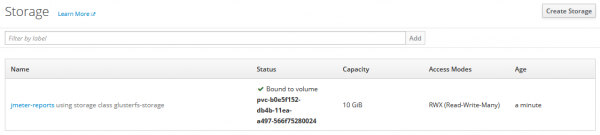
Check the status for PVC:
$ oc get pvc -n perftest
NAME             STATUS    VOLUME                                     CAPACITY   ACCESS MODES   STORAGECLASS        AGE
jmeter-reports   Bound     pvc-b0e5f152-db4b-11ea-a497-566f75280024   10Gi       RWX            glusterfs-storage   8m
Here's what it will look like in the GUI:
Creating a base JMeter image
Let's move on to creating ImageStream and BuildConfig.
All necessary information can be found in the documentation — .
The build strategy for images uses Docker from a local source.
Let's create the base image jmeter-base, which will be the foundation for jmeter-master.
Dockerfile
FROM openjdk:8u212-jdk

ARG JMETER_VER="5.2"
ENV JMETER_HOME /jmeter/apache-jmeter-$JMETER_VER
ENV PATH $JMETER_HOME/bin:$PATH

RUN mkdir -p /jmeter/results
    && mkdir /jmeter/tests

WORKDIR /jmeter

COPY apache-jmeter-$JMETER_VER.tgz .

RUN tar -xzf $JMETER_HOME.tgz
    && rm $JMETER_HOME.tgz
    && ls -la

RUN sed -i s/#server.rmi.ssl.disable=false/server.rmi.ssl.disable=true/ $JMETER_HOME/bin/jmeter.properties

EXPOSE 60000
is.yaml
$ tee is.yaml<<EOF
apiVersion: v1
kind: ImageStream
metadata:
  labels:
    build: jmeter-base
  name: jmeter-base
EOF
bc.yaml
$ tee bc.yaml<<EOF
apiVersion: v1
kind: BuildConfig
metadata:
  name: jmeter-base
spec:
  failedBuildsHistoryLimit: 5
  nodeSelector: null
  output:
    to:
      kind: ImageStreamTag
      name: 'jmeter-base:latest'
  postCommit: {}
  resources: {}
  runPolicy: Serial
  source:
    binary: {}
    type: Binary
  strategy:
    dockerStrategy:
      from:
        kind: ImageStreamTag
        name: 'openjdk:8u212-jdk'
    type: Docker
  successfulBuildsHistoryLimit: 5
EOF
Let's create the objects IS and BC:
$ oc create -f is.yaml -n perftest
$ oc create -f bc.yaml -n perftest
Now let's build the base image jmeter-base:
$ oc start-build jmeter-base -n perftest --from-dir=. --followJMeter WEB
jmeter-web this is the Apache web server. Its purpose is to provide a directory with testing results for review.
Prepared Dockerfile and the configuration file httpd.conf. For the directive DocumentRoot the value is set to /jmeter/reports, i.e., the directory where the test results are stored.
Dockerfile
$ tee Dockerfile<<EOF
FROM httpd:2.4

COPY httpd.conf /usr/local/apache2/conf/httpd.conf
RUN chmod -R 777 /usr/local/apache2/logs

EXPOSE 8080

CMD ["httpd", "-D", "FOREGROUND"]
EOF
is.yaml
$ tee is.yaml<<EOF
apiVersion: v1
kind: ImageStream
metadata:
  generation: 1
  labels:
    build: jmeter-web
  name: jmeter-web
EOF
bc.yaml
$ tee bc.yaml<<EOF
apiVersion: v1
kind: BuildConfig
metadata:
  name: jmeter-web
spec:
  failedBuildsHistoryLimit: 5
  nodeSelector: null
  output:
    to:
      kind: ImageStreamTag
      name: 'jmeter-web:latest'
  runPolicy: Serial
  source:
    binary: {}
    type: Binary
  strategy:
    dockerStrategy:
      from:
        kind: ImageStreamTag
        name: 'httpd:2.4'
    type: Docker
  successfulBuildsHistoryLimit: 5
EOF
Let's create ImageStream and BuildConfig objects:
$ oc create -f is.yaml -n perftest
$ oc create -f bc.yaml -n perftest
Building the image from Dockerfile:
$ oc start-build jmeter-web -n perftest --from-dir=. --followdc.yaml
$ tee dc.yaml<<EOF
apiVersion: apps.openshift.io/v1
kind: DeploymentConfig
metadata:
  name: jmeter-web
spec:
  replicas: 1
  template:
    metadata:
      labels:
        name: jmeter-web
    spec:
      containers:
        - image: 172.30.1.1:5000/perftest/jmeter-web
          name: jmeter-web
          volumeMounts:
            - mountPath: /jmeter/reports
              name: jmeter-reports
          ports:
            - containerPort: 80
              protocol: TCP
            - containerPort: 8080
              protocol: TCP
      volumes:
        - name: jmeter-reports
          persistentVolumeClaim:
            claimName: jmeter-reports
EOF
sc.yaml
$ tee sc.yaml<<EOF
apiVersion: v1
kind: Service
metadata:
  labels:
    app: jmeter-web
  name: jmeter-web
spec:
  ports:
    - name: 8080-tcp
      port: 8080
      protocol: TCP
      targetPort: 8080
  selector:
    deploymentconfig: jmeter-web
  sessionAffinity: None
  type: ClusterIP
EOF
Let's create the objects Service and DeploymentConfig:
$ oc create -f sc.yaml -n perftest
$ oc create -f dc.yaml -n perftest
Jmeter-master
Let's handle the deployment of the Apache web server.
This is the Dockerfile jmeter-master‘a, based on jmeter-base, which will run the tests and save the results into storage.
Dockerfile
Dockerfile for jmeter-master, based on jmeter-base.
FROM jmeter-base

ARG JMETER_VER="5.2"
ENV JMETER_HOME /jmeter/apache-jmeter-$JMETER_VER
ENV PATH $JMETER_HOME/bin:$PATH

WORKDIR /jmeter
COPY run.sh /jmeter/
COPY tests/*.jmx /jmeter/tests/
RUN chmod +x /jmeter/run.sh

ENTRYPOINT ["/bin/bash"]
CMD ["/jmeter/run.sh"]
run.sh
run.sh is the script that executes JMeter and saves the results in the directory files.
Each time the script runs, it deletes previous tests, so it can only work with the latest data. But this is not a problem, as it can be adjusted to your needs.
#!/bin/bash

set -e

if [ -d "/jmeter/reports/files" ]
then
    echo "Directory /jmeter/reports/files exist - OK"
else
    echo "Creating /jmeter/reports/files directory"
    mkdir /jmeter/reports/files
fi

if [ -d "/jmeter/reports/dashboards" ]
then
    echo "Directory /jmeter/reports/dashboards exist"
else
    echo "Creating /jmeter/reports/dashboards directory"
    mkdir /jmeter/reports/dashboards
fi

echo "*** JMeter START Tests ***"

for item in $(ls -1 /jmeter/tests | grep jmx)
do
    echo "*** Removing dashboard directory for $item"
    rm -rdf /jmeter/reports/dashboards/${item}*

    echo "*** Removing tests directory for $item"
    rm -rdf /jmeter/reports/files/${item}*

    echo "*** Testing a $item file ***"
    jmeter -n -t /jmeter/tests/${item} -l /jmeter/reports/files/${item}-report.jtl -e -o /jmeter/reports/dashboards/${item}-dash
done
is.yaml
$ tee is.yaml<<EOF
apiVersion: image.openshift.io/v1
kind: ImageStream
metadata:
  generation: 1
  labels:
    build: jmeter-master
  name: jmeter-master
EOF
bc.yaml
$ tee bc.yaml<<EOF
apiVersion: build.openshift.io/v1
kind: BuildConfig
metadata:
  name: jmeter-master
spec:
  failedBuildsHistoryLimit: 5
  nodeSelector: null
  output:
    to:
      kind: ImageStreamTag
      name: 'jmeter-master:latest'
  runPolicy: Serial
  source:
    binary: {}
    type: Binary
  strategy:
    dockerStrategy:
      from:
        kind: ImageStreamTag
        name: 'jmeter-base:latest'
    type: Docker
  successfulBuildsHistoryLimit: 5
EOF
Let's create IS and BC objects:
$ oc create -f is.yaml -n perftest
$ oc create -f bc.yaml -n perftest
Collecting jmeter-master image:
$ oc start-build jmeter-master -n perftest --from-dir=. --followJob
Job's are used in OpenShift'e to run one or more POD's and ensure their successful completion after executing the command/script.
$ tee job.yaml<<EOF
apiVersion: batch/v1
kind: Job
metadata:
  name: jmeter-master
  labels:
    jobName: jmeter-master
spec:
  completions: 1
  parallelism: 1
  template:
    metadata:
      name: jmeter-master
      labels:
        jobName: jmeter-master
    spec:
      containers:
        - name: jmeter-master
          image: 172.30.1.1:5000/perftest/jmeter-master:latest
          volumeMounts:
            - mountPath: /jmeter/reports
              name: jmeter-reports
          imagePullPolicy: Always
      volumes:
        - name: jmeter-reports
          persistentVolumeClaim:
            claimName: jmeter-reports
      restartPolicy: Never
      terminationGracePeriodSeconds: 30
EOF
Creating an object Job:
$ oc create -f job.yaml -n perftestLet's check the job status:
$ oc get jobs -n perftest
NAME            DESIRED   SUCCESSFUL   AGE
jmeter-master   1         1            5m
To delete Job we will use the command:
$ oc delete jobs/jmeter-master -n perftest --ignore-not-found=trueJenkins Pipeline
Now for the automation. Let’s go over the steps again:
git cloneoc whoami -toc start-build ...oc delete jobs/jmeter-masteroc create -f job.yaml -n perftest
Below is the pipeline where repository cloning, deletion, and OpenShift creation takes place. Job's.
#!groovy

pipeline {

    agent any

    stages {

        stage('Start Notifications') {
            steps {
                echo "Sending Email Notification"
            }
            post {
                always {
                    echo "STARTED - Performance Tests"
                    mail(to: 'username@srv.net', from: "jenkins@srv.net", subject: "START - Performance Tests",mimeType: "text/html", body: "<strong>START - Performance Tests</strong><br /><br />Project: Name of Project<br />Environment: PerfTest<br />Build number: ${env.BUILD_NUMBER}<br />Build URL:   ${env.BUILD_URL}"
                }
            }
        }

        stage('Git checkout') {
            steps {
                ...
            }
        }

        stage('Perf Tests') {
            steps {
                script {
                    sh '''
                        OC_CMD1="oc login -u=username -p=PASS -n=perftest
                        --server=https://...:8443"

                        $OC_CMD1

                        OC_TOKEN=`oc whoami -t`

                        OC_CMD2="oc --token=$OC_TOKEN --server=https://...:8443
                        start-build jmeter-master -n=perftest --from-dir=./master
                        --follow=true"

                        OC_CMD3="oc --token=$OC_TOKEN --server=https://...:8443
                        delete jobs/jmeter-master -n=perftest --ignore-not-found=true"

                        OC_CMD4="oc--token=$OC_TOKEN --server=https://...:8443
                        create -f ./master/job.yaml -n=perftest"

                        $OC_CMD2
                        $OC_CMD3
                        $OC_CMD4
                    '''
                }
            }
        }

        post {
            failure {
                echo "FAILED - Performance Tests"
                mail(to: 'username@srv.net', from: "jenkins@srv.net", subject: "FAILED - Performance Tests",mimeType: "text/html", body: "<strong>FAILED - Performance Tests</strong><br /><br />Project: Name of Project<br />Environment: PerfTest<br />Build number: ${env.BUILD_NUMBER}<br />Build URL: ${env.BUILD_URL}"
                }

            success {
                echo "SUCCESSED - Performance Tests"
                mail(to: 'username@srv.net', from: "jenkins@srv.net", subject: "SUCCESSED - Performance Tests",mimeType: "text/html", body: "<strong>SUCCESSED - Performance Tests</strong><br /><br />Project: Name of Project<br />Environment: PerfTest<br />Build number: ${env.BUILD_NUMBER}<br />Build URL:   ${env.BUILD_URL}"
            }
        }

    }
}
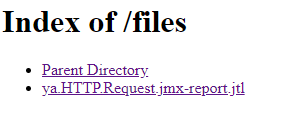
After the Pipeline has run, we will receive a notification via email. 'username@srv.net from jenkins@srv.net.
By following the link we will see the directory files, which contains the test reports:
Contents of the file ya.HTTP.Request.jmx-report.jtk:
timeStamp,elapsed,label,responseCode,responseMessage,threadName,dataType,success,failureMessage,bytes,sentBytes,grpThreads,allThreads,URL,Latency,IdleTime,Connect
1597311456443,569,Yandex - HTTP Request,200,Ok,Thread Group 1-1,text,true,,59449,220,1,1,https://ya.ru/,145,0,57
1597311456443,147,Yandex - HTTP Request-0,302,Found,Thread Group 1-1,,true,,478,110,1,1,http://ya.ru/,145,0,57
1597311456592,420,Yandex - HTTP Request-1,200,Ok,Thread Group 1-1,text,true,,58971,110,1,1,https://ya.ru/,370,0,259
Conclusion
This article demonstrated one of the ways to run JMeter tests in an OpenShift environment. We completed all the steps manually, after which we created a Jenkins Pipeline to automate the testing process.
Resources and Documentation
- openshift
Source: habr.com
