

There are times when you need to obtain a full copy of a volume within a single storage system (SCD), not a snapshot or clone, but a complete volume. However, not all SCDs allow this to be done using their built-in tools. The only apparent option is to copy through a server, which will send all the data through the server itself, the network to the SCD, and the SCD ports, putting a load on all these components. There are SCSI commands that can allow you to do everything within the SCD itself, and if your system supports VAAI from VMware, then there is almost a 100% chance that the XCOPY (EXTENDED COPY) command is supported, which instructs the array what and where to copy without involving these processes. server and the network.
It seems like it should be simple, but I couldn't find any ready-made scripts right away, so I had to reinvent the wheel. For the OS server I chose Linux, and for the copying tool, the ddpt command (http://sg.danny.cz/sg/ddpt.html). With this combination, you can copy volumes from any OS, as the copying is done block by block on the SCD side. Since it’s necessary to copy block by block, and the number of blocks needs to be counted, the blockdev command was used to calculate the number of such iterations. The maximum block size was determined by experimentation, as ddpt did not work with a larger block in practice. As a result, I came up with the following rather simple script:
#!/bin/bash
# first parameter = input device
# second parameter = output device
# device size must be the same
# changing bs variable can reduce speed, max speed should be at bs=32768. 32768 is max setting, lower settings should be calculated dividing by 2

set -o nounset
bs=32768
s=`blockdev --getsz $1`
i=0
while [ $i -le $s ]
do
ddpt of=$2 bs=512 oflag=xcopy,direct if=$1 iflag=xcopy,direct count=$bs verbose=-1 skip=$i seek=$i
i=$(( $i+$bs ))
done
Let's do a small check! Well, not so small, a 1TB file was created and md5sum was checked, not quickly 🙂
root@sales-demo-05:/home/vasilyk# blockdev --getsz /dev/mapper/mpathfs
2516582400
root@sales-demo-05:/home/vasilyk# blockdev --getsz /dev/mapper/mpathfr
2516582400
root@sales-demo-05:/home/vasilyk# mount /dev/mapper/mpathfs /xcopy_source/
mount: /xcopy_source: wrong fs type, bad option, bad superblock on /dev/mapper/mpathfs, missing codepage or helper program, or other error.
root@sales-demo-05:/home/vasilyk# mkfs /dev/mapper/mpathfs
mke2fs 1.44.1 (24-Mar-2018)
Discarding device blocks: done
Creating filesystem with 314572800 4k blocks and 78643200 inodes
Filesystem UUID: bed3ea00-c181-4b4e-b52e-d9bb498be756
Superblock backups stored on blocks:
        32768, 98304, 163840, 229376, 294912, 819200, 884736, 1605632, 2654208,
        4096000, 7962624, 11239424, 20480000, 23887872, 71663616, 78675968,
        102400000, 214990848

Allocating group tables: done
Writing inode tables: done
Writing superblocks and filesystem accounting information: done

root@sales-demo-05:/home/vasilyk# mount /dev/mapper/mpathfs /xcopy_source/
root@sales-demo-05:/home/vasilyk# ls -l /xcopy_source/
total 16
drwx------ 2 root root 16384 Aug 19 15:35 lost+found
root@sales-demo-05:/home/vasilyk# head -c 1T  /xcopy_source/1TB_file
root@sales-demo-05:/home/vasilyk# ls -l /xcopy_source/
total 1074791444
-rw-r--r-- 1 root root 1099511627776 Aug 19 17:25 1TB_file
drwx------ 2 root root         16384 Aug 19 15:35 lost+found
root@sales-demo-05:/home/vasilyk# umount /xcopy_source
root@sales-demo-05:/home/vasilyk# mount /dev/mapper/mpathfr /xcopy_dest/
mount: /xcopy_dest: wrong fs type, bad option, bad superblock on /dev/mapper/mpathfr, missing codepage or helper program, or other error.
root@sales-demo-05:/home/vasilyk# cat xcopy.sh
#!/bin/bash
# first parameter = input device
# second parameter = output device
# device size must be the same
# changing bs variable can reduce speed, max speed should be at bs=32768. 32768 is max setting, lower settings should be calculated dividing by 2

bs=32768
s=`blockdev --getsz $1`
i=0
while [ $i -le $s ]
do
ddpt of=$2 bs=512 oflag=xcopy,direct if=$1 iflag=xcopy,direct count=$bs verbose=-1 skip=$i seek=$i
i=$(( $i+$bs ))
done
root@sales-demo-05:/home/vasilyk# time ./xcopy.sh /dev/mapper/mpathfs /dev/mapper/mpathfr
real    11m30.878s
user    2m3.000s
sys     1m11.657s
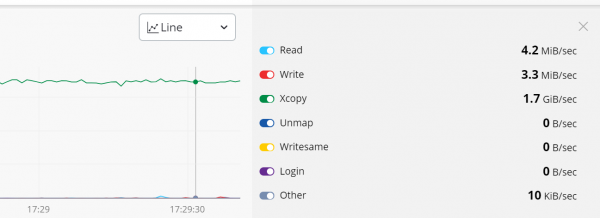
What was happening in the storage system at that moment:
Let's continue with Linux.
root@sales-demo-05:/home/vasilyk# mount /dev/mapper/mpathfr /xcopy_dest/
root@sales-demo-05:/home/vasilyk# ls -l /xcopy_dest/
total 1074791444
-rw-r--r-- 1 root root 1099511627776 Aug 19 17:25 1TB_file
drwx------ 2 root root         16384 Aug 19 15:35 lost+found
root@sales-demo-05:/home/vasilyk# mount /dev/mapper/mpathfs /xcopy_source/
root@sales-demo-05:/home/vasilyk# md5sum /xcopy_source/1TB_file
53dc6dfdfc89f099c0d5177c652b5764  /xcopy_source/1TB_file
root@sales-demo-05:/home/vasilyk# md5sum /xcopy_dest/1TB_file
53dc6dfdfc89f099c0d5177c652b5764  /xcopy_dest/1TB_file
root@sales-demo-05:/home/vasilyk#
It worked, but test and use at your own risk! It’s better to take snapshots of the source volume at first.
Source: habr.com
