

A little over a year has passed since . But time passes, everything changes, and Intel has already released the fresh line of 10th generation processors, the Intel Core i9-10900K. What surprises do these processors hold for us, and is everything really changing — let's talk about it right now.
Comet Lake-S
The codename for the 10th generation Intel Core processors is Comet Lake. And yes, it's still 14 nm. Yet another refresh , which Intel themselves refer to as an 'evolution'. That’s their prerogative. Let them call it what they want. For now, let's take a look at what has changed in the new generation compared to the previous, the ninth. And we'll find out how far the i9-10900K has moved away from the i9-9900K. So, let's get started.
Socket change
(Socket H4) was designed in 2015 and lasted a full 5 years, having seen as many as four generations of processors, which is generally unusual for Intel, a company that likes to change sockets every two years. However, it's worth noting that the company compensated for this somewhat with incompatibility between new/old processors and chipsets...
Yes, nothing lasts forever under the moon, and Intel, alongside the release of the 10th generation, introduced a new socket — LGA 1200 (Socket H5). Although it is compatible with the mounting holes (75 mm) of existing cooling systems, the faint hope that they wouldn't need to be replaced disappeared after the first preliminary tests. But more on that later.
More cores, higher frequency
Already a traditional Intel solution when it comes to nanometers: if you don't change the , then add cores and increase the frequencies. It worked again this time.
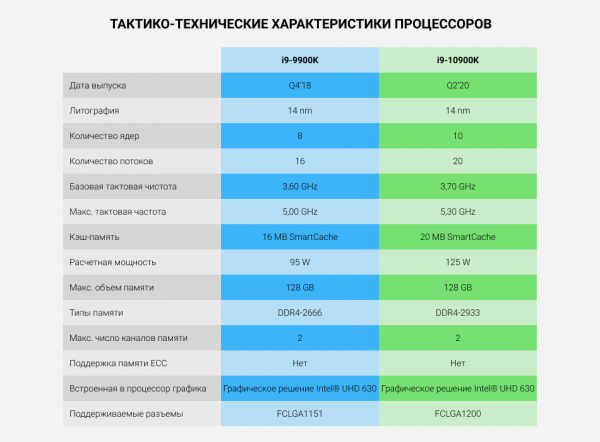
The Intel i9-10900K processor got two additional cores, accordingly, 4 threads in (HT). As a result, the total number of cores increased to 10, while the number of threads rose to 20.
Since the technology process hasn't changed, the heat removal requirements, or , increased from 95W to 125W — that’s more than a 30% increase. I remind you that these figures are when all cores are running at base frequency. Cooling this 'heat monster' with air is rather challenging. It’s advisable to use a liquid cooling system (LCS). However, there’s a catch.
If the base frequency of the new processor has only risen by 100 MHz — from 3.6 to 3.7, then with It has become more interesting. If you remember, the i9-9900K in Turbo Boost can reach 5 GHz on one core (rarely on two), 4.8 GHz on two, while the remaining cores operate at a frequency of 4.7 GHz. In the case of the i9-10900K, one core now operates at 5.1-5.2 GHz, and all others at 4.7 GHz. But Intel didn't stop there.
In addition to the already familiar Turbo Boost technology, a mega super turbo boost has been introduced. Officially, it is called Thermal Velocity Boost (TVB). It should be noted that this technology was implemented back in the eighth generation of Intel Core, but only a select few got access to it. For example, I personally know of the i9-9980HK and i9-9880H.
The essence of the technology lies in the fact that at a certain processor temperature, the frequency of one or more cores rises above Turbo Boost. The added frequency depends on how much the operating temperature of the processor is below the maximum. The maximum frequency of the processor cores with Intel Thermal Velocity Boost enabled is achieved at an operating temperature not exceeding 50°C. As a result, in TVB mode, the clock frequency of one core rises to 5.3 GHz, while the other cores increase to 4.9 GHz.
Since the new generation has two more cores, at maximum auto-overclocking with all types of boosts, this "kettle" can draw up to 250 W, which is already a challenge even for a water cooling system (WCS), especially in a compact case without external water blocks...
Having discussed the cores, explained the frequencies, and lamented the socket, let's move on. Among the main changes, we can add a slightly increased L3 cache and a higher frequency of supported RAM — from DDR-2666 to DDR4-2933. That's about it. Intel hasn't updated the integrated graphics core either. The RAM capacity also remains unchanged; the same 128 GB has been inherited from the previous generation. So, as always with refreshes: they added cores and frequencies, but also changed the socket. There are no other significant changes, at least in the context of servers. I suggest we move on to testing and see how the performance of the new generation has changed compared to the previous one.
Testing
Two processors from the Intel Core line are involved in the testing:
- The ninth generation i9-9900K
- The tenth generation i9-10900k
Tactical and technical specifications of the platforms
Intel i9-9900K processors
- Motherboard: Asus PRIME Q370M-C
- RAM: 16 GB DDR4-2666 MT/s Kingston (2 pcs.)
- SSD Drive: 240 GB Patriot Burst (2 pcs. in RAID 1 — a habit developed over the years).
Intel i9-10900K Processors
- Motherboard: ASUS Pro WS W480-ACE
- RAM: 16 GB DDR4-2933 MT/s Kingston (2 pcs.)
- SSD: 240 GB Patriot Burst, 2 in RAID 1.
Both configurations use single-unit platforms with water cooling. However, there is a nuance… To avoid losing TVB frequencies and to properly 'start' the Intel i9-10900K, it was necessary to assemble a powerful custom water cooling system (hereafter referred to as CWS) for the tenth generation Core platform. This took considerable effort (and not a small amount), but this solution allowed us to achieve stable 4.9 GHz for each core under peak loads, without exceeding the temperature threshold of 68 degrees. Kudos to the hero-customizers.
Let me digress slightly and explain that this approach is dictated solely by pragmatic considerations. We find technical solutions that deliver maximum performance with minimal rack utilization, achieving reasonable costs in the process. We do not engage in overclocking 'hardware' and use only the functions that the hardware developers have built in. For example, stock overclocking profiles, if the platform has any at all. No manual adjustments of timings, frequencies, or voltages. This allows us to avoid various surprises. Just like the preliminary testing we conduct before handing over the finished solutions to clients.
We always test in single-unit configurations for a reason — such testing is quite sufficient to ensure the reliability of the found solution. As a result, the client receives verified equipment and maximum speed at minimal cost.
Returning to our i9-10900Ks, I note that the temperature of none of the compared processors exceeded 68 degrees. This means that the solution has a good overclocking potential in addition to its other merits.
Software part: OS CentOS Linux 7 x86_64 (7.8.2003).
Kernel: UEK R5 4.14.35-1902.303.4.1.el7uek.x86_64
Optimizations made relative to the default installation: added kernel boot options elevator=noop selinux=0
Testing was performed with all patches for Spectre, Meltdown, and Foreshadow attacks backported to this kernel.
Tests that were used
1. Sysbench
2. Geekbench
3. Phoronix Test Suite
Detailed test description
Geekbench Test
A package of tests conducted in both single-threaded and multi-threaded modes. The result is a performance index for both modes. In this test, we will consider two main indicators:
- Single-Core Score — single-threaded tests.
- Multi-Core Score — multi-threaded tests.
Units of measurement: abstract 'parrots'. The more 'parrots', the better.
Sysbench Test
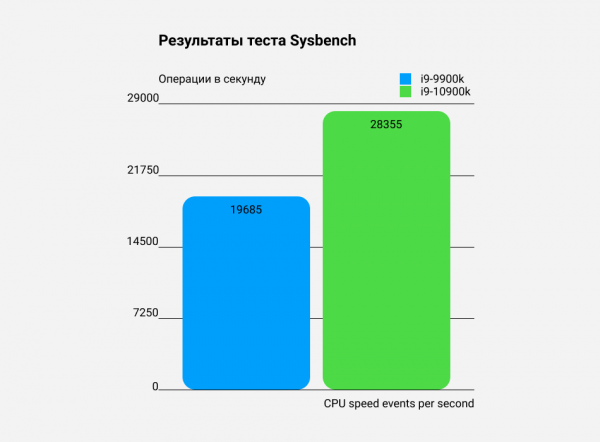
Sysbench — a benchmarking package for evaluating the performance of various subsystems of a computer: processor, RAM, data storage. The test is multi-threaded, using all cores. In this test, I measured one indicator: CPU speed events per second — the number of operations performed by the processor per second. The higher the value, the more productive the system.
Phoronix Test Suite Test
Phoronix Test Suite — a very rich set of tests. Almost all tests presented here are multi-threaded. The only exceptions are two single-threaded tests: Himeno and LAME MP3 Encoding.
In these tests, the higher the score, the better.
- Multithreaded test John the Ripper for password cracking. Let's take the Blowfish cryptographic algorithm. It measures the number of operations per second.
- Himeno Test is a linear solver for Poisson pressure using the Jacobi point method.
- 7-Zip Compression — 7-Zip test using p7zip with an integrated performance testing function.
- OpenSSL is a set of tools implementing SSL (Secure Sockets Layer) and TLS (Transport Layer Security) protocols. It measures the performance of RSA 4096-bit OpenSSL.
- Apache Benchmark measures how many requests per second a system can handle when executing 1,000,000 requests, with 100 requests being processed simultaneously.
In these tests, lower is better — all tests measure the time taken.
- C-Ray tests CPU performance on floating-point calculations. This test is multi-threaded (16 threads per core), shooting 8 rays from each pixel for smoothing and generating a 1600×1200 image. The execution time of the test is measured.
- Parallel BZIP2 Compression measures the time required to compress a file (a .tar package of the Linux kernel source code) using BZIP2 compression.
- Audio data encoding. The LAME MP3 Encoding test is performed in a single thread. It measures the time taken for the test.
- Video data encoding. The ffmpeg x264 test is multi-threaded. It measures the time taken for the test.
Test Results
The i9-10900K outperforms its predecessor by 44%. In my opinion, the result is simply superb.
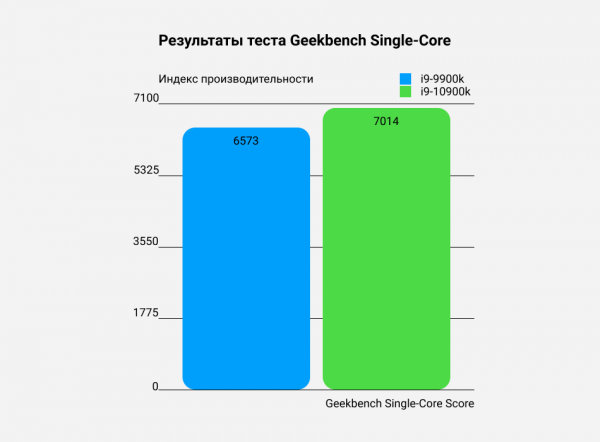
The difference in the single-thread test is only 6,7%, which is to be expected: the difference between 5 GHz and 5.3 GHz is exactly 300 MHz. That's about 6%. There was quite a bit of talk about this 🙂
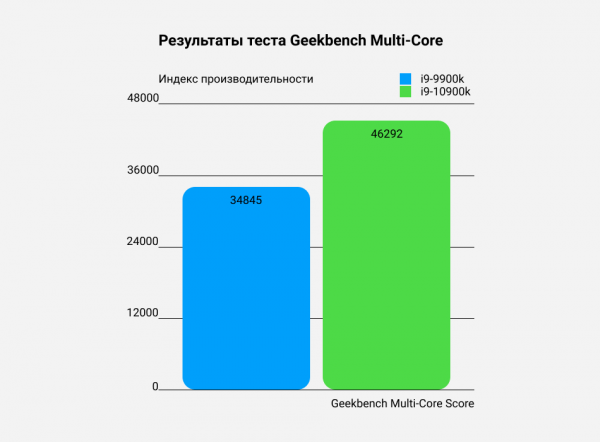
However, in the multi-threaded "parrot" test, the new model shows nearly 33% better performance. The significant role was played by TVB, which we were able to maximize with a custom cooling solution. During the test, the peak temperature did not exceed 62 degrees, and the cores operated at a frequency of 4.9 GHz.
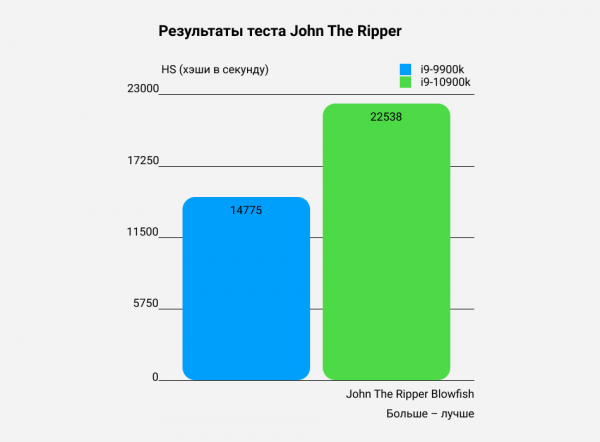
The difference 52,5%. Just like in the Sysbench tests and the multi-threaded Geekbench, such a significant gap is achieved thanks to the cooling solution and TVB. The temperature of the hottest core is 66 degrees.
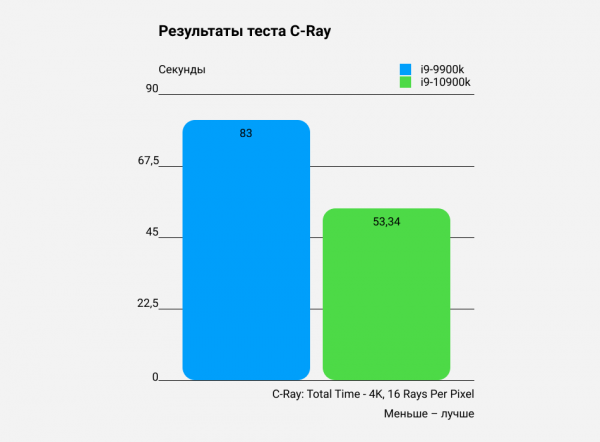
In this test, the difference between processors of different generations is 35,7%. This is the test that 100% of the time keeps the processor under maximum load, heating it to 67-68 degrees.
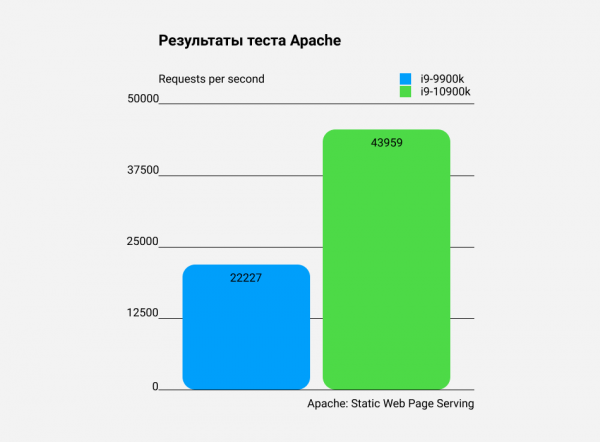
97,8%. The probability of almost doubling the performance due to 2 cores and a few megahertz is "extremely low." Therefore, the result resembles more of an anomaly. I assume that either the test itself was optimized or the processor was optimized. Perhaps both. We will not rely on the results of this test in this case. Although the figure is impressive.
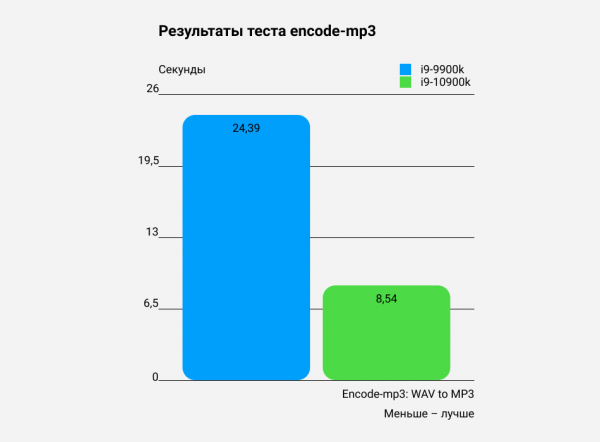
Here I am absolutely certain that optimization was done in the test itself. This is proven by repeated tests of the AMD Ryzen, which perform significantly better, considering that Ryzen is not so strong in single-threaded tests. Therefore, the advantage in 65% will not count. However, it was impossible not to mention this. Nevertheless, we write one — keep two in mind.
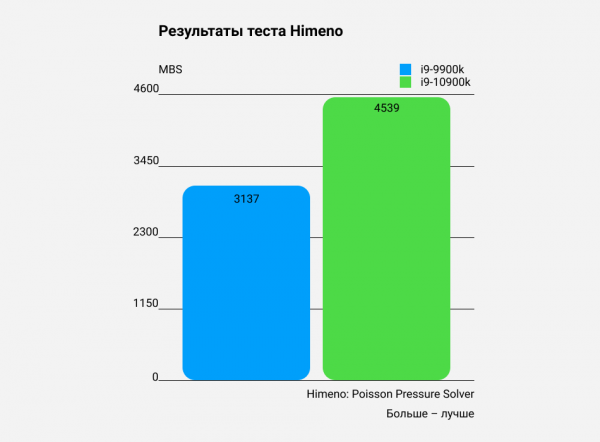
The difference between generations is 44,7%. Here everything is fair, so we accept the result. After all, this is the test where maximum performance is extracted under single-threaded load. On one hand, the work done on refinement and optimization of the core is visible — a refresh is a refresh, but something under the hood has clearly been optimized. On the other hand, such results may indicate that we didn't manage to extract the maximum in the previous test with the i9-9900K. I would be glad to read your thoughts on this in the comments.
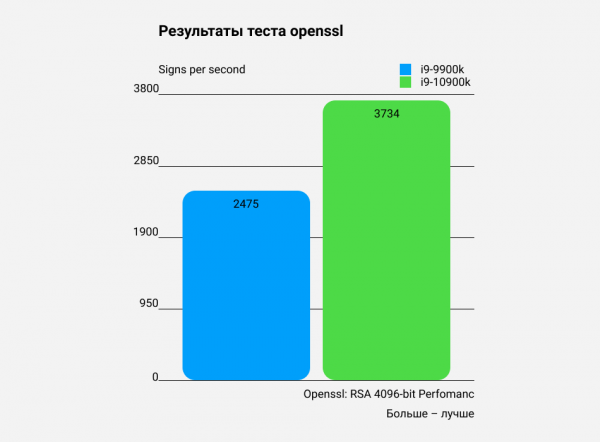
The tenth generation confidently outperforms the ninth by 50,9%. This is quite expected. Here, cores and frequency added by the Intel i9-10900K are key.
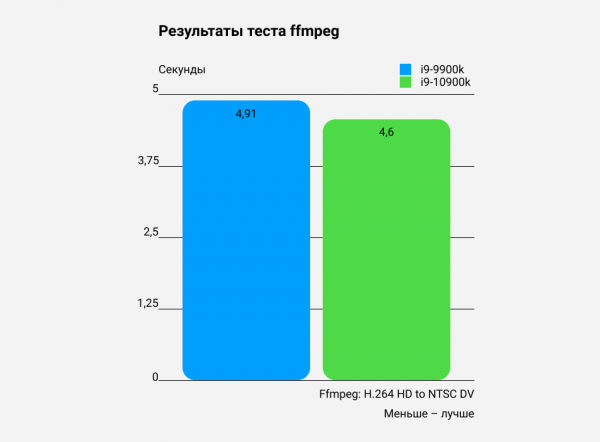
The difference between generations is 6,3%. In my opinion, the result is quite controversial. In future articles, I am considering completely abandoning this test. The thing is that in systems with more than 36 cores (72 threads), the test does not even run with default settings, and sometimes the difference in results has to be calculated to the third decimal place. Well, we will see. You can share your opinion on this in the comments.
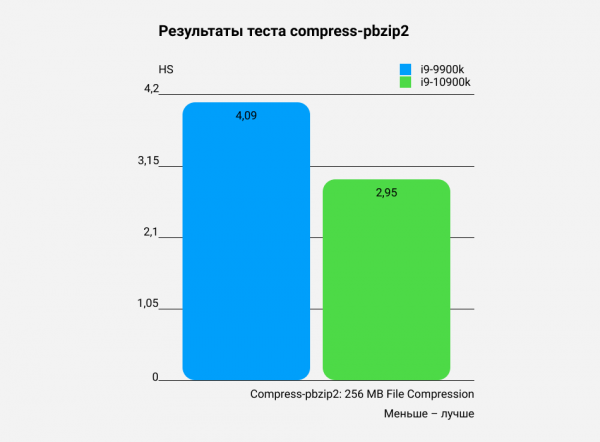
The difference is 28%. No surprises, anomalies, or optimizations are noticed here. Just a pure refresh and nothing more.
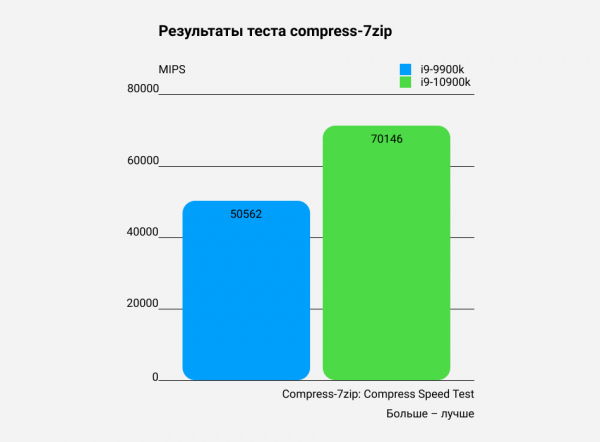
The i9-10900K outperforms the i9-9900K by 38,7%. As in the case with the results of the previous test, the difference is expected and clearly shows the actual gap between processors on the same microarchitecture.
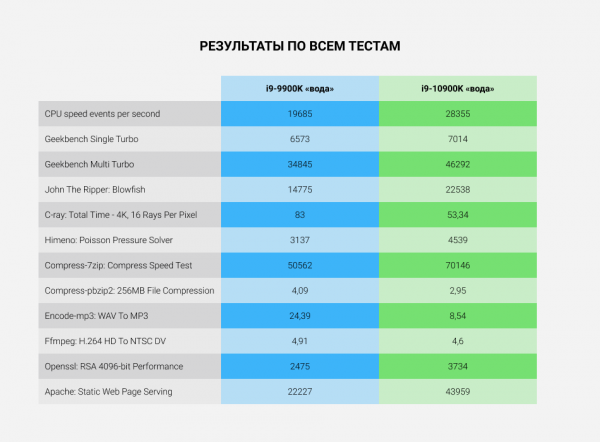
So, let's summarize. Overall, nothing unexpected – the i9-10900K outperforms its predecessor, the i9-9900K, in all tests. As was to be proven. The price for this is heat output. If you're looking for a new processor for home use and plan to squeeze the maximum performance out of the tenth generation of Core, I recommend considering a cooling system ahead of time, as mere coolers may not suffice.
Or come to us for dedicated servers. A ready-made solution on a solid platform with a very decent cooling system, which, as we have found, also has overclocking potential.
Dedicated servers were used in the testing based on processors. Any of them, as well as configurations with the i7-9700K processor, can be ordered with a 7% discount using the promo code INTELHABR. The duration of the discount corresponds to the payment period chosen when ordering the server. The promo code discount is cumulative with the period discount. The promo code is valid until December 31, 2020, inclusive.
Source: habr.com
