

As we approach the start of the course we have prepared an interesting material translation for you
There is one wonderful thing about DMVPN that I encountered some time ago: DMVPN Per-Tunnel QoS. Obviously, I'm not the only one (like a lab rat) who thinks this is cool. Every time I show it to people, I see their faces light up — the result of small bulbs in their minds indicating emerging ideas on how they can use it.
It's time to unleash your geek!
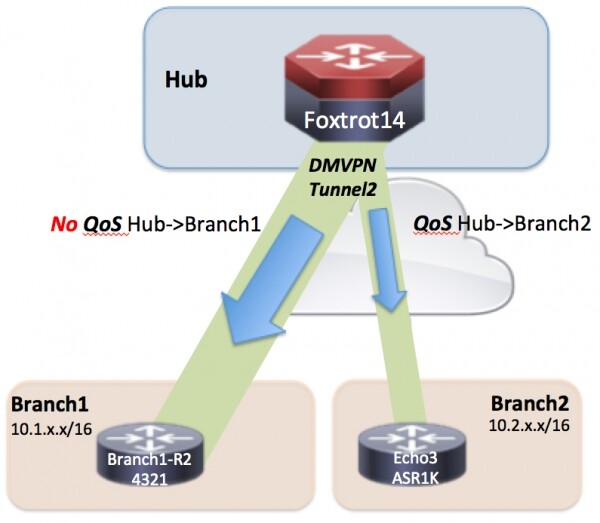
Let’s assume that Branch_1 and Branch_2 are in the same DMVPN tunnel with the DMVPN hub "Foxtrot14". We would like to apply a QoS policy from the hub to the spoke for Branch_2, but not for Branch_1. Since they are in the same mGRE tunnel, how can we achieve this?
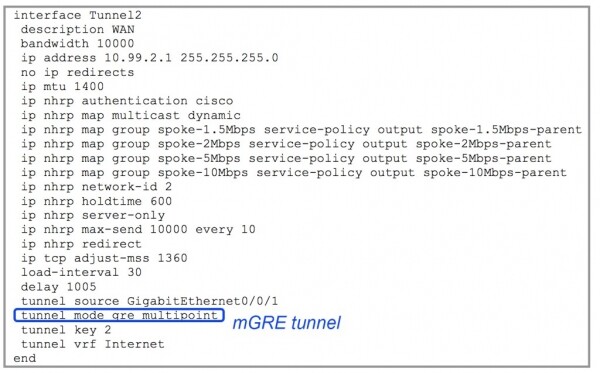
Essentially, what we need to do is:
- On the DMVPN hub:
- We configure various QoS policies in the global configuration section that you want the hub to 'offer' as QoS policies for the spokes
- We apply all the policies that you intend to 'offer' to the spokes in the DMVPN tunnel interface using the command ip nhrp map group
- On the DMVPN spoke, we configure the DMVPN interface with the name of the mapped group that you would like to apply to it.
On the DMVPN hub
Let’s break this down:
"1) Configure various QoS policies in the global configuration section that you want the hub to 'offer' as QoS policies for the spokes"
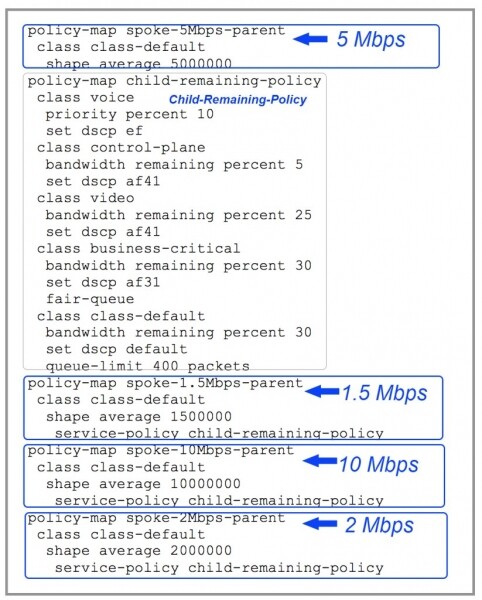
So, overall, what you can see above is that we are configuring our DMVPN hub to offer 5 different QoS options to the spokes.
- 1.5Mbps
- 2Mbps
- 5Mbps
- 10Mbps
- Unlimited
"2) Apply all the policies that you intend to 'offer' to the spokes in the DMVPN tunnel interface using the command ip nhrp map group"

On the DMVPN spoke
"On the DMVPN spoke, we configure the DMVPN interface with the name of the mapped group that you would like to apply to it."
So I just move to Echo3 (Branch_2) and put the command "ip nhrp group spoke-2Mbps" in the spoke's tunnel interface.
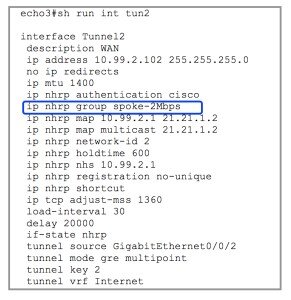
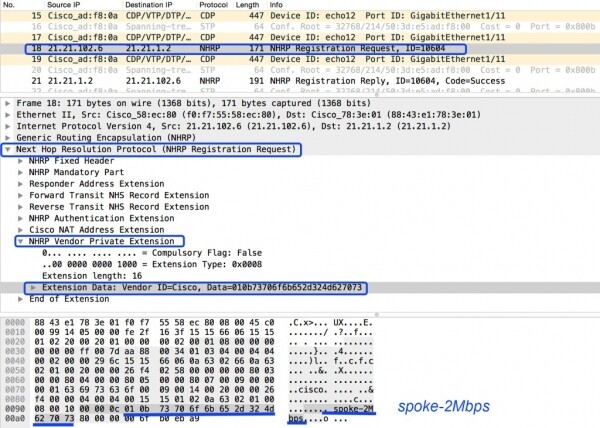
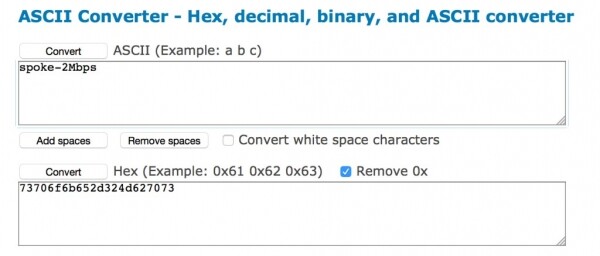
What will happen now? Echo3 simply places the name "spoke-2Mbps" in the NHRP registration request. Voila! It's actually that simple. Neat, right? If you need to refresh your knowledge on NHRP registration, take a look at . There you will find the basics of the NHRP registration request.
Let's see how this looks in the network and on the DMVPN hub.
You can download the current file pcap, which we will examine together
< — it's in my public Dropbox, and I plan to keep it there for a few years.
Ready?
We are going to examine Frame 18 and Frame 21 concerning the following networks and IP addresses. Place this closer to the sniffer's trace for better IP address mapping.
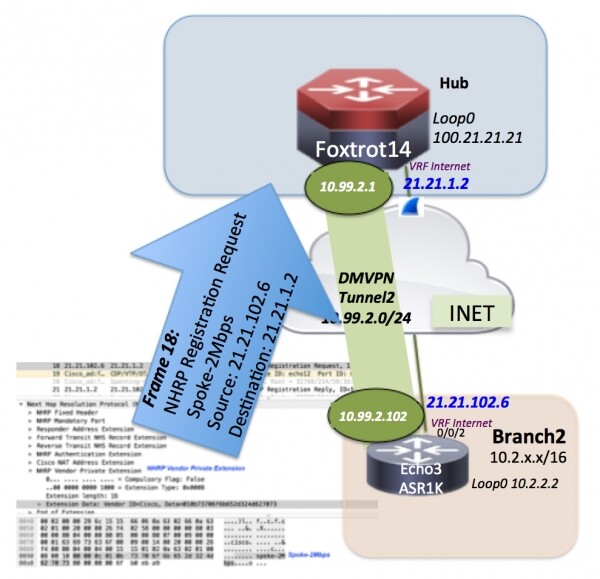
So, the first is frame 18. An NHRP registration request from Echo3 (Branch_2) looks completely normal until we reach the NHRP Vendor Private Extension.
Want to indulge the geek within you?
What happens after Frame 18 reaches the DMVPN hub Foxtrot14? Потому что Echo3 (Branch_2) wanting to be applied with 'spoke-2Mbps' does not yet mean it is a configured option on the hub. Thus, you will see frame 21 again as a response to the registration request confirming 'spoke-2Mbps' in the vendor section.
What now?
Let's go to Foxtrot14 and see what it thinks about this situation.
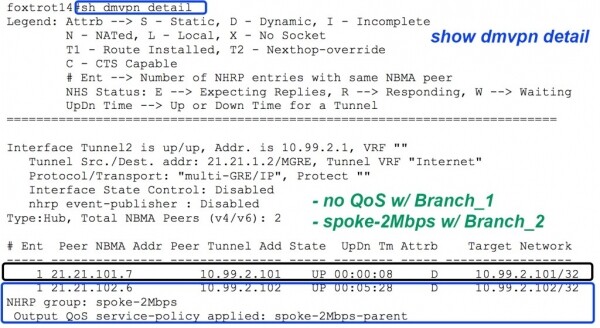
Wonderful! In the same mGRE tunnel, we have QoS applied to the hub for spoke traffic to branch_2, but not to branch_1.
*NOTE: This post was originally published on this site in 2015. It was last updated and reformatted on February 15, 2020.
Source: habr.com
