

You are looking at a subjective, unserious, and non-technical review of the Ubuntu Linux 20.04 operating system and its five official flavors. If you're interested in kernel versions, glibc, snapd, and the presence of the experimental Wayland session, this isn't the place for you. If you're hearing about Linux for the first time and want to understand how someone who has been using Ubuntu for eight years thinks about it, then you are in the right place. If you'd like to check out something not too complicated, slightly ironic, and with pictures, then this is also the place for you. If you think that this review is full of inaccuracies, omissions, and contradictions, and completely lacks logic—perhaps it does, but this is just a non-technical and subjective overview.
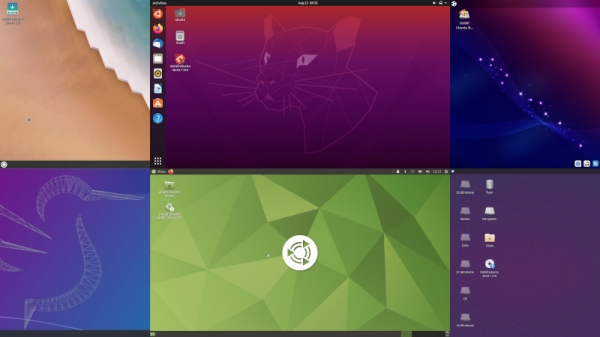
To start, a brief introduction to the topic. There are operating systems: , and Linux. Everyone has heard of Windows, and everyone has used it. Almost everyone has heard of macOS, but not everyone has used it. Not everyone has heard of Linux, and only the bravest and most daring have used it.
There are many Linux distributions. Windows is one system, and macOS is also one. Of course, they have versions: Windows 7, 8, 10, or High Sierra, Mojave, Catalina. But fundamentally, they are one system, developed progressively by one company. There are hundreds of Linux distributions, created by different people and companies.
Why are there so many Linux distributions? Linux itself is not an operating system; it is the kernel, the most critical part. Without the kernel, nothing works, but the kernel alone is not very useful for the average user. It needs a bunch of other components, and to make everything look nice with windows, icons, and pictures on the desktop, a so-called graphical interfaceneeds to be added on top. One group of people develops the kernel, another group develops the additional components, and a third group creates the graphical interface. There are many components and interfaces, and they can be mixed in various ways. As a result, fourth groups of people come together to assemble everything and prepare a proper operating system in a familiar form. In other words— distribution Linux. A single person can create a distribution, which is why there are so many. By the way, "Russian operating systems" are simply Linux distributions, and the only native elements are slightly less boring wallpapers, separate programs, plus certified tools for handling classified and other confidential information.
With so many distributions available, choosing can be difficult, and this becomes yet another headache for anyone who decides to take the plunge and try to move away from Windows (or from macOS). In addition, of course, to more mundane problems like: "Oh, Linux is hard," "It's only for programmers," "I'll never get it right," "I'm afraid of the command line." Plus, as usual, developers and users of different distributions constantly argue over which Linux is superior.
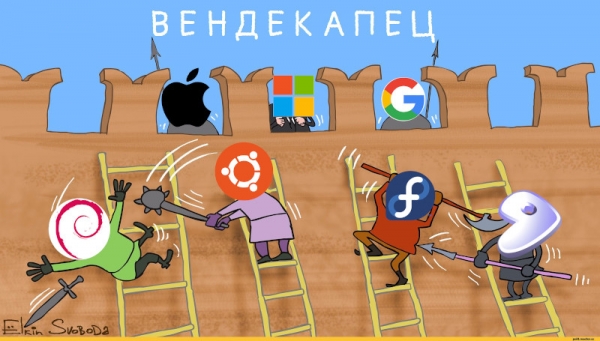
Linux distributions unite in their battle against Microsoft's hegemony. The author of the original image is S. Yolkin, while the missing elements were drawn by the article's author.
I decided to update the operating system on my computer and began choosing. I had previously done this — downloading Linux distributions and testing them. But that was quite a while ago. Since then, Linux distributions have changed, so it wouldn’t hurt to test again.
From several hundred, I picked six. All are varieties of Ubuntu is one of the most popular distributions. A whole bunch of distributions have been made based on Ubuntu (yes, they even propagate this way: one Linux creates another, built on it — a third one, then a fourth, and so on until the new wallpaper for the desktop runs out). I used one of these derivative distributions (by the way, a Russian one — ), so I started testing Ubuntu and its official variants. seven variants. Out of these seven, two can be ignored because one of them while the other is for Let's look at the remaining five plus the original. Naturally, it's very subjective and filled with numerous side notes.
Ubuntu
Ubuntu is the original. In slang, it's referred to as "vanilla Ubuntu," as it is wants to connect to the service standard, without any particular features. The other five distributions are based on it and differ only in their graphical interface: desktop, windows, panel, and buttons. Ubuntu itself resembles macOS, except the panel is on the left instead of at the bottom (but it can be moved to the bottom). Everything's in English — I was just too lazy to switch it, but there’s actually a Russian option as well.
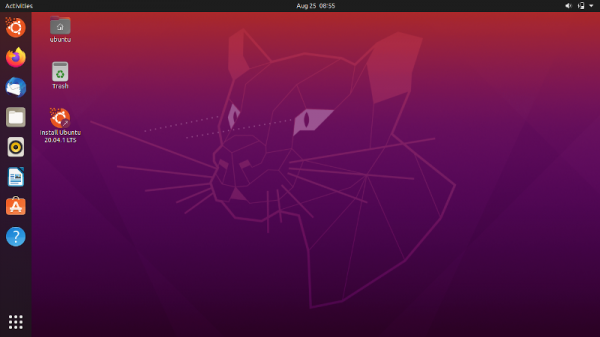
Ubuntu right after booting up
A cat shooting beams from its eyes — this is actually It resembles a feline, but actually belongs to a different family. It lives in Madagascar. Each version of Ubuntu has its own code name: an animal and an adjective. Version 20.04 is called Focal Fossa. Focal means focus in the sense of 'central point,' while Fossa also reminds of — Free and Open Source Software, free software with open source. So in the picture, the fossa is focusing on something.
At first glance, the impression is good, but it deteriorates when you start working. If you did not see the familiar panel with open windows, like in Windows, that's correct: there is no such panel. Instead, there are icons of running applications that get highlighted, and there's also a feature called Activities, which resembles a list of open programs on Android.
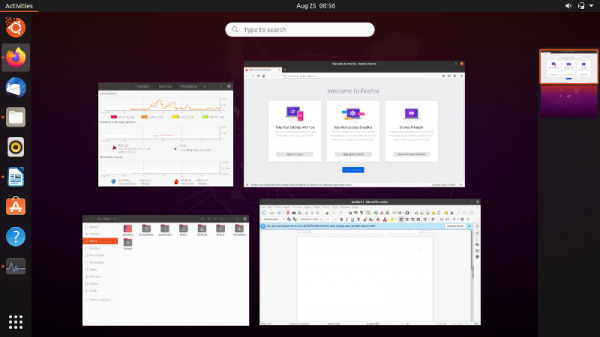
Learning to switch between windows in Ubuntu: drag the mouse towards Activities, click, hover over the window, and click again. Do you see how simple it is?
It looks impressive, especially with beautiful smooth animations, but in terms of convenience — not so much. If I were just listening to music and watching movies without leaving the browser — that would be one thing — but I constantly need to switch between programs, and having 10 open windows at once is not uncommon. Now imagine: each time you need to drag the mouse somewhere, click something, drag again (by searching for the necessary window not by title, but by a small image), and click again... In short, after an hour you will want to throw this system away and never return. Of course, you can use Alt-Tab to switch windows, but that's another tricky feature.
By the way, it resembles Android for a reason. In 2011, some smart people who were making , saw the iPad and thought: 'This is the future. Let's create an interface that looks like Apple's so that it can be used on a tablet. Then all tablets will have our graphical interface, we'll be in a great position, and As a result, Android tablets have left iOS behind, and even Microsoft has stepped away from that. Windows is alive and well, while the decent interface of Ubuntu has suffered. Of course, Ubuntu on tablets is used only by extreme enthusiasts (I must admit — I haven't even attempted it). Maybe it is necessary to roll everything back, but with the amount of time and money invested in this interface over the past ten years, it continues to be developed. Well, what can I say... At the very least, it is still beautiful. As for usability — it seems like you can install some additional tools to restore a normal window panel. But I'm not really eager to experiment with them.
Plus, I checked the resource consumption — Ubuntu uses a gigabyte of RAM right after booting. That's almost like Windows. No thanks. Everything else seems like a normal system.
Kubuntu
If Ubuntu resembles macOS, then — it resembles Windows. See for yourself.
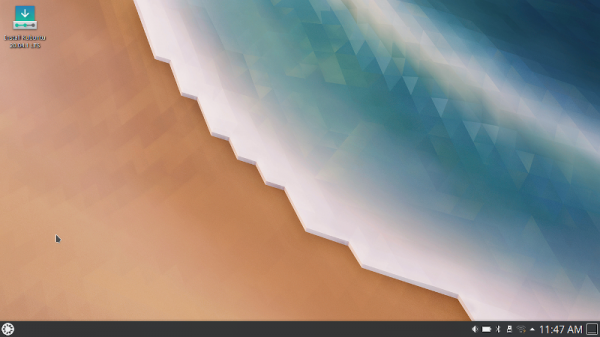
Kubuntu right after booting. The codename is also Focal Fossa, but the image is different.
Here, fortunately, there are no attempts to make the system for tablets, but there is an effort to create a relatively decent working environment for desktop computers. The desktop environment is called KDE — don’t ask me what it stands for. In common parlance, it’s known as "KDE". Hence the "K" in the name of the operating system. They really love the letter "K" there: if possible, they add it to the beginning of the program's name, and if not possible — no worries, they’ll add it to the end of the name. At worst, they will draw it on the icon.
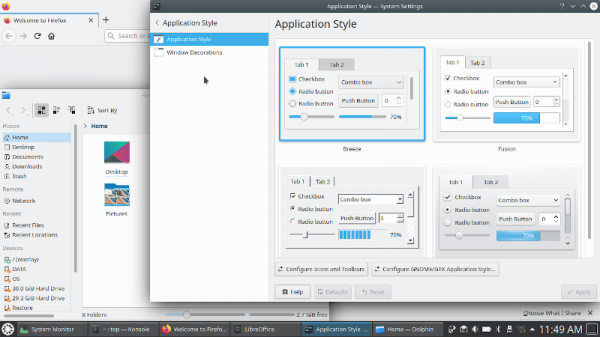
Doesn't it remind you of Windows?
The color scheme resembles 'ten', and even the 'ding' when a notification appears is spot on… I swear, it’s not Kubuntu, but some sort of Windubunt. The attempt to mimic Windows goes so far that you can even set the buttons like in Windows — although, for some reason, it resembles Windows 95 (check the screenshot in the settings at the bottom left). Of course, you can 'dress up' the system since everything in Linux is customizable, and then it will no longer look like Windows, but you’ll have to dig around in the settings. Just in case: if you enable the windows and buttons from '95, the system will still consume resources as if it were 2020. However, it’s quite modest in this regard: about 400 MB of memory after booting is practically nothing. I didn’t expect that. Persistent rumors suggested that 'KDE' was slow and resource-hungry. But it seems not. Otherwise, it’s still Ubuntu, as technically this is the same system. Some programs are different, but Firefox and LibreOffice are still there.
Ubuntu MATE
— is an attempt to recreate Ubuntu as it was before 2011. That is, before the time when the original team decided to make the system for tablets and did what I showed earlier. Then, other smart people, who didn’t want to give up, took the code of the old graphical shell and started improving and supporting it. I remember watching their work as an attempt to create a zombie and thinking: 'Well, fine, this project is inherently unviable, it will spin for a couple of years and then shut down.' But look at how it turned out — it has been alive and thriving for almost ten years now, even making it into the official varieties of Ubuntu. Well, it happens. People’s attachment to classics is unyielding.
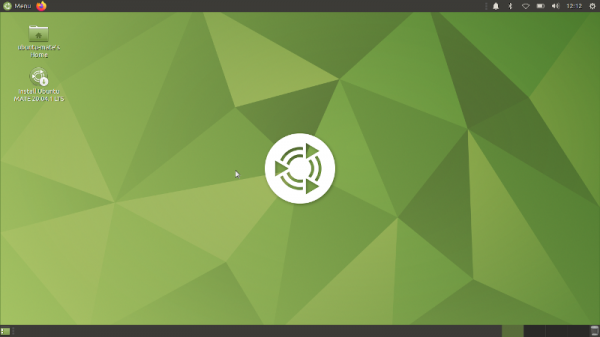
Yes-yes, there are two panels here! Just so you know, the panels are the two gray stripes at the top and bottom.
MATE is the name of this green graphical shell. Mate is , a South American plant, which is why it's green. And also, mate means friend, hinting at "friendliness." Mate is unlike anything else—neither Windows nor MacOS. It resembles itself, or rather, an original concept from the Linux scene of the 90s and early 2000s: to create not one panel with windows and icons, but two: one with windows and another with icons. And it turned out quite well. By the way, you can also see four rectangles in the bottom right corner—this is the workspace switcher. Such a feature recently appeared in Windows, but has existed in Linux since time immemorial. You can open something work-related on one desktop, then switch to an adjacent one and hang out on VKontakte. However, I rarely use more than one desktop.
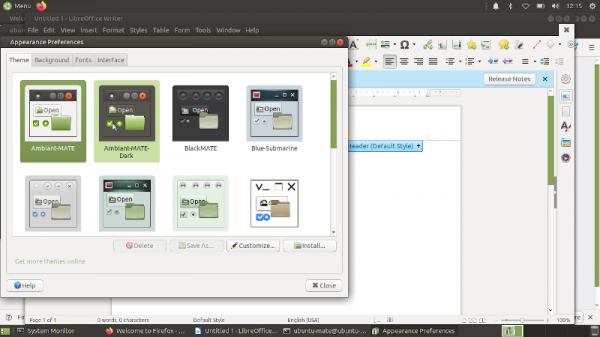
If you open many windows, it'll look like this
Other than that, it’s the same Ubuntu, both in terms of resource consumption and speed—just like the original. It also consumes about a gigabyte of memory after boot. I don't mind much, but it still feels a bit upsetting.
Ubuntu Budgie
has done the impossible: become even more like MacOS than Ubuntu. Budgie is the name , just so you know. Although you probably guessed that yourself.
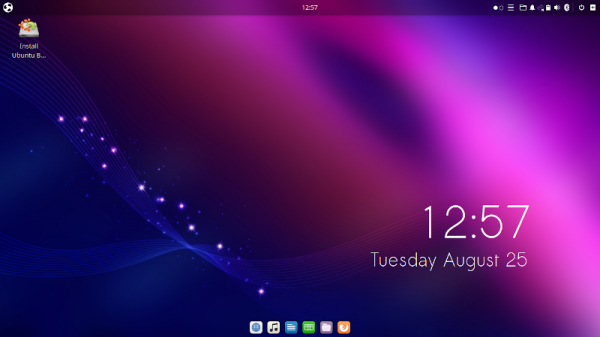
Free MacOS Ubuntu Budgie right after boot
Let me explain how this wonder came to be. When in 2011 some clever people decided to make Ubuntu for tablets… yes, that's when it all started 🙂 So while some dissidents were experimenting with creating zombies (as it turned out, quite successfully), others decided to create a fundamentally new person, a new desktop environment that would be convenient like the old one but not tailored for tablets, while being cool, fashionable, and technological. They worked hard and ended up with something resembling MacOS. At the same time, the creators of the original Ubuntu were also working away and ended up with something similar to MacOS. But I think Budgie looks a bit more like it: after all, the icons are at the bottom, not on the side. This, however, doesn't make it any more convenient: switching between windows is just as confusing, and I didn't immediately understand where to click.
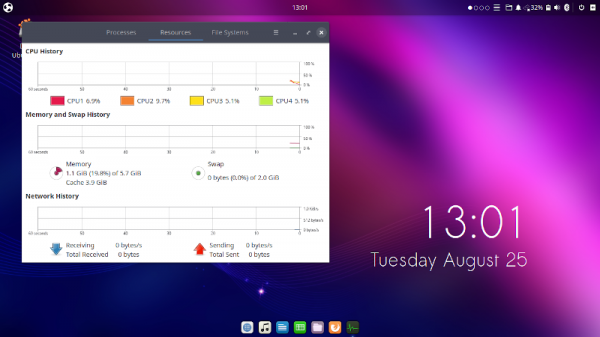
Do you see a tiny spark under the right icon? That means the program is running.
Overall, in terms of convenience and resource usage, it differs little from the original — the same gigabyte, as you can see, and the same issues with "sacrificing convenience for aesthetics." Additionally, this system has one more problem: Budgie is a less popular option than Ubuntu, so the chances of easily customizing it to your liking and fixing any issues is significantly lower.
Lubuntu
is Ubuntu for less powerful computers. The 'L' stands for lightweight, meaning light. Well, I wouldn’t exactly call 400 MB of RAM after booting "lightweight," but okay, we'll take it at face value.
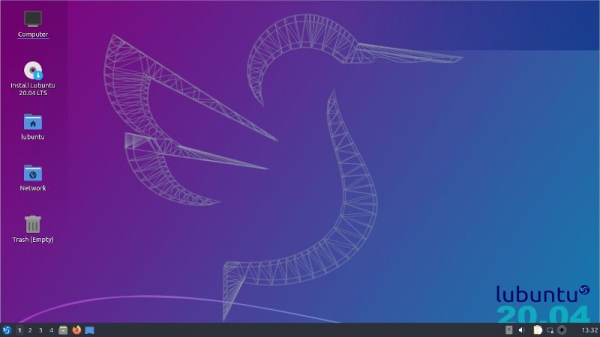
Booted up, took a selfie…
It also resembles Windows and KDE, respectively. It’s not coincidental that it resembles KDE — the same technology underlies it (I won’t go into details, but you can Google "Qt"). However, to create something a bit faster and less resource-hungry (though, judging by memory usage, it’s not really less resource-hungry), many programs and components had to be replaced with simpler alternatives that supposedly work faster. It turned out okay on one hand, but not so much in terms of visual impression.
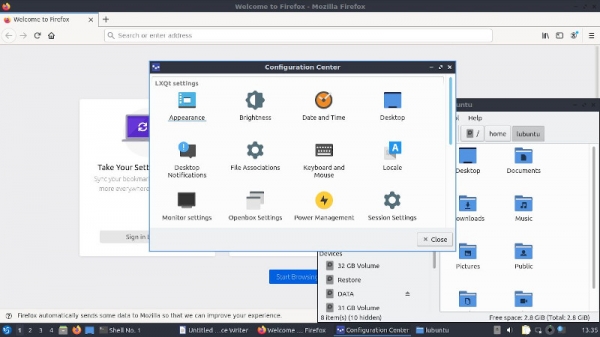
Old-school windows reminiscent of Windows 95. In fact, it is possible to make prettier ones, but it requires a bit of effort.
Xubuntu
is another relatively "lightweight" variation of Ubuntu, but with a different graphical interface. The graphical environment is called Xfce (pronounced ex-ef-ce!), and it is often noted as one of the most unattractive names in Linux. In slang, it's referred to as "mouse," because of its logo.
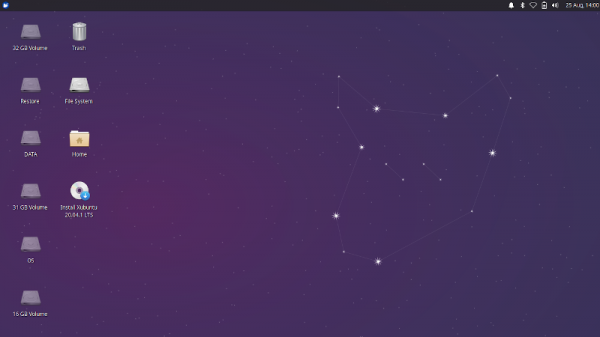
In the top left corner, you can see an icon with a mouse face — that’s the logo of the graphical interface. And it seems they also drew a mouse face with the stars on the right.
In terms of appearance, it is something between Windows, macOS, and a unique variant. Actually, you can easily move the panel down, and it will look like Windows. In terms of resource efficiency, it’s like Lubuntu. Overall, it’s quite a decent system, maintaining a classic style — not super trendy, but completely suitable for work.
Conclusions
No clear conclusions can be drawn. It's purely a matter of personal taste. Additionally, there are many technical nuances depending on which programs one plans to use and how curious one is to tinker under the hood, meaning the settings. My personal ranking would be something like this.
- Kubuntu
- Xubuntu
- Ubuntu
- Ubuntu MATE
- Ubuntu Budgie
- Lubuntu
If you're desperately trying to connect such a ranking to the article's content and understand why this is the case — don't bother. If you see no logic — yes, that's correct, probably there isn't any here. I'm telling you — it's subjective. Remember the picture about the Windows fiasco from the beginning of the article.
However, let's not forget that there are hundreds of Linux distributions. So, perhaps the conclusion is, 'definitely not Ubuntu, but rather ».
Source: habr.com
