

Google Inc. release of the open mobile platform . The related source texts for the new release are posted in the project (branch android-11.0.0_r1). Firmware updates have been prepared for devices in the series , as well as for smartphones manufactured by OnePlus, Xiaomi, OPPO, and Realme. Additionally, universal GSI (Generic System Images) builds suitable for various devices based on ARM64 and x86_64 architectures.
:
- Changes have been made aimed at simplifying communication between people using smartphones. In the drop-down notification area at the top, a summary section for messages has been implemented, allowing users to view and respond to messages from all applications in one place (messages appear without separating by individual applications). Important chats can be marked as priority to ensure they are prominently displayed, even in 'Do Not Disturb' mode.
The 'bubbles' concept has been activated, allowing pop-up dialogs for actions in other applications without leaving the current program. For example, with bubbles, you can continue a conversation in a messenger, quickly send messages, keep a task list in view, take notes, access translation services, and receive visual reminders while working in other applications.
- The on-screen keyboard has implemented a contextual suggestion system for quick replies to messages, proposing emojis or standard responses relevant to the received message (for example, when receiving the message 'how did the meeting go?' it suggests 'great'). This mechanism is realized using machine learning methods and the platform , enabling the selection of recommendations on the local device without contacting external services.
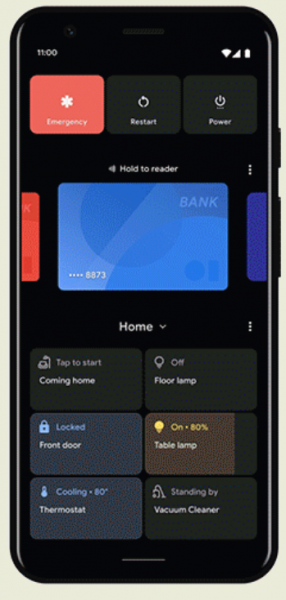
An interface for quick access to management tools for connected devices, such as smart home control systems, has been proposed, invoked by long-pressing the power button. For instance, now it is possible to quickly adjust the home thermostat settings, turn on the lights, and unlock doors without launching separate applications. The interface also offers buttons for quick selection of linked payment systems and electronic boarding passes.
New playback controls have been added for multimedia content, allowing for quick and easy switching between devices used for video or audio playback. For example, you can quickly switch music playback from headphones to a TV or external speakers.

- Support for granting one-time permissions has been added, allowing an application to perform a privileged operation once and request confirmation again on the next access attempt. For instance, you can set up a prompt for permissions for each access to the microphone, camera, or location API.
A feature for automatically blocking requested permissions for applications that have not been used for more than three months has been implemented. When blocking, a special notification appears with a list of applications not launched recently, where you can restore permissions, delete the application, or keep it blocked.
- The ability to create screencasts recording changes on the screen and sound from the microphone has been built-in.
- It has been simplified to highlight text and images for placing in the clipboard and sharing between applications.
- The voice control system for the device has been upgraded (), allowing overall smartphone management solely through voice commands. Voice Access now understands screen content and context, as well as generates labels for accessibility commands.
- The 'Nearby Share' feature has been added for quickly and securely sending files, videos, location data, and other information to nearby devices running the Android platform or with the Chrome browser.
- The Android Emulator has added an experimental capability to run 32- and 64-bit applications compiled for ARM architecture in a system image of Android 11 running in the emulator, built for x86_64 architecture. The emulator also now supports simulating the work of the front and rear cameras. For the rear camera, the Camera2 API HW has been implemented. with support for YUV processing and RAW capture mode.
The front camera has implemented with support for a logical camera (one logical device based on two physical devices with narrow and wide viewing angles). - Extended support for the 5G mobile communication standard, providing higher bandwidth and lower latency. Applications that create significant network load, such as streaming video in 4K quality and downloading high-resolution game assets, can now operate not only over Wi-Fi but also via cellular networks. To simplify the adaptation of applications for 5G network conditions, the API has been expanded. , used to check whether the connection is billed for traffic and whether large volumes of data can be transmitted over it. This API now covers cellular networks and allows for the identification of connections from providers offering truly unlimited plans when connected via 5G. A 5G state API has been added, enabling the application to quickly recognize a connection via 5G in modes. or .
The API has also been expanded. , allowing the prediction of the available bandwidth for uploading or sending data without conducting its own network tests.
- Support for new types of screens, "pinhole" (where the screen covers the entire front surface of the smartphone except for a small circle in the upper left corner for the front camera) and "waterfall" (where the screen also covers the rounded side edges of the device), has been added. Applications can now determine the presence of additional visible and blind areas on these screens using the standard API. . To cover the side edges and organize interaction in areas next to the edges of "waterfall" screens, new options are proposed in the API. .
- New options have been added for controlling application access to personal data. In addition to the mode introduced in the previous release that allows location access only while the application is in use (background access is blocked) in Android 11, there is support for one-time permissions. Users can now provide applications with temporary access to key permissions, such as location, microphone, and camera. The permission is valid for the duration of the current session and is revoked as soon as the user switches to another application.
- Changes have been made to simplify the migration of applications to storage.
, which allows for the isolation of application files on external storage (for example, on an SD card). When using Scoped Storage, the application's data is confined to a separate directory, and accessing shared collections of multimedia files requires obtaining separate permissions. Android 11 has implemented support for an optional mode of access to storage via full file paths,
the DocumentsUI API has been updated, adding the ability to perform bulk operations in MediaStore. - Expanded capabilities for biometric sensors for authentication. The BiometricPrompt API, which offers a universal biometric authentication dialog, has added support for three types of authenticators — strong, weak, and device credentials. The integration of BiometricPrompt with various application architectures has been simplified, not limited to the use of the class .
- In building platform components that require enhanced security, compile-time protection mechanisms have been employed (Control Flow Integrity), , (Integer Overflow Sanitization) and . To identify memory issues in applications, pointer checks in the heap based on attached tags have been implemented (). To find memory-related errors an additional system image has been prepared, which includes a debugging mechanism (Hardware-assisted AddressSanitizer).
- An API has been prepared , which allows for secure sharing of binary data between applications. For example, this API can be used to provide multiple applications access to machine learning models when launched by a single user.
- Support has been added for platforms for securely storing and retrieving verified identity documents, such as electronic driver's licenses.
- As part of the Mainline project, which allows updating individual system components without updating the entire platform, 12 new updatable modules have been prepared in addition to the 10 modules available in Android 10. The updates affect hardware-agnostic components that can be downloaded via Google Play separately from the manufacturer's OTA firmware updates. Among the new modules that can be updated through Google Play without firmware updates are a module for managing permissions, a module for working with storage (with support for Scoped Storage), and a module with NNAPI (Neural Networks API).
- work to reduce the impact of behavioral changes in some subsystems on application performance. Innovations that may affect application performance can now be optionally disabled and adjusted at the SDK level. To simplify testing application compatibility with Android 11, settings have been provided in the Developer Options interface and in the adb utility for enabling and disabling features that impact compatibility (allowing testing without changing targetSdkVersion and without rebuilding the application). The gray lists of restricted APIs not provided in the SDK have been updated.
- Framework added , allowing additional resources to be dynamically loaded during the application's runtime.
- The call verification service has added the ability to pass the verification status of incoming calls to applications, which can be used to create customized dialogs after the call is processed, for example, including additional actions for marking calls as spam or adding them to the address book.
- Improved API , allowing the application (network connection manager) to influence the algorithm for selecting preferred wireless networks by providing a ranked list of networks, while also taking into account additional metrics such as bandwidth and quality of the connection during previous connections. The ability to manage wireless networks supporting the (Passpoint) standard has been added, including consideration of the expiration time of the user profile and the implementation of self-signed certificates in profiles.
- The ImageDecoder API now supports decoding and displaying animated images in HEIF format (HEIC for Apple), using HEVC (H.265) compression methods. Compared to animated GIFs, the HEIF format significantly reduces file size.
- The NDK has added an API for using image encoding and decoding operations (JPEG, PNG, WebP, etc.) in native code, without the need for third-party libraries. This new API allows for smaller APK file sizes for native applications and addresses the issue of updating embedded libraries that may contain vulnerabilities.
- Camera apps can now temporarily disable vibration notifications (for example, during notifications) to prevent them from triggering while using the camera.
- The ability to enable modes has been provided. (background blur in photos) for devices that support it (for example, still mode provides higher image quality, while continuous mode offers more accurate sensor data matching).
- An API for and low-latency video playback modes has been added, which are in demand in real-time streaming applications. Additionally, support for low-latency HDMI mode (game mode) has been added, which disables graphics post-processing on televisions or external monitors to reduce delays.
- For devices with folding screens API to retrieve information from the angle sensor of the screen halves. With the new API, apps can determine the exact opening angle and adapt the output accordingly.
- The call screening API has been expanded with features to identify robocalls. For call screening apps, support for checking the status of incoming calls through to detect spoofing of caller ID, as well as returning the reason for call blocking and changing the contents of the system screen displayed after the call ends to mark the call as spam or add it to the address book.
- The API has been expanded , providing applications with the ability to leverage hardware acceleration for machine learning systems. The API is positioned as a foundational layer for functioning within Android machine learning frameworks such as and Caffe2.
Support for the activation function has been added. , which helps reduce the training time of neural networks and improve the accuracy of certain tasks, for example, speeding up work with computer vision models based on . Added a Control operation that enables the creation of more advanced machine learning models that support branching and loops. An Asynchronous Command Queue API has been implemented to reduce latency when chaining small related models.
A range of pre-trained neural network models has been proposed for use on mobile devices, including (object recognition in photos), (computer vision) and Smart
Reply (suggesting responses to messages). support for extended quantization using signed integers instead of floating-point numbers, which helps reduce model size and accelerate processing. Additionally, the Quality of Service API has added capabilities for managing priorities and timeouts during model execution, and the Memory Domain API has been expanded to reduce memory copying and transformation operations during sequential model execution. - Separate types of background services have been added for the camera and microphone, which will need to be requested if the application needs to access the camera and microphone while inactive.
- New APIs have been added for rendering application interface elements with the emergence of the on-screen keyboard to organize smoother animation by informing the application of changes at the frame level.
- An API for managing screen refresh rate, allowing certain games and applications to set a different refresh rate (for example, by default, Android uses a refresh rate of 60Hz, but some devices allow it to be increased to 90Hz).
- a mode for seamless operation continuation after an OTA firmware update that requires the device to be rebooted. The new mode allows applications to retain access to encrypted storage without the user needing to unlock the device after a reboot, meaning applications can immediately continue their functions and receive messages. For instance, automatic installation of an OTA update can be scheduled for nighttime and conducted without user involvement.
- Added to obtain information about the reasons for the program's termination, allowing the determination of whether the program terminated at the user's initiative, as a result of a crash, or was forcefully terminated by the operating system. The API also provides the ability to assess the program's state immediately before termination.
- Added , a heap memory analyzer that helps identify and fix issues caused by unsafe memory operations. GWP-ASan analyzes memory allocation operations with minimal overhead and detects anomalies. By default, GWP-ASan is enabled for platform executables and system applications. Separate activation is required to apply GWP-ASan to your applications.
- In the ADB (Android Debug Bridge) utility an incremental mode for APK package installation ("adb install --incremental"), which significantly speeds up the installation of large programs, such as games, during their development. The essence of the mode is that essential parts of the package are transferred first for launching, and the rest is downloaded in the background, without blocking the program's launch capability. For example, when installing APK files over 2GB in size, the time to launch can be reduced by up to 10 times. Incremental installations currently work only on Pixel 4 and 4XL devices, and the number of supported devices will be expanded by the release.
- Fully a debugging mode that runs ADB over a wireless connection. Unlike debugging with a TCP/IP connection, debugging via Wi-Fi does not require a cable for setup and can remember previously established device pairings. Plans also include implementing a simpler pairing scheme using a QR code displayed in Android Studio.
- Updated tools for data access that allow analyzing which user data the application accesses and after which user actions. some API audit calls.
- Added 'Ethernet tethering' mode, allowing internet access through a smartphone using Ethernet adapters connected via USB ports.
- A section with notification history has appeared in the settings, along with the ability to schedule activation of the dark theme.
Source: opennet.ru
