


There are various options for integrating Asterisk IP PBX and Bitrix24 CRM, but we decided to create our own solution.
The functionality is standard:
- Clicking on the link with the client's phone number in Bitrix24 connects the internal number of the user who clicked with the client's phone number. A record of the call is logged in Bitrix24 and after the call ends, the conversation recording is retrieved.
- An external call comes into Asterisk — we show the client's card in the Bitrix24 interface to the employee whose number received the call.
If there is no such client, we will open a new lead creation card.
As soon as the call ends, we reflect this in the card and pull in the recording of the conversation.
Below, I will explain how to set everything up on your side and provide a link to GitHub — feel free to grab it and use it!
General Description
We named our integration CallMe. CallMe is a small web application written in PHP.
Technologies and Services Used
- PHP 5.6
- Composer
- Nginx + php-fpm
- supervisor
- AMI (Asterisk Manager Interface)
- Bitrix Webhooks (simplified implementation of REST API)
Pre-setup
On the server with Asterisk, you need to install a web server (we use nginx+php-fpm), supervisor, and git.
Command to install (CentOS):
yum install nginx php-fpm supervisor gitNavigate to the directory accessible to the web server, pull the application from git, and set the required permissions on the folder:
cd /var/www
git clone https://github.com/ViStepRU/callme.git
chown nginx. -R callme/
Next, let's configure nginx; our config is located in
/etc/nginx/conf.d/pbx.vistep.ru.confserver {
server_name www.pbx.vistep.ru pbx.vistep.ru;
listen *:80;
rewrite ^ https://pbx.vistep.ru$request_uri? permanent;
}
server {
# listen *:80;
# server_name pbx.vistep.ru;
access_log /var/log/nginx/pbx.vistep.ru.access.log main;
error_log /var/log/nginx/pbx.vistep.ru.error.log;
listen 443 ssl http2;
server_name pbx.vistep.ru;
resolver 8.8.8.8;
ssl_stapling on;
ssl on;
ssl_certificate /etc/letsencrypt/live/pbx.vistep.ru/fullchain.pem;
ssl_certificate_key /etc/letsencrypt/live/pbx.vistep.ru/privkey.pem;
ssl_dhparam /etc/nginx/certs/dhparam.pem;
ssl_session_timeout 24h;
ssl_session_cache shared:SSL:2m;
ssl_protocols TLSv1 TLSv1.1 TLSv1.2;
ssl_ciphers kEECDH+AES128:kEECDH:kEDH:-3DES:kRSA+AES128:kEDH+3DES:DES-CBC3-SHA:!RC4:!aNULL:!eNULL:!MD5:!EXPORT:!LOW:!SEED:!CAMELLIA:!IDEA:!PSK:!SRP:!SSLv2;
ssl_prefer_server_ciphers on;
add_header Strict-Transport-Security "max-age=31536000;";
add_header Content-Security-Policy-Report-Only "default-src https:; script-src https: 'unsafe-eval' 'unsafe-inline'; style-src https: 'unsafe-inline'; img-src https: data:; font-src https: data:; report-uri /csp-report";
root /var/www/callme;
index index.php;
location ~ /.{
deny all; # deny access to hidden files
}
location ~* /(?:uploads|files)/.*.php$ {
deny all; # deny access to uploaded scripts
}
location ~* ^.+\.(ogg|ogv|svg|svgz|eot|otf|woff|mp4|ttf|rss|atom|jpg|jpeg|gif|png|ico|zip|tgz|gz|rar|bz2|doc|xls|exe|ppt|tar|mid|midi|wav|bmp|rtf)$ {
access_log off;
log_not_found off;
expires max; # static caching
}
location ~ .php {
root /var/www/callme;
index index.php;
fastcgi_pass unix:/run/php/php5.6-fpm.sock;
# fastcgi_pass 127.0.0.1:9000;
fastcgi_index index.php;
fastcgi_param SCRIPT_FILENAME $document_root/$fastcgi_script_name;
include /etc/nginx/fastcgi_params;
}
}
I'll leave the config parsing, security questions, obtaining the certificate, and even choosing the web server out of the scope of this article — there's plenty written about that. The application has no restrictions; it works over both http and https.
We are using https with a Let’s Encrypt certificate.
If you have done everything correctly, you should see something like this when you follow the link.
Configuring Bitrix24
Let's create two webhooks.
Incoming webhook.
Under the administrator account (with id 1), go to: Applications -> Webhooks -> Add webhook -> Incoming webhook.
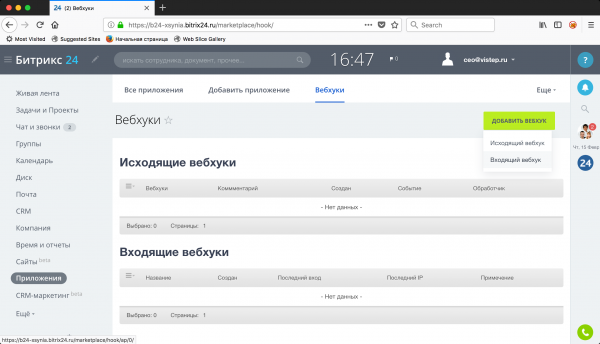
Fill in the parameters of the incoming webhook as shown in the screenshots:
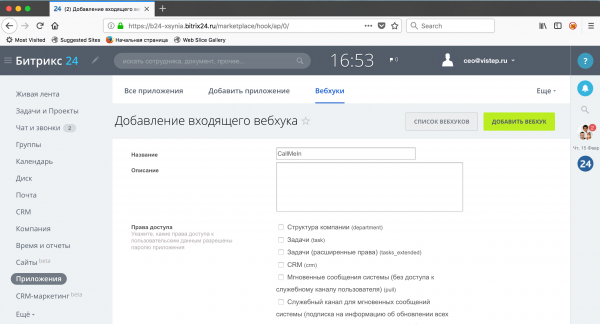
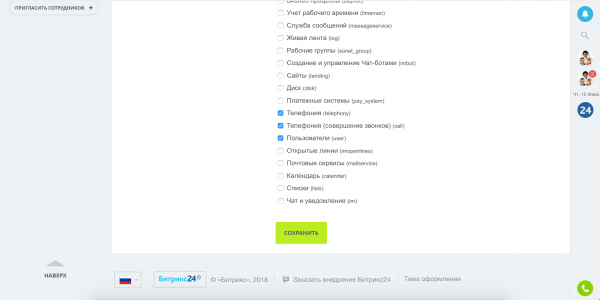
And click save.
After saving, Bitrix24 will provide the URL of the incoming webhook, for example:
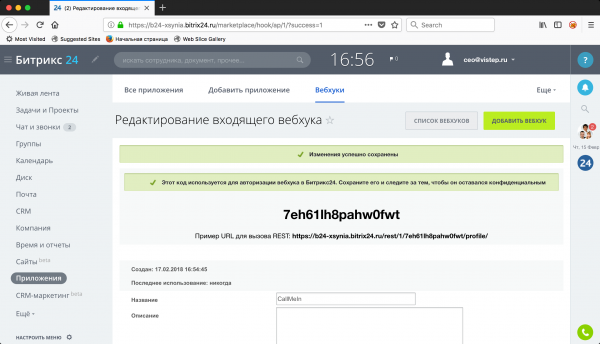
Save your version of the URL without the trailing /profile/ — it will be used in the application to handle incoming calls.
Mine is https://b24-xsynia.bitrix24.ru/rest/1/7eh61lh8pahw0fwt/
Outgoing webhook.
Applications -> Webhooks -> Add webhook -> Outgoing webhook.
Details are again in the screenshots:
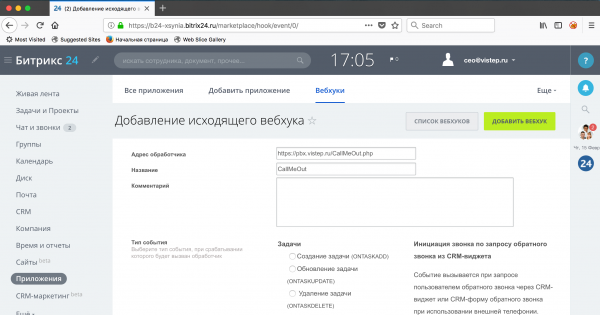
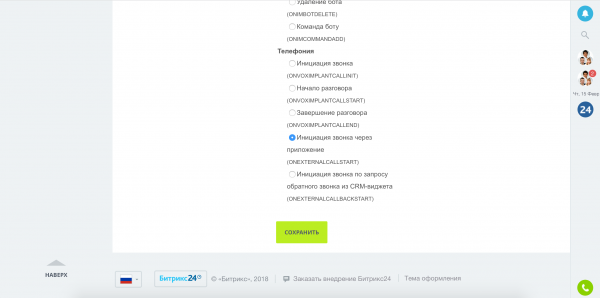
Save it and get the authorization code.
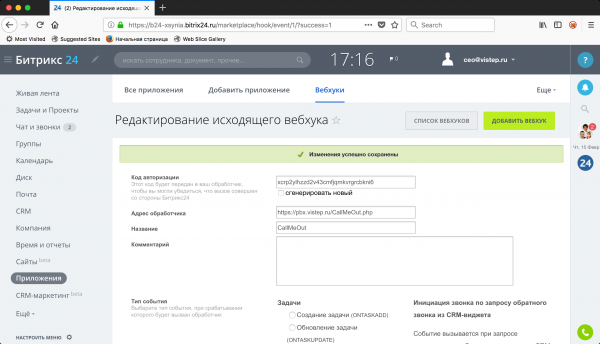
Mine is xcrp2ylhzzd2v43cmfjqmkvrgrcbkni6. You also need to copy this; it is required for making outgoing calls.
Important!
An SSL certificate must be configured on the Bitrix24 server (You can use letsencrypt), otherwise the Bitrix API will not work. If you have a cloud version, you don't need to worry — it's already equipped with SSL.
Important!
In the 'Handler Address' field, an address accessible from the Internet must be specified!
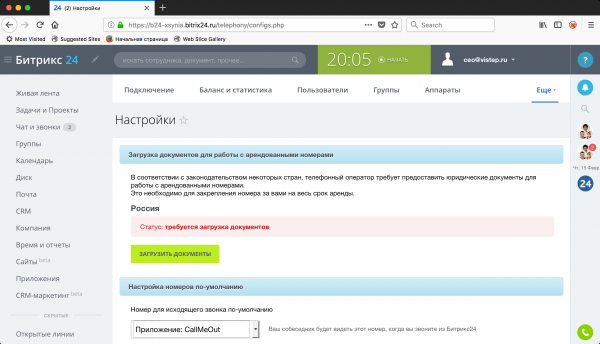
Lastly, we will set up our CallMeOut as an application for making calls (so that clicking on a number sends a command to originate the call to the PBX).
In the menu, select: More -> Telephony -> More -> Settings, set 'Default Outgoing Call Number' to Application: CallMeOut and click 'Save'.
Configuring Asterisk
For successful interaction between Asterisk and Bitrix24, we need to add the AMI user callme in manager.conf:
[callme]
secret = JD3clEB8_f23r-3ry84gJ
deny = 0.0.0.0/0.0.0.0
permit = 127.0.0.1/255.255.255.0
permit= 10.100.111.249/255.255.255.255
permit = 192.168.254.0/255.255.255.0
read = system,call,log,verbose,agent,user,config,dtmf,reporting,cdr,dialplan
write = system,call,agent,log,verbose,user,config,command,reporting,originate
Next, there are several tricks that need to be implemented via dialplan (for us, this is extensions.ael).
I will provide the entire file, and then I will give explanations:
globals {
    WAV=/var/www/pbx.vistep.ru/callme/records/wav; // Temporary directory for WAV
    MP3=/var/www/pbx.vistep.ru/callme/records/mp3; // Where to save mp3 files
    URLRECORDS=https://pbx.vistep.ru/callme/records/mp3;
    RECORDING=1; // Recording, 1 - enabled.
};

macro recording(calling,called) {
        if ("${RECORDING}" = "1"){
              Set(fname=${UNIQUEID}-${STRFTIME(${EPOCH},,%Y-%m-%d-%H_%M)}-${calling}-${called});
	      Set(datedir=${STRFTIME(${EPOCH},,%Y/%m/%d});
	      System(mkdir -p ${MP3}/${datedir});
	      System(mkdir -p ${WAV}/${datedir});
              Set(monopt=nice -n 19 /usr/bin/lame -b 32  --silent "${WAV}/${datedir}/${fname}.wav"  "${MP3}/${datedir}/${fname}.mp3" && rm -f "${WAV}/${fname}.wav" && chmod o+r "${MP3}/${datedir}/${fname}.mp3");
	      Set(FullFname=${URLRECORDS}/${datedir}/${fname}.mp3);
              Set(CDR(filename)=${fname}.mp3);
	      Set(CDR(recordingfile)=${fname}.wav);
              Set(CDR(realdst)=${called});
              MixMonitor(${WAV}/${datedir}/${fname}.wav,b,${monopt});

       };
};


context incoming {
888999 => {
	&recording(${CALLERID(number)},${EXTEN});
        Answer();
        ExecIF(${CallMeCallerIDName}?Set(CALLERID(name)=${CallMeCallerIDName}):NoOp()); // Set CallerID if recognized from Bitrix24
        Set(CallStart=${STRFTIME(epoch,,%s)});
        Queue(Q1,tT);
        Set(CallMeDISPOSITION=${CDR(disposition)});
        Hangup();
        }

h => {
    Set(CDR_PROP(disable)=true);
    Set(CallStop=${STRFTIME(epoch,,%s)});
    Set(CallMeDURATION=${MATH(${CallStop}-${CallStart},int)});
    ExecIF(${ISNULL(${CallMeDISPOSITION})}?Set(CallMeDISPOSITION=${CDR(disposition)}):NoOP(=== CallMeDISPOSITION already was set ===));
}

}


context default {

_X. => {
        Hangup();
        }
};


context dial_out {

_[1237]XX => {
	&recording(${CALLERID(number)},${EXTEN});
        Set(__CallIntNum=${CALLERID(num)});
	Set(CallStart=${STRFTIME(epoch,,%s)});
        Dial(SIP/${EXTEN},,tTr);
        Hangup();
        }

_11XXX => {
	&recording(${CALLERID(number)},${EXTEN});
	Set(CallStart=${STRFTIME(epoch,,%s)});
	Set(__CallIntNum=${CALLERID(num)});
        Dial(SIP/${EXTEN:2}@toOurAster,,t);
        Hangup();
        }

_. => {
	&recording(${CALLERID(number)},${EXTEN});
        Set(__CallIntNum=${CALLERID(num)});
	Set(CallStart=${STRFTIME(epoch,,%s)});
	Dial(SIP/${EXTEN}@toOurAster,,t);
	Hangup();
        }

h => {
        Set(CDR_PROP(disable)=true);
        Set(CallStop=${STRFTIME(epoch,,%s)});
        Set(CallMeDURATION=${MATH(${CallStop}-${CallStart},int)});
	if(${ISNULL(${CallMeDISPOSITION})}) {
          Set(CallMeDISPOSITION=${CDR(disposition)});
        }
	System(curl -s http://pbx.vistep.ru/CallMeOut.php --data action=sendcall2b24 --data call_id=${CallMeCALL_ID} --data-urlencode FullFname=${FullFname} --data CallIntNum=${CallIntNum} --data CallDuration=${CallMeDURATION} --data-urlencode CallDisposition=${CallMeDISPOSITION});
}

};
Let's start from the very beginning: the directive globals.
The variable URLRECORDS stores the URL to the call recording files, which Bitrix24 will pull into the contact card.
Next, we are interested in the macro recording.
Here, in addition to recording calls, we will set the variable FullFname.
Set(FullFname=${URLRECORDS}/${datedir}/${fname}.mp3);It stores the full URL to a specific file (the macro is called everywhere).
Let's analyze an outgoing call:
_. => {
	&recording(${CALLERID(number)},${EXTEN});
        Set(__CallIntNum=${CALLERID(num)})
	Set(CallStart=${STRFTIME(epoch,,%s)});
	Dial(SIP/${EXTEN}@toOurAster,,t);
	Hangup();
        }

h => {
        Set(CDR_PROP(disable)=true);
        Set(CallStop=${STRFTIME(epoch,,%s)});
        Set(CallMeDURATION=${MATH(${CallStop}-${CallStart},int)});
	if(${ISNULL(${CallMeDISPOSITION})}) {
          Set(CallMeDISPOSITION=${CDR(disposition)});
        }
	System(curl -s http://pbx.vistep.ru/CallMeOut.php --data action=sendcall2b24 --data call_id=${CallMeCALL_ID} --data-urlencode FullFname=${FullFname} --data CallIntNum=${CallIntNum} --data CallDuration=${CallMeDURATION} --data-urlencode CallDisposition=${CallMeDISPOSITION});
}
Assuming we are calling 89991234567, the first thing we encounter is here:
&recording(${CALLERID(number)},${EXTEN});This means the call recording macro is invoked and the necessary variables are set.
Next,
        Set(__CallIntNum=${CALLERID(num)})
	Set(CallStart=${STRFTIME(epoch,,%s)});
We record who initiated the call and log the start time.
And upon its completion, in a special context h
h => {
        Set(CDR_PROP(disable)=true);
        Set(CallStop=${STRFTIME(epoch,,%s)});
        Set(CallMeDURATION=${MATH(${CallStop}-${CallStart},int)});
	if(${ISNULL(${CallMeDISPOSITION})}) {
          Set(CallMeDISPOSITION=${CDR(disposition)});
        }
	System(curl -s http://pbx.vistep.ru/CallMeOut.php --data action=sendcall2b24 --data call_id=${CallMeCALL_ID} --data-urlencode FullFname=${FullFname} --data CallIntNum=${CallIntNum} --data CallDuration=${CallMeDURATION} --data-urlencode CallDisposition=${CallMeDISPOSITION});
}
We disable the recording in the CDR table for this extension (it's unnecessary there), set the call end time, calculate duration, and if the call result is unknown, we set (the variable CallMeDISPOSITION) and finally, we send everything to Bitrix using a system curl.
And a little more magic — the incoming call:
888999 => {
	&recording(${CALLERID(number)},${EXTEN});
        Answer();
        ExecIF(${CallMeCallerIDName}?Set(CALLERID(name)=${CallMeCallerIDName}):NoOp()); // Setting CallerID if we recognized it from Bitrix24
        Set(CallStart=${STRFTIME(epoch,,%s)}); // Start the call timer
        Queue(Q1,tT);
        Set(CallMeDISPOSITION=${CDR(disposition)});
        Hangup();
        }
Here we are only interested in one line.
ExecIF(${CallMeCallerIDName}?Set(CALLERID(name)=${CallMeCallerIDName}):NoOp());It tells the PBX to set CallerID(name) to equal the variable CallMeCallerIDName.
The variable CallMeCallerIDName, in turn, is set by the CallMe application (if there is a name for the calling number in Bitrix24, it will be set as CallerID(name), no — we won't do anything).
Application settings
The application configuration file — /var/www/pbx.vistep.ru/config.php
Description of application parameters:
- CallMeDEBUG — if 1, all events processed by the application will be written to the log file, 0 — we write nothing
- tech — SIP/PJSIP/IAX/etc
- authToken — Bitrix24 authorization token, outgoing webhook authorization code
- bitrixApiUrl — Incoming webhook URL, without profile/
- extentions — List of external numbers
- context — Context for outbound call origination
- listener_timeout — Event processing speed from Asterisk
- asterisk — Array with connection settings to Asterisk:
- host — IP or hostname of the Asterisk server
- scheme — Connection scheme (tcp://, tls://)
- port — Port
- username — Username
- secret — Password
- connect_timeout — Connection timeout
- read_timeout — Read timeout
Example of configuration file:
 1, // debug log messages: 1 - log, 0 - no log
        'tech' => 'SIP',
        'authToken' => 'xcrp2ylhzzd2v43cmfjqmkvrgrcbkni6', // Bitrix authorization token
        'bitrixApiUrl' => 'https://b24-xsynia.bitrix24.ru/rest/1/7eh61lh8pahw0fwt/', // URL to Bitrix API (incoming webhook)
        'extentions' => array('888999'), // list of external numbers, comma-separated
        'context' => 'dial_out', // outbound context for call origination
        'asterisk' => array( // settings for connection to Asterisk
                    'host' => '10.100.111.249',
                    'scheme' => 'tcp://',
                    'port' => 5038,
                    'username' => 'callme',
                    'secret' => 'JD3clEB8_f23r-3ry84gJ',
                    'connect_timeout' => 10000,
                    'read_timeout' => 10000
                ),
        'listener_timeout' => 300, // event processing speed from Asterisk

);
Supervisor settings
Supervisor is used to run the event handler process CallMeIn.php, which monitors incoming calls and interacts with Bitrix24 (show card, hide card, etc.).
Configuration file that needs to be created:
/etc/supervisord.d/callme.conf
[program:callme]
command=/usr/bin/php CallMeIn.php
directory=/var/www/pbx.vistep.ru
autostart=true
autorestart=true
startretries=5
stderr_logfile=/var/www/pbx.vistep.ru/logs/daemon.log
stdout_logfile=/var/www/pbx.vistep.ru/logs/daemon.log
Starting and restarting the application:
supervisorctl start callme
supervisorctl restart callme
View the application's status:
supervisorctl status callme
callme                           RUNNING   pid 11729, uptime 17 days, 16:58:07
Conclusion
It turned out quite complex, but I am confident that an experienced administrator will be able to implement this and delight their users.
As promised, .
Questions, suggestions — please leave them in the comments. If you're interested in the development journey of this integration, let me know, and in the next article, I will try to reveal everything in more detail.
Source: habr.com
